
Automatically assign every new lead to the right rep, branch, team, or pipeline based on the rules your business actually uses.
Alltomate builds lead routing workflows that reduce manual triage, improve speed to first action, and keep CRM ownership clear from the moment an inquiry comes in.
Start Free Audit | Explore Automation & Integration Services
What this solution covers
This page focuses on routing logic and ownership automation.
If your main issue is delayed handoff, inconsistent assignment, or leads reaching the wrong person, this is the right page to start with.
If you need the broader framework for lead capture, qualification, follow-up, CRM sync, duplicate prevention, and reporting, read our full lead management automation guide.
Who this solution is for
- You have a CRM, but leads are still being assigned manually or inconsistently
- You use multiple lead sources, but ownership depends on inbox checking or admin forwarding
- You have multiple reps, branches, or service areas and need routing rules that match reality
- You are missing follow-up targets because new leads sit unassigned too long
- You do not trust your CRM owner history because reassignment happens after the fact
- You need round robin, territory, service-type, or after-hours routing without manual cleanup
Common lead routing failures we fix
- Leads assigned with missing required fields
- Round robin logic ignoring territory or service rules
- Duplicate leads creating split ownership
- After-hours inquiries sitting untouched until morning
- The wrong branch or team receiving the lead
- CRM owner updates failing silently
- Manual forwarding creating delays and inconsistent handoff
- Different sources creating different routing behavior
These failures usually do not look dramatic at first. They show up as slow response, confused ownership, duplicate outreach, and reporting that becomes harder to trust over time.
What Alltomate builds into every routing workflow
We do not just connect a form to a CRM and stop there. We build the routing layer around your business rules, edge cases, and downstream actions.
- Lead source mapping and intake standardization
- Field validation before routing logic runs
- Duplicate checks before record creation or update
- Rules-based assignment, round robin, or hybrid logic
- Fallback paths for missing data, unavailable reps, or rule conflicts
- CRM owner updates, routing metadata, and status handling
- Alerts through Slack, email, SMS, tasks, or internal notifications
- Exception handling so failures do not disappear quietly
- Testing, QA, and workflow documentation before launch
Common routing logic we implement

Route by territory or geography
Assign leads based on city, region, ZIP code, state, or service area.
Route by service type
Send leads to the right team based on requested service, job type, or inquiry category.
Route by branch or business unit
Useful for companies operating across multiple locations, regions, or specialized teams.
Route by lead source
Separate website leads, Facebook Lead Ads, referrals, call tracking, partner submissions, and booking tools into the right path.
Route by round robin
Distribute leads fairly across reps while still honoring territory, service, or availability rules.
Route by priority or intent
Fast-track urgent, high-value, or high-intent inquiries to the best response path.
Route with fallback rules
If a rule fails, data is incomplete, or the primary owner is unavailable, the workflow sends the lead to a backup path instead of failing silently.
Examples of routing workflows we can build
- Territory-based routing: Route by ZIP code or service area, then assign to the correct regional rep
- Service-based routing: Send roofing, HVAC, plumbing, consultation, or support requests to different teams
- Multi-location routing: Send inquiries to the correct branch based on location and availability
- Round robin with fallback: Distribute leads evenly, but reroute when a rep is unavailable
- After-hours routing: Route to an on-call team, queue, or alert path outside business hours
- Qualification-aware routing: Route based on form answers, lead score, or source quality before the first human touch
Example use case
A multi-location service business receives leads from website forms, ad campaigns, and call tracking. Before automation, inquiries land in a shared inbox, an admin forwards them manually, and reassignment happens later inside the CRM.
Alltomate can rebuild that flow so the lead is checked for duplicate records, matched to the correct service area and service type, assigned to the right branch or rep, written into the CRM with the correct owner, and pushed into an alert or task path in real time.
How implementation works
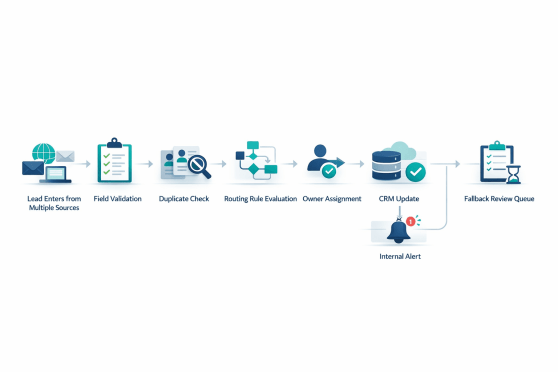
- We map your current lead flow. We identify sources, assignment rules, exceptions, and where handoff is breaking today.
- We define routing logic. We structure the criteria, fallback rules, CRM behavior, and exception handling your process actually needs.
- We build the workflow. This can include Zapier, Make, APIs, webhooks, CRM automations, notification tools, and custom logic where needed.
- We test edge cases. We validate duplicates, missing fields, conflicts, and failed assignments before launch.
- We launch and refine. After deployment, we monitor the workflow and improve logic based on real lead flow.
Platforms and systems this solution can connect
| Lead Source | Destination / Action | How Alltomate Uses It |
|---|---|---|
| Website forms, landing pages, Gravity Forms, Typeform | CRM record creation, owner assignment, alerts | Standardize intake, validate fields, and trigger routing logic |
| Facebook Lead Ads, chat tools, booking tools, call tracking | CRM updates, task creation, rep notifications | Route leads from multiple channels into one governed handoff process |
| HubSpot, Salesforce, Pipedrive, ActiveCampaign, Close, GoHighLevel, ServiceTitan, Jobber | Owner updates, pipeline fields, metadata, follow-up triggers | Keep assignment, record state, and downstream workflow aligned |
| Slack, email, SMS, internal task tools | Immediate alerts and fallback handling | Make sure the right person sees the lead and knows what to do next |
What improves when routing is implemented correctly

- Reduced time to assignment
- Fewer unassigned or misrouted leads
- Faster speed to first action
- Clearer rep, team, and branch ownership
- More reliable SLA compliance
- Cleaner CRM ownership history
- Fewer silent routing failures
- Better accountability and reporting confidence
| Problem | Manual State | Automated Result |
|---|---|---|
| Lead ownership | Unclear or delayed | Assigned immediately using defined logic |
| Speed to lead | Depends on inbox checking or admin forwarding | Faster first action and cleaner handoff |
| CRM hygiene | Messy owner history and duplicate risk | Controlled record creation and cleaner ownership |
| SLA compliance | Inconsistent follow-up timing | More reliable next-step triggers |
| Reporting confidence | Hard to trust who owned what and when | More accurate routing and accountability data |
Where human review still matters

Good routing automation should handle the standard path automatically and surface exceptions clearly.
We often add a review path when:
- required routing data is missing
- multiple rules conflict
- a likely duplicate is detected
- territory or service fit is unclear
- the primary owner is unavailable
- the lead is high-value and should be reviewed before assignment
That is one of the biggest differences between a basic integration and a durable operational workflow.
Get a free audit of your lead handoff workflow
Related reading
- Slow Lead Response Is Costing You Revenue. Here’s How to Fix It With Automation
Learn where response delays hurt conversion and why routing speed matters. - Automated Lead Scoring: Qualify and Route Leads Faster
Useful if routing decisions depend on qualification or priority logic. - Duplicate Leads in CRM: What They’re Really Costing Your Business
Relevant if your routing workflow also needs duplicate prevention before record creation. - CRM Pipeline Problems: Why Your CRM Is Full but Your Pipeline Still Feels Weak
Helpful if routing issues are affecting pipeline trust and ownership visibility.
Frequently asked questions
Can you route leads by territory and service type together?
Yes. Routing rules can combine multiple conditions such as geography, service type, source, priority, language, and team availability.
Can you work with our current CRM?
In many cases, yes. Alltomate can work with CRMs like HubSpot, Salesforce, Pipedrive, ActiveCampaign, Close, GoHighLevel, ServiceTitan, Jobber, and custom setups depending on the workflow requirements.
What happens if routing data is missing?
We can create fallback logic that sends the lead to a review queue, backup owner, or exception alert instead of letting the workflow fail silently.
Can you improve an existing routing setup instead of rebuilding it?
Yes. If you already have routing automation in place, we can audit the logic, identify weak points, and improve reliability, ownership rules, or exception handling.
Can you add round robin assignment?
Yes. Round robin can be used on its own or combined with territory, service, or qualification logic.
How do you handle after-hours leads?
We can route them to an on-call path, queue them for the next business window, trigger alerts, or apply a different fallback owner rule based on your process.
How long does lead routing automation usually take to implement?
The timeline depends on the number of sources, systems, rules, and exception paths involved. Simple setups can move quickly, while multi-source or multi-location workflows usually take longer because they need more logic, testing, and QA.
Can routing work across forms, ads, calls, and chat together?
Yes. A good routing workflow can standardize data from multiple channels, then apply one governed ownership process across all of them.
Why businesses choose Alltomate for lead routing automation
Alltomate approaches lead routing as an operational workflow, not just a one-step integration. We look at where the lead comes from, how ownership should be decided, what should happen next, what exceptions need handling, and how the CRM should reflect the process accurately.
Every day your routing depends on inbox checking, manual forwarding, or late-stage cleanup, leads are waiting longer than they should, getting assigned to the wrong rep, or not getting followed up at all. A free audit is the fastest way to see where your routing process is breaking and what should be automated first.
You must be logged in to post a comment.