
Published on March 26, 2026
Quick Answer: Lead routing is the system that evaluates an incoming lead and directs it to the appropriate owner, queue, or workflow. Routing rules can use criteria such as territory, product interest, account ownership, language, lead score, capacity, or availability. Reliable routing does more than assign a name: it records ownership, triggers notification and follow-up, handles exceptions, and makes failures visible.
Table of Contents
A lead can enter the CRM successfully and still receive no meaningful follow-up. The form worked, the record exists, and no obvious error appears—but ownership is missing, the wrong representative was selected, or the notification never reached the person expected to respond.
That is why lead routing should be treated as a small operational system rather than a single assignment rule. It connects lead capture, qualification, ownership, notification, response, and reporting. When those parts are disconnected, delays and duplicate work appear downstream.
Need to review your current lead flow?
Join the free business process audit waitlist to identify where capture, routing, or follow-up is breaking.
What Is Lead Routing?
Lead routing is the process of evaluating an incoming lead and directing it to the appropriate sales representative, team, queue, or automated workflow. The decision is based on defined business rules rather than an informal judgment made after someone notices the lead.
A routing rule might send leads to different owners based on geography, industry, product interest, existing account ownership, language, deal potential, capacity, or working hours. A complete routing system also defines what happens when data is missing, no representative is available, or two rules appear to match.
Routing and assignment are related, but they are not identical:
- Lead assignment is the ownership update: a person or queue receives the lead.
- Lead routing is the wider decision process that validates the lead, selects the route, assigns ownership, triggers the next action, and records the result.
For implementation examples, see how to automate lead routing and how to automate lead assignment.
Why Lead Routing Matters
Routing influences how quickly a lead receives a response, whether the response comes from the right person, and whether the CRM accurately reflects who owns the opportunity. A fast assignment to the wrong owner is not a good outcome, and a correct assignment that sits unnoticed is not enough.
Response speed is an important part of the system. Research reported by Harvard Business Review found that many companies were not responding to online inquiries quickly enough and that faster contact was associated with a greater likelihood of qualifying the lead. The practical lesson is not that every business must promise the same response time. It is that routing should support a defined service level appropriate to the team’s sales motion and operating hours.
Reliable routing also improves reporting. When ownership is consistent and every routing outcome is logged, the team can compare response times, reassignment rates, conversion rates, and workload by route. Without reliable ownership data, those reports become difficult to trust.
The dashboard below illustrates the relationship between routing activity and the performance indicators a team may monitor.

Where Lead Routing Breaks
Routing problems often appear as symptoms elsewhere in the funnel: unassigned records, repeated reassignment, duplicate outreach, slow response, or inconsistent pipeline reporting. The visible symptom may involve a salesperson, but the underlying cause is often incomplete data or unclear workflow logic.
| Failure Point | What Happens | Control to Add |
|---|---|---|
| Missing or inconsistent data | Territory, product, or qualification rules cannot evaluate the lead correctly. | Validate required fields and create a review queue for incomplete records. |
| Overlapping rules | More than one owner or route appears valid. | Define rule priority and make conditions mutually exclusive where appropriate. |
| No fallback owner | Unmatched leads remain unassigned. | Use a monitored fallback queue with an escalation deadline. |
| Availability not considered | Leads are assigned to someone who is unavailable or overloaded. | Check schedules, active status, capacity, or backup coverage before assignment. |
| Notification without verification | Ownership changes, but no one confirms that follow-up began. | Track response status and escalate when the service-level target is missed. |
If ownership looks correct but leads still receive no response, the next issue may be follow-up execution rather than routing. See how to automate lead follow-up and lead response-time automation.
Quick diagnostic: Submit a controlled test lead using each important route. Confirm that the record is created once, the correct owner is selected, the owner is notified, the response workflow starts, and a visible alert appears if any expected output is missing.
How an Automated Lead Routing System Works
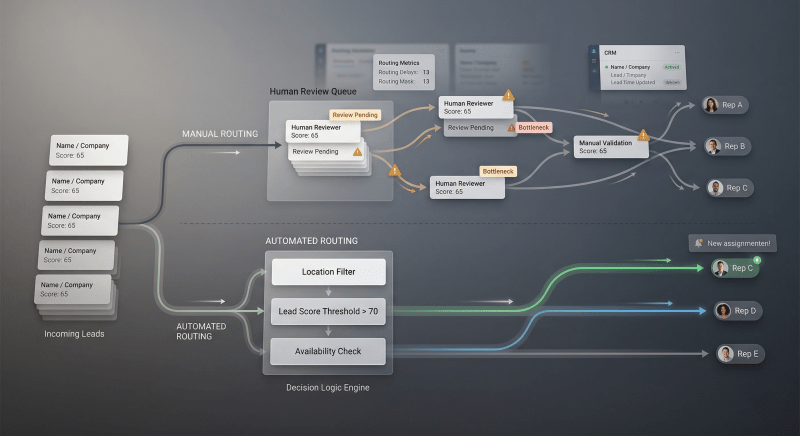
A reliable automated routing workflow separates intake, decision logic, assignment, and follow-up. This makes the system easier to test and prevents a single assignment rule from carrying responsibilities it was never designed to handle.
- Capture: A lead enters through a form, chat, event, referral, imported list, API, or another approved source.
- Normalize and validate: The workflow standardizes values and checks whether the fields required for routing are present.
- Qualify: The system applies any eligibility, account-matching, scoring, or prioritization rules.
- Select a route: Territory, product, language, account ownership, capacity, and availability rules determine the intended destination.
- Assign and notify: The lead receives an owner or queue, and the responsible person receives an actionable notification.
- Verify and escalate: The system confirms the expected outputs and escalates unmatched, failed, or overdue leads.
Notifications should contain enough context to act: the lead’s name, company, source, relevant request, priority, owner, and a direct link to the CRM record. A notification is not proof of follow-up, so the workflow should also monitor whether the required next step occurred.

Types of Lead Routing
The right routing model depends on the sales process, team structure, and information available when the lead arrives. Many systems combine several models in a specific order.
- Round-robin routing: Rotates leads among a defined group of owners. It supports even distribution, but it does not automatically account for expertise or availability unless those checks are added.
- Territory-based routing: Assigns by geography, market, industry, company size, or another account segment.
- Account-based routing: Sends a new inquiry to the existing account owner or team so the relationship stays coordinated.
- Skill-based routing: Matches language, product expertise, certification, deal type, or another specialist requirement.
- Priority or score-based routing: Directs selected high-intent or high-fit leads to a priority queue, provided the scoring inputs are reliable.
- Capacity-aware routing: Considers workload, working hours, leave status, or an active availability signal before assigning the lead.
For example, a workflow might first match an existing account owner, then apply territory and language rules, then select an available representative from the resulting group. A monitored fallback queue receives any lead that still cannot be assigned. This is more robust than treating one round-robin rule as the entire routing system.
Manual vs. Automated Lead Routing
Manual routing can be workable at very low volume when one person clearly owns intake and coverage is continuous. Its weakness is dependence on someone noticing, interpreting, and forwarding every lead correctly. Delays grow when that person is busy, unavailable, or uncertain about the rule.
| Area | Manual Routing | Automated Routing |
|---|---|---|
| Decision timing | Depends on someone noticing and evaluating the lead. | Evaluates the lead when the defined trigger occurs. |
| Consistency | Relies on memory and individual judgment. | Applies documented conditions consistently. |
| Exception handling | Often resolved through messages or ad hoc reassignment. | Can send incomplete or unmatched leads to a monitored queue. |
| Audit trail | The reason for an assignment may not be recorded. | Can record the route, rule result, owner, and timestamp. |
| Scalability | Requires more coordination as volume and rules grow. | Handles repeatable volume but still needs monitoring and rule maintenance. |
Automation does not fix a poorly defined ownership model. Before building the workflow, decide which system owns the lead, which rules take priority, what counts as available capacity, how quickly follow-up is expected, and who handles exceptions.
How to Design Reliable Lead Routing
Start with the routing policy, not the automation tool. A workflow can execute incorrect rules very efficiently, so the business decisions need to be explicit before configuration begins.
- Map every lead source. Include forms, chat, imports, referrals, events, advertising platforms, partner channels, and manually created records.
- Define required routing data. Specify the fields each route needs and how missing or invalid values will be handled.
- Set rule priority. Decide whether account ownership, territory, product, language, score, or capacity should be evaluated first.
- Create a fallback route. Every unmatched lead needs a monitored destination, named owner, and resolution target.
- Connect routing to response. Assignment should trigger an actionable notification and the next required sales step.
- Add failure signals. Notify an owner when assignment fails, a required field is missing, or follow-up does not occur within the agreed service level.
- Test every meaningful route. Include incomplete records, overlapping conditions, unavailable owners, duplicate leads, and after-hours submissions.
Metrics worth monitoring:
- Time from capture to assignment
- Percentage of leads left unassigned
- Reassignment and duplicate-ownership rate
- Time from assignment to first meaningful response
- Routing failures and fallback-queue volume
- Conversion and workload by route
Review the system when territories, products, staffing, working hours, lead sources, or qualification criteria change. A technically functioning workflow can still produce the wrong assignments when its business assumptions are outdated.
Final Answer: Lead routing is the decision system that evaluates an incoming lead and directs it to the appropriate owner, queue, or workflow. Reliable routing validates the input, applies prioritized rules, assigns ownership, triggers follow-up, records the result, and escalates exceptions. The best model may combine account ownership, territory, skills, score, and availability. The objective is not assignment alone—it is consistent ownership, timely response, visible failures, and trustworthy pipeline data.
Need a clearer lead-routing system?
Join the free business process audit waitlist to review where assignment, notification, or follow-up is failing.
Related Resources
Frequently Asked Questions
Is lead routing only for large sales teams?
No. A small team can benefit whenever lead ownership is unclear, different inquiries need different expertise, or coverage changes throughout the day. The workflow can remain simple, but it should still include a fallback owner and a visible response expectation.
What is the difference between lead routing and lead assignment?
Lead assignment is the ownership update. Lead routing is the wider process that evaluates the lead, chooses the destination, performs the assignment, triggers the next action, records the result, and handles exceptions.
Can lead routing be automated without a CRM?
Yes, but the workflow still needs a reliable system of record for lead identity, ownership, status, and history. Without one, duplicate records and conflicting ownership become harder to prevent. For many teams, a CRM is the most practical place to maintain that record.
How quickly should lead routing happen?
Routing should normally happen as soon as the required data is available. The appropriate response-time commitment depends on lead intent, sales model, staffing, operating hours, and channel expectations. Define the target explicitly and monitor exceptions instead of relying on a universal number.
What should happen when no routing rule matches?
The lead should move to a monitored fallback queue rather than remain silently unassigned. The fallback needs a named owner, an alert, a resolution deadline, and enough context to determine whether the lead data or the routing policy needs correction.
How do I know whether lead routing is working?
Track capture-to-assignment time, unassigned leads, reassignment rate, duplicate ownership, response time after assignment, fallback-queue volume, and conversion by route. Test the workflow after changes to forms, CRM fields, territories, staffing, or qualification rules.
About the author

Miguel Carlos Arao is the Founder & CEO of Alltomate, a Zapier Certified Platinum Solution Partner focused on business workflow automation, CRM integration, and multi-platform data routing.

Built by a certified Zapier automation partner
Explore more at lead-routing automation, lead response-time automation, and the free business process audit waitlist.