
Published on May 18, 2026
Quick Answer: The most common workflow automation mistakes include automating broken processes, missing error handling, skipping data validation, building rigid single-path flows, and failing to account for how errors cascade across connected systems. Most failures aren’t tool problems — they’re design problems that exist before the first node is placed.
If your automations keep breaking or producing inconsistent results, explore our automation consulting services or get a free business process audit to find out where the gaps are.
Table of Contents
- Automating a Process That Was Already Broken
- No Error Handling Means One Failure Stops Everything
- Treating Data as Clean When It Isn’t
- Building for the Happy Path Only
- Skipping Ownership — Nobody Knows What Broke
- Hardcoding Logic That Will Change
- Connecting Too Many Systems Without Isolation
- Launching Without a Monitoring Plan
- Final Answer
- FAQs
Workflow automation fails more often than people expect — not because automation is hard, but because most failures are designed in from the start. Research and industry reporting consistently show that many automation failures stem from implementation, integration, and process design problems rather than the tools themselves. Teams rush to build, skip the logic layer, and trust that tools will handle edge cases they haven’t thought through. The result is automations that work in demos and break in production. This guide covers the specific design mistakes that cause the most damage, why they happen, and what changes at the system level.
Supporting source:
Yomly Workflow Automation Statistics
For a broader look at how workflow automation fits into your business operations, the workflow automation guide covers the full strategic context.
Automating a Process That Was Already Broken
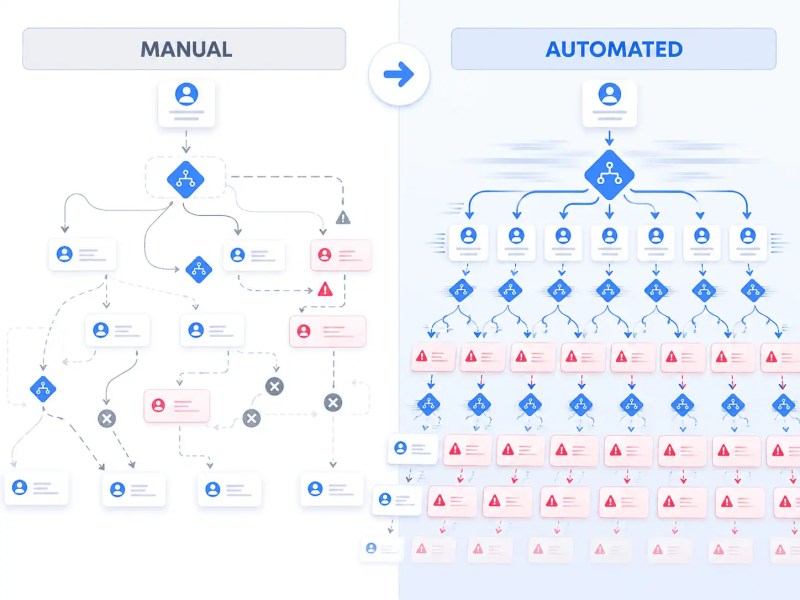
The most expensive automation mistake isn’t a technical one — it’s automating a process before understanding whether that process actually works. Teams see manual, repetitive tasks and assume automation will fix the inefficiency. But automation doesn’t fix a bad process. It runs it faster, at higher volume, with less visibility.
A common example: a sales team manually routes leads based on geography, but the rules are inconsistently applied and the criteria haven’t been updated in two years. When that process gets automated, the outdated logic gets automated too. Leads get assigned wrong — only now it happens to hundreds of records before anyone notices.
The correct sequence is to document the process, identify where it already fails manually, fix those failures at the logic level, and then automate the corrected version. Automation should lock in a process that works — not preserve one that doesn’t. The business process automation guide explains how process mapping and operational design should happen before workflow implementation begins.
The comparison below illustrates how automation amplifies operational problems when flawed workflows are scaled without redesigning the underlying process first.
Watch for this: If your team needs to regularly “check the automation output” to catch errors, the process feeding the automation has unresolved design problems. Fixing downstream alerts won’t help — the upstream logic needs work first.
No Error Handling Means One Failure Stops Everything
Most automation builders configure the success path thoroughly and leave the failure path blank. This works until something unexpected happens — an API times out, a required field comes in empty, a third-party service is briefly unavailable. Without an error path defined, the entire workflow stops at the point of failure and nothing downstream executes.
The downstream effect depends on what was automated. In a document approval workflow, a missed error path might mean that approvals stop silently — no rejection, no notification, no retry. The requester waits. No one knows it failed. Days pass.
Error handling isn’t about catching every possible exception. It’s about defining what the system should do when something unexpected happens: notify a specific person, write the failed record somewhere recoverable, stop cleanly rather than partially, or retry under a controlled condition. These decisions need to be made before the workflow launches — not discovered during an incident.
Scale Effect: A workflow processing 10 records per day with no error handling is a minor risk. The same workflow processing 400 records per day means a single unhandled exception can corrupt a full batch before anyone intervenes.
If your current automations lack error paths, our workflow automation support team can audit and restructure them before a live failure causes real damage.
Treating Data as Clean When It Isn’t
Automation systems assume data arrives in the format the workflow expects. In practice, it rarely does. Phone numbers come in with different formatting. Email fields contain display names instead of addresses. Required fields arrive empty because the form didn’t enforce them. Names arrive in all caps, or split incorrectly, or with trailing spaces that break matching logic downstream.
The mistake isn’t that dirty data exists — it always will. Poor CRM hygiene, duplicate records, and inconsistent field structures are some of the most common upstream causes of automation failure, which is why CRM data cleanup strategies become critical before scaling workflow automation. The mistake is building a workflow that depends on clean input without any validation step to enforce or normalize it. When dirty data hits a workflow that expects clean data, one of three things happens: the workflow errors out, it continues and produces wrong output, or it silently skips the record entirely.
Every workflow that accepts external data needs a validation layer before any logic runs. This layer checks that required fields exist, that values match expected formats, and that records meet the minimum criteria to be processed. Anything that fails validation should be routed to a separate path — logged, flagged, or held for review — not silently dropped.
This validation structure is illustrated below, where malformed or incomplete records are isolated before they can corrupt downstream automation systems.

| Data Problem | What Breaks | What to Do Instead |
|---|---|---|
| Empty required fields | CRM record created with no owner or stage | Validate before record creation, route to review queue |
| Inconsistent phone format | SMS automation fails silently or reaches wrong number | Normalize format at intake before passing downstream |
| Duplicate records entering flow | Same contact gets processed and emailed twice | Deduplicate check as a pre-processing step |
| Mismatched field types | Date field receives text, filter logic fails | Type-check and transform at the validation layer |
Building for the Happy Path Only
Consider two versions of the same lead routing automation. Version one routes a lead to the correct rep, sends a confirmation, and closes cleanly. Version two routes the lead — but what if the rep is on leave? What if the lead came from a source that doesn’t exist in the routing table? What if the deal value is above the territory limit?
The first version was built assuming everything would match the expected pattern. The second version is a real system. Most automation builds never leave version one. The happy path gets configured, tested with sample data that fits the expected format, and deployed. The edge cases — the records that fall outside the assumed pattern — get discovered in production.
Before any workflow is built, the design process should include a deliberate exercise: list every condition where the standard path won’t apply. What happens with partial data? What happens when a trigger fires twice? What happens when a downstream system is unavailable? Each of those conditions needs a defined behavior — even if that behavior is “pause and alert someone.”
Scale Effect: On low-volume workflows, happy-path-only designs fail occasionally. On high-volume workflows, the percentage of records that hit an undefined edge case becomes a daily operational problem that someone has to manually clean up.
Skipping Ownership — Nobody Knows What Broke
Automations have a silent failure mode that’s worse than an error: they run, produce output, and nobody checks whether the output was right. This happens when workflows are built and handed off without a defined owner. The person who built it is no longer responsible. The team that uses it doesn’t know how it works. When it produces wrong results, no one escalates until the damage is visible.
Ownership in automation isn’t about who clicks buttons — it’s about who is accountable for the system’s behavior. That person should know: what the automation is doing, what triggers it, what the expected output looks like, and where to look when something seems off. Without this, automation becomes a black box that everyone depends on and no one monitors.
Every workflow should have a named owner, basic documentation of what it does and why, and a notification path that alerts the owner when something fails — not a generic error report, but a specific alert that routes to the right person. For example, a failed lead-routing run should create a review record and send a Slack alert to the revenue ops owner, not a shared inbox that nobody monitors.
Hardcoding Logic That Will Change
A wrong assumption in automation design: that the rules you’re encoding today will stay the same. Teams get assigned based on headcount that changes. Pricing thresholds shift quarterly. Approval limits get updated based on company policy. When these rules are hardcoded inside the automation — embedded in filter conditions, locked into branch logic — every change requires digging into the workflow itself.
The risk isn’t just maintenance effort. It’s that the workflow runs with outdated logic because no one knew the change was needed. A new team structure takes effect on Monday. The automation still routes based on last month’s assignment rules. It runs correctly by its own logic — but the output is wrong based on how the business now operates.
Routing rules, thresholds, and approval criteria belong in a configuration layer — a lookup table, a spreadsheet, a CRM field — that can be updated without touching the automation itself. The workflow reads the current rule at runtime. Changing the rule changes the behavior without requiring a rebuild.
This is especially relevant in lead routing systems. The lead routing automation guide covers how to structure dynamic routing rules that stay current without constant workflow edits.
Connecting Too Many Systems Without Isolation
The bigger a workflow gets — more systems connected, more triggers, more branching paths — the more fragile it becomes. Not because complexity is inherently bad, but because most multi-system workflows are built as single flows. Every system is connected in sequence, which means a problem at any one point creates a chain reaction.
An example: a workflow that triggers from a form submission, enriches the data via an API call, creates a CRM contact, sends a Slack notification, and initiates a document generation step. If the document tool is rate-limited on step five, the entire workflow fails — including the CRM record creation on step three, which may have already been partially written. The result is an orphaned record, a missed Slack message, and no document.
The fix is structural: break large workflows into discrete, isolated stages rather than one long chain. The guide to connecting multiple systems covers how orchestration layers, synchronization logic, and staged workflows reduce failure propagation across integrations. Each stage should complete and confirm before the next begins. If a stage fails, only that stage fails — and it can be retried independently without re-running steps that already completed. This is especially important for workflows that touch systems with different reliability characteristics.
The workflow structure below shows how a single downstream integration failure can cascade across connected systems when workflows are chained without isolation layers.

Scale Effect: A five-step sequential workflow connecting three external systems creates compounding failure probability. Even highly reliable individual steps become less reliable when chained together because failures compound across the sequence. The longer the chain, the more likely something fails before reaching the end.
Reliability and failure propagation principles are reinforced in the
AWS Well-Architected Framework — Failure Management.
Launching Without a Monitoring Plan
Automation that runs unmonitored is a liability. It can fail silently, produce wrong output at volume, or stop running entirely — and none of that gets noticed until someone manually investigates a problem that’s been accumulating for days. AWS’s Reliability Pillar identifies silent failure as one of the most dangerous operational failure modes because systems stop functioning correctly without immediate detection. The absence of monitoring isn’t a gap in tooling. It’s a gap in how the workflow was designed from the start.
Source:
AWS Reliability Pillar — Monitor Workload Resources
Monitoring for automation doesn’t require complex infrastructure. It requires answering three questions before launch: How will you know the workflow ran? How will you know it ran correctly? How will you know if it stopped? If you can’t answer all three, the workflow isn’t ready to deploy.
Practical approaches vary by workflow type. For document processing workflows, a daily count of records processed vs. records expected provides a useful baseline check. For lead routing, periodic spot-checks of assignment accuracy serve the same purpose. For high-volume or critical workflows, automated alerts triggered by failure conditions are necessary from day one.
As shown below, monitoring systems create visibility into silent workflow failures before operational issues accumulate across connected automations.

For workflows that integrate multiple systems, the common integration mistakes post covers the specific monitoring gaps that appear when systems are connected but not coordinated.
Final Answer: Common workflow automation mistakes are almost always design failures, not tool failures. Automating broken processes, skipping error paths, ignoring dirty data, building only for the happy path, leaving ownership undefined, hardcoding rules that change, chaining too many systems together, and launching without a monitoring plan — each of these creates failures that compound over time and at scale. The fix in every case starts before the first node is placed: in how the process is mapped, how edge cases are defined, and how failure behavior is decided in advance.
Businesses earlier in the automation process may benefit from the small business automation guide, which covers how to prioritize workflows before scaling more complex automation systems.
Need a reliable system?
Get a free business process audit to identify where your current automation design has gaps before they become operational problems.
Related Resources
Frequently Asked Questions
Why do workflow automations fail even when the tool is working correctly?
Most automation failures are design failures, not tool failures. The workflow may be running exactly as configured — but the logic it encodes was wrong from the start, or the process it automated was already broken. Tools execute what they’re given; they don’t self-correct for poor upstream design.
How do I know if my automation is producing wrong output silently?
Silent wrong output is one of the hardest failures to detect because the workflow can look healthy while producing bad records. The practical fix is to define a baseline before launch and compare actual output against it with periodic spot-checks or automated reconciliation. If drift shows up, the owner should be alerted immediately.
What’s the difference between an automation bug and a process design problem?
An automation bug is a mismatch between what the workflow was designed to do and what it actually does — a misconfigured filter, a wrong field mapping, a broken trigger. A process design problem is when the workflow does exactly what it was designed to do, but the design itself was wrong — wrong routing logic, wrong approval sequence, wrong escalation path. Both produce bad output, but they require very different fixes.
Should I build one large automation or break it into smaller ones?
For anything that touches more than two systems or has more than one meaningful decision point, smaller isolated workflows are more reliable. Each stage can be monitored, retried, and debugged independently. A single large chain makes it difficult to isolate where failures occur and increases the risk that a failure in one step corrupts work already done by previous steps.
How often should automation logic be reviewed after launch?
Any automation that encodes business rules — routing criteria, thresholds, approval limits, team assignments — should be reviewed whenever those business rules change. For workflows that run continuously at high volume, a quarterly review of output accuracy is a reasonable baseline even without a known change event. Logic that was accurate at launch becomes inaccurate as the business evolves around it.
About the author

Miguel Carlos Arao is the Founder & CEO of Alltomate, a Zapier Certified Platinum Solution Partner focused on workflow automation design, including error handling architecture, data validation layers, and multi-system integration patterns. This article is based on hands-on automation design, workflow systems, and real-world implementation experience.

Built by a certified Zapier automation partner
Explore more at
the workflow automation guide,
automation consulting services, and
the business process audit.
workflow automation support