
Cross-platform workflows fail when a record starts in one system, changes in another, and never returns cleanly to the source. The result is usually stale status, duplicate work, or a team that stops trusting the automation and starts checking everything by hand. Request a cross-platform automation review.
What this solution covers
This solution connects business systems so records, tasks, approvals, and status updates move through a controlled workflow instead of being copied manually. It covers field mapping, sync logic, handoffs, retries, and exception logging, with real-world checks for missing values, duplicate entries, and downstream API rejection.
It is the right scope when the problem is not a lack of process, but a breakdown between tools. For broader operating models and platform selection context, see our business process automation guide.
What this solution does NOT cover
- Does not replace a source system’s internal business rules or logic.
- Does not fix bad data at the point of capture (CRM hygiene, document intake, extraction).
- Does not unify all platforms into a single database.
If the issue is CRM hygiene, document intake, or field extraction, the better fit is CRM cleanup, document processing, or data extraction.
When this solution is the right fit
Use this when the workflow already exists, but execution fails at the boundary between systems. That usually means a form submits correctly, an approval happens elsewhere, and the final update lands late, incomplete, or nowhere at all.
It is a fit when teams are dealing with integration delays, mixed input formats, manual re-entry, or status drift across CRM, documents, project tools, and reporting. If the bottleneck is isolated to a single connection point rather than a full workflow, a narrower solution such as API integrations or data sync is usually enough.
Who this solution is for
This is for teams where multiple systems and owners are involved in the same workflow, but no single system controls the full record lifecycle.
It applies to operations teams, sales operations, finance operations, and service teams that depend on several tools staying aligned. It also fits agencies and internal teams that manage handoffs across CRM automation, document automation, and external collaboration tools.
If one team can own every step inside one application, cross-platform automation is unnecessary. The value appears when ownership is split and delay creates risk.
Where this problem shows up in practice
The failure pattern is visualized below, where records break across systems due to missing fields, duplicates, and incomplete updates.

These issues are usually visible before the root cause is. Records look correct in one system and wrong in another, duplicate tasks appear after partial retries, or a status update never reaches the reporting layer because one field was missing or renamed.
Human behavior adds pressure: someone edits a record mid-process, someone skips a required field, or someone approves work after the workflow has already timed out. That is why manual checking quietly becomes part of the process.
For a broader view of how workflows behave across systems, see what is workflow automation.
This page sits close to system integration, task handoffs, and contact sync, but focuses specifically on how records move, update, and remain consistent across systems after connections are already in place.
Start the integration scope here when the workflow spans more than one platform and the failure point is not yet clear.
Get a cross-platform workflow audit
Failure control and governance

This control flow ensures failures are detected, retried, and escalated instead of silently breaking the workflow.
In practice, these controls activate in sequence: a delayed response triggers retries, repeated failures trigger escalation, and final failure states are logged with full context for diagnosis.
| Control area | Operational rule | Why it matters |
|---|---|---|
| SLA timing | Triggered when a transfer exceeds expected response time; system flags delay and prevents silent completion. | Without SLA tracking, delays go unnoticed and records become outdated across systems. |
| Retries | Triggered on API timeout, rate limit, or transient failure; system retries with backoff before escalation. | Without retries, temporary outages permanently drop records. |
| Escalation | Triggered after repeated failure or hard API rejection; record is routed to a human queue with error context. | Without escalation, failures remain hidden and workflows silently break. |
| Fallback | Triggered when destination system is unavailable or rejects payload; system preserves data and reroutes or queues it. | Without fallback, one system failure blocks the entire workflow chain. |
| Logging | Triggered on every failure or exception; system records payload, source, destination, and error type. | Without logging, recurring failures cannot be diagnosed or fixed. |
A common implementation pattern
One common scenario is a lead, request, or order entering one system, being validated, then pushed into a second system for action while the first system receives a status update. If the target system rejects the payload because of a renamed field, duplicate record, or permission issue, the workflow logs the failure and hands it to a human queue instead of dropping it.
This is especially relevant when workflows cross CRM, forms, spreadsheets, and communication tools. Related build paths include CRM updates, reporting, file organization, deal tracking, and pipeline management, but each should stay isolated to its own page.
How we implement this solution
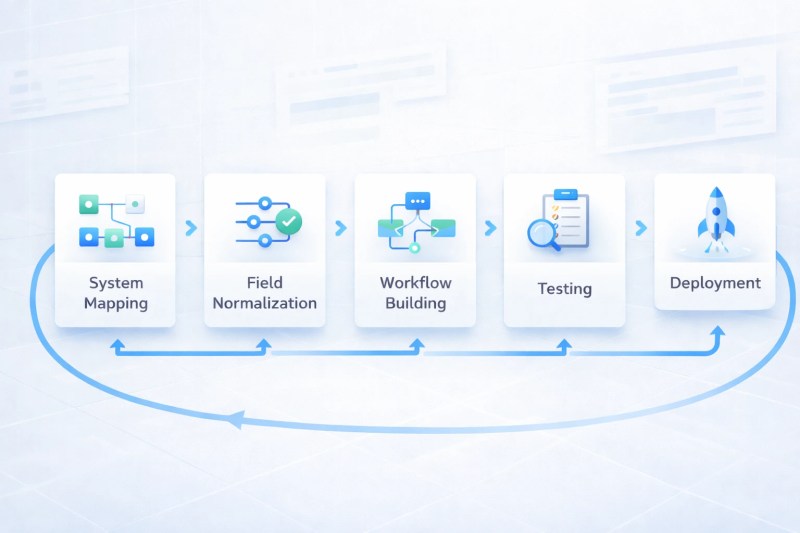
This sequence shows how workflows are built step-by-step to prevent errors before they reach production systems.
We build workflows that act as a controlled system between your tools, ensuring data is validated before it moves and confirmed once it arrives. The implementation follows a structured sequence:
- Map the source and destination systems, then define the single operational record that must stay aligned.
- Normalize fields, choose the source of truth, and account for schema changes and edge cases that create drift over time.
- Build the workflow with validation, retries, logging, and fallback handling before adding extra automation.
- Test with messy inputs, duplicate records, delayed approvals, and failed API responses.
- Release with monitoring so defined exceptions are visible instead of buried inside normal activity.
What this solution depends on
Cross-platform automation depends on stable ownership, clean field mapping, access to the connected tools, and a decision about which system is authoritative for each data point. When those rules are unclear, integrations become fragile and teams begin fixing the same issue in different places.
Platforms and systems this solution can connect
This solution can connect CRMs, document systems, spreadsheets, databases, ticketing tools, project trackers, email, and messaging platforms when the workflow needs a controlled handoff between them. In practice, connection reliability depends on API limits, permission scopes, and inconsistent field structures, which can block or distort data transfer if not handled explicitly.
For platform comparison and build strategy, see Zapier vs Make vs n8n and Zapier alternatives. For service-level execution, this often intersects with AI-powered automation and systems like AI workflow automation when classification or routing requires adaptive decision-making.
How system performance is measured
A workflow that “runs” is not the same as one that completes correctly; systems often report success while records fail silently across platforms.
What matters is whether the transferred record arrives correctly, on time, and with a traceable outcome. A workflow that “mostly works” still creates manual cleanup if the error rate, retry count, or sync lag remains high.
| Metric | What it shows | Why it matters |
|---|---|---|
| Completion rate | How many transfers finish without manual rescue. | Shows whether the workflow is reliable under load. |
| Sync lag | How long it takes for a change to appear across systems. | Late visibility causes bad decisions and duplicate action. |
| Retry count | How often the workflow needs another attempt to succeed. | Reveals unstable connections or weak upstream data. |
| Exception volume | How often items move to manual handling. | Shows where real-world complexity is still leaking through. |
| Duplicate rate | How often the same item is created more than once. | Signals poor matching logic or weak idempotency. |
Results of this solution

The optimized state below reflects consistent data flow and reduced system friction across all connected tools.
Without control, cross-platform workflows create duplicated effort, inconsistent records, and delayed execution across teams.
When the workflow is controlled properly, teams spend less time reconciling systems and more time using the record that is already in motion. Updates arrive faster, exceptions are visible earlier, and the same task does not need to be checked across three tools.
The result is not perfection. The result is a system that still behaves correctly when the input is messy, the API is slow, or a human changes a record halfway through the chain.
Where human judgment still matters
People still need to handle ambiguous matches, policy decisions, rejected records, and cases where the source data cannot be trusted. Automation should route the exception, not guess its way through it.
That is why manual override, exception review, and owner approval remain part of the design. Without them, the workflow becomes fast but unreliable.
Next steps and related resources
Start here:
Map the process, confirm system ownership, and identify failure points before implementation.
Key references:
All automation guides,
business process automation,
CRM automation,
AI automation,
automation blogs,
how to connect multiple systems,
all automation solutions,
API integrations.
Services and systems:
All automation services,
Integration scoping and build support,
CRM-specific automation support,
Document workflow support,
Data sync systems.
Frequently asked questions
- Is this the same as API integration?
No. API integration is one mechanism; cross-platform workflow automation is the operational system around it, including rules, retries, logging, and fallback handling. - Do all connected systems need to be automated at once?
No. The safer approach is to automate the highest-risk handoff first, then expand once the record flow and exception handling are stable. - What happens when one system is down?
The workflow should stop at the failure point, log the issue, keep the payload intact, and route the record to a fallback or manual queue until the destination is available again.
Why Alltomate
Alltomate designs cross-platform workflows as operating systems, not one-off automations. That means the build includes boundaries, retries, escalation, logging, and scoped dependencies from the start, so the workflow still behaves under messy inputs and real team behavior. Book a cross-platform automation call to map the workflow before it breaks in production.