
Published on May 25, 2026
If you are unsure where to start, explore our business automation consulting services or join the free business process audit waitlist.
Quick Answer: Small business automation uses software to carry out defined tasks or workflow steps, such as capturing leads, preparing documents, updating CRM records, and assigning follow-up work. Start with a repeatable process whose inputs and expected results you understand. Define the trigger, decision rules, review route, and responsible owner, then test the workflow with representative data before allowing live actions.
Table of Contents
- What Small Business Automation Means
- Where to Look for Time Lost in Manual Work
- Three Layers for Planning a Workflow
- Resolve Process Gaps Before Automating
- How to Decide What to Automate First
- Connecting Systems Without Breaking Data Integrity
- Scaling Beyond the First Few Workflows
- Final Answer
- FAQs
This small business automation guide focuses on practical decisions: which process to improve, what the software needs to do, and how to check that it worked. Useful automation depends on clear rules, suitable tools, reliable inputs, and ongoing ownership.
The examples below are illustrative designs, not measured client results. For broader process mapping and system design, see our business process automation guide.
What Small Business Automation Means
Automation can operate inside one application or connect several systems. For example, a form submission might create a CRM record, assign a rep using a territory rule, and prepare a confirmation message. A person may still review the message or approve an exception. Human involvement does not make the automated steps any less useful.
Digitizing a process is different from automating it. A spreadsheet may replace a paper form while still requiring someone to copy every record into another app. Look for the specific steps software could perform and the decisions that should remain with a person.
Lead handling, document processing, and CRM updates are useful areas to examine. A routing error can delay follow-up, a document error can require correction, and stale CRM values can affect reports that reuse them. The consequences depend on the workflow and its checks. Explore the lead management, document automation, and CRM automation guides for those areas.
For each proposed automation, specify the starting event, required inputs, permitted action, and expected result. Include what should happen when information is missing or the action cannot be completed. Clear rules help you test the design, but they still need to be implemented correctly in the chosen platform.
Recovery matters: correcting a workflow does not automatically fix records it changed earlier. Retain source IDs and destination references so you can identify affected records and plan any necessary cleanup.
Where to Look for Time Lost in Manual Work
Measure both hands-on effort and waiting time. Copying a lead into a CRM may take only a few minutes, while the submission waits hours for someone to notice it. Those are different problems: one needs less manual work, and the other may need clearer routing, ownership, or alerts.
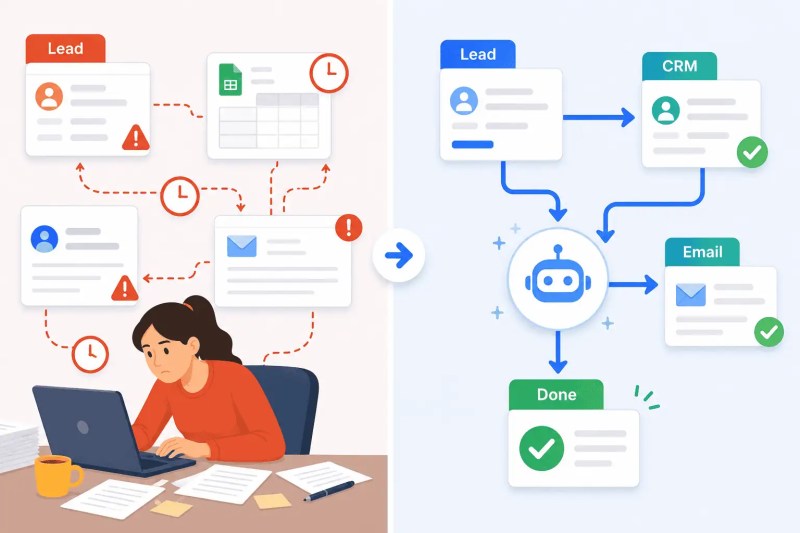
Consider an illustrative lead process. A form sends an email, someone enters the details into the CRM, chooses a rep, and sends a response. Check the timestamps for submission, assignment, and first meaningful follow-up. Check whether the response is recorded in the CRM and whether the rep can see earlier contact. Do not assume that sending an automated acknowledgement completes the handoff.
Use the baseline to choose a measurable goal, such as reducing unassigned enquiries or shortening the time to a rep’s response. Avoid treating a general response-time benchmark as a revenue guarantee for your business. Our lead response time automation guide covers the routing and follow-up process.
The diagram compares manual handoffs with an automated route. Either approach still needs a way to detect incomplete work.
| Process | What to measure | Possible first improvement |
|---|---|---|
| Lead entry into CRM | Entry time, missing fields, unassigned leads | Capture required data and create an assigned follow-up task |
| Invoice approval | Time awaiting review and missing approval records | Route drafts to the correct approver and track decisions |
| Client onboarding | Missing documents, repeated requests, incomplete tasks | Generate the appropriate checklist from a verified service tier |
| Report preparation | Collection time, data freshness, unmatched records | Collect data into a reviewable report with source timestamps |
Not sure which process to review first?
Join the free business process audit waitlist to discuss your current workflows.
Three Layers for Planning a Workflow
A useful planning model separates intake, routing, and output. It is a way to organize the design, not a requirement to build three separate systems. Permissions, monitoring, and recovery apply across all three.
Intake and capture: define where information arrives, which fields are required, and how each submission is identified. Standardize formats where appropriate without discarding useful context, such as a phone number’s country code or a timestamp’s time zone. Multiple intake channels can feed a shared process; they do not all have to be replaced by one application.
Routing and logic: define how the workflow chooses its next step. A territory can determine lead ownership, an amount can determine an approval route, and a support category can determine a queue. For ambiguous or consequential cases, create a review task rather than forcing the input into a guessed category.
Output and confirmation: specify the record, draft, task, or notification the workflow should produce. Capture the destination ID and outcome so the result can be checked. A successful API call or delivered notification does not by itself prove that the business task was completed correctly.

Resolve Process Gaps Before Automating
Undocumented exceptions make implementation difficult. Ask the person doing the work to explain the normal process and show examples of cases handled differently. Record which exceptions have clear rules and which require judgement.
A process does not need to be entirely predictable before any part can be automated. Automate the well-defined steps and keep an explicit handoff for decisions a person must make. Give that reviewer the source information, proposed action, and reason for review.
Illustrative example: a service business uses different intake forms for different service tiers. An onboarding workflow that sends the same form to everyone can miss required information. Map verified tiers to approved forms, send unknown tiers for review, and test each route before allowing automatic delivery.
Human judgement can remain part of daily execution, not just initial process design. Define who may approve an exception, which action the approval covers, and how the workflow verifies the decision before proceeding. See what business process automation involves.
How to Decide What to Automate First
Compare frequency, manual effort, waiting time, error impact, process stability, implementation effort, and recovery options. High error costs justify careful attention, but they do not automatically make a process the best first candidate for unattended automation.
- Lead capture and routing: consider it when enquiries are copied manually or frequently remain unassigned. Start with verified inputs and a monitored exception queue. See lead routing automation.
- Document processing: consider draft generation, approval reminders, or filing when repeated manual handling creates delays. Preserve review for details that need verification. See manual document processing problems.
- CRM entry and updates: consider it when the source data is reliable and the destination record can be identified consistently. Check duplicate handling and field ownership first. See CRM data entry automation.
For a first pilot, favour a useful task with clear acceptance criteria and manageable consequences if something goes wrong. Drafts, internal reports, or proposed updates may offer a suitable starting point, but even a classification or routing decision needs review if another process acts on it.
Estimate the benefit using measured workload. For example, multiply eligible cases by the manual minutes each case currently takes, then subtract the expected review and maintenance effort. This estimates staff capacity released, not guaranteed cash savings. Include software, integration, and support costs separately.
Pilot acceptance: test normal input, missing fields, duplicate events, an unavailable destination, and a case requiring review. Confirm the intended records and messages, then measure the live exception rate and review effort. Expand when the evidence meets your criteria, rather than after a fixed number of days.
Connecting Systems Without Breaking Data Integrity
Connected apps can hold different versions of the same information. Before syncing them, decide which system owns each important field, what triggers an update, and how conflicts should be resolved. Ownership can vary by field: the CRM may own the sales contact details while the billing system owns invoice status.
Consider an illustrative contact update. A rep changes a phone number in the CRM, but a document workflow reads an older copy from an email platform. The resulting document can contain stale information even though every technical step succeeds. Read the field from its designated source or verify that the copy is current before using it.
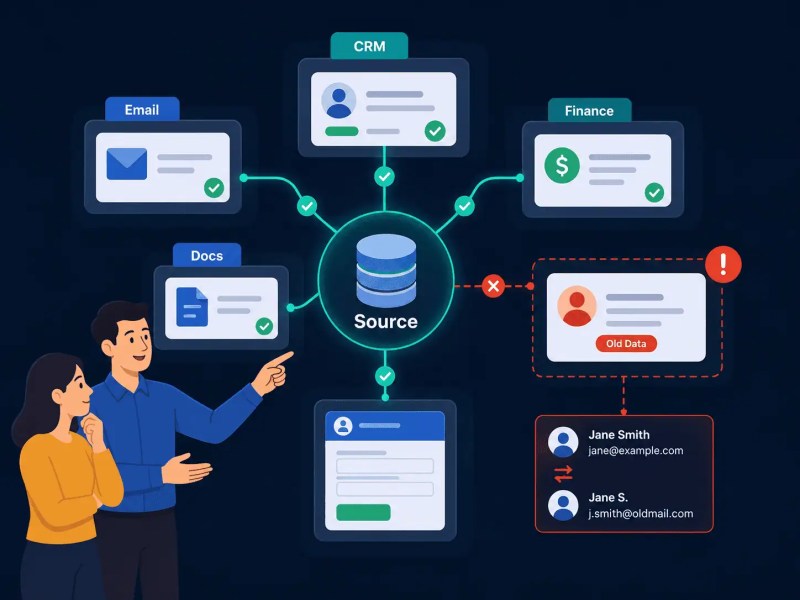
Use stable record IDs to match records across apps. Specify how blank values, deletions, duplicate events, and simultaneous updates should behave. Avoid circular updates by tracking the origin of changes or otherwise preventing the same change from being sent back repeatedly.
A timestamp check can help detect stale data, but a separate read followed by a write does not guarantee protection from concurrent updates. Where conflicting writes matter, consider processing changes for a record one at a time or using destination features that reject an outdated version. Check what your platform actually supports.
Keep access limited to the accounts and fields the workflow needs. Store credentials through the platform’s supported credential mechanism, and avoid putting secrets or unnecessary customer information into logs and notifications.
Our data sync automation solution and guide to connecting multiple systems cover related design considerations. For CRM-specific implementation, explore our CRM automation service.
Scaling Beyond the First Few Workflows
As workflows share more records and dependencies, document how they interact. Keep a simple inventory with each automation’s purpose, owner, trigger, connected accounts, expected outputs, dependencies, and recovery steps. Update it when the workflow changes and ensure someone else can use it during an absence or handover.
Review workflows when team roles, service tiers, fields, app permissions, or operating volumes change. Periodic checks are also useful, but the schedule should reflect the process. Infrequent work still needs test cases; an annual workflow with no recent runs is not automatically obsolete.

Use the business process automation guide for broader planning. A shared spreadsheet can be enough for the initial inventory. If your team needs help with ownership or maintenance, review what a small business automation consultant does or explore our automation and integration services.
Make failures visible and actionable:
Configure technical error alerts and a separate check for missing business outcomes. A workflow that never starts cannot send its own failure alert. A scheduled reconciliation process can compare received submissions with created records, identify items still pending beyond an agreed time, and notify an owner.
Include the source ID, failed or missing step, current status, and next action in the alert. Choose time limits based on the actual process; document generation, human approval, and overnight reporting should not share an arbitrary deadline.
Configure review routes separately from intentional stops. For example, a Zapier Filter that rejects an input stops later actions; an alert placed after it will not run for that rejected input. Use an alternate branch or another monitoring process. See Zapier’s Filter documentation.
Check retry and notification settings rather than assuming failures are handled automatically. Zapier’s Autoreplay depends on the plan and configuration, and error notifications can wait until its final attempt fails. Replaying an entire Zap can repeat completed actions. See Zapier’s replay documentation.
Before retrying any uncertain outcome, check whether the destination already changed. Retain stable event IDs and completed-action references to prevent duplicate records or messages. Restoring an earlier workflow version will not undo emails sent or records written; recovery needs to account for those actions separately.
Final Answer
Start with one measurable process, define its inputs and expected outputs, and automate the steps your tools can perform reliably. Keep human review where it adds necessary judgement. Validate the result, monitor missing work as well as technical errors, and expand only when the workflow’s benefits and operating costs are understood.
Need help planning your next workflow?
Related Resources
Frequently Asked Questions
What’s the difference between automating a task and automating a workflow?
Task automation handles a defined action, such as preparing a confirmation email. Workflow automation coordinates several steps, such as capture, validation, assignment, review, and delivery. A workflow can combine automated actions with human decisions; reliability depends on how those steps and exceptions are handled.
How do I know if a process is ready to be automated?
You can identify the trigger, required inputs, expected result, and who owns exceptions. The repeatable steps should have testable rules, while uncertain cases need an explicit review route. You also need suitable app access and a way to verify and recover the result. Documenting exceptions is part of preparation, not a requirement to eliminate all human judgement.
Do I need a developer to automate small business workflows?
Not always. A trained operator may be able to configure supported app connections using a no-code platform such as Zapier. Some API connections can also be configured without custom code, but authentication, complex data transformations, and consequential actions may require specialist help. If considering n8n, include the maintenance responsibilities of your chosen hosting model. Use our platform selection guide to compare requirements.
What happens when an automated workflow fails silently?
The expected business result is missing or wrong without an actionable alert. This can happen even when a run reports success, or when the trigger never starts a run. Compare source events with destination results, investigate mismatches, and notify an owner. Technical error alerts and outcome checks address different parts of the problem.
How many automations should a small business start with?
Start with one well-defined pilot if your team is new to the tools. Choose a process that is useful, testable, and manageable to recover. Add further workflows when the team can explain their behavior, handle exceptions, and measure the benefit. There is no universal workflow count or fixed learning period that guarantees readiness.
About the author

Miguel Carlos Arao is the Founder & CEO of Alltomate, a Zapier Certified Platinum Solution Partner focused on small business workflow automation, including process design, system integration, and multi-platform data routing.

Built by a certified Zapier automation partner
Explore our business process automation guide, business automation consulting, and free business process audit waitlist.