
Published on April 15, 2026
See how these systems apply to your workflows: explore AI workflow solutions or AI workflow automation. You can also explore AI automation services or request a free business process audit.
Quick Answer: AI automation in business works by embedding decision logic into workflows—classifying inputs, validating outputs, and routing actions. Common examples include lead scoring, document processing, customer support routing, and CRM updates. These systems fail when context is missing, validation is skipped, or workflows scale without control layers.
Table of Contents
Most AI automation examples look clean in demos. In real operations, they break under inconsistent inputs, missing context, and scale pressure. Understanding where they fail is more useful than understanding what they do—especially when designing automation systems.
Why Most AI Automation Examples Fail in Practice

This failure pattern is illustrated above, where missing validation leads to incorrect routing outcomes.
Failures usually appear after deployment. A system that classifies leads correctly during testing starts misrouting them once edge cases increase. Document pipelines begin mislabeling files when formats vary.
The underlying issue is not the AI model—it’s the absence of system structure. Without validation checkpoints and controlled routing, outputs are accepted as correct even when they are not.
At scale, small inaccuracies compound. A 5% misclassification rate becomes operational friction across sales, support, and reporting layers.
Scale Effect: Minor classification errors propagate into misrouted leads, delayed responses, and inaccurate reporting across sales and support systems. As data quality research from IBM highlights, small inaccuracies at the point of entry can scale into significant downstream inefficiencies and revenue impact across organizations.
AI Lead Scoring and Routing Systems

The difference between validated and non-validated routing is shown above.
Some lead routing systems prioritize speed, while others prioritize accuracy. Systems optimized for speed often skip validation, while accuracy-focused systems introduce checkpoints before routing decisions.
This works only when enrichment is complete. Missing firmographic data or inconsistent input formats lead to incorrect scoring.
Compare two setups:
| System Type | Behavior | Outcome |
|---|---|---|
| Without validation | Leads routed instantly, errors undetected | Higher misrouting and delayed follow-up |
| With validation | Leads checked before routing | More accurate routing and faster response |
Example: validated vs non-validated lead routing flow
Without validation, misrouted leads reduce response quality and delay conversions. Salesforce research shows reps spend a large portion of their time on non-selling tasks like data entry and admin work, reducing time available for customer engagement. With validation, incorrect classifications are caught early.
See deeper system design in lead routing automation.
Example System: A lead submits a form → Zapier captures the submission → OpenAI classifies lead intent → enrichment API adds company data → a validation step checks confidence score → only validated leads are routed to the CRM, while low-confidence leads are flagged for manual review.
Fix broken automation workflows
AI Document Processing Pipelines
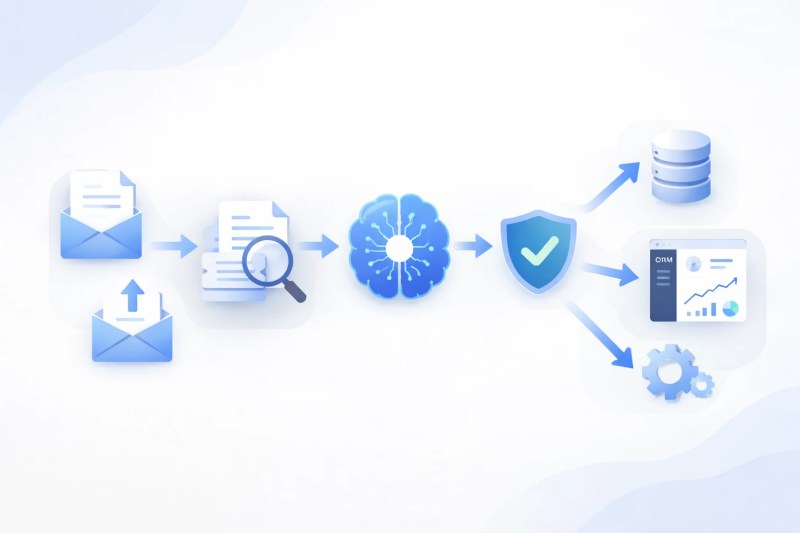
The document processing workflow shown above highlights where validation is required.
Document automation uses AI to extract and classify data from invoices, contracts, or forms. The goal is to remove manual processing.
The common misconception is that extraction accuracy alone defines success. For a deeper breakdown of document systems, see the document automation guide.
- Incorrect file categorization leads to wrong workflows
- Missing fields break downstream approvals
- Unstructured formats reduce consistency
Example: An invoice classified as a contract enters the wrong approval pipeline, delaying payment and affecting finance operations. Accounts payable workflows often slow down when invoice exceptions require additional validation and routing.
Example System: Incoming invoices are captured via email → parsed using OCR (e.g., Google Vision or similar tools) → structured into JSON → validated for required fields → then routed into the correct approval workflow in the accounting system.
Scale Effect: As document volume increases, misclassification routes files into incorrect workflows, delays approvals, and creates reporting inconsistencies across finance and operations.
Where AI Support Routing Breaks Under Real Tickets

The reassignment loop shown above demonstrates how misclassification delays resolution.
Support systems fail when tickets are classified incorrectly. Misrouted tickets are a common source of delays, increasing resolution times and creating backlog across support teams.
The failure point is not response generation—it’s incorrect classification. A billing issue routed as a general inquiry delays resolution and affects customer experience.
A stable system includes:
- Context enrichment before classification
- Validation rules for confidence thresholds
- Fallback handling for uncertain outputs
Without confidence thresholds, low-certainty classifications are treated as correct, causing tickets to be routed to the wrong teams. This leads to repeated reassignment, delayed responses, and inconsistent handling across support workflows.
Without these layers, AI responses appear correct but fail operationally.
Example system: Incoming support tickets are captured → AI classifies intent → customer and account data are enriched → a confidence score determines routing → low-confidence tickets are sent to a human queue, while high-confidence tickets are routed automatically to the correct team.
How CRM Automation Corrupts Data Without Normalization

The data inconsistency pattern shown above illustrates how automation corrupts CRM records without normalization.
CRM systems break quietly when automation introduces inconsistent data. Duplicate contacts, overwritten fields, and mismatched records often go unnoticed until reporting becomes unreliable.
The challenge is consistency. If different systems format data differently, automation creates duplicates or overwrites correct entries.
Example scenario: A contact submitted via two channels gets created twice due to inconsistent formatting, affecting reporting and outreach.
The system requires normalization before updates. Without it, automation amplifies inconsistencies instead of maintaining data integrity.
Final Answer: AI automation examples for business are only effective when embedded in structured systems. Lead scoring, document processing, support automation, and CRM updates all depend on validation, routing logic, and consistent inputs. Without these layers, automation scales errors instead of efficiency.
Need a reliable system?
Related Resources
FAQs
What is an example of AI automation in business?
Lead scoring systems that classify and route leads automatically based on behavior and data inputs.
Why do AI automation systems fail?
They fail due to missing validation, inconsistent inputs, and lack of structured workflow design.
Can AI automation replace manual processes completely?
Only partially. Human oversight is still required for edge cases and system exceptions.
What is the most important layer in AI automation?
Validation. Without it, incorrect outputs propagate across systems.
About the author

Miguel Carlos Arao is the Founder & CEO of Alltomate, a Zapier Certified Platinum Solution Partner focused on AI automation systems, including validation layers, routing logic, and workflow orchestration. This article is based on hands-on automation design, workflow systems, and real-world implementation experience.

Built by a certified Zapier automation partner
Explore more at AI automation services, Automation guides, and AI automation insights.