
Reports fail quietly—data is missing, numbers don’t match, and teams only notice after decisions are made. This system builds reports from validated data pipelines, so incomplete inputs trigger control actions instead of producing misleading outputs. If your reporting still depends on manual exports or fragile integrations, you are operating without failure protection.
We design reporting systems that generate accurate outputs under real-world conditions—messy inputs, late updates, and API failures included.
If your reports can generate without verifying data completeness, you are not automating reporting—you are creating decision risk. Fixing this requires a controlled reporting system, not another reporting tool.
System Snapshot
- Problem: Reports generate with incomplete or inconsistent data
- Core System: Validated data pipeline → report generator → controlled delivery
- Key Risk if Missing: Decisions made on inaccurate or partial reports
- Primary Outcome: Consistent, reliable reporting with failure-aware controls
When reporting automation fails and why this system exists
This system generates reports from multiple sources while enforcing validation, normalization, and completeness checks before output. It becomes necessary when reports depend on inconsistent inputs like CRM data, spreadsheets, or delayed updates that break report accuracy. These conditions require controlled validation to ensure reports are either accurate or intentionally blocked before delivery.
How the reporting pipeline handles failure before output
In real-world conditions, report inputs are often delayed, incomplete, or inconsistent due to upstream system behavior. Reporting starts only after data passes validation rules, preventing partial datasets from being converted into final outputs. When inputs fail validation—missing fields, mismatched IDs, or delayed sync—the system blocks report generation and routes the issue into a retry or escalation path instead of producing incorrect data, often caused by upstream failures in systems like data synchronization or broken cross-platform workflows where data movement is not synchronized.
This flow is shown below, where validation checkpoints prevent incomplete data from progressing into report generation.

- Trigger → collect data → validate + normalize to ensure consistency (failure → queue + retry, otherwise incomplete billing or CRM records enter reports and can distort revenue totals by 5–15% depending on missing billing data)
- Process → assemble report → generate output only if complete to prevent partial datasets from being treated as final (failure → partial flag + escalation, otherwise revenue, pipeline, and activity metrics are calculated from incomplete datasets)
- Delivery → send/export report → log result for traceability (failure → resend + alert, otherwise stakeholders assume reports were delivered and act on missing or outdated information)
Report generation is treated as a controlled process, not a final step, so failures in upstream systems are surfaced before they affect outputs. This ensures that automation reinforces data integrity instead of amplifying upstream errors.
If your current setup depends on tools instead of system logic, review business process automation or explore common integration mistakes to understand why reporting fails under real conditions.
When reporting systems allow incomplete or inconsistent data to pass through, errors don’t remain isolated—they accumulate across revenue, pipeline, and forecasting layers, creating systemic reporting drift. Fixing this requires a controlled reporting system that enforces validation before output, not more reporting tools.
Control layer and system governance
Reporting systems fail at the edges—late data, API timeouts, or schema changes—so control layers enforce reliability when inputs are unstable. Each report run is governed by rules that define when to proceed, retry, escalate, or fail safely.
The control mechanisms below show how the system detects, retries, or blocks failures before they affect reporting outcomes.
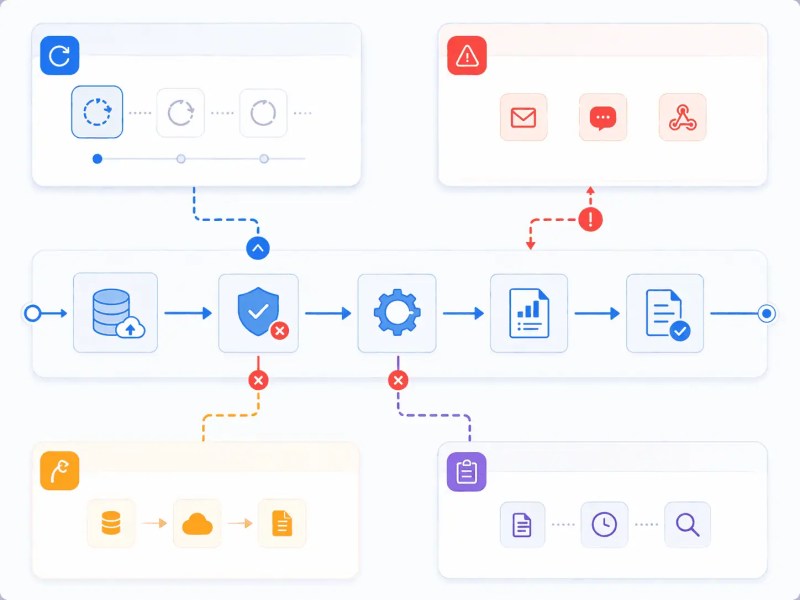
Control Layer
- SLA: if report generation exceeds defined time window (e.g., 15 minutes past scheduled run due to delayed upstream data or API lag), execution is halted (missing SLA → stale reports used for decisions despite delayed inputs)
- Retries: when API/data pulls fail or completeness drops below required threshold (e.g., <95% required fields), retries are triggered with backoff up to a defined limit (no retries → reports generate with partial data)
- Escalation: if validation fails after retry threshold (e.g., 3 failed attempts), alerts are sent to owners (no escalation → failures remain silent)
- Fallback: if dataset completeness fails defined threshold after retries, last valid dataset is used with flag (no fallback → reporting pipeline stalls)
- Logging: when each report generation or delivery attempt executes, status and failure reason are recorded for audit and retry decisions (no logging → failures cannot be traced, retried correctly, or audited)
This layer ensures that failures are surfaced before reports are delivered, so incomplete or invalid data cannot silently pass through the system. Unlike basic automations that validate once, this system enforces validation at each stage of the reporting pipeline.
Example implementation scenario
A sales report pulls data from a CRM and a billing system like Stripe, but the billing API delays invoice sync by 20–30 minutes during peak periods. Instead of generating a partial report, the system detects missing revenue entries, flags the dataset as incomplete, and delays output while triggering retries and notifying stakeholders.
This difference between uncontrolled and controlled reporting behavior is illustrated below.

If this control is missing, the report generates with incomplete revenue numbers, leading leadership to assume a performance drop and make incorrect decisions. In practice, this can result in underreported revenue, misallocated budget, or incorrect performance actions that compound over time.
What controlled report generation looks like in practice
The system structure below shows how triggers, validation, processing, and delivery components coordinate to control reporting behavior.
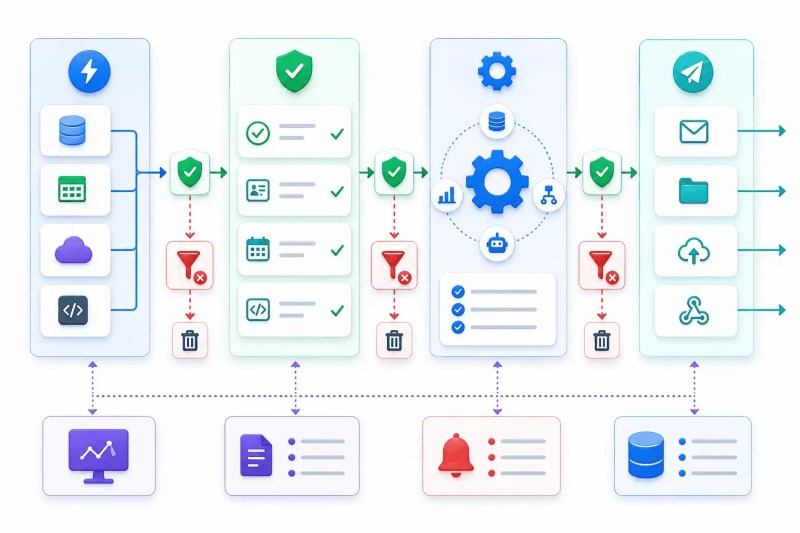
Report generation only begins after receiving a data sync completion signal via webhook or scheduled job. If upstream systems are delayed, the process pauses to prevent partial outputs. This dependency often relies on correctly sequenced task handoffs between systems to ensure data readiness before execution.
Pre-generation validators check schema consistency and required fields before records enter the report assembly queue. When mismatches occur, records are isolated to prevent invalid data from affecting calculations. These issues often originate from broken upstream processes like CRM update automation where field inconsistencies are not controlled.
Report generation engines operate on normalized datasets, so inconsistent formats from sources like CRM or spreadsheets are transformed before aggregation. Without normalization, calculations break or produce inaccurate totals that appear valid.
Zapier steps or webhook-based delivery handlers track send status via API/webhook responses. When delivery fails due to response errors or timeouts, retries or escalation are triggered, otherwise reports fail silently and stakeholders assume delivery succeeded.
Dependencies and platform constraints
This system depends on stable upstream conditions such as consistent CRM record IDs, predictable data sync cadence, and API availability across connected platforms. It integrates with CRMs, spreadsheets, databases, and reporting tools, but each introduces constraints such as API rate limits, inconsistent schemas, or missing unique identifiers. For example, CRM records without stable IDs break aggregation logic, while API rate limits can delay data retrieval by minutes to hours under load, directly affecting report completeness at runtime. These dependencies often rely on properly structured system integration to ensure data flows reliably between platforms.
When these conditions are unstable, report generation becomes unreliable and requires control-layer intervention to prevent incorrect outputs. Related systems like automate data sync and CRM update automation ensure upstream consistency before reporting.
What changes when reporting is failure-aware
Teams can rely on reports as a decision-making source instead of verifying data manually before use. This removes the need for cross-checking before decisions and can reduce report validation time across teams. Reports are only generated when data meets validation criteria, and accuracy, generation success rate, and time-to-delivery are tracked under real operating conditions.
Result: Reliable reporting that reflects real data conditions, not assumptions
Where human judgment still matters
Automation cannot interpret anomalies such as unexpected spikes or missing business context, so human review is required when reports deviate from expected patterns. For example, a sudden increase in closed deals may reflect a successful campaign or a data sync error—only a human with business context can distinguish between the two. Without this layer, valid but unusual data may be treated as errors or ignored incorrectly.
Next steps and related resources
Explore CRM automation or document automation to stabilize upstream data and reporting outputs, or read manual vs automated workflows to understand why reporting systems fail without structure.
For document-based outputs, see document automation services, or for cross-system reliability, review automation integration services.
Frequently asked questions
Can reporting automation work with messy data?
Yes, if validation and normalization layers filter and correct inputs before report generation. Without these, messy data flows directly into reports and produces incorrect outputs.
What happens when data is missing during report generation?
The system blocks or flags report generation and triggers retries or escalation. Without this control, reports generate with incomplete data and mislead decision-making.
How do we know when a report has failed versus when it’s just delayed?
The system distinguishes between the two through SLA thresholds and logging. If data retrieval exceeds the defined time window, execution is halted and stakeholders are alerted. If data is delayed but within threshold, the system retries with backoff. Without this distinction, delayed reports and failed reports look identical—and both go undetected.
What if our data sources have inconsistent structures or unreliable integrations?
Validation and normalization layers handle schema inconsistencies before records enter the report assembly queue. Sources with unstable APIs or missing identifiers are flagged, isolated, or routed to fallback handling rather than allowed to propagate errors into outputs. Without this, inconsistencies from upstream sources pass directly into report calculations.
Why Alltomate
Alltomate designs reporting systems that operate under real-world constraints—API failures, messy data, and delayed updates are handled as part of the system, not exceptions. Unlike typical automations that validate data once, these systems enforce validation at every stage of the reporting pipeline, ensuring accuracy is maintained even when upstream systems behave unpredictably. Most automation setups assume clean data; these systems are designed to operate reliably even when data is delayed, incomplete, or inconsistent.
If your reporting depends on manual fixes or fragile automations, explore Alltomate’s automation services, including CRM automation, to build systems that operate reliably under failure conditions. Before any build, Alltomate maps your data sources, validation requirements, and failure states so the system is designed around your actual reporting conditions—not assumed ones.
About the solution designer

Miguel Carlos Arao is the Founder of Alltomate and a Zapier Certified Platinum Solution Partner specializing in automation systems, workflow architecture, and real-world implementation.

Built by a certified Zapier automation partner
Explore related work: