
Published on June 9, 2026
If you’re building automation around Apollo.io, start with a automation integration services — or free business process audit to catch structural gaps before you build.
Quick Answer: The Apollo.io API gives you programmatic access to prospect data, sequences, contact records, and enrichment — but it’s not a fire-and-forget connection. Rate limits, field mapping gaps, and sequence state logic create real failure points that most integrations don’t account for. Building reliably around it means understanding what the API exposes, where it stops, and how to design the surrounding workflow to compensate.
Table of Contents
The Apollo.io API is well-documented on the surface. You can pull contacts, push enrichment data, trigger sequence enrollment, and sync activity back to your CRM. But in practice, the gap between “the API supports this” and “this integration works reliably” is where most builds fall apart. This article covers the API’s actual behavior — not the feature list.
What the Apollo.io API Actually Exposes
Apollo.io’s API is organized around a few core objects: People (contacts), Organizations (accounts), Sequences, Email Accounts, and Opportunities. Each has endpoints for create, read, update, and in some cases delete — plus a search endpoint that accepts filters like title, seniority, location, and industry keywords.
The enrichment surface is where Apollo differentiates from a simple CRM. You can pass a partial contact record — name, company domain, LinkedIn URL — and get back a hydrated record with job title, phone, verified email, technographic data, and org structure signals. In implementations we’ve built for outbound sales teams, this enrichment endpoint is the one doing most of the work: a lead comes in from a form or LinkedIn scrape with minimal fields, and Apollo fills in the gaps before the record ever reaches a human.
The API also exposes sequence activity — opens, clicks, replies, bounces — as readable events. This is underused. Most teams treat Apollo as a sending tool and pull results manually. But the activity endpoints let you build feedback loops: a reply event can trigger a CRM stage change, a bounce can trigger a data hygiene workflow, and a click pattern can qualify a lead for a higher-touch sequence — all without anyone logging into Apollo.
What the API does not expose well: template-level analytics at scale, mailbox health signals, and anything related to Apollo’s AI-generated sequence suggestions. If those matter to your workflow, they stay inside the Apollo UI. For a broader view of how Apollo fits into a multi-system stack, see our guide on how to connect multiple systems.
Where Apollo.io API Integrations Break
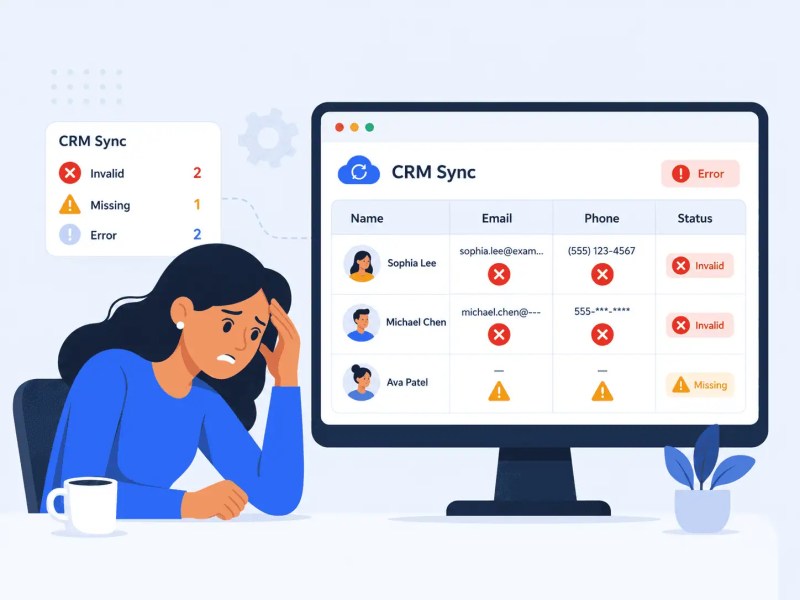
The failure pattern we see most often isn’t a missing endpoint — it’s a field mapping assumption that collapses the first time Apollo returns a record with unexpected structure. Apollo’s People object returns a wide set of fields — titles, phone numbers, email confidence scores, technographic data, and org structure signals. Most integrations map a fraction of them and assume the rest are either empty or irrelevant. When a contact comes back with a non-standard title format, a multi-value phone array, or a null email confidence score, the downstream system either skips the record silently or writes bad data.
A consistent pattern we see in new installs: teams build the happy-path integration first, validate it with 20 test contacts, and consider it done. The edge cases surface weeks later — a contact with no organization attached, a record returned with two conflicting email addresses, or an enrichment call that times out and returns a partial response. None of these kill the integration immediately. They degrade it gradually, and by the time someone notices, the CRM has hundreds of corrupted records.
The fix isn’t more complex mapping logic — it’s defensive field handling from the start. Define what a valid record looks like. Validate before writing. Route failed validations to a review queue rather than letting them pass through silently. This is less about the Apollo API specifically and more about treating enrichment data as inherently uncertain, which it is.
That failure path is shown below: the CRM does not break because Apollo returned data, but because invalid or missing fields were allowed to continue downstream without validation.
For teams building this on Zapier or Make, the approach is the same: add a validation step between the Apollo response and the CRM write. We’ve covered the integration architecture for this in our business process automation guide — the principles apply directly here.
Building automation around Apollo.io? Apollo integration services that don’t break at scale.
Rate Limits Are a Design Constraint, Not a Warning
Apollo.io’s API enforces rate limits by endpoint, measured per minute, hour, and day — and the exact numbers vary by plan. The safest implementation pattern is to check your account’s current limits via Apollo’s API usage endpoint rather than assuming a fixed number. What is consistent: Bulk People Enrichment runs at 50% of the single-person enrichment endpoint’s per-minute rate limit, while hourly and daily limits stay the same. For a team syncing 500 new leads per day, that’s manageable. For a team enriching a backlog of 10,000 contacts, rate limits become a primary design constraint.
The mistake is treating rate limits as something to work around — adding delays, batching calls, hoping for the best. The better frame is to design the workflow around the limit from the beginning. If you’re enriching 10,000 records, that’s a scheduled batch job running over hours, not a single triggered workflow. If you’re syncing leads in real time, the rate limit is almost never a problem — because you’re processing one record at a time, triggered by an event, with seconds between calls.
Where rate limits create real operational pain is in the middle case: a triggered workflow that fans out. A new deal created in the CRM triggers enrichment for all contacts in the account — which might be 20 contacts, or 200. That fan-out behavior can spike your request rate unpredictably. At scale, a single trigger can exhaust your minute window, causing downstream calls to fail for every other workflow running in parallel.
The architectural fix is queue-based enrichment: requests go into a controlled queue that respects the rate limit regardless of upstream trigger volume. This is more complex to build but eliminates the entire class of failure. Tools like Make and n8n both support this pattern natively — for more on how those platforms handle concurrency differently, see our Zapier vs Make vs n8n.
The difference between fan-out and queue-based processing is easier to see as a system behavior, not just a timing issue.

Sequence Enrollment via API: The Logic Gap
Apollo.io lets you add contacts to sequences via API, but the workflow is more specific than passing a person ID and a sequence ID. The person must already exist as a contact in your team’s Apollo database, you need to supply the sending email account ID alongside the sequence ID, and the call requires a master API key. Most builds that break here skip one of those prerequisites.
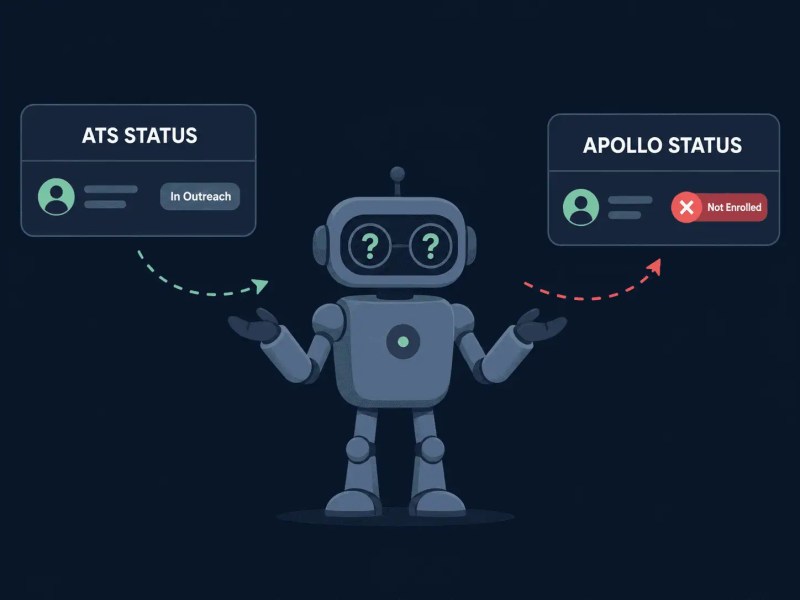
Beyond the prerequisites, Apollo enforces a set of sequence controls that determine whether enrollment proceeds: unverified email addresses, contacts already active or finished in other sequences, ownership permissions, same-company conflicts within the same sequence, and queue status can all block or defer enrollment. The response doesn’t always make clear which condition triggered the failure — which is exactly why the calling system needs its own confirmation step rather than assuming a non-error response means the contact is actually in outreach.
In a recruitment firm we built a sourcing pipeline for, this failure pattern caused a significant data quality problem: candidates were being marked as “in outreach” in the ATS, but the Apollo enrollment was silently failing. Recruiters assumed follow-ups were being sent. They weren’t. The fix required building an enrollment confirmation step — after the API call, a verification check confirmed the contact’s sequence status before updating the ATS record. Adding that one verification layer caught the failure rate and surfaced the root cause within the first week.
The critical issue is the mismatch between what the ATS believes happened and what Apollo actually confirmed.
This mirrors a case study on a similar pipeline we documented — the lead generation automation for recruitment — where the same enrollment confirmation pattern was the critical system behavior that made the workflow reliable.
How Enrichment Data Flows Downstream
The enrichment endpoint is where Apollo delivers its core value — but enrichment data is probabilistic. Apollo assigns confidence scores to fields like email addresses and phone numbers. Most integrations ignore those scores entirely and treat all enriched fields as equally valid. That’s the wrong mental model.
A phone number returned with a low confidence score should be treated differently from one returned at high confidence — routed to a verification queue, flagged for manual review, or simply excluded from automated outreach until validated. The same applies to email addresses. Apollo classifies email addresses as valid, invalid, risky, or unknown — a critical signal that downstream systems should act on, not discard.
Across the client work we’ve done in B2B sales and professional services, the integrations that hold up at scale are the ones that treat enrichment output as a scored input rather than a final record. The data flows into the CRM with its confidence metadata attached. Automation rules act differently depending on score ranges. A contact with a verified email and high-confidence phone goes directly into the outreach queue. A contact with unverified email gets routed into a data hygiene step first.
This matters more at scale. A team running 100 enrichment calls per week can afford to spot-check quality manually. A team running 5,000 per week cannot. The confidence-scoring logic needs to be in the system from the start — retrofitting it after the CRM is full of mixed-quality data is significantly harder than building it in upfront.
Building a Reliable Apollo.io API Workflow
A reliable Apollo.io API workflow isn’t one that works on the first test — it’s one that degrades gracefully when the API behaves unexpectedly. The difference is in what happens at the edges: how partial responses are handled, what triggers a retry, and where failures surface so someone can act on them.
The structural pattern that works across implementations: trigger → validate → enrich → score → route. The trigger can be anything — a form submission, a CRM webhook, a scheduled list upload. Validation checks the minimum required fields before calling the API. Enrichment runs the Apollo call. Scoring applies logic to the enrichment result (confidence thresholds, verification status, completeness). Routing sends the record to the right downstream step based on score.
The workflow below shows why each step exists: the system does not just call Apollo, it checks whether the record is ready, scores the result, and routes it based on quality.

Each step should be observable. Failures at validation, enrichment, or scoring should write to a log or a review queue — not silently drop the record. This is especially important in automation platforms like Zapier or n8n, where a failed step in the middle of a Zap or workflow can complete successfully without the record actually going anywhere useful. We’ve covered the failure patterns in multi-system integrations in depth in our common integration mistakes — most of them apply directly to Apollo API setups. For teams layering AI-driven routing on top of enrichment data, our AI-powered automation covers how that layer gets structured.
One practical addition that pays off quickly: a duplicate check before writing to the CRM. Use the right Apollo endpoint for the job — Search for Contacts when checking records already in your team’s Apollo database, and People API Search when searching Apollo’s broader people database. Without a pre-write deduplication step, high-volume enrichment pipelines generate duplicate contacts at a rate that compounds over time. One extra lookup before the CRM write can save hours of cleanup later.
Final Answer: The Apollo.io API gives you robust programmatic access to prospect data, enrichment, sequence enrollment, and activity events — but the reliability of any integration built on it depends on how the surrounding workflow handles partial responses, rate limits, enrollment failures, and enrichment confidence scores. The API endpoints themselves are well-structured. The gaps appear in the logic between the API response and the downstream system. Build defensively: validate before writing, route failures explicitly, treat enrichment data as scored rather than final, and design for rate limits from the start rather than patching around them later.
Need a reliable system?
Related Resources
FAQs
Does the Apollo.io API support bulk enrichment?
Yes, but bulk enrichment via API is rate-limited and best handled as a scheduled batch job rather than a single triggered request. For large backlogs, design a queue-based system that respects the per-minute limit rather than trying to process all records in a single run.
Why does sequence enrollment via the Apollo API need validation?
Because adding a contact to a sequence depends on several conditions: the person must exist as a contact in your team’s Apollo database, the sending email account must be provided, and sequence controls like unverified email, active sequence membership, ownership permission, and queue status can all affect the result. The safest workflow confirms sequence status before updating the CRM or ATS.
What’s the difference between Apollo.io API enrichment and using it inside the platform?
Functionally, the enrichment data is the same. The API approach gives you control over when enrichment runs, how the output is validated, and where the data goes next — which the in-platform UI doesn’t offer. For automated pipelines, API enrichment is the right choice. For one-off lookups or manual prospecting, the UI is faster.
Can the Apollo.io API write data back into Apollo, or is it read-only?
It’s bidirectional. You can create and update contact and account records, update sequence enrollment, log custom field data, and push activity records back into Apollo from external systems. This makes it possible to use Apollo as a central outreach layer while keeping the source of truth in a separate CRM.
How should enrichment confidence scores be used in a downstream automation?
Treat them as routing signals. High-confidence enriched records can proceed directly into outreach workflows. Mid-confidence records should be flagged for review or sent through a verification step before being acted on. Low-confidence records — particularly unverified emails — should not enter automated outreach sequences, as they increase bounce rates and risk mailbox health.
About the author

Miguel Carlos Arao is the Founder & CEO of Alltomate, a Zapier Certified Platinum Solution Partner focused on Apollo.io API integration workflows, including enrichment confidence routing, sequence enrollment validation, and CRM data sync architecture. The patterns in this article come directly from building and troubleshooting Apollo.io API-related systems across client engagements in B2B sales automation and recruitment pipeline automation.

Built by a certified Zapier automation partner
Explore more at
automation integration services,
CRM automation services, and
Lead Generation Automation Case Study.