
Published on July 30, 2026
Picking a workflow automation platform is easy to get backwards — most teams start by comparing feature lists instead of the actual bottleneck they’re trying to remove. If you’d rather skip the comparison shopping and just get the right system built, our team handles automation strategy and implementation directly, or start with a free business process audit to see what’s worth fixing first.
Quick Answer: There’s no single “best” workflow automation tool — the right one depends on your team’s technical skill level, how many systems you’re connecting, and how much governance you need. Zapier wins on breadth of integrations and ease of setup for non-technical teams. Make is the better value for teams willing to learn a visual canvas. n8n suits technical teams that want to self-host and control cost at volume. Power Automate makes sense if you’re already deep in Microsoft 365. HubSpot Workflows is the right call when the automation lives entirely inside your CRM. Workato, Tray.io, and Pipedream serve different flavors of enterprise and developer-heavy needs. Most businesses land on the right answer by matching the platform to their constraint, not by picking the “most powerful” one.
Table of Contents
- What Changes When You Move From Manual to Automated
- The Criteria That Separate These Platforms
- Zapier
- Make
- n8n
- Microsoft Power Automate
- HubSpot Workflows
- The Enterprise Tier: Workato, Tray.io, and Pipedream
- Side-by-Side Comparison
- Where These Tools Hit a Wall Before Anyone Notices
- Matching the Platform to Your Business, Not the Other Way Around
- FAQs
Every one of these platforms can technically connect App A to App B. That’s not where the decision gets made. The real differences show up in how much a platform assumes about your technical skill, how it prices you as you scale past your first ten workflows, and what happens the day a connected app changes its API without warning. This guide walks through the major workflow automation platforms on the market in 2026 — what each one is actually built for, where it’s genuinely strong, where it falls short, and how to match the choice to your business rather than chasing whichever tool has the loudest marketing.
What Changes When You Move From Manual to Automated
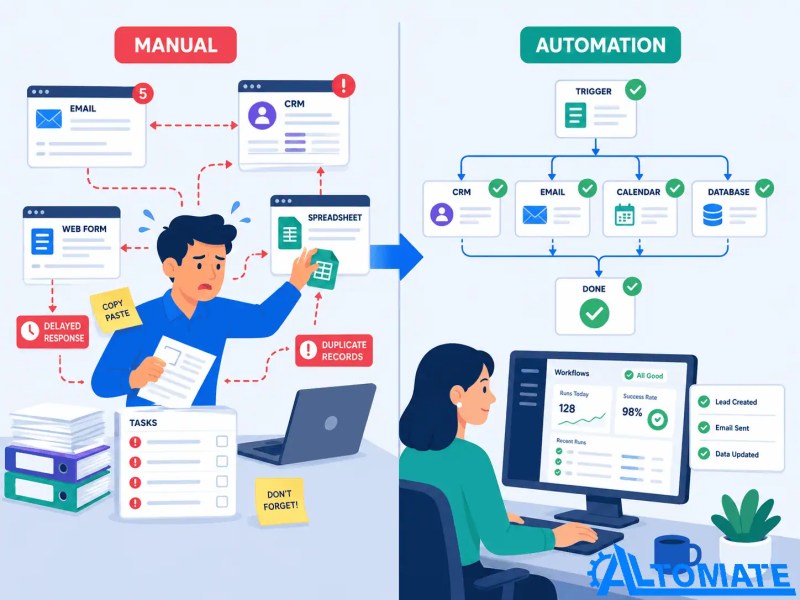
Most businesses don’t wake up one day and decide they need “workflow automation” as an abstract goal. They hit a specific breaking point: a lead sits in an inbox for six hours before anyone follows up, an invoice gets entered twice into two systems and the numbers don’t match, or a new hire’s onboarding checklist depends entirely on one person remembering to run it. The gap between manual and automated workflows usually isn’t about speed for speed’s sake — it’s about removing the point where a human is the only thing standing between a trigger and an action.
That framing matters because it changes what you’re actually shopping for. You’re not buying “automation” — you’re buying a system that reliably does one of a few things: moves data between tools (see these integration automation examples) without someone re-typing it, routes something to the right person based on a rule, or triggers an action the moment a condition is met. Every platform in this guide does some version of that. The differences are in who can build and maintain it, what it costs as your volume grows, and how gracefully it fails when something upstream changes.
The transformation below illustrates how removing repetitive manual work eliminates bottlenecks between business events and the actions that should immediately follow.
The Criteria That Separate These Platforms
Before comparing tools by name, it’s worth being explicit about what you’re actually evaluating, because the marketing pages for all of these platforms sound remarkably similar.
- Ease of use: Can someone outside IT build and maintain a workflow, or does every change require a developer?
- Integrations: Does it connect natively to the specific tools you already run, or will you need custom API work?
- AI capabilities: Can the platform classify, summarize, or make judgment calls inside a workflow — not just move data?
- Scalability: What happens to cost and reliability once you’re running thousands of executions a month instead of dozens?
- Pricing model: Are you billed per task, per execution, per user seat, or per bot — and how does that model behave as you grow?
- Security and governance: Does it support SSO, role-based access, and audit logs if you need them for compliance?
- Customization: Can you drop into code (JavaScript, custom API calls) when the pre-built connector doesn’t do what you need?
Keep this list in mind as you read the platform breakdowns below — most vendor comparisons skip straight to feature counts and integration numbers, which is exactly the kind of surface-level comparison that leads teams to pick the wrong tool.
The criteria above sound similar on every vendor’s marketing page — the framework below is what actually separates them once you’re using one.

Zapier
Zapier is the platform most non-technical teams reach for first, and for good reason: its connector library is the largest on the market, and building a simple Zap — trigger, action, done — takes minutes even with zero automation background.
Strengths: Breadth of integrations (thousands of apps), the fastest path from “idea” to “working automation” for simple use cases, and a large, active community, which matters when something breaks at 5pm on a Friday.
Limitations: Zapier bills by task, and every step in a multi-step Zap consumes its own task — so complex workflows get expensive fast compared to platforms that bill by execution or operation instead. It’s also the least cost-efficient option at high volume; teams running the same workflow on Make or n8n typically pay meaningfully less for equivalent throughput.
Pricing: Zapier offers a limited free tier, then paid plans that scale by monthly task volume and Zap complexity, moving up to a custom-quoted Enterprise tier for high-volume, mission-critical workflows. The exact numbers shift periodically, so check Zapier’s own pricing page for the current tiers before budgeting.
Best for: Small teams and solo operators who need something working today, non-technical business owners who don’t have (and don’t want) a dedicated automation admin, and any team whose priority is app coverage over cost-per-task efficiency.
Make
Make trades some of Zapier’s plug-and-play simplicity for a visual, node-based canvas that gives you real control over branching logic, error handling, and data transformation — without writing code.
Strengths: Meaningfully cheaper per unit of automation than Zapier for equivalent volume, native support for routers, iterators, and conditional branches that would require workarounds in Zapier, and a visual canvas that makes complex multi-branch logic easier to actually see and debug.
Limitations: The learning curve is real — Make expects you to understand how its execution model counts operations (a single scenario with ten steps run one hundred times consumes far more than one hundred units), and teams that don’t budget for that end up surprised by their bill. It also has a smaller pure integration count than Zapier, though it covers the vast majority of common business tools.
Pricing: Make uses a credit-based (formerly “operations”-based) model, with a limited free tier and paid plans that scale up through Core, Pro, and Teams tiers before reaching custom Enterprise pricing. Because pricing is granular per module call, the number that matters isn’t the plan price — it’s how many operations your actual workflows burn per run.
Best for: Teams with someone willing to learn the canvas in exchange for lower cost per automation and finer control over logic — a common fit for operations-minded small and mid-sized businesses.
n8n
n8n is the platform that shows up in almost every conversation with a technical founder or ops lead who’s outgrown no-code tools but doesn’t want to build integrations from scratch. It’s open-source, can be self-hosted for free, and bills its hosted cloud version by execution rather than by step.
Strengths: The self-hosted Community Edition has no execution limits and no license fee — the only ongoing cost is the server it runs on, which can be a few dollars a month. Its execution-based billing model (one workflow run = one execution, regardless of step count) is dramatically more predictable than Zapier’s per-task model for complex workflows. It also supports writing custom JavaScript directly inside a node, which closes the gap when a pre-built connector doesn’t do exactly what you need.
Limitations: Self-hosting means someone owns the maintenance — applying updates, renewing SSL certificates, and being on call when the server has an issue at 2am. n8n Cloud removes that burden but reintroduces a paid tier structure, and its execution allowances can run out faster than expected on any workflow that polls frequently.
Pricing: Self-hosted is free beyond hosting costs. n8n Cloud offers paid Starter and Pro tiers priced around monthly execution allowances, with a higher-tier Business plan and custom Enterprise pricing for teams that need SSO, advanced roles, or guaranteed support.
Best for: Technical teams or businesses with access to a developer who want long-term cost control, full customization, and don’t mind owning (or having someone own) the infrastructure.
Microsoft Power Automate
For businesses already living inside Microsoft 365, Power Automate has a structural advantage the other platforms can’t match: basic cloud flows between Microsoft apps — Outlook, SharePoint, Teams, OneDrive — are often already included in an existing subscription.
Strengths: Deep, native integration with the Microsoft ecosystem, a licensing on-ramp that many organizations have already partially paid for, and a clear path into more advanced capability — attended and unattended RPA, AI Builder for document processing — as needs grow.
Limitations: The moment a workflow needs to reach outside Microsoft’s ecosystem — Salesforce, a custom API, a non-Microsoft database — the free-with-M365 tier stops working and you’re into paid licensing per user. Unattended RPA is priced per bot rather than per user, which can escalate quickly if a business needs several parallel automated processes running without anyone logged in.
Pricing: Basic flows using standard connectors are typically included with an existing Microsoft 365 subscription. The Premium tier (unlocking premium connectors and attended RPA) is priced per user, per month. Unattended RPA bots and cloud-hosted bot infrastructure are priced separately, per bot, and cost meaningfully more.
Best for: Microsoft-centric organizations automating internal, Microsoft-to-Microsoft workflows, where the licensing overlap with an existing M365 plan makes the entry cost close to zero.
HubSpot Workflows
HubSpot Workflows isn’t a general-purpose automation platform in the way the others are — it’s automation built into a CRM, which means its real strength shows up when the trigger and the action both live inside HubSpot itself. Deciding whether HubSpot’s pricing makes sense for your automation needs is worth doing before assuming Workflows is the default answer just because you already own HubSpot.
Strengths: Native access to every contact, deal, and ticket property without a separate connector, tight integration with HubSpot’s own lead scoring, sequences, and reporting, and no need to manage a second tool just to route a lead or trigger a follow-up email.
Limitations: Workflow capability is gated behind HubSpot’s paid tiers, and meaningful automation (branching logic, webhooks, scheduled triggers) typically requires Professional-tier pricing or above — which is a CRM decision as much as an automation one. It’s also the weakest option here for automating anything that doesn’t touch HubSpot data at all.
Pricing: HubSpot Workflows access depends on which Hub and tier you’re on — the entry-level Starter tier includes basic automation, while more advanced branching, webhooks, and scheduled workflow triggers sit in the Professional and Enterprise tiers, each priced substantially higher and typically requiring a one-time onboarding fee.
Best for: Teams already committed to HubSpot as their CRM who want lead routing, follow-up sequences, and lifecycle automation without adding another platform to the stack.
The Enterprise Tier: Workato, Tray.io, and Pipedream
Three platforms come up consistently once a business outgrows the no-code tier entirely — Workato and Tray.io at the enterprise iPaaS level, and Pipedream for developer teams who want code-level control without building an integration platform from scratch.
Workato is built for large organizations that need governed, “business technologist” automation at scale — think lead-to-cash processes spanning Salesforce, NetSuite, and a dozen other systems, with the audit trails and permission controls a compliance team requires. Its pricing is quote-based rather than published, and typically starts in five-figure annual contract territory, which puts it out of reach for most small and mid-sized businesses.
Tray.io serves a similar enterprise audience but leans further toward technical, API-first flexibility — a better fit when the integration challenges are genuinely complex and there’s a skilled integration team to build and maintain them, rather than business users self-serving.
Pipedream sits in a different lane entirely: a developer-first platform where workflows are written in code (Node.js, Python) rather than assembled from pre-built connectors, with a genuinely usable free tier and paid plans that stay well below Workato or Tray.io pricing. It’s the right call when a technical team wants full control over logic and doesn’t need an enterprise governance layer.
Best for: Workato and Tray.io suit large enterprises with dedicated integration budgets and compliance requirements; Pipedream suits developer-led teams that want code-level flexibility without the enterprise price tag.
Side-by-Side Comparison
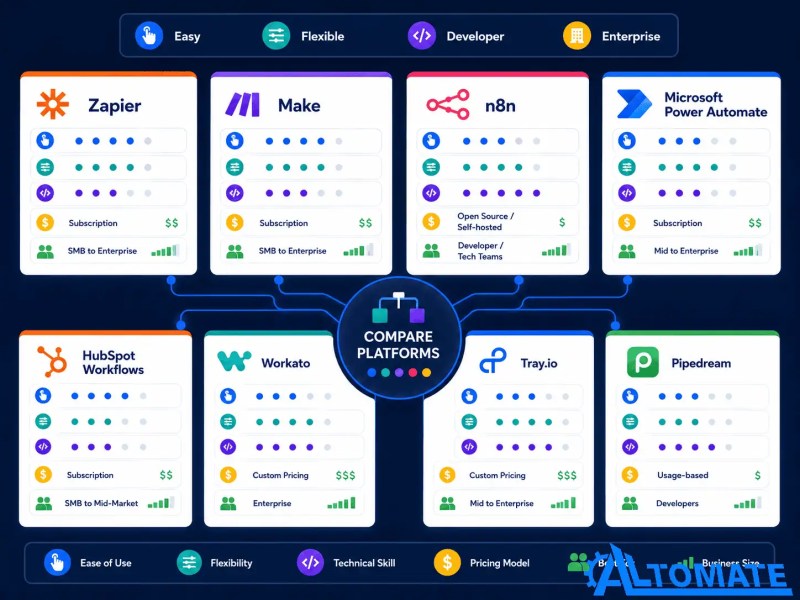
| Platform | Best For | Technical Skill Needed | Pricing Model |
|---|---|---|---|
| Zapier | Non-technical teams, fastest setup | None | Per task |
| Make | Cost-conscious teams with branching logic | Low-moderate | Per operation/credit |
| n8n | Technical teams, cost control at scale | Moderate-high | Per execution / self-hosted |
| Power Automate | Microsoft 365-centric orgs | Low-moderate | Per user / per bot |
| HubSpot Workflows | HubSpot-native CRM automation | None | Bundled in Hub tier |
| Workato | Large enterprise, governed automation | Low-moderate (business technologist) | Custom quote |
| Tray.io | Complex, developer-led integrations | High | Custom quote |
| Pipedream | Developer teams wanting code-level control | High | Free tier + usage-based |
Use this side-by-side view to shortlist two or three platforms before testing them against your own workflows.
Where These Tools Hit a Wall Before Anyone Notices
Here’s what most comparison articles skip: the platform you pick almost never fails on day one. It fails three to six months in, when the business has added five more workflows on top of the original one and nobody’s mapped out what happens when a connected app changes its data format or an API key expires quietly in the background.
A consistent pattern we see when clients migrate off a platform they’ve outgrown: the workflows that break are the exception paths, not the happy path. The trigger-to-action flow that runs the same way every time is rarely the problem. It’s the edge case — a lead form submitted with a blank required field, a webhook that fires twice, a CRM record that gets updated by two workflows at once — that quietly breaks and nobody notices until a customer complains. That’s true whether you’re on Zapier, Make, n8n, or a five-figure enterprise iPaaS contract. The platform doesn’t prevent that failure mode; the design of the workflow does.
In implementations we’ve built across professional services and field service businesses, the tool choice matters far less than the governance layer wrapped around it — error notifications, retry logic, and a clear owner for when something breaks. Our custom workflow automation case study covers exactly this kind of situation: a business whose automation was technically working but had no visibility into failures until they’d already cost time and, in one case, a client relationship.
(leave empty — delete entirely)
Matching the Platform to Your Business, Not the Other Way Around
If you’re a small business with one or two people who’ll ever touch the automation, and speed of setup matters more than cost-per-task efficiency, Zapier is still the fastest honest answer. If you have someone (even part-time) willing to learn a canvas in exchange for meaningfully lower cost at volume, Make is worth the week it takes to get comfortable with it. If you have a developer on staff or on call, n8n gives you the most control and the lowest long-run cost — but only if someone actually owns the infrastructure.
If your business already runs on Microsoft 365 and the automations stay inside that ecosystem, Power Automate’s licensing overlap makes it close to free to start. If your automation lives entirely inside your CRM, HubSpot Workflows removes the need for a second tool altogether — but it’s a reason to evaluate HubSpot’s tier, not a reason to buy Workflows on its own. And if you’re past the point where a no-code tool can carry the volume or governance requirements of your organization, Workato, Tray.io, or Pipedream are the honest next step — with the understanding that you’re now buying an enterprise contract, not a monthly subscription.
None of that changes the fact that business process automation strategy comes before platform selection, not after. The tool is the easy decision. Mapping which processes are actually worth automating, in what order, and with what fallback when something breaks — that’s the part that determines whether the automation actually holds up.
The pairings below show how the same evaluation criteria lead different businesses to different — equally correct — answers.

Final Answer: If you’re still unsure, start with one question: who will build and maintain this a year from now? A non-technical owner points to Zapier or HubSpot Workflows. A developer or dedicated ops hire points to Make, n8n, or the enterprise tier. Pricing, integrations, and governance are all second-order filters once that’s answered.
Need a reliable system?
Related Resources
FAQs
Can I use more than one workflow automation platform at the same time?
Yes, and many businesses do — often HubSpot Workflows for CRM-native automation alongside Zapier or Make for everything outside the CRM. The tradeoff is added complexity in knowing which platform owns which workflow, so it’s worth documenting clearly rather than letting it grow organically.
Is n8n worth the extra setup work if I don’t have a developer on staff?
Usually not as a first choice. n8n’s cost advantage comes from self-hosting and code-level customization, both of which assume someone comfortable with servers or JavaScript. Without that, the maintenance burden typically outweighs the savings — Make is a more realistic middle ground.
Do workflow automation tools support AI features like document classification or lead scoring?
Most of the major platforms now include some AI capability. If you’re evaluating AI-first vendors, see our guide to the top AI automation agencies. Zapier, Make, and n8n all offer AI-powered steps for tasks like content generation, classification, or data extraction, and HubSpot has its own AI-assisted scoring inside Workflows. The depth and reliability of these features varies significantly by platform and use case, so it’s worth testing on your actual data rather than trusting the marketing page.
How much does it actually cost to run the same workflow on Zapier versus Make versus n8n?
It depends heavily on how many steps your workflow has and how often it runs, because each platform counts usage differently — Zapier by task (each step), Make by operation (each module call), and n8n by execution (each full workflow run, regardless of steps). A workflow with many steps run frequently will generally cost less on Make or n8n than on Zapier, but the exact difference depends on your specific setup.
Should a small business skip no-code tools entirely and go straight to a developer-built system?
Rarely. Most small businesses get more value faster from a well-configured no-code or low-code platform than from a custom-built system, simply because the automation need is usually simpler than it feels. Custom development makes sense once you hit a specific limitation — a workflow the platform genuinely can’t express — not as a default starting point.
About the author

Miguel Carlos Arao is the Founder & CEO of Alltomate,
a Zapier Certified Platinum Solution Partner focused on multi-platform workflow automation selection, including Zapier-to-Make cost migrations, n8n self-hosted deployments, and Power Automate and HubSpot Workflows builds inside Microsoft- and CRM-centric organizations.
The patterns in this article come directly from building and troubleshooting workflow-automation-platform-related systems across client engagements in professional services and field service businesses.

Built by a certified Zapier automation partner
Explore more at
our business process automation guide,
business automation consulting, and
our free business process audit.