
Published on August 3, 2026
Quick Answer: HubSpot data enrichment automation can add available business information to eligible contacts and companies automatically, continuously, or through a workflow. Start with a work email or company domain, map fields deliberately, protect trusted values, and validate results before enriched data controls routing, scoring, or outreach. Use external automation only when several providers, unstructured sources, custom validation, or other systems must be coordinated.
Table of Contents
- Quick setup path
- What HubSpot needs before enrichment can work
- How to choose the right enrichment mode
- How to map properties and control overwrites
- Why identity should be stable before enrichment runs
- Why deduplication must come first
- How to validate enriched data before automation uses it
- When native HubSpot is enough
- Credits, permissions, and data governance
- Common enrichment failure points
- Frequently asked questions
Incomplete CRM records slow work; incorrect enriched records can misroute leads, distort scores, and trigger irrelevant outreach. Safe automation adds useful data without losing record identity, source ownership, or human judgment.
Quick Setup Path for Safe HubSpot Data Enrichment
- Test eligibility: confirm contacts have work emails and companies have domains.
- Choose the mode: start with automatic enrichment for new records or a controlled workflow for higher-risk updates.
- Map properties: protect trusted fields and define which values enrichment may overwrite.
- Resolve duplicates: normalize identifiers and identify the record that should own the result.
- Test downstream use: validate enriched values before they control routing, scoring, or outreach.
This is the shortest safe path. The sections below explain the controls and exceptions behind each step, while the broader CRM automation operating model covers record updates, ownership, and governance.
HubSpot Data Enrichment Automation Begins With Record Eligibility
HubSpot data enrichment matches records against its commercial dataset, third-party providers, and public business information. Contact matching uses first name, last name, and a work email; company matching uses the company domain.
That creates three practical constraints:
- Personal emails are not eligible. Standard contact enrichment requires a business address rather than Gmail, Yahoo, or another personal address.
- A company name is not enough. Native company enrichment requires a domain.
- Eligibility does not guarantee a result. HubSpot only writes properties when matching information is available.
Before enabling automation broadly, scan for enrichment gaps and estimate record eligibility. A poor match rate is usually a source-data problem, not a reason to add workflow steps.
The eligibility gate below shows why reliable identifiers must be present before HubSpot can return usable enrichment data.

Choose Automatic, Continuous, Manual, or Workflow-Based Enrichment by Risk
HubSpot supports several enrichment paths. Its current data enrichment settings documentation also includes automatic enrichment for recently engaged records. Choose the method based on when the record becomes trustworthy and how much update control is required.
| Method | Best use | Primary control |
|---|---|---|
| Automatic | New eligible records from forms, integrations, or manual creation | Fills blank values without replacing values set by users or other systems |
| Continuous | Previously enriched records that need available updates | Updates enrichment-owned values monthly; user or system edits stop later updates to that property |
| Recently engaged | Contacts and companies with recent emails, meetings, or other activity that updates Last engagement date | Limits enrichment to records showing current engagement |
| Manual or bulk | Backlogs, imports, testing, and reviewed segments | A user chooses the records and whether blank or existing values may be filled |
| Workflow action | Records that should be enriched only after defined criteria are met | Enrollment, re-enrollment, and action-level overwrite settings |
Automatic enrichment is off by default and configured separately for contacts and companies. Start with a test segment. The Enrich record action also requires HubSpot workflow access, which varies by subscription.
Map Properties Before Enrichment Is Allowed to Replace Trusted Data
In HubSpot’s property-mapping settings, administrators can map supported enrichment fields to compatible CRM properties and choose: fill empty values only, fill and overwrite existing values, or do not fill.
Use fill empty values only for identity and high-trust fields. Allow overwrites only for values expected to change, such as job title or seniority. Disable enrichment for properties owned by a contractual source, master system, or maintained taxonomy.
Important precedence rule: HubSpot states that an Enrich record workflow action’s overwrite settings take precedence over the account’s mapping rules. A safe account-wide “fill empty only” policy can therefore be bypassed by one workflow configured to overwrite. Review both layers before publishing the workflow.
The conflict below shows why reviewing only the account-level property mapping is not enough to protect trusted CRM values.
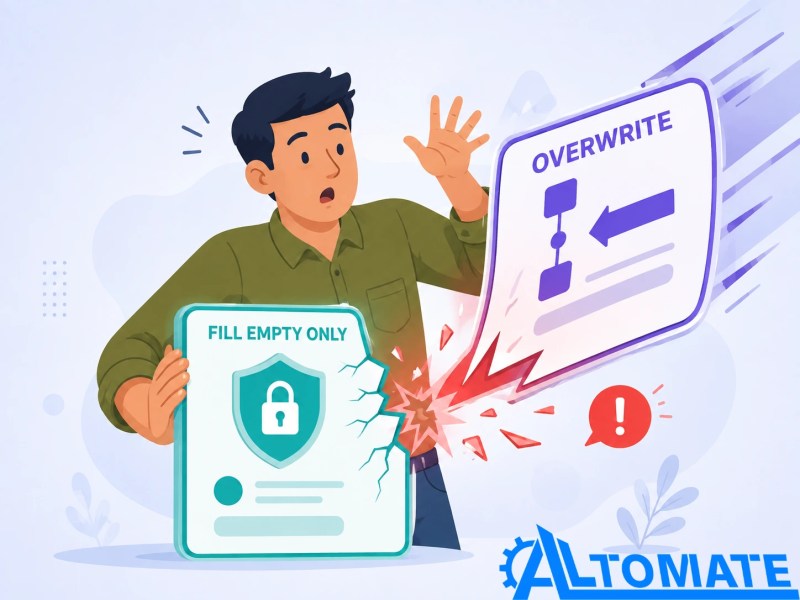
Custom dropdown options must align with enrichment values or the workflow can produce blanks and conflicting taxonomies. Treat mapping as a data-model decision.
Trigger Enrichment After Identity Is Stable, Not Merely After Record Creation
“Contact created” is often too early. An integration may create the contact before writing the domain, normalizing the email, or associating the correct company. Enrichment can then run with incomplete identifiers.
If records are created before identifiers stabilize, use a validation-first CRM data entry workflow to control capture and mapping before enrichment.
Illustrative scenario: A B2B company receives demo requests through regional forms. The form creates a contact before a separate integration writes the normalized work email and domain.
A safer workflow waits for the work email, checks exclusions and prior enrichment, then runs Enrich record. A validation branch sends missing or conflicting results to review instead of routing them automatically.
The sequence below shows why waiting for stable identity data is a workflow control rather than an unnecessary delay.

Good enrollment criteria confirm the identifier, source processing, enrichment state, and approval. Control re-enrollment so property changes cannot start a loop. The same identity-stabilization problem shows up in lifecycle stage automation and in webhook-based triggers, where a record can fire a change before its data is actually ready to act on.
Design the data rules before connecting more sources
If several forms, databases, or enrichment providers can update the same HubSpot properties, define source priority, overwrite ownership, and exception handling before automating the flow.
Explore business automation consulting for CRM data governance
Deduplication Comes Before Enrichment Because the Wrong Record Can Still Be Complete
Enrichment adds properties; it does not choose which duplicate should survive. HubSpot deduplicates contacts by email and companies by domain in supported creation paths. Imports and external workflows also need a reliable unique property.
Before enriching a large segment:
- Normalize work emails and company domains.
- Search or match before creating new records.
- Review duplicate contacts and companies in HubSpot’s data-quality tools.
- Resolve parent, subsidiary, and multiple-domain rules.
- Enrich only after the record that should own the result is clear.
HubSpot’s record deduplication guidance explains its identifiers. When an outside tool creates records, enrichment can make both duplicates look legitimate while splitting activities and ownership.
The consequence is illustrated below: enrichment can make both copies appear complete without resolving which record should own the relationship.

Use CRM data cleanup strategies for legacy data, and the guide to stopping duplicate leads in a CRM when duplicates are the specific issue.
Validate Enriched Values Before They Control Routing, Scoring, or Outreach
A populated field is not automatically decision-ready. Industry may be too broad, employee count may sit near a routing threshold, or a job title may conflict with first-party information.
Use two layers of validation:
- Structural validation: required fields exist, values match the property type, dropdown options are valid, and the record has a stable identifier.
- Business validation: the values are plausible for the automated lead-routing rule, do not conflict with trusted first-party data, and are recent enough for the intended decision.
For high-impact decisions, compare enriched values with trusted fields and promote them only when rules pass. Send uncertain cases to review. This is essential before company size, industry, or seniority feeds AI-assisted lead scoring; a sophisticated score cannot repair a bad input.
For the HubSpot-specific downstream step, pass only validated properties into HubSpot lead scoring automation.
AI is unnecessary for exact email, allowed-value, and domain checks. Use it for interpretation, such as classifying a free-text company description, consistent with when AI belongs in a workflow.
Native HubSpot Enrichment Is Enough Until the Process Needs Cross-System Judgment
Use native HubSpot enrichment capabilities when eligible identifiers, supported properties, and overwrite rules provide enough control. This keeps the system simpler and preserves enrichment activity on the CRM timeline.
An external automation layer becomes reasonable when the workflow must:
- query several enrichment providers in a defined order;
- normalize vendor-specific values into an internal taxonomy;
- apply confidence thresholds or regional restrictions;
- enrich custom objects or synchronize validated contact data across platforms;
- extract source values from documents, email bodies, or other unstructured content; or
- send conflicts through an approval or research queue.
The decision boundary below separates work that native HubSpot can manage from the broader orchestration that belongs in an external automation layer.

Enrichment looks up business information from an identifier; AI data extraction reads unstructured material. A workflow may use both, but they need separate validation rules.
Standard Enrichment Does Not Use HubSpot Credits, but Adjacent AI Features Can
Standard contact and company enrichment does not consume HubSpot Credits. Smart properties and other usage-based AI actions may, so one workflow can mix non-credit-consuming enrichment with credit-consuming analysis.
Before publishing, check each action’s current credit indicator, seat requirement, subscription availability, and limit. Avoid budgeting from an old Breeze Intelligence allowance or another account’s screenshot; use HubSpot’s current credit and billing documentation.
Permissions and governance are separate from cost:
- Check the configuration path: HubSpot’s dedicated enrichment documentation lists Super Admin access for enrichment settings, while its broader AI account-setup guidance lists Super Admin or Partner Admin for the account and feature settings covered there. Verify the live requirement in the portal before assigning configuration ownership.
- Users need Data enrichment access or Super Admin permissions to enrich records.
- Automatic enrichment is optional and should be approved for both contacts and companies.
- Property history and the enrichment activity log should be included in operational reviews.
Governance also covers source and permitted use. HubSpot says certain verified business contact data may contribute to its commercial dataset. If a contact opts out, future enrichment stops, but existing CRM values are not automatically removed. Review the opt-out process with the privacy owner, and document HubSpot data privacy automation controls before downstream use.
Common Failure Points Reveal Which Control Is Missing
- No properties are added: Confirm the contact has a work email or the company has a domain, then verify that matching data is available.
- Only some new records are enriched: Check whether the records were created after automatic enrichment was enabled and whether contact and company settings were configured separately.
- A trusted value changes: Inspect property history, mapping rules, and the workflow action’s overwrite setting. The action-level rule may be taking precedence.
- Continuous enrichment stops for one property: Determine whether a user, workflow, or integration edited that property after enrichment.
- Dropdown values are blank or inconsistent: Align the custom property’s options with the supported enrichment values and test the mapping on a small segment.
- Routing becomes unreliable: Separate enrichment from the downstream decision and add validation, exception handling, and a fallback owner.
- Duplicate records receive different values: Repair matching and deduplication before rerunning enrichment. If the issue affects older data, follow a controlled CRM cleanup workflow before enabling enrichment again.
Final Answer: Automate HubSpot data enrichment only after reliable work emails and company domains are present. Choose the least complex enrichment mode that fits the risk, map each property intentionally, protect trusted values, resolve duplicates first, and validate enriched data before it drives scoring, routing, or outreach. Use external automation only when native HubSpot controls cannot handle the required sources, transformations, or exceptions.
Build enrichment that improves CRM decisions instead of multiplying data risk
Alltomate can help design HubSpot enrichment, validation, duplicate prevention, exception routing, and downstream CRM workflows around the systems and ownership rules your team already uses.
Explore CRM Automation Services for cleaner, more reliable HubSpot workflows
Related Resources
Frequently Asked Questions About HubSpot Data Enrichment Automation
Does HubSpot data enrichment use HubSpot Credits?
Standard contact and company enrichment does not consume HubSpot Credits. Smart properties and other usage-based AI actions may, so one workflow can mix non-credit-consuming enrichment with credit-consuming analysis.
Can HubSpot enrich contacts with Gmail or Yahoo addresses?
No. Standard HubSpot contact enrichment requires a business email address. Company enrichment requires a company domain name. Personal email contacts need another research or review process if additional business data is required.
Does automatic enrichment overwrite existing HubSpot values?
Automatic enrichment fills blank or empty properties and does not overwrite values set by a user or another system. Manual enrichment can overwrite selected values, and an Enrich record workflow action can use overwrite settings that take precedence over the account mapping rule.
How often does continuous enrichment update records?
HubSpot checks previously enriched records monthly when new information is available. If a user or another system edits a property that enrichment previously filled, continuous enrichment stops updating that property.
Does HubSpot enrichment remove duplicate records?
No. Enrichment adds or updates property values; it does not merge duplicate records. HubSpot uses email addresses to deduplicate contacts and company domains to deduplicate companies in supported processes, so those identifiers should be normalized before enrichment runs.
When should an external enrichment tool be used with HubSpot?
Use an external tool when the process needs several data providers, custom confidence rules, nonstandard objects, unstructured source data, cross-system synchronization, or approval routing that native HubSpot enrichment cannot provide. Keep native enrichment when its properties and controls already satisfy the requirement.
About the author

Miguel Carlos Arao is the Founder & CEO of Alltomate, a Zapier Certified Platinum Solution Partner focused on CRM automation, AI-assisted workflows, and multi-tool automation. This article examines how enrichment sources, HubSpot mapping rules, and validation controls interact in a reliable CRM data process.

Built by a certified Zapier automation partner
Explore more in the
CRM Automation Guide,
AI Automation Guide, and
CRM Automation Services.