
Published on July 29, 2026
Before selecting software, define which HR decisions must remain human-led and which handoffs can follow fixed rules. That boundary determines whether automation removes administrative friction or quietly creates a new operational risk.
Quick Answer: HR workflow automation uses defined triggers, rules, integrations, approvals, and exception paths to move routine HR work forward without relying on manual follow-up. It is best used for repeatable tasks such as interview scheduling, onboarding document collection, leave routing, employee-data updates, reminders, and offboarding checklists. Hiring decisions, performance judgments, accommodations, sensitive-data exceptions, and other consequential choices should retain meaningful human review.
Table of Contents
- What HR automation should and should not decide
- Benefits of HR workflow automation
- How to choose the first workflow
- Recruitment without automated judgment
- Onboarding across documents and access
- Leave, approvals, and employee updates
- Offboarding as access revocation
- Privacy, security, and human review
- How to choose HR automation tools
- A controlled implementation sequence
- Metrics that reveal workflow health
- Frequently asked questions
HR workflow automation works when it removes predictable coordination work without hiding the decisions that affect candidates and employees. The goal is not to create a fully automated HR department. It is to give every request, document, approval, and exception a known route, owner, status, and recovery path.
Human resources automation touches information and decisions that ordinary back-office workflows may not. A missing accommodation request, rejected leave record, or incorrect termination date can affect a person directly, so HR process automation needs stronger boundaries than a simple trigger-and-notification recipe.
What HR Workflow Automation Should and Should Not Decide
Separate administrative movement from employment judgment. Automation can check required fields, route a request, create a task, send a reminder, synchronize an approved change, and record completion. It should not turn an incomplete signal into a hiring rejection, performance conclusion, leave denial, or other significant employment outcome.
This is where the difference between manual and automated workflows becomes practical. Fixed rules are useful when the correct next action is known. Human review is necessary when context, fairness, policy interpretation, or an employee’s circumstances can change the answer.
| Workflow | Safe automation target | Human decision point |
|---|---|---|
| Recruitment | Scheduling, reminders, status updates, and record creation | Candidate assessment, accommodations, and hiring decisions |
| Onboarding | Document requests, task sequencing, and approved account requests | Role access, exceptions, policy questions, and sensitive documents |
| Leave and record changes | Completeness checks, routing, reminders, and approved updates | Eligibility, conflicting information, and special circumstances |
| Offboarding | Task creation, access-revocation requests, and completion evidence | Timing changes, legal holds, disputes, and unusual access needs |
The visual summary below turns this boundary into a simple operating rule: routine steps may continue, but an exception stops before it becomes a consequential employment decision.

Benefits of HR Workflow Automation
The most useful benefit is not simply “saving time.” A well-designed workflow reduces the coordination gaps that force HR teams to chase forms, approvals, status updates, and task owners across multiple systems.
Less follow-up
Reminders, assignments, and status changes move according to defined conditions.
Faster handoffs
Complete requests reach the correct owner instead of waiting in an unmonitored inbox.
Consistent experiences
Each person receives the steps, documents, and communications required for the process.
Fewer missed steps
Required fields and completion checks expose blockers before work moves downstream.
Clear accountability
HR can see the current state, pending owner, approval history, and unresolved exception.
Stronger controls
Access, records, and documents follow defined permissions, evidence, and retention rules.
These benefits depend on workflow quality. Automating a confusing policy or incomplete intake process can make errors travel faster, so speed should be evaluated alongside completeness, exception rates, and employee impact.
Choose the First Workflow by Queue, Rule, and Consequence
The best first project is rarely the most impressive one. Choose a recurring queue with a stable trigger, a documented rule, a clear owner, and a measurable end state. Interview reminders, standard onboarding task creation, approved employee-data synchronization, and routine offboarding checklists are often easier to control than performance reviews or policy exceptions.
Score each candidate workflow against four questions: How often does it occur? How predictable is the next action? What happens when it fails? How difficult is it to reverse an incorrect action? High-frequency, rule-based, reversible work is a stronger starting point than low-volume work with serious consequences and ambiguous judgment.
Recruitment Needs Faster Handoffs, Not Automated Judgment
One risky pattern in recruitment workflow automation is treating a missing field as evidence about a candidate. A safer workflow treats it as an operational exception: pause the record, request the missing information, and assign a recruiter to decide what happens next.
The missing-field scenario below shows why pausing the record is safer than converting incomplete data into a negative candidate outcome.

Useful recruitment automation can create an applicant record from an approved source, detect duplicates, route candidates by job requisition, coordinate calendars, send reminders, and update interview status. A focused interview-scheduling workflow can remove back-and-forth while leaving candidate evaluation with the hiring team.
The review boundary is not just a design preference. The U.S. Equal Employment Opportunity Commission warns that employment software and AI can create disability-discrimination risks. European Commission guidance also describes safeguards for certain significant decisions based solely on automated processing. The correct control depends on jurisdiction and legal advice, but the workflow should permit human intervention instead of hiding the decision inside an opaque score. See the EEOC’s employment-technology guidance and the European Commission’s automated-decision guidance.
This article provides general operational information, not legal advice. Consult qualified counsel about employment, privacy, accessibility, and recordkeeping requirements in the jurisdictions where your organization operates.
For platform-specific examples that remain separate from this vendor-neutral design guide, explore these Zapier HR automation use cases for recruitment, onboarding, leave management, compliance tracking, and offboarding.
Keep Onboarding Document State and Access State Aligned
A dependable onboarding flow cannot rely on a single system’s “ready” label. A signed offer does not automatically mean payroll data is complete, equipment is assigned, or application access has been authorized. Treat each of those milestones as a separate state with its own condition and owner.
Consider an illustrative professional-services firm onboarding a new project coordinator. An approved-hire status in the applicant tracking system starts the workflow, but it does not provision access immediately. The workflow first creates the employee record in the HR system, checks that the legal name, work location, manager, role, and start date are present, then sends the required documents through the approved document and e-signature process.
After the manager confirms the role and selects an approved access profile, the workflow opens equipment and identity-access tasks, assigns orientation steps, and schedules calendar events. Each downstream task stores the employee’s source-record identifier so an updated start date changes the existing work instead of creating duplicates. If an e-signature remains incomplete, the manager chooses a nonstandard permission set, or an account request fails, the workflow pauses only the affected branch and places the issue in an exception queue with an owner and due date.
State tracking is what makes employee onboarding automation dependable. Beyond confirming that a message was sent, the workflow should prevent duplicate tasks after edits, retain the source-record identifier, and record which approval released each downstream action.
A controlled HR workflow
Completion evidence
At any blocked state: route the record to an exception queue with the failed step, current owner, due date, and safe recovery action.
Leave, Approvals, and Employee Updates Need Auditable Rules
Reliable HR approval workflows begin by moving the rule out of someone’s inbox. Define the request type, required fields, approver, fallback approver, response window, effective date, and system of record before building the automation. If two policies could apply, route the request for review rather than allowing the workflow to select the more convenient result.
Business-rules automation is useful here because it makes routing conditions explicit. For example, an approved address change can update an employee record after validation, while a compensation change can require a second approval and a future effective date. A rejected or incomplete request should retain the original submission, decision reason, and next owner.
Offboarding Is an Access-Revocation Workflow, Not Just a Checklist
Treat the confirmed effective time as the shared control point for HR, payroll, facilities, IT, and system owners. Sending a checklist is not enough if nobody verifies that accounts, shared credentials, forwarding rules, devices, and third-party access were handled.
The system map below shows why one confirmed effective time must coordinate every department responsible for completing the departure.
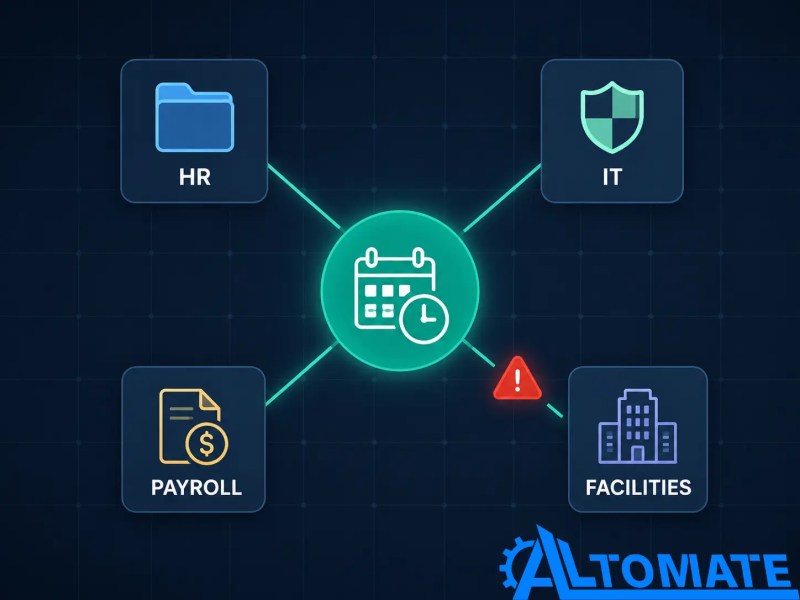
A changed departure date can update the HR record without rescheduling access removal, leaving two systems with different effective times. To keep them aligned, build a cancellation or rescheduling path, collect completion evidence from every owner, and escalate any critical revocation that remains open. Least-privilege access should also shape the design: CISA defines it as assigning only the minimum access needed to perform a role, which gives onboarding and offboarding workflows a clearer permission boundary. See CISA’s least-privilege definition.
Protect Employee Data at Every Handoff
HR document automation can spread sensitive data faster than a manual process if forms, email attachments, shared folders, and workflow logs are connected without limits. Map which fields move, why they are needed, where they are stored, who can view them, how long they remain, and what appears in error notifications.
The European Commission’s GDPR guidance establishes data minimization: collect and process only what the workflow needs for its stated purpose. We recommend applying that same discipline even in organizations not directly governed by the GDPR, since it reduces data-exposure risk regardless of jurisdiction. The Commission also advises setting time limits to erase or review stored personal data. Those principles translate into practical controls such as field-level mapping, restricted folders, role-based permissions, redacted alerts, retention rules, and deletion or review tasks. Review the European Commission’s data-minimization guidance and retention guidance.
The filtering model below translates data minimization into a workflow control: only the fields required by the destination are allowed to pass through.

For a platform-specific follow-up, this guide to HubSpot GDPR automation examines how GDPR-related workflow controls apply within HubSpot. Its scope is narrower than this guide’s broader treatment of employee data across the full HR technology stack.
A common integration mistake is sending complete employee records to every downstream tool when only a name, work email, role, and start date are required. Other cross-system workflow mistakes include embedding credentials in steps, exposing personal details in alerts, and leaving failed updates without an owner.
Assess one workflow before connecting the full HR stack.
Use the automation audit checklist to document its trigger, data fields, approvers, exceptions, permissions, and recovery path.
How to Choose HR Automation Tools
Choose HR automation tools by the role each layer must perform, not by the length of a feature list. The first question is which system owns the authoritative record. Every other tool should receive only the data and actions needed for its part of the process.
The categories and platform examples below are illustrative rather than prescriptive. The right combination depends on your existing systems, governance requirements, workflow complexity, and internal technical capacity.
| Tool layer | Workflow role | Selection question |
|---|---|---|
| HRIS or ATS | Owns employee or candidate status and core records | Which events and fields are authoritative? |
| Integration or orchestration platform | Coordinates triggers, rules, approvals, retries, and cross-system updates | Can it support the required logic, security, monitoring, and recovery path? |
| Forms, documents, and e-signature | Collects structured data and records document state | Can access, retention, completion, and corrections be controlled? |
| Identity and access management | Provisions, changes, and revokes approved access | Does the process require explicit approval and completion evidence? |
| Messaging, calendar, and task systems | Delivers communications, schedules events, and assigns work | How will changes, cancellations, duplicates, and delivery failures be handled? |
| Monitoring and exception management | Shows workflow health, failed steps, owners, and resolution status | Can HR identify and recover a partial failure without replaying completed work? |
Zapier, Make.com, n8n, direct APIs, and webhooks can all serve parts of the orchestration layer, but the correct method depends on available connections, authentication, data sensitivity, workflow complexity, and support requirements. Test the actual systems and required actions before assuming that a listed integration covers the complete HR process.
Build the Workflow in Controlled Stages
- Map the current process. Record the real trigger, queue, systems, owners, approvals, exceptions, and final evidence of completion.
- Define the system of record. Decide which platform owns candidate status, employee data, documents, leave decisions, and access state.
- Separate rules from judgment. Write the conditions automation may execute and the conditions that must pause for review.
- Minimize the data path. Map only necessary fields, restrict permissions, and decide what logs and alerts may contain.
- Design exceptions first. Assign owners for missing fields, duplicate records, rejected updates, unavailable systems, late approvals, and changed effective dates.
- Test with controlled scenarios. Include a normal request, incomplete submission, duplicate trigger, rejected approval, corrected record, unavailable destination, and manual cancellation.
- Release gradually. Start with a limited process or group, review logs and exceptions, then expand only after owners trust the workflow’s behavior.
The rollout model below summarizes the progression: inspect a bounded workflow, verify its safeguards, and expand only after the process produces dependable outcomes.

Partial completion must have its own recovery path. If an HR record updates but the access request fails, the workflow should not restart every successful action. Effective workflow error monitoring should identify the failed step, preserve context, notify the correct owner, and allow the process to resume only where doing so is safe.
Measure Exceptions and Outcomes, Not Just Tasks Run
Task count proves activity, not reliability. Track the time from request to completion, percentage completed within the expected window, incomplete-submission rate, approval aging, exception rate, duplicate-prevention events, failed updates by system, manual rework, and unresolved access-removal tasks.
Interpret those measures together. A faster workflow with a rising exception rate may be pushing incomplete work downstream. High manual review can mean the process is judgment-heavy, the intake form is weak, or the rules no longer reflect policy.
Final Answer: Effective HR workflow automation moves repeatable administrative work through clear triggers, rules, approvals, integrations, and exception paths while keeping consequential employment decisions under meaningful human control. Begin with one high-volume, rule-based, reversible process; define its data and decision boundaries; test failure scenarios; and measure completion quality as well as speed.
Need an HR workflow that remains dependable after the first successful run?
Explore Automation & Integration Services for your HR systems
Related Resources
Frequently Asked Questions
What HR workflows should be automated first?
Start with a frequent, rule-based, reversible workflow that has a clear trigger, owner, and completion state. Standard onboarding tasks, interview coordination, routine reminders, approved data updates, and offboarding checklists are stronger candidates than performance judgments or complex policy exceptions.
Can recruitment decisions be fully automated?
Automation can support scheduling, routing, completeness checks, reminders, and record updates. Candidate evaluation and other significant employment decisions should retain meaningful human review, with controls appropriate to the organization’s policies, risks, and applicable laws.
How does HR workflow automation protect employee data?
Protection depends on the design. Reliable workflows minimize transferred fields, restrict access by role, keep sensitive details out of alerts, secure credentials, apply retention rules, log important actions, and route privacy or data-quality exceptions to an accountable owner.
What happens when an automated HR workflow fails?
The workflow should preserve the source record and failed-step context, avoid repeating completed actions, notify the correct owner, and provide a controlled retry or manual resolution path. A failure should not leave the employee record in an unknown state.
How should HR automation success be measured?
Measure request-to-completion time, completion within the expected window, incomplete submissions, approval aging, exception rates, failed updates, duplicate prevention, manual rework, and unresolved access tasks. Task volume alone does not show whether the process is reliable.
What tools can an HR automation workflow connect?
An HR automation workflow can connect systems such as an HRIS, applicant tracking system, forms, document storage, e-signature, identity and access management, payroll, messaging, calendars, and task platforms. The viable connection method depends on each system’s available integrations, API or webhook support, authentication, data requirements, and security controls.
About the author

Miguel Carlos Arao is the Founder & CEO of Alltomate, a Zapier Certified Platinum Solution Partner focused on automation and integration systems, including lifecycle handoffs, approval controls, and cross-platform data synchronization.
This article applies those operational patterns to reliable HR workflow automation.

Built by a certified Zapier automation partner
Explore the broader principles in the
Business Process Automation Guide,
Zapier HR Automation Use Cases ,
Automate Approval Workflows.