
Published June 2, 2026 • Last Updated June 2, 2026
If your team makes decisions that follow a pattern — approving requests, routing leads, flagging exceptions — those decisions can be automated. Start with a free business process audit or explore automation integration services to see where rule-based logic applies to your workflows.
Quick Answer: Business rules automation is the practice of encoding decision logic — conditions, thresholds, and outcomes — into a system so that those decisions execute without manual input. Instead of a person checking if an invoice exceeds a budget limit or whether a lead meets qualification criteria, the system evaluates the rule and acts. It sits between raw workflow automation (moving data) and full AI decision-making (inferring intent). When implemented correctly, it makes processes consistent, auditable, and scalable.
Table of Contents
- What Business Rules Automation Actually Is
- Where Business Rules Break Down in Practice
- The Three Types of Business Rules Worth Automating
- How Business Rules Fit Into a Larger Workflow System
- What Good Rule Design Looks Like — and What It Avoids
- When Business Rules Automation Fails at Scale
- Final Answer
- FAQs
Most automation projects stall not because of the tools but because the logic behind the decisions was never made explicit. Business rules automation forces that clarity. It requires someone to articulate the conditions, the thresholds, and the expected outcome — before a single workflow is built. That process of making logic explicit is often where the real value surfaces.
What Business Rules Automation Actually Is
A business rule is any decision a business makes consistently based on a defined condition. “If the invoice amount exceeds $5,000, route it to a manager for approval.” “If a lead works at a company with more than 50 employees and has visited the pricing page, assign it to a senior sales rep.” “If a support ticket mentions a specific product term, escalate it to the technical team.”
These decisions happen repeatedly throughout the day in most businesses. They are often handled manually — someone reads the input, applies the rule from memory, and takes the action. Business rules automation replaces that manual step by encoding the condition-and-action logic into a system. The system evaluates the condition at the point where a decision is needed, then executes the corresponding action without human input.
The distinction matters: this is not general workflow automation, which is about moving data and triggering tasks. It is specifically about encoding decisions — the evaluation layer that sits between receiving information and taking action. Understanding where to apply it requires a clear grasp of what business process automation is first, so the rule layer has a stable workflow to operate on.
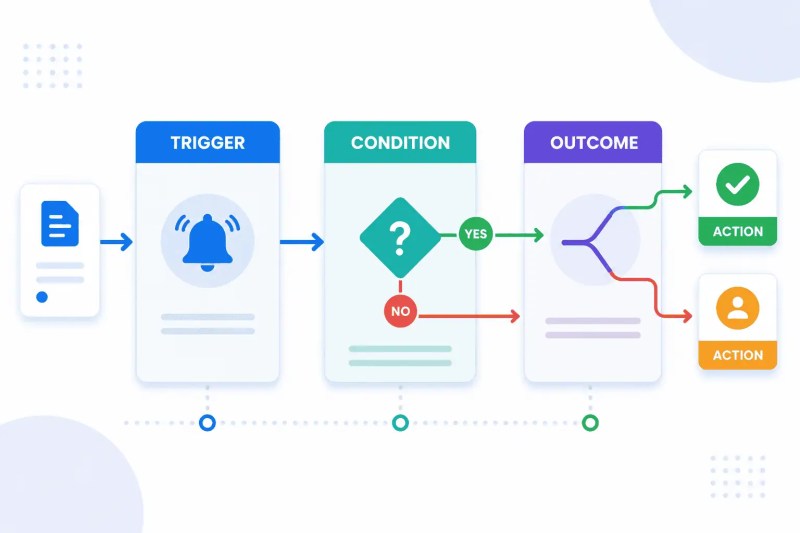
A well-structured rule has three components: a trigger (when the evaluation happens), a condition (what is being evaluated), and an outcome (what action follows). When all three are defined precisely, the rule can be automated reliably. When any one is vague or unstated, the automation produces inconsistent results — which is often blamed on the tool rather than the logic design.
The flow below shows how business rules evaluate incoming events. Every automated decision depends on the trigger, condition, and outcome being defined explicitly and consistently.
Where Business Rules Break Down in Practice
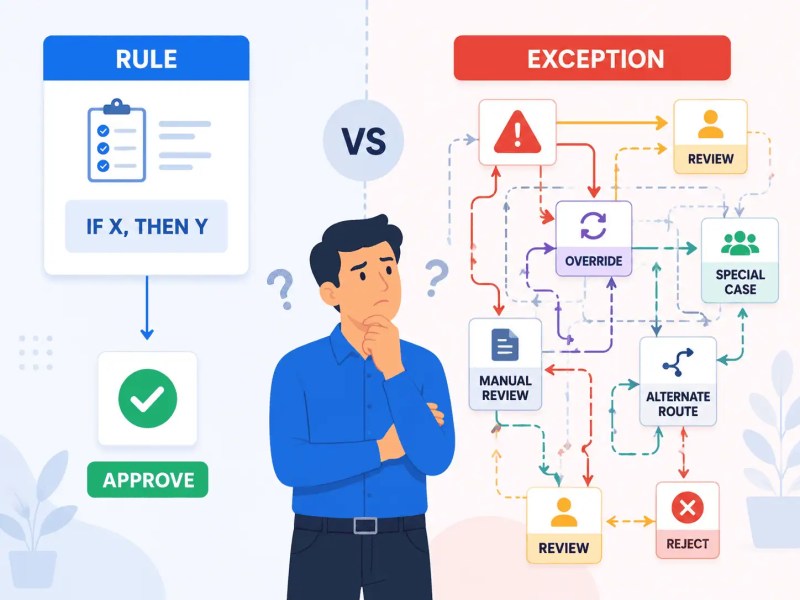
The failure mode we see most often is not technical — it is definitional. A team decides to automate an approval rule, builds the workflow, and then discovers that the rule they encoded does not match how decisions are actually made. The written rule says “route orders over $10,000 to the CFO.” What the team actually does is route orders over $10,000 from new clients to the CFO, but existing clients go to the account manager. That exception was never written down. It lived in someone’s head.
This produces a specific kind of system failure: the automation is technically correct but operationally wrong. Every exception gets escalated manually anyway, and the team gradually loses trust in the automated system — not because it malfunctioned, but because the rule it enforced was incomplete.
A consistent pattern we see in this setup is that the undocumented exceptions are often more important than the stated rule. They represent the actual decision logic the business has developed over time. Surfacing them before building the automation is the most valuable part of the process. This is why a business process audit is the right first step — not tool selection.
The second breakdown happens when rules are built without considering edge cases. What happens when the condition is partially met? What happens when data is missing? A rule that evaluates “invoice amount” against a threshold will fail silently if the invoice arrives with no amount field populated. The system needs a defined behavior for incomplete inputs — a secondary condition that handles the exception rather than passing it through or dropping it entirely.
The comparison below illustrates why many automation projects fail: the documented rule is often much simpler than the actual decision-making process used by the business.
If your team is navigating which decisions can be automated and which still need human judgment, the business process automation guide covers how to map that boundary before building anything.
The Three Types of Business Rules Worth Automating
Not every business decision is a good candidate for rule automation. The ones that work well share a common property: they can be evaluated deterministically given consistent inputs. The three categories that meet this threshold most reliably are routing rules, threshold rules, and validation rules.
Routing rules determine where something goes based on its properties. A lead gets assigned to a specific rep based on territory, deal size, or industry. A support ticket gets routed to a queue based on product type or stated urgency. These are binary-outcome evaluations — the input matches a condition, and the system directs it accordingly. They are the easiest to automate because the conditions are usually clean and the outcomes are explicit.
Threshold rules evaluate a numeric or status value against a defined boundary. Invoice approval limits, credit limits, SLA response windows, inventory reorder points. These rules are common in finance, operations, and customer success workflows. The risk with threshold rules is boundary ambiguity — what happens when a value lands exactly on the threshold? Defining that edge case explicitly prevents inconsistent behavior at scale.
Validation rules check whether incoming data meets a required standard before it enters a downstream system. A record missing a required field, a date entered in the wrong format, a duplicate entry. Validation rules are often the least glamorous to implement but produce the highest leverage — they prevent bad data from propagating through a system and creating problems that are expensive to diagnose and fix later. In CRM and operations workflows, the absence of validation logic is consistently the root cause of data quality problems that teams blame on their tools. Errors introduced at the point of entry propagate across every connected system and report — making them expensive to trace and fix after the fact.
Scale Effect: Validation rules that catch one bad record a day become critical infrastructure when volume reaches hundreds of records daily. A single missing-field condition that passes silently at low volume creates a corrupted dataset at scale — one that requires manual remediation across every downstream system that consumed it.
How Business Rules Fit Into a Larger Workflow System
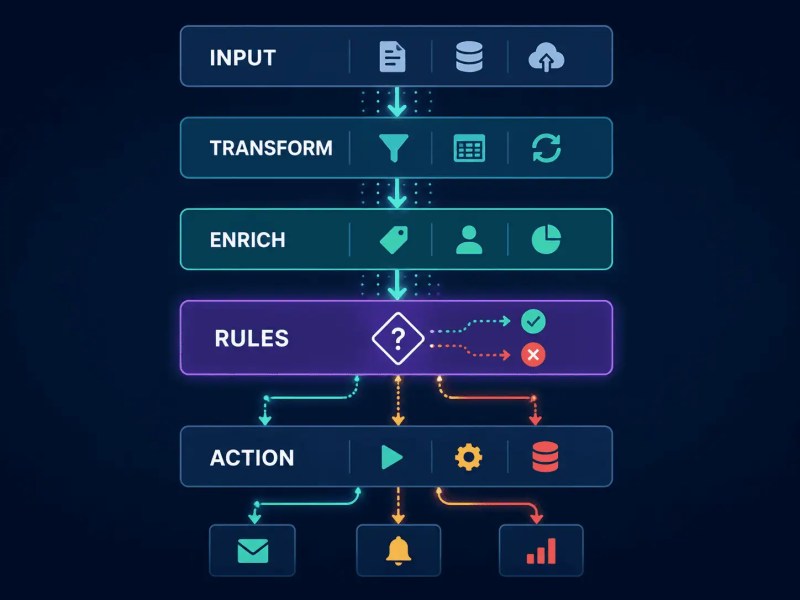
Business rules do not operate in isolation. They are one layer in a workflow system that also includes data collection, transformation, action execution, and notification. Understanding where the rule layer sits — and what depends on it — determines how it should be designed and maintained.
The typical sequence is: data enters the system from a trigger source, it passes through a transformation or enrichment step if needed, it is then evaluated against the business rules, and the outcome of that evaluation drives the downstream action. The rule layer is the decision point. Everything before it is preparation; everything after it is execution.
The architecture below shows where business rules sit within a larger workflow system. Notice that every downstream action depends on the quality of data reaching the rule layer correctly.
This matters for troubleshooting. When a workflow produces the wrong outcome, the failure is usually in one of three places: the data arriving at the rule layer is incorrect, the rule itself is misconfigured, or the action triggered by the rule misfired. Each requires a different diagnostic approach. Teams that don’t understand the layer structure spend time debugging the wrong component — fixing the action when the problem is in the data, or adjusting the rule when the data transformation is feeding it the wrong input.
Connecting business rules to live data sources — CRMs, forms, databases — requires clean integration between systems. If you are building rule logic across platforms, automating system integration is what makes the rule layer reliable rather than brittle. A rule that queries stale or disconnected data does not enforce the business logic — it enforces an outdated version of it.
In a real-world example: a professional services firm we built automation for had an approval rule that routed client requests based on contract value stored in their CRM. The rule worked in testing but produced wrong outputs in production because the CRM field storing contract value was formatted inconsistently — some records used a plain number, others included a currency symbol. The rule evaluation was correct; the data feeding it was not. Fixing the transformation step before the rule resolved the issue entirely.
What Good Rule Design Looks Like — and What It Avoids
Most rule-design failures are not failures of logic — they are failures of scope. A rule that tries to handle too many conditions in a single block becomes unmaintainable. Six months after it is built, no one can confidently explain what it does or modify it without risking a break. The rule has become tribal knowledge encoded in a workflow instead of tribal knowledge in a person’s head. The medium changed; the problem did not.
Good rule design is modular. A complex decision is decomposed into a sequence of simpler evaluations. Each rule handles one condition and produces one outcome. The outcomes chain together to produce the final behavior. This makes individual rules easy to test, easy to update, and easy to audit — which matters when a business process is subject to compliance review or when conditions change and the logic needs to be updated quickly.
The second design principle is that rules should be stateless wherever possible. A rule that depends on knowing what happened in a previous interaction requires the system to maintain and pass state, which increases complexity and introduces failure points. If a rule can be evaluated entirely from the data present at the moment of the trigger, it is more reliable and easier to maintain.
The case study that illustrates both principles clearly is the brand compliance automation work done for a client managing multi-location operations — the rule logic covered approval routing, content validation, and exception handling across dozens of locations. The system held because each rule was scoped narrowly. You can review how that system was structured at the brand compliance automation case study.
What good rule design avoids specifically: catch-all conditions at the end of a rule chain that silently absorb unhandled cases, nested conditions that make the evaluation path difficult to trace, and rules that were accurate when written but have not been reviewed as the business changed. Stale rules are one of the highest-risk components in an automation system because they continue to execute confidently while enforcing decisions that no longer match current policy.
When Business Rules Automation Fails at Scale
A rule set that works correctly at low volume can produce systematic errors at scale. The mechanism is usually one of two things: exception frequency or evaluation cost.
Exception frequency becomes a problem when a rule was designed for a typical input distribution that changes as the business grows. A routing rule built when the sales team handled one product line may produce unacceptable results when the team expands to three product lines with overlapping criteria. The rule still executes, but the proportion of inputs that fall into edge cases — inputs the rule was not designed for — increases significantly. What was a rare manual override becomes a daily intervention, and the automation is no longer providing the expected leverage.
The diagnostic for this is straightforward: track the volume of manual overrides to the system’s outputs. If that number is growing faster than total volume, the rule set is not keeping pace with operational reality. It needs to be reviewed and extended — not patched with additional exceptions at the end of the existing chain.
Scale Effect: A rule set covering three conditions at 50 transactions per day is manageable. At 5,000 transactions per day, the same rule set produces a proportionally larger volume of edge-case failures — each requiring manual review. The overhead scales with volume even though the rule logic did not change.
Evaluation cost is a less visible problem. When rules require external data lookups — checking a CRM record, querying an inventory database, calling an API — each evaluation carries a latency and reliability cost. At low volume, this is invisible. At high volume, it introduces delays, rate limit collisions, and failure points that are difficult to attribute to the rule layer specifically. The fix is usually to enrich the data before it reaches the rule layer rather than having the rule fetch what it needs at evaluation time. This is a system design issue, not a tool limitation, and it requires thinking about automated data sync as infrastructure rather than an afterthought.
Across the client work we’ve done in logistics and professional services, the pattern holds consistently: the rule layer performs well until the data feeding it is no longer clean, current, or structured consistently. The rules themselves rarely need to change. The pipeline feeding them almost always does.
The visualization below shows what happens as volume increases: exceptions, overrides, and manual reviews can grow faster than the rule set itself.

Final Answer: Business rules automation is the layer in a workflow system that makes decisions — evaluating conditions against incoming data and executing defined outcomes without manual input. It is distinct from general workflow automation because it encodes judgment, not just movement. The most common failure is not technical: it is encoding a rule that does not reflect how decisions are actually made, usually because the exceptions and edge cases were never surfaced before building. Good implementation starts with making the logic explicit, designing rules to be modular and stateless, and ensuring the data pipeline feeding the rule layer is clean and current. At scale, the rules themselves rarely break — the infrastructure around them does.
Need a reliable system?
Related Resources
FAQs
What is the difference between a business rule and a workflow trigger?
A workflow trigger initiates a process when a specific event occurs — a form submission, a record update, a time condition. A business rule evaluates data after the trigger fires and determines which path the workflow takes or what action it executes. The trigger starts the process; the rule makes the decision within it.
Do I need a dedicated business rules engine, or can I use a general automation tool?
For most small and mid-sized businesses, general automation platforms handle rule logic adequately — especially routing, threshold, and validation rules. Dedicated business rules engines (BREs) are typically justified when rule sets are large enough that they need to be managed, versioned, and updated independently of the workflows that use them, or when non-technical stakeholders need to edit rules without touching the automation layer directly. IBM’s ODM documentation covers when centralized rule management becomes operationally necessary at enterprise scale. If you are also deciding between building custom logic versus using a no-code platform, the custom API vs no-code automation comparison covers that tradeoff directly.
How do I handle a rule that has too many exceptions to define cleanly?
If a rule has so many exceptions that it cannot be defined cleanly, it is usually a signal that the decision is not actually rule-based — it requires judgment that varies with context. In those cases, the right design is to automate what can be automated (data collection, routing to the right person, pre-populated context) and preserve human review for the decision itself. Not every judgment should be automated; the goal is to remove the overhead around it.
What happens when a business rule becomes outdated?
An outdated rule continues to execute confidently while enforcing decisions that no longer reflect current policy. This is one of the highest-risk states in an automation system because the errors it produces are consistent and hard to attribute — they look like correct behavior until someone compares the output against current business reality. Rules need to be reviewed on a defined schedule, not just when something breaks.
Can business rules automation handle multi-step approvals?
Yes. Multi-step approval chains are a well-suited application. The rule layer evaluates each condition in sequence — first-level approval threshold, second-level threshold, exception conditions — and routes accordingly. The key design requirement is that each step in the chain has a defined outcome for all possible inputs, including rejections, timeouts, and incomplete data, so the chain does not stall silently when an edge case is reached.
About the author

Miguel Carlos Arao is the Founder & CEO of Alltomate, a Zapier Certified Platinum Solution Partner focused on business rules automation, including condition-based routing logic, threshold rule design, and validation layer implementation across CRM and operations workflows. The patterns in this article come directly from building and troubleshooting business rules automation systems across client engagements in professional services and logistics.

Built by a certified Zapier automation partner
Explore more at
automation integration services,
the business process automation guide, and
the automation audit checklist.