
Published on
Quick Answer: An n8n Claude Code integration can mean using Claude Code to help build and review n8n workflows, or connecting it to n8n through an MCP server that exposes selected tools. Calling a Claude model from a running n8n workflow is a separate API integration; it does not automatically run Claude Code. Choose the approach based on whether you need development assistance, tool access, or AI processing during each workflow execution. Review generated changes and validate outputs before they affect business systems.
If you are building AI-assisted automation systems, review our AI-assisted workflow automation services or request a free business process audit.
Table of Contents
- Why AI-generated workflow logic breaks in production
- How n8n and Claude Code operate together
- Where orchestration becomes more important than prompts
- What happens when AI-generated code touches live systems
- The operational difference between assistants and automation systems
- How teams structure safer AI-assisted execution layers
- Frequently asked questions
Claude Code can help with the development work around n8n: inspecting workflow files, drafting transformation code, and explaining execution errors. That is different from adding a Claude model call to a live workflow. Keeping these roles separate makes it easier to choose credentials, define permissions, and understand which component is responsible when something fails.
Our workflow automation overview explains how connected steps differ from isolated tasks. A mistake in a local draft can be caught before deployment. The same mistake in a workflow with permission to update records can affect several connected systems. Review the intended action as well as the generated code.
For broader platform and workflow design principles, see our n8n automation guide.
Why AI-generated workflow logic breaks in production
A generated workflow can pass a small test and still fail on real data. Possible causes include incorrect syntax, unsupported node settings, missing fields, unexpected data types, expired credentials, and API errors. Treat a plausible-looking result as a draft to inspect and test, rather than evidence that the integration is ready for production.
As an illustrative example, a generated CRM transformation might process ten complete sample records correctly but overwrite an existing phone number when a later record omits that field. Add explicit rules for missing values, duplicates, and conflicting updates before connecting the transformation to a write action.
Common failure pattern:
- AI generates structurally correct code
- Workflow passes isolated testing
- Production data introduces inconsistencies
- Automation spreads incorrect outputs downstream
- Teams discover the issue after operational damage appears
Code review and workflow controls address different problems. Review the generated logic for correctness, then test field validation, error routes, retry behavior, and permitted actions. A well-structured workflow cannot compensate for an incorrect transformation, and correct code cannot compensate for the wrong destination or credentials.
At higher volumes: a repeated mapping error can affect many records before someone notices. Monitor business outcomes, such as unexpected blank fields or repeated updates, alongside execution success and failure counts.
Define accepted input and the expected result before asking Claude Code to draft a transformation. Clear examples and rejection rules give both the coding assistant and the reviewer something concrete to check.
If your workflows already suffer from inconsistent execution behavior, our workflow automation mistakes breakdown explains the operational patterns behind these failures.
This cascading failure pattern is illustrated below.

How n8n and Claude Code operate together
Claude Code is a coding tool, while Claude models can also be called through an API. n8n coordinates triggers, routing, integrations, and execution. Claude Code can assist with building that workflow; a Claude API call can provide model output during a run. If you are unfamiliar with the platform, start with our introduction to n8n.
There are three useful patterns to distinguish. They can be combined, but each has its own setup and access requirements.
| Approach | How it works | What to check |
|---|---|---|
| Claude Code for development | Use workflow files, sanitized sample data, and requirements to draft or review changes before applying them in n8n. | Node compatibility, field mappings, code behavior, and the changes made to the workflow. |
| Claude Code connected through MCP | Configure Claude Code as a client of an MCP server that exposes n8n-related tools. | The specific server’s available tools, authentication, permissions, and which actions need approval. |
| Claude API calls inside n8n | A configured model integration sends input to Claude and passes the returned output to later workflow steps. | API credentials, model availability, usage limits, output validation, and failure handling. This is not Claude Code. |
For a development-only approach, start with a workflow export and sanitized examples. Ask Claude Code to explain the existing behavior before proposing changes, then review the edited file or code before importing or applying it. Importing generated JSON does not prove that every node, expression, and credential reference will work in your n8n instance.
For MCP access, the server defines the tools Claude Code can call. Do not assume that connecting a server grants workflow creation, editing, and execution: inspect the actual tool list and permissions. Different n8n MCP options and third-party servers can expose different capabilities. See our n8n MCP Claude integration article for that connection pattern.
Illustrative runtime example: an n8n workflow sends a support request to a Claude model through an API integration, checks the returned category against an allowed list, and routes the ticket. Invalid or ambiguous results go to review. Claude Code could help build this workflow, but it does not need to be involved in each execution.
The diagram below illustrates a runtime AI workflow. It shows the separation between model output, validation, and business actions; it is not a Claude Code installation diagram.

If you only need help writing a deterministic transformation, there may be no need for a model call during execution. Once reviewed and tested, the transformation can run as ordinary workflow logic.
Where orchestration becomes more important than prompts
A clearer prompt can help Claude Code generate a better draft or help a runtime model return a useful answer. The workflow still needs rules for what happens next: which values are accepted, which destination receives them, and what happens when an expected result is missing.
Define failure handling before enabling writes. n8n does not automatically undo completed actions in external systems when a later step fails. Where supported, use reversible updates or compensating actions, and record enough context to recover incomplete work.
This becomes visible in multi-system environments where one execution triggers additional downstream automations.
- CRM updates trigger onboarding workflows
- Onboarding workflows trigger document generation
- Document systems trigger notification workflows
- Notification systems trigger reporting updates
Once AI-generated logic sits near the top of the chain, a single incorrect interpretation can propagate across the entire operational system.
Check the handoff between steps: a successful API response or valid JSON structure does not establish that a proposed business action is correct. Confirm destination IDs, permitted values, and the intended record before performing a write.
For workflows that use a model during execution, make these responsibilities explicit:
- reasoning layers
- execution layers
- validation layers
- human approval layers
With separate steps for interpretation, validation, approval where needed, and execution, a reviewer can identify where an incorrect value entered the process. Keep sufficient execution context to investigate without unnecessarily retaining sensitive payloads.
The operational difference between isolated prompting and structured orchestration is shown below.

Businesses evaluating orchestration tools often compare architectural tradeoffs across platforms. Our Make vs n8n comparison covers some of those operational differences.
Need help designing AI-assisted workflows?
Explore AI-powered workflow orchestration services or request a free business process audit.
What happens when AI-generated code touches live systems
Risk depends on what the integration is allowed to do. A local workflow draft, an MCP tool that reads workflow information, and a tool that changes live records have different consequences. Review the actual permissions and actions rather than judging risk from the product name.
A generated transformation script connected to production APIs can create issues that are difficult to reverse:
- incorrect CRM overwrites
- duplicate invoice generation
- broken approval chains
- misrouted support tickets
- corrupted synchronization states
Use separate test records and destinations before enabling production writes. A manual n8n test can still send real messages or change records if it uses production credentials. Disable or redirect those actions while checking generated logic.
For an MCP connection, also check the selected server and each tool request before granting access. A tool that executes a workflow may trigger every enabled downstream action in that workflow.
The following is a practical review guide, not a universal risk rating. Sensitivity, audience, permissions, and reversibility can change the level of review needed.
| System Type | Review focus |
|---|---|
| Internal summaries | Check factual accuracy and access to sensitive source data. |
| Draft generation | Review before sending or publishing; restrict recipients and destinations. |
| Customer-facing workflows | Validate the action and customer record; provide an exception route. |
| Financial or compliance systems | Require domain-specific checks and appropriate approval before consequential changes. |
For each action, define what could go wrong, whether it can be reversed, and who can approve or recover it. A summary used for a consequential decision may require more review than a routine, reversible record update.
A useful starting scope is to generate a draft, classification, or proposed update. Add automatic writes only after the allowed actions, validation rules, and recovery behavior are clear.
The operational difference between assistants and automation systems
A conversational response and an action-taking tool need different checks. Claude Code can interact with files and tools, so it should not be treated as a passive chat window whenever those capabilities are enabled.
A useful answer can still omit a required field or identify the wrong record. Once an output becomes input to an automation, the workflow needs an explicit contract for accepted data and permitted actions. Our AI vs traditional automation guide provides broader context.
Use the task and available permissions to decide which checks are required.
Advice or draft: a person reviews the proposed code, explanation, or business action before using it.
Tool or workflow action: an authorized operation reads or changes a system. Its inputs, permissions, expected outcome, and failure path need to be defined.
Human review is only a useful control when the reviewer can see the target, proposed change, and relevant evidence before approving. A generic approval button without that context can miss the same errors as an automatic action.
For example, present the existing record and proposed field changes together, rather than asking someone to approve a vague request to update a CRM.
As an illustrative example, a proposed lead-priority change can be reviewed by sales staff before it affects account ownership. If the workflow applies routine changes automatically, limit the allowed fields and accounts, record the result, and route exceptions for review.
Match access to the intended task. For code review, provide only the files and sanitized samples needed. For MCP tools or API actions, use credentials with appropriate access and require explicit approval for consequential changes. Treat retrieved documents, repository text, and tool results as data that may contain misleading instructions.
Our guide on when to use AI in workflows explains where AI interpretation adds value and where deterministic automation remains safer.
How teams structure safer AI-assisted execution layers
Start with a small, reviewable integration and a clearly defined outcome. The following development sequence helps establish what is being changed and how it will be checked.
For a first Claude Code-assisted n8n change:
- Define one task: for example, normalize contact fields without overwriting existing values when the source omits them. Specify accepted inputs, expected outputs, and rejection rules.
- Prepare the context: provide a workflow export, the relevant n8n version and node settings, and sanitized sample inputs. Inspect exports and pasted logs for secrets and customer data before sharing them.
- Request a limited change: ask Claude Code to explain the affected nodes, draft the transformation or workflow edits, and identify assumptions. Keep the proposed change separate from the live workflow until reviewed.
- Review and test: inspect the changes, map credentials in n8n, and use isolated destinations. Check ordinary input, missing values, wrong types, duplicate events, and a failed destination request.
- Add tool access only when needed: if using MCP, configure the intended server and authentication, inspect its tools, and start with a limited action. Do not assume all servers expose the same capabilities.
- Release and monitor: retain the previous workflow version, enable only the intended actions, and check destination outcomes. Define how to stop the workflow and recover completed external changes if something goes wrong.
If the workflow calls a Claude model at runtime, add a separate check for the returned output. Validate required fields, data types, allowed values, and business constraints before writing records. Matching a JSON schema does not prove that the content is factually correct or authorized.
Handle timeouts, rate limits, and invalid results deliberately. Use bounded retries for suitable transient failures, and prevent repeated attempts from creating duplicate business actions. Send unresolved cases to a visible review or error route.
Reverting a workflow definition only changes future executions. It does not reverse messages already sent or records already modified, so recovery procedures must account for those external effects.
The diagram illustrates how validation and controlled actions can fit into the execution path.
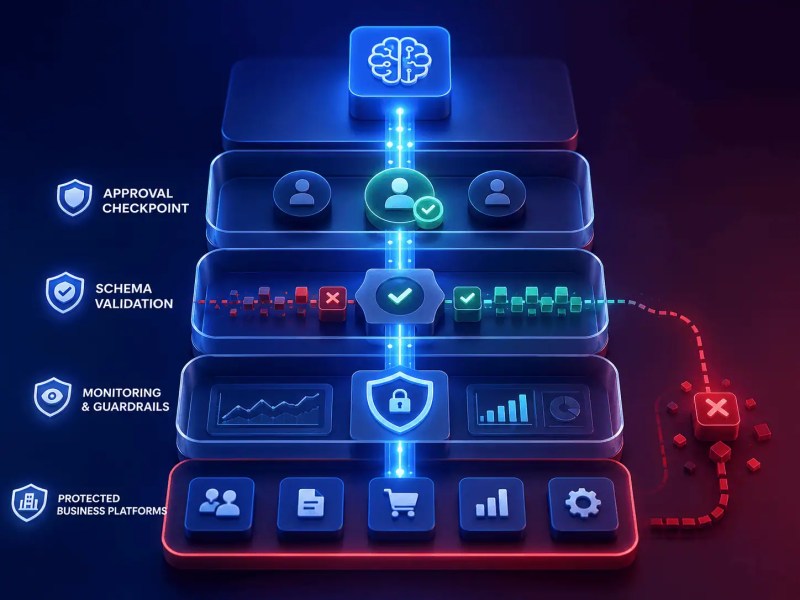
Start with the integration you actually need: use Claude Code to help develop and review workflow changes, MCP when it needs access to explicitly exposed tools, and a Claude API integration when the running workflow needs model output. Validate each approach in an isolated test, limit permitted actions, and check the resulting business records before expanding the scope.
Need a reliable system?
Related Resources
Frequently asked questions
Can Claude Code generate n8n workflows automatically?
Claude Code can help draft workflow JSON and transformation code when given relevant context. Check that the result uses node types and settings supported by your n8n version, then import or apply it in a test workflow and map credentials. Direct creation or editing through tools depends on the MCP server or other integration you configure; it is not guaranteed by installing Claude Code.
Is AI-generated workflow logic reliable enough for production?
It can be used in production after appropriate review and testing. Verify the code itself, realistic input cases, permissions, destination behavior, and failure recovery. Generated code does not carry a reliability guarantee, and workflow controls do not remove the need to check its logic.
What is the biggest risk in AI-assisted workflow automation?
One consequential failure is an incorrect output triggering an authorized but unintended action. Examples include overwriting the wrong CRM record or sending an unreviewed message. Data exposure, excessive permissions, and repeated actions also need to be considered for the chosen setup.
Should AI-generated outputs directly modify production systems?
Only within a defined scope with validated inputs, appropriate permissions, and tested failure handling. Use approval for consequential or ambiguous changes. Even low-consequence automatic actions need limits; low risk is not a reason to grant unrestricted access.
About the author

Miguel Carlos Arao is the Founder & CEO of Alltomate, a Zapier Certified Platinum Solution Partner focused on AI-assisted workflow automation, orchestration systems, and operational process design.

Built by a certified Zapier automation partner
Explore more AI automation insights in our automation blog library, workflow automation services, and AI automation guides.