
Published on May 1, 2026
Imagine you connect Claude to Zapier MCP, run a contact update, and everything looks fine — until a sales rep discovers three days later that the record has no email address, no log of what failed, and no way to trace it back. That is not a setup problem. That is what happens when Claude controls execution without structured validation, routing rules, and state tracking in place. This article covers exactly where MCP workflows break and what a controlled system actually enforces to prevent it.
Quick Answer: Zapier MCP shifts automation from fixed workflows to dynamic tool execution. Without enforced validation, routing constraints, and state tracking, workflows produce inconsistent outputs and propagate errors across systems. Reliable automation requires adding control layers on top of MCP’s execution model.
Once connected, Claude can trigger any enabled Zap dynamically during a conversation — and that flexibility is exactly where the problems start.
Table of Contents
- What changes when Claude controls execution instead of a trigger
- How Claude selects tools dynamically and where that selection goes wrong
- Why MCP failures are silent and what they actually look like
- What a controlled MCP system actually enforces to prevent those failures
- How adding more tools compounds errors and why scale makes this worse
Connecting Claude to Zapier workflow automation systems through MCP introduces a different model of automation, similar to patterns shown in integration automation examples. Instead of trigger-based workflows, the system depends on structured tool execution, context passing, and dynamic decisions, as described in Zapier’s MCP documentation, where workflows shift from trigger-based execution to callable tools. This changes not just how workflows run, but how failures appear and propagate across systems.
Connect Claude to real workflows using automation integration services or explore broader automation and integration services, including implementation paths through automation solutions such as API integration automation systems and system integration automation systems.
If your workflows are already producing inconsistent results, evaluate platform differences through Zapier alternatives or run a free automation system audit to identify where execution breaks.
What changes when Claude controls execution instead of a trigger
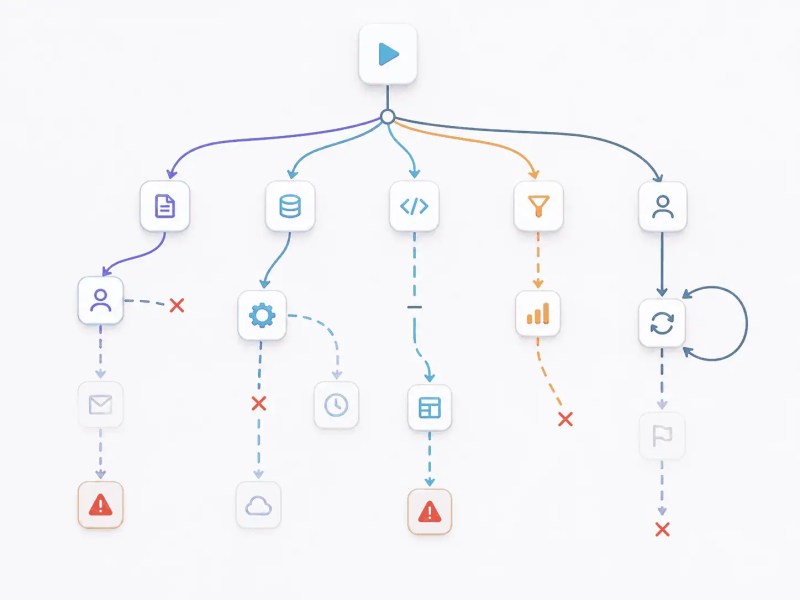
Traditional Zapier workflows run on fixed triggers — a form submission fires Step 1, Step 1 fires Step 2, and so on. The sequence is predetermined. MCP removes that structure entirely. Claude reads the available context, decides which tool to call, executes it, reads the output, and decides what to do next. There is no fixed path. Every decision point is conditional.
This creates a problem that fixed workflows do not have: execution reliability now depends on context quality and tool boundaries, not on a predefined sequence. If the context is incomplete or tool descriptions overlap, Claude may call the wrong Zap, call them out of order, or skip a step without raising an error. The workflow appears to run — it just does not run correctly.
How Claude selects tools dynamically and where that selection goes wrong
The problem is not that Claude makes decisions — it is that those decisions happen without guardrails. When Claude selects a tool, it is pattern-matching against context and tool descriptions, not following a verified sequence. That distinction matters because the failure mode is invisible until it compounds.
- Claude interprets context → selects tool
- Tool executes → returns output
- Claude continues → next decision
The dynamic execution model is shown below, where Claude selects tools based on context instead of following a fixed workflow path.

The system is no longer linear — it becomes conditional, dynamic, and dependent on context quality. Claude does not follow a predetermined path. It reads the available context, selects what it believes is the correct tool, executes it, reads the output, and decides what to do next, consistent with how Claude uses tools dynamically based on context (Anthropic). Each decision point is a potential failure if the context is incomplete or the tool boundaries are not clearly defined.
Without defined boundaries, Claude may call tools incorrectly or out of sequence — for example, triggering a CRM update before a required routing decision has been made, or skipping qualification steps entirely because the tool descriptions were ambiguous enough that Claude judged them unnecessary.
If your Claude-driven workflows are triggering tools incorrectly or producing inconsistent outputs, automation integration services enforce tool usage rules, validation layers, and controlled execution paths before failures compound across systems.
A CRM record gets updated without an email field. A document generates partially. Claude receives a 200 OK from the API and moves to the next step — because no validation layer exists to tell it otherwise.
Why MCP failures are silent and what they actually look like
Example of how MCP workflows fail without validation:
| Step | What Happens |
|---|---|
| Claude sends CRM update | Missing email field |
| Zapier executes | Partial record created |
| Claude continues | Assumes success |
Here is what this looks like in a real workflow: Claude calls update_crm_contact with the payload {"name": "Sarah Chen", "company": "Acme Corp"}. The email field is missing. Zapier executes the action and creates a partial CRM record. The API returns 200 OK because the record was technically created — just incomplete. Claude receives the success response and immediately moves to the next step: sending a follow-up email to the new contact. That email is sent to a blank address field. No error is raised at any point. The failure surfaces three days later when a sales rep tries to follow up and finds a contact with no email, no idea when it was created, and no log of what went wrong.
This type of silent failure is illustrated below, where missing data propagates through the system without detection.

The same pattern appears in document automation — invoices generated with missing line items, contracts routed for approval with blank fields, files organized into the wrong directories. The system reports success at every step. The damage only becomes visible when someone opens the output.
The system appears successful but produces inconsistent data. In document automation systems, this results in partially generated files and incomplete records, mirroring failures described in common integration mistakes.
Without structured outputs, any downstream system that reads from the same data — automated reporting systems, dashboards, and data pipelines — becomes unreliable because they are consuming records that were silently written with missing fields, a common issue where incomplete data propagates across systems (Salesforce).
What a controlled MCP system actually enforces to prevent those failures
Reliable MCP systems require structured validation, routing, and execution control because Claude selects tools dynamically based on context rather than enforced system rules.
In regulated environments, such as those requiring Zapier HIPAA-compliant automation systems, missing validation and control layers can lead to compliance risks and untraceable data exposure.
- Input validation before tool execution — before Claude calls any tool, the system checks that all required fields are present and correctly formatted. If the email field is missing from a CRM update, the tool call is blocked and Claude is returned an error instead of a 200 OK.
- Controlled tool routing (not open selection) — instead of letting Claude freely choose from all available tools, the system prompt explicitly maps each task type to a specific tool. Claude is told: if the task is a contact update, use
update_crm_contactonly, notcreate_crm_contactor any other variant. - Output verification before continuation — after each tool executes, the system checks the response for required fields and expected values before allowing Claude to proceed. A partial record returned from Zapier is treated as a failure, not a success, and Claude is instructed to stop and flag it.
- State tracking between steps — the system maintains a record of what has executed, what succeeded, and what data was passed between steps. If a downstream step fails, the state log shows exactly which upstream step produced the bad data and what it contained.
A controlled MCP system is shown below, where validation checkpoints and routing constraints prevent incorrect execution.

Without these controls, workflows continue execution even when intermediate steps fail, because failure is not enforced as a stopping condition, a known issue in automation systems without proper error handling and validation (Microsoft). This breaks system reliability by allowing incorrect data, duplicate actions, and inconsistent outputs across connected systems.
In multi-step workflows, automated task handoff systems ensure execution transitions correctly between tools, preventing skipped or duplicated steps.
When execution paths span multiple tools and APIs, connecting MCP to cross-platform workflow automation systems provides the external execution control that MCP alone does not enforce.
How adding more tools compounds errors and why scale makes this worse
Adding more tools, APIs, and decision paths increases complexity faster than traditional automation, similar to challenges described in choosing the right automation platform, where increasing system integration complexity raises coordination and failure risk (IBM).
Scale Effect: Each additional tool introduces new execution paths, increasing the chance of incorrect decisions and mismatched states across systems.
This results in the following execution failures, especially in systems requiring data synchronization automation systems and contact synchronization automation systems:
- Duplicate actions — when Claude loses track of what has already executed, it may call the same tool twice. A contact gets created twice in your CRM, a notification fires twice, or a payment is triggered twice. Without state tracking, there is no check that prevents the same action from running again.
- Missed executions — when one tool returns an unexpected output format, Claude may skip the next step entirely because it cannot map the output to the next tool’s expected input. The workflow appears to complete but one or more steps never ran, and nothing in the log indicates they were skipped.
- Inconsistent data states — when two tools update the same record at different points in the workflow using different data snapshots, the final record reflects whichever tool wrote last, not the correct merged state. This produces contacts with outdated fields, deals with wrong stage values, and reports that cannot reconcile across systems.
Here is what this looks like at scale: a sales team connects Claude to five Zaps — lead capture, CRM create, lead scoring, Slack notification, and follow-up email sequence. Everything works in testing with three contacts. They scale to 200 leads in a week. Claude loses track of execution state midway through a batch and calls the CRM create Zap twice for 34 contacts. Those contacts now exist as duplicates — different record IDs, different creation timestamps, different assigned owners depending on which duplicate the round-robin caught.
The Slack notification fires twice per contact, which the team assumes is a Zapier glitch and ignores. The follow-up email sequence enrolls both duplicate records, so 34 leads receive the same email twice within minutes of each other. No error appears in Zapier’s task history. Every task shows a green checkmark. The team discovers the problem two weeks later when a lead replies asking why they keep getting contacted twice, and the sales rep cannot find a single clean record to work from.
In advanced setups, combining MCP with AI-powered tools — lead scoring, document classification, email response, and support routing — multiplies these failure risks. Each AI layer adds another decision point with its own output format, its own failure mode, and its own potential to pass bad data downstream without detection.
MCP is not a reliability problem on its own — it is an execution model that trades fixed sequencing for dynamic decision-making. That trade-off is worth it when the system around it enforces validation, routes tools explicitly, verifies outputs, and tracks state between steps. Without those layers, the flexibility MCP provides becomes the source of the failures it was meant to eliminate. The more tools you add, the faster errors compound — and the harder they become to trace after the fact.
Final Answer: Zapier MCP with Claude enables dynamic automation, but without validation, controlled execution, and state management, workflows fail silently and scale unpredictably. Reliable systems require structured control layers beyond default MCP behavior.
MCP workflows break when execution is not controlled
If your MCP workflows are producing inconsistent results, run a structured system audit to identify where validation, routing, and execution control are missing.
Related Resources
FAQs
What is Zapier MCP?
Zapier MCP is a server that exposes your Zaps as callable tools. Instead of a Zap running on a fixed trigger like a form submission or a scheduled time, Claude can call any enabled Zap by name during a conversation, passing structured input data to it. The Zap then executes and returns a result to Claude, which can use that result to decide what to do next.
Can Claude fully automate workflows using MCP?
Yes, but Claude decides which tool to call based on the context it is given — it does not follow a fixed sequence unless you enforce one. This means that if your system prompt is vague or your tool descriptions overlap, Claude may call the wrong Zap, call them out of order, or skip a step entirely without raising an error. Reliable automation requires you to constrain Claude’s tool selection through clear system prompts, explicit routing rules, and output validation between steps.
What is the main risk of MCP-based automation?
The main risk is silent continuation. When a step fails or returns incomplete data, Claude does not automatically stop — it receives a success response from the API and moves to the next action. This means errors do not surface immediately. They appear days later as corrupted records, missing contacts, or reports with unexplained gaps. By that point, tracing the failure back to its source in the MCP execution chain is difficult without proper logging and state tracking in place.
Does using Zapier MCP cost extra?
Zapier MCP is available on Zapier’s paid plans. Each Zap that Claude triggers counts toward your Zapier task usage the same way a normal Zap run would — so a workflow that calls three Zaps in one conversation consumes three tasks. There is no separate MCP fee, but high-volume AI-driven workflows can exhaust your task quota faster than traditional trigger-based automations. Check your current plan limits in the Zapier dashboard before scaling.
About the author

Miguel Carlos Arao is the Founder & CEO of Alltomate, a Zapier Certified Platinum Solution Partner focused on AI-driven automation systems, including tool execution, workflow validation, and system orchestration. This article is based on hands-on automation design, workflow systems, and real-world implementation experience.

Built by a certified Zapier automation partner
Explore more at
automation and integration services,
automation solutions,
automation articles, and
automation guides.