
Published on May 29, 2026
If you’re actively evaluating automation platforms for your business, our automation integration services team can help assess implementation requirements, or you can start with a free business process audit.
Quick Answer: n8n (pronounced “n-eight-n,” short for “nodemation”) is an open-source, node-based workflow automation tool that lets technical teams connect apps, APIs, and services through a visual canvas — while still allowing custom code execution when off-the-shelf nodes aren’t enough. Unlike fully managed tools, n8n can be self-hosted, giving teams direct control over their data, infrastructure, and workflow logic. Official n8n Repository
Table of Contents
Most automation questions start with the tool. The better question is: what kind of system do you need to run, and does this platform let you build it cleanly? n8n positions itself at a specific point in the automation spectrum — past no-code platforms where the logic starts getting complicated, but before full custom development becomes the only option. Understanding what it actually is means understanding where that line sits and what it enables on either side of it.
What n8n Actually Is (and What It’s Not)
The easiest way to misread n8n is to treat it as another Zapier alternative — a tool you pick when you want cheaper task pricing. That framing misses what it’s actually doing architecturally. n8n is a workflow execution engine. It processes data moving between systems through a sequence of configurable nodes, where each node represents a discrete operation: an API call, a data transformation, a conditional branch, a loop, or a code block. The visual canvas is an interface on top of that engine, not the engine itself.
That distinction matters because it changes how you design workflows. In tools built primarily around triggers and actions, the mental model is sequential: “when X happens, do Y, then Z.” In n8n, the mental model is more like a pipeline — data enters, gets shaped, gets filtered, gets routed based on evaluated conditions, and exits through one or more paths. The workflow isn’t a list of steps; it’s a graph of operations with a defined execution order.
What n8n is not: a drag-and-drop tool for non-technical users who want to connect Slack to Gmail in two clicks. That’s a legitimate use case — but it’s not where n8n is built to shine. The platform assumes a certain baseline of technical comfort: understanding APIs, reading JSON, making decisions about data structure. Teams without that background will likely find tools like Zapier more practical for everyday use. If you’re evaluating the platform itself, see our n8n platform overview. For a direct breakdown against a leading alternative, see our Zapier vs n8n comparison.
How the Node-Based Architecture Works
Every workflow in n8n is built from nodes connected on a canvas. There are three categories worth understanding as distinct operational layers — not as marketing labels, but because each layer has a different job in how data moves through the system.
Trigger nodes are the entry point. They determine when a workflow runs — on a schedule, when a webhook receives a payload, when a file lands in a folder, or when a manual run is initiated. The trigger defines the data shape that enters the workflow. If the trigger receives malformed data or fires at the wrong moment, every downstream node is working from a flawed input.
Action and integration nodes handle the actual work — calling APIs, reading from databases, writing records, sending messages, updating CRM entries. n8n ships with a large library of pre-built integrations, and most major platforms have a native node. When a native node doesn’t exist, you fall through to the HTTP Request node, which lets you hit any REST API directly by configuring the method, headers, body, and authentication manually.
Logic and transformation nodes are where n8n separates from simpler tools. You can run conditional branches, merge data from multiple sources, loop over arrays, split execution paths, and write raw JavaScript or Python inside a Code node. This isn’t a workaround — it’s a core design feature. The ability to run arbitrary code inside a workflow means you’re not constrained by what any single integration node exposes. If an API returns a nested object you need to flatten before passing it downstream, you write the logic directly in the workflow rather than routing it through an external service.
The workflow structure described above is easier to understand visually than through text alone.

If you’re evaluating whether n8n fits your current stack, our automation integration services team can help you map your workflows before committing to a platform.
When Self-Hosting Changes the Equation
Most automation platforms are SaaS by default. Your workflow logic, credentials, and execution history live on the vendor’s infrastructure. For many teams, that’s an acceptable tradeoff. For others — healthcare organizations, financial services firms, legal operations teams, or any business with strict data residency requirements — it’s a non-starter.
n8n’s self-hosted option means you deploy the platform on your own infrastructure: a cloud VPS, an on-premises server, or a containerized environment via Docker or Kubernetes. The workflow runs entirely within your environment. API credentials aren’t transmitted to a third party. Execution logs stay on your servers. If your compliance posture requires this kind of isolation, n8n becomes relevant not because it’s cheaper, but because it’s structurally compatible with your requirements in a way that SaaS-only tools aren’t. n8n Hosting Documentation
The tradeoff is operational overhead. When you self-host, you own the infrastructure: uptime, updates, database backups, security patching. At small scale, this is a few hours of setup. At scale — hundreds of workflows running continuously, multiple teams using the same instance — it becomes a real infrastructure management problem. The n8n Cloud option exists as a middle path: managed hosting with fewer operational responsibilities, but with less control than full self-hosting.
The infrastructure ownership model looks roughly like the system shown below.

Where n8n Handles What No-Code Tools Can’t
The ceiling of most no-code automation tools isn’t about the number of integrations — it’s about logic depth. You can usually get data from A to B with any platform. The problem appears when you need to make a decision mid-workflow based on the content of that data, or when the data requires transformation before it’s usable, or when one incoming trigger needs to fan out into parallel operations across multiple systems.
Consider a support operations scenario: a customer submits a ticket via a web form. A simple automation might log it in a CRM and notify a Slack channel. But what if the routing logic depends on the account tier, the issue category, and whether a prior ticket exists within the last 30 days? That’s three conditional checks, a lookup against an external database, and a branching output that routes to different queues. In a tool constrained to linear trigger-action flows, you’re either building multiple separate zaps that partially overlap, or you’re hitting the limit of what the tool can express cleanly.
In n8n, that entire system lives inside a single workflow: the incoming webhook triggers execution, a database lookup node retrieves account history, an IF node evaluates tier and recency, and a Switch node routes to the appropriate output path — each path executing a different set of actions. The logic is visible, testable, and modifiable without rebuilding the flow from scratch. For teams managing automation complexity at that level, this structural clarity isn’t a luxury; it’s what makes the system maintainable. You can read more about how these compare in practice on our Make vs n8n comparison page.
The routing process becomes easier to manage when complex decisions are centralized inside a single workflow.

What n8n Workflows Look Like in Practice
Describing a node-based workflow in the abstract only gets you so far. Here’s what it looks like in a real system.
[Job Board Trigger]
        ↓
[Parse Applicant Data]
        ↓
[Normalize Fields]
        ↓
[Database Lookup]
        ↓
      [IF]
     /    \
Match    No Match
  ↓          ↓
Update    Create CRM Record
  \          /
   └────────┘
        ↓
[Internal Dashboard Notification]
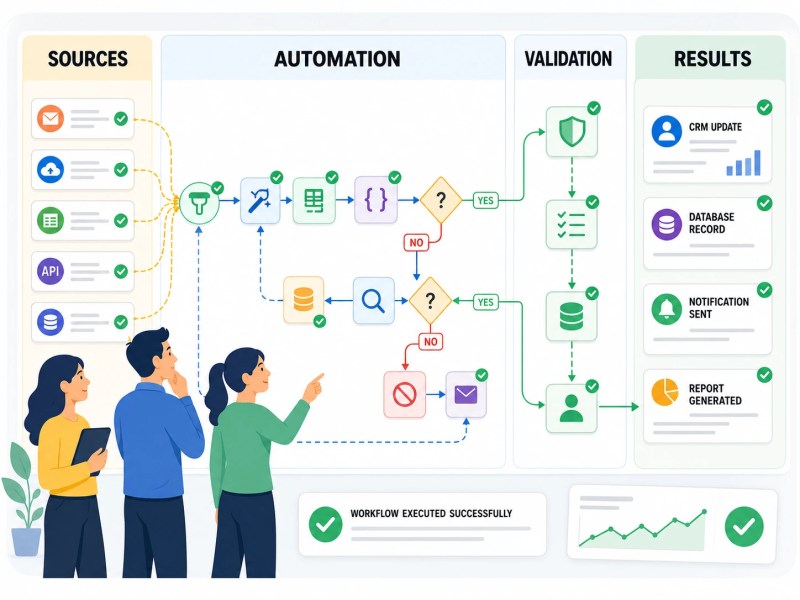
A recruitment agency needed to automate its lead intake from multiple job boards. Each board returned applicant data in a different format — some as JSON, some as XML, one as a CSV attachment in an email. The processing requirement was the same for each: extract the applicant’s core fields, normalize them into a standard schema, deduplicate against the existing candidate database, and create a record in the CRM if no match was found.
In n8n, this was built as three parallel sub-workflows, one per source, each with its own trigger and parsing logic. A Code node handled the XML transformation. This is the type of data-processing task that often becomes difficult or awkward in simpler no-code automation tools. A Set node normalized the field names. An HTTP Request node queried the candidate database via API. An IF node evaluated whether a match was returned. The “no match” path created the CRM record; the “match found” path updated a timestamp and moved on. The three sub-workflows merged into a shared notification step that logged the outcome to an internal dashboard.
The result wasn’t remarkable because it was built in n8n specifically. It was remarkable because the logic — multi-source, parallel, conditional, with custom parsing — could be expressed cleanly in a single observable system rather than spread across scripts, cron jobs, and partially-connected tools.
A production workflow often looks more like an interconnected system than a simple automation.
Who n8n Is Actually Built For
The honest answer isn’t “everyone who wants automation.” n8n is well-suited to a specific profile: technical teams or operators who understand how APIs work, are comfortable reading and writing basic code, and need workflow logic that exceeds what point-and-click tools can handle — without committing to a full custom development project.
That includes developers who want to automate internal tooling without building a full integration layer from scratch. It includes DevOps and data engineering teams running operational pipelines. It includes automation-forward agencies building bespoke systems for clients. And it includes businesses in regulated industries where the self-hosting option is a compliance requirement rather than a preference.
Where n8n is a poor fit: teams that need fast, reliable automation with minimal setup and no technical maintenance. For those use cases, managed platforms with strong support ecosystems — and lower operational surface area — are usually the better choice. If you’re trying to decide between platforms, our Zapier alternatives guide walks through the trade-offs across the major options including n8n, Make, and others. If n8n doesn’t fit your requirements, you may also want to explore our guide to n8n alternatives. For teams that want to evaluate where automation fits in their current operations, a free business process audit is a practical first step before committing to any platform.
Final Answer: n8n is an open-source, node-based workflow automation platform designed for technical teams that need precise control over multi-step, conditional, and data-intensive processes. It supports self-hosting for full data and infrastructure control, allows custom code inside workflows, and handles logic complexity that no-code tools can’t express cleanly. It’s not a beginner automation tool — it’s a system-building tool for teams that have outgrown simpler platforms or require more architectural flexibility than SaaS automation products allow.
Need a reliable system?
Related Resources
FAQs
Can non-technical users operate n8n effectively?
n8n has a visual canvas that non-technical users can navigate for simple workflows, but its real utility — conditional logic, custom code nodes, complex data transformations — requires a baseline of technical understanding. Teams without technical capacity may find the learning curve steeper than it appears from the interface alone.
Does n8n charge per workflow execution the way Zapier charges per task?
n8n’s pricing model differs significantly. Self-hosted instances have no per-execution charge — you pay for the infrastructure you run. The cloud plans are based on workflow executions per month, but the pricing structure is not directly comparable to Zapier’s task-based model. For teams with high execution volumes, the cost difference can be substantial.
Is n8n reliable enough for production-critical business processes?
That depends on how it’s deployed. A self-hosted instance on minimal infrastructure introduces operational risk — if the server goes down, workflows stop. A properly architected deployment with redundancy, health monitoring, and a defined update process can be production-reliable. The reliability question is partly a platform question and partly an infrastructure question.
What happens when an n8n workflow fails mid-execution?
n8n logs execution history and marks failed runs with error details, including which node failed and what data was present at that point. You can configure error workflows — separate workflows that trigger automatically when a failure is detected — to handle notifications, retries, or fallback logic. This makes debugging faster than platforms that only surface a generic failure notification. n8n Error Handling Documentation
How does n8n handle API authentication for external services?
n8n stores credentials in an encrypted credential store within the platform. Each credential is attached to nodes that use it, and credentials are not exposed in the workflow export by default. In self-hosted environments, the encryption keys are under your control. For teams evaluating n8n in regulated environments, this credential isolation is one of the more relevant security considerations. n8n Encryption Key Documentation
About the author

Miguel Carlos Arao is the Founder & CEO of Alltomate, a Zapier Certified Platinum Solution Partner focused on open-source and managed workflow automation, including platform evaluation, node-based system design, and API integration architecture. This article is based on hands-on automation design, workflow systems, and real-world implementation experience.

Built by a certified Zapier automation partner
Explore more at
n8n Platform,
Zapier vs n8n, and
Automation Integration Services.