
Published on July 18, 2026
Quick Answer: Relay.app is closing free accounts on August 15, 2026 at 11:59 p.m. PT and paying accounts on September 14, 2026 at 11:59 p.m. PT. Users should export their workflows, Sequences, run history, Tables, and MCP servers where applicable. Make is a practical alternative for many Relay.app workflows, but migration requires rebuilding the logic, reconnecting applications, and testing the replacement scenarios before Relay.app access ends.
Table of Contents
Relay.app users are not simply choosing another automation tool. They are moving business logic out of a platform that will soon delete their accounts and associated data. For teams searching for a Make alternative to Relay.app, the safest approach is to preserve that logic, select the replacement architecture, and complete a controlled cutover while the original workflows still run. Teams considering the platform can begin with this guide to Make automation before rebuilding production workflows.
Relay.app’s deadline is also a data-deletion deadline
Relay.app has confirmed that it is shutting down. New signups and free-to-paid upgrades have stopped, but existing workflows will continue operating during the applicable wind-down period. The deadline does more than remove access to the application.
| Account type | Access ends | What happens next |
|---|---|---|
| Free account | August 15, 2026 at 11:59 p.m. PT | The account and associated data are permanently deleted. |
| Paying account | September 14, 2026 at 11:59 p.m. PT | The account and associated data are permanently deleted. |
Source: Relay.app — official shutdown notice.
The two account types have different shutdown windows, but both lead to permanent account-data deletion after the applicable deadline, as shown below.

Paying-customer transition allowance: Relay.app says paying workspaces will retain free access during the 60-day wind-down period and receive an additional 25,000 steps and 10,000 AI credits per month. Customers will not be charged for usage during that period.
Paying customers will not be charged again during the transition. Relay.app has also stated that annual customers will receive an automatic, prorated refund for the unused remainder of their current billing period, typically within five business days. Confirm the latest terms through the official Relay.app shutdown notice.
The operational mistake would be treating the final date as the date to start migrating. A workflow may take only an hour to recreate visually, but its authentication, field mappings, decision rules, AI instructions, duplicate controls, and error paths may require several testing cycles.
Export the workflow logic before the interface disappears
Relay.app currently allows users to export workflows, Sequences, and MCP servers as JSON files and AI-readable prompts. MCP servers are relevant only to workspaces that use Relay.app’s Model Context Protocol features. Users can also export run history and download Relay Tables as CSV files.
These exports should be stored somewhere controlled by the business rather than left in a personal downloads folder. Relay.app provides additional instructions in its official data-export guide.
For each active workflow, preserve:
- The workflow JSON and AI prompt export
- Relevant run-history records
- Relay Tables exported as CSV files
- Screenshots showing branches, approvals, and field mappings
- Examples of successful input and output data
- A list of connected applications and their account owners
- Schedules, delays, retry rules, and notification recipients
An export is not the same as a functioning replacement. Relay describes the JSON and prompt files as resources that help users rebuild elsewhere. It does not promise that those files will automatically generate a complete Make scenario with working connections.
Authentication must also be handled separately. Relay.app states that its stored credentials and tokens for connected apps will be deleted when the account is deleted, and that it will no longer access those apps. Teams should therefore create fresh, authorized connections inside Make instead of attempting to transfer or reuse Relay-held credentials.
JSON, prompts, history, and Tables
Triggers, rules, owners, and exceptions
Create and reconnect the Make scenario
Compare outputs and failure paths
Disable Relay and monitor Make
Make is a strong candidate, not a one-click substitute
Make can visually connect applications, data sources, APIs, and AI services across multi-step scenarios. Its official integrations directory currently promotes more than 3,000 prebuilt application integrations, while its HTTP app can connect services that provide an API.
Make also documents routers and filters for branching scenario logic, including ordered routes and fallback handling. These capabilities make it a realistic Relay.app alternative for workflows that depend on conditional processing, data transformation, scheduled execution, and cross-application updates.
In that architecture, Make operates as the central scenario layer connecting each application rather than replacing the underlying business systems.

Readers unfamiliar with the platform can review how the Make automation tool works. The important migration question, however, is not whether Make has many features. It is whether the exact behavior of each Relay.app workflow can be reproduced without losing a control, condition, or approval step.
Make is likely to fit when the workflow needs:
- Multiple application actions in one process
- Conditional routes based on incoming data
- Custom API or webhook connections
- Visible field mapping and data transformation
- Scheduled, instant, or on-demand execution
- AI steps combined with deterministic business rules
A closer technical review is needed when a Relay.app workflow relies heavily on a platform-specific trigger, specialized human approval behavior, or an application event that Make does not detect in the same way. The correct replacement may require polling, an API call, an external database, or a redesigned approval state rather than a direct module-for-step copy.
Map Relay.app behavior to Make before building modules
In workflow rebuilds we’ve handled for operations teams, the failure is rarely the visible sequence of steps. It is usually a hidden condition: which records are excluded, what happens when a field is empty, which system owns the final status, or whether a failed action should retry automatically.
Build a migration map before opening the Make scenario editor. This separates the business requirement from the platform interface.
| Relay.app component | Possible Make approach | What must be verified |
|---|---|---|
| Workflow trigger | Instant trigger, webhook, polling module, or schedule | Whether the same event is available and how quickly it is detected |
| Application action | Native Make module or HTTP/API request | Required fields, permissions, and returned data |
| Conditional branch | Router with filters and, where appropriate, a fallback route | Route order, overlapping conditions, and unmatched records |
| AI prompt or classification | AI application module, API request, or controlled AI-agent step | Prompt structure, output format, confidence rules, and review requirements |
| Relay Table | Make data store, spreadsheet, database, CRM, or another source of record | Record IDs, update logic, duplicates, and data ownership |
| Human approval | Approval application, status field, notification, and resume logic | Who may approve, timeout behavior, rejection paths, and audit history |
| Run history | Migration test cases and expected-output records | Whether the new scenario produces the same business outcome |
In professional-services onboarding systems we’ve built, a completed intake form creates a CRM record, generates a project folder, notifies an account manager, and pauses for an approval status. Rebuilding that visible sequence is straightforward. The failure risk sits in duplicate submissions, missing account-manager assignments, rejected approvals, and records that already exist in the CRM. A migration is successful only when those exceptions continue producing the intended operational outcome.
Already mapped your Relay.app workflows but unsure how to rebuild their routing, data controls, or failure paths? Review Alltomate’s Make automation services before activating the replacement scenarios.
Migrate by failure cost, not by workflow count
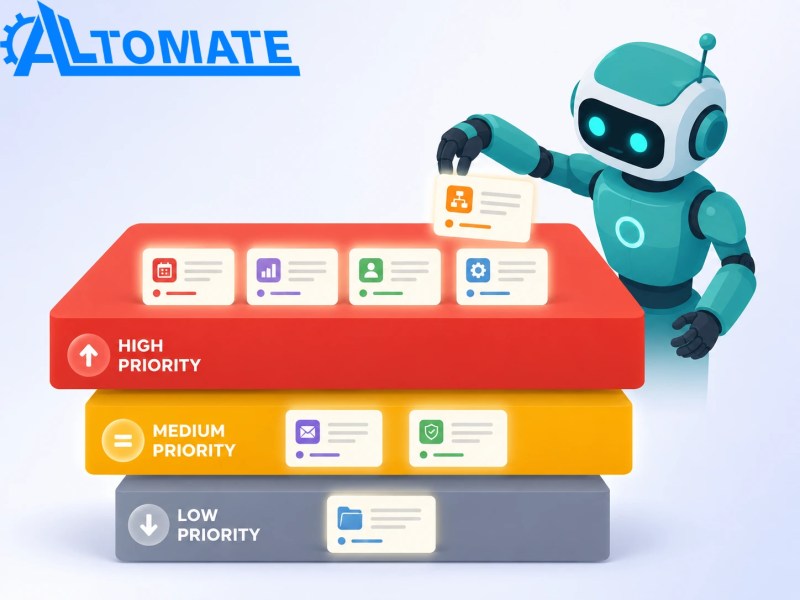
A workspace with twenty workflows does not necessarily contain twenty equal migration projects. One lead-routing workflow may be more important than ten internal notifications. Prioritization should reflect the cost of failure, the volume of records processed, and the number of downstream systems affected.
Priority 1: Revenue, customer, and compliance workflows
Start with lead assignment, customer onboarding, payment notifications, support escalations, contract routing, and processes tied to compliance deadlines. These workflows need the longest testing window because a silent error can affect customers or financial records.
Priority 2: High-volume operational workflows
Next, migrate CRM synchronization, data enrichment, recurring reports, task creation, and internal status updates. Individual failures may appear minor, but the accumulated cleanup becomes expensive when hundreds of records are involved.
Priority 3: Convenience automations
Personal reminders, low-volume alerts, and nonessential content processes can move later. Some may not need to be rebuilt at all. A platform migration is a useful point to retire automations that no longer support an active process.
The resulting migration queue should place workflows according to operational risk rather than treating every automation as equally urgent.
Parallel testing catches what screenshots cannot show
Across client onboarding systems we’ve built, the original workflow usually contains hidden assumptions. A blank company field may be accepted in one platform but rejected in another. A trigger may fire once in Relay.app and twice through a webhook configuration. An AI step may return valid text while breaking the structured fields required by the next module.
Test the new Make scenario with examples taken from the exported Relay.app run history. Include normal records, incomplete records, duplicates, rejected approvals, API errors, and records that should be intentionally excluded.
Parallel testing compares the existing and replacement workflows against the same expected outcomes before the production cutover.

Before cutover, confirm that:
- The trigger detects the correct event without creating duplicates
- Every required field reaches the correct destination
- Routers send records through the intended path
- Unmatched records have a controlled fallback or review queue
- AI outputs follow the required format before downstream actions run
- Failed actions produce an alert, retry, or recoverable incomplete execution
- The new scenario does not run against live data while Relay.app performs the same action
Where possible, run both systems during a controlled comparison period using restricted test records or a clearly separated route. Once the Make outputs match the expected Relay.app outcomes, choose a cutover time, disable the original trigger, activate the production scenario, and monitor its first executions closely.
When professional migration support is worth the cost
A small Relay.app workflow that moves one form submission into a spreadsheet may be reasonable to rebuild internally. Professional support becomes more useful when the workflow spans several applications, contains custom APIs, processes sensitive records, uses AI-generated decisions, or requires approvals and recovery paths.
Support is also justified when nobody can clearly explain why the current workflow behaves the way it does. That usually indicates undocumented business rules. Rebuilding the automation without recovering those rules can create a technically successful scenario that produces the wrong operational result.
A proper migration review should identify active workflows, application dependencies, risk levels, replacement architecture, testing requirements, and ownership after launch. It should also distinguish workflows that need to be rebuilt from those that should be retired or simplified.
The intended outcome is not simply a recreated scenario, but a stable Make system with clear connections, ownership, and monitoring after the migration.

Final Answer: Make is a strong Relay.app alternative for many multi-step and AI-assisted workflows, but the migration should be treated as a controlled system rebuild rather than a direct import. Export Relay.app data immediately, document hidden rules, migrate the highest-risk workflows first, reconnect applications securely, and verify the new Make scenarios before disabling the originals.
Need a reliable system?
Related Resources
Frequently asked questions about the Relay.app shutdown
When will Relay.app accounts be deleted?
Free Relay.app accounts and associated data are scheduled for deletion after August 15, 2026 at 11:59 p.m. PT. Paying accounts and associated data are scheduled for deletion after September 14, 2026 at 11:59 p.m. PT.
Will Relay.app workflows keep running before the deadline?
Relay.app states that existing workflows will continue operating through each account’s wind-down period. Users should still begin migrating early so they have time to rebuild and test the replacement.
What transition benefits do paying Relay.app customers receive?
Relay.app says paying workspaces will keep full access for free during the 60-day wind-down period. Each workspace will also receive an additional 25,000 steps and 10,000 AI credits per month during that period, with no charges for usage.
Can Relay.app JSON files be imported directly into Make?
Relay.app describes its JSON and AI-prompt exports as resources for rebuilding workflows elsewhere. Users should not assume those files will generate a complete Make scenario automatically. Connections, field mappings, routes, and error handling should be reconstructed and tested.
What happens to Relay.app application credentials?
Relay.app’s official shutdown notice confirms that stored credentials and authentication tokens will be deleted when the account is deleted. New authorized connections should be created inside Make for each application used by the replacement scenario.
What should be exported first from Relay.app?
Start with business-critical workflows, their JSON and AI-prompt exports, run histories, related Tables, successful sample records, screenshots, schedules, and a list of connected applications. Preserve enough information to reproduce both the workflow and its exception handling.
Should Relay.app users choose Make or n8n?
The answer depends on workflow complexity, hosting requirements, technical resources, governance, application coverage, and maintenance capacity. Our Make vs n8n comparison explains the tradeoffs in greater detail. Make often suits teams that want visual scenario building and managed infrastructure, while n8n may appeal to teams seeking greater deployment and code-level control.
About the author

Miguel Carlos Arao is the Founder & CEO of Alltomate, a Zapier Certified Platinum Solution Partner. His work covers Make-based workflow migration, including workflow mapping, scenario reconstruction, and controlled cutover testing.
The patterns in this article come directly from building and troubleshooting cross-platform workflow systems across client engagements involving professional-services onboarding and internal operations.

Built by a certified Zapier automation partner
Explore more at
Make platform capabilities,
business automation consulting, and
Alltomate.