
Published on July 14, 2026
Most teams that ask “what should I build in n8n” already have a workflow in mind — they just haven’t seen it laid out as a working example yet. Below are the categories we build most often for clients, what each one actually does under the hood, and where it tends to break. If you’re weighing n8n against a hosted alternative first, our complete n8n automation guide covers setup and platform fundamentals before you get to workflow design.
Quick Answer: The most useful n8n workflows fall into a handful of categories — lead routing and CRM sync, AI-powered document and data processing, web scraping and data collection, form intake and approval routing, webhook-triggered real-time actions, and email/notification logic. Each works well for a specific trigger-to-outcome pattern; the failure point is almost always at the handoff between steps, not the trigger itself, which is why workflows that look simple on a template page often need more validation logic than expected once they run against real data.
Table of Contents
- Where n8n Workflows Actually Pay Off — and Where They’re Overkill
- Lead Routing and CRM Sync Workflows That Don’t Break at the Handoff
- AI Workflows: RAG Pipelines, Document Extraction, and Agent Chains
- Web Scraping and Data Collection Workflows
- Form Intake and Approval Routing Workflows
- Webhook-Triggered Workflows for Real-Time Systems
- Email and Notification Workflows Beyond Basic Alerts
- When These Workflows Outgrow a Single n8n Instance
Where n8n Workflows Actually Pay Off — and Where They’re Overkill
Before picking a workflow off a template list, it’s worth being honest about which problems n8n actually solves well. It earns its place when a process involves multiple systems that don’t talk to each other natively, or when logic needs to branch based on data conditions — not just move data from A to B. A single Slack notification when a form is submitted doesn’t need n8n; a native integration or a simple Zap does that fine.
Where it gets genuinely useful is when a workflow needs to pull data from one system, transform it, check it against a condition, write it to two or three other places, and handle failure differently depending on which step broke. That’s the shape of almost every workflow below. If your process doesn’t have at least one conditional branch or one data transformation step, you’re probably overbuilding by reaching for n8n at all.
Lead Routing and CRM Sync Workflows That Don’t Break at the Handoff
A typical lead routing workflow pulls a new lead from a form or ad platform, enriches it with firmographic data, scores it against qualification rules, and writes it into the CRM with the right owner assigned. On paper this is a five-node build. In practice, the failure almost never happens at capture — it happens at the CRM write step, where duplicate detection and field mapping quietly diverge from what the CRM actually expects.
In implementations we’ve built for recruitment firms, this is where lead routing quietly breaks: a candidate submits through two different channels within a week, the workflow creates two contact records instead of updating one, and the sales or recruiting team ends up working a stale duplicate while the real conversation happens somewhere else. The fix isn’t a smarter trigger — it’s a dedupe check inserted before the write step, matched on email and phone rather than name. Teams enriching leads before CRM sync often pair this with Apollo.io and n8n integration. If you’re routing leads specifically into HubSpot, our HubSpot and n8n integration guide covers the field-mapping setup in more detail.
The workflow below highlights where production lead routing usually fails: duplicate records must be stopped before the CRM write step rather than cleaned up afterward.

AI Workflows: RAG Pipelines, Document Extraction, and Agent Chains
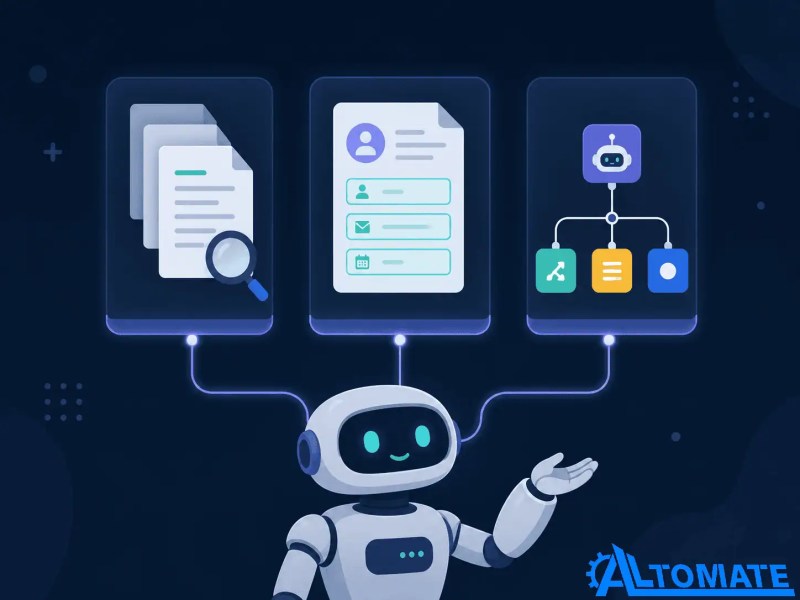
This is the fastest-growing category we get asked about, and it splits into three distinct patterns rather than one. The first is retrieval-augmented generation, where a workflow chunks and embeds documents, then answers questions by retrieving relevant chunks before generating a response — our n8n RAG workflow breakdown walks through the chunking and retrieval logic. The second is document data extraction, where AI pulls structured fields out of unstructured input like invoices or intake forms. The third is agent chaining, where an AI model decides which tool or sub-workflow to call next based on the input — covered in our Claude Code and n8n integration guide.
A consistent pattern we see in this setup, especially with logistics and professional services clients, is that teams start with the extraction pattern and only add retrieval or agent logic once the extraction step is reliable. That order matters: an AI extraction step that’s 85% accurate and unvalidated will quietly poison every downstream step it feeds, so the diagnostic question isn’t “does the AI step work” but “what happens to the workflow when it’s wrong.” For a broader view of where AI fits versus rules-based logic across use cases, our AI automation with n8n guide covers that decision point directly. If you’re connecting AI outputs directly into business systems, see our OpenAI CRM integration with n8n. Teams evaluating different models may also find our Google Gemini automation with n8n useful.
These three AI workflow patterns solve different problems and are often combined as systems mature, as shown below.
Web Scraping and Data Collection Workflows
Scraping workflows in n8n typically follow the same shape: fetch a page or API response on a schedule, parse the target fields, compare against previously stored data, and trigger an action only when something changed — a price drop, a new listing, a competitor update. The parsing step is where these workflows are most fragile, since a site layout change or an API version bump silently breaks field extraction without throwing an obvious error.
Community nodes make this more maintainable than writing raw HTTP requests for every source. Storing scraped results in structured tables also makes downstream automations easier, which we cover in our n8n Data Tables automation guide. Our web scraping automation with n8n covers selector strategy in more depth, and if you’re scraping at any real volume, the Apify community node for n8n handles proxy rotation and rendering that a plain HTTP Request node won’t.
A resilient scraping workflow stores historical results so it can detect meaningful changes instead of reacting to every scheduled run.

Workflows like these tend to multiply — a scraping workflow feeds a scoring workflow which feeds a CRM sync, and suddenly one build has become three that all depend on each other. If that’s the stage you’re at, a professional n8n automation services is usually less about writing new nodes and more about untangling that dependency chain before it breaks in production.
Form Intake and Approval Routing Workflows
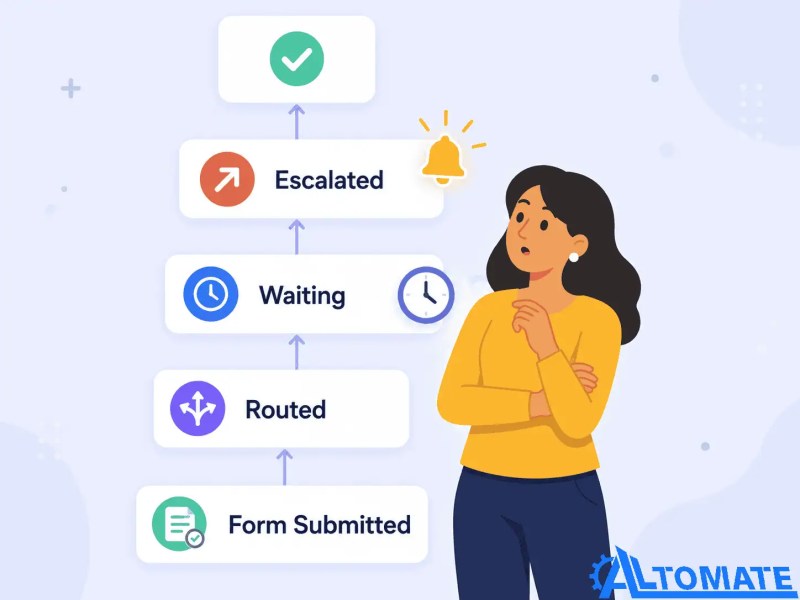
Form-triggered workflows look simple until an approval step gets involved. The basic version — form submission writes a row to a spreadsheet or database — rarely needs a workflow tool at all. The version that actually justifies n8n routes the submission to a different approver based on submitted values, waits for that approval (sometimes for days), and only then triggers the next action, whether that’s a contract generation, a purchase order, or a client onboarding sequence.
The wait step is the part people underestimate. A workflow that pauses for human approval needs to handle what happens if no one responds within a reasonable window — an escalation path, not just a silent stall. Our forms automation with n8n covers the wait-node and escalation pattern in more detail.
The workflow below illustrates why approval systems need escalation paths instead of waiting indefinitely for a response.
Webhook-Triggered Workflows for Real-Time Systems
There’s a common assumption that webhook-triggered workflows are the “simple” category since they fire instantly instead of on a schedule. That assumption falls apart the first time a webhook fires twice for the same event — which happens more often than most people expect, since most reliable providers choose at-least-once delivery over at-most-once, meaning an occasional duplicate is treated as the safer failure mode than a silently dropped event. A workflow that isn’t built to recognize a duplicate event will process it twice: two Slack messages, two CRM updates, two charges.
The fix is building an idempotency check into the workflow itself — storing the event ID and skipping anything already processed — rather than trusting the sending platform to only fire once. Our guide to n8n webhooks covers webhook response timing and this duplicate-event problem specifically.
Email and Notification Workflows Beyond Basic Alerts
The basic version of this workflow — send an email when X happens — is a one-node build most teams don’t need n8n for. The version worth building routes notifications differently depending on urgency, batches low-priority updates into a daily digest instead of firing them individually, and suppresses repeat alerts for the same issue within a set window so a flaky integration doesn’t flood someone’s inbox.
We see this consistently in new installs once a team moves past its first five workflows: notification volume becomes its own problem, separate from whatever the workflows are actually automating. At that point the notification logic deserves its own workflow rather than being duplicated inline across every other build. Our email automation with n8n covers the batching and suppression pattern in more detail.
When These Workflows Outgrow a Single n8n Instance
Every workflow above works fine as a standalone build on a small self-hosted instance. What changes at scale isn’t any single workflow — it’s the number of them running concurrently against the same execution queue. Once a team is running dozens of workflows with overlapping schedules, execution history grows fast, and a single slow external API call in one workflow can back up the queue for everything else waiting behind it.
At that point the conversation shifts from “which workflow do I build next” to infrastructure questions: queue mode versus single-instance execution, worker scaling, and how workflows are organized across teams so one department’s automation doesn’t compete for resources with another’s. Our enterprise automation with n8n and n8n for teams cover that transition in more detail.
The architectural difference below explains why growing teams eventually move from a single execution engine to distributed workers.

Final Answer: The n8n workflows worth building are the ones with a real branch or transformation step — lead routing with dedupe logic, AI extraction with a validation layer, scraping with change detection, form approval with escalation, webhook handling with idempotency checks, and notification logic with batching. Each of these looks straightforward as a template but breaks at a specific, predictable point once it runs against real data — which is exactly where the build time actually goes.
Need a reliable system?
Get a free business process audit or explore our business automation consulting.
Related Resources
FAQs
Can I import these workflow types directly from n8n’s template library instead of building from scratch?
Most of the patterns above have a starting template in n8n’s library, but templates rarely include the validation, dedupe, or escalation logic described here — that part usually needs to be added manually after import.
Do I need coding knowledge to build workflows like these?
No for the basic trigger-to-action shape, but the conditional logic, error handling, and API authentication steps that make these workflows reliable often require at least comfort with JSON and basic expressions inside the Code node.
How many of these workflows can a self-hosted n8n instance run before performance becomes an issue?
It depends more on execution frequency and external API latency than raw workflow count — a handful of workflows polling every minute can strain a small instance faster than dozens running a few times a day.
What’s the real difference between an n8n workflow and a Zapier Zap for something like lead routing?
Zapier’s linear step model handles simple routing fine; n8n’s branching logic and Code node make it a better fit once routing depends on multiple conditions checked against each other rather than a single trigger field.
About the author

Miguel Carlos Arao is the Founder & CEO of Alltomate,
a Zapier Certified Platinum Solution Partner focused on n8n workflow design, including trigger-based lead routing, AI-assisted document extraction, and multi-step approval chains.
The patterns in this article come directly from building and troubleshooting n8n workflow-related systems across client engagements in recruitment and logistics.

Built by a certified Zapier automation partner
Explore more at
complete n8n automation guide,
n8n platform page, and
n8n implementation services.