
Published on July 11, 2026
Most Storage by Zapier setups start small and outgrow themselves quietly. If you’d rather have someone map the right state layer before you build around the wrong one, our Zapier automation team can look at the workflow directly, or start with a free business process audit.
Quick Answer: Storage by Zapier is a key-value data store built into Zapier that lets a Zap remember small pieces of information — a counter, an ID, a flag — between separate Zap runs, or share that information across different Zaps entirely. It’s available on Professional plans and above (not the Free plan), doesn’t consume monthly task usage, and is capped at 500 keys and 25KB per value. For anything closer to structured records, filterable data, or reporting, Zapier Tables or an external database is the better fit.
Table of Contents
- What Storage by Zapier Actually Holds
- Where Teams Reach for It First: Counters, Flags, and Lookups
- Is Storage by Zapier Actually Free?
- Reading and Writing State Through the API and Code Steps
- The Limits That Force a Decision
- When Storage by Zapier Is the Wrong Layer
- Choosing the Right State Layer as Complexity Grows
A Zap, by design, has no memory. Each run starts clean — it doesn’t know what the last run did, whether it already processed this record, or what number it was counting toward. Storage by Zapier exists to patch that gap: a small key-value store, native inside the Zapier platform, that a Zap can write to and read from without leaving the workflow. The question worth asking before you build with it isn’t “how do I use Storage” — it’s “how much state does this workflow actually need to carry, and does Storage carry it safely at the volume I’m expecting.”
What Storage by Zapier Actually Holds
Strip away the marketing language and Storage by Zapier is a key-value pair store, identified by a “store secret” — a UUID that functions as both the account identifier and its password. Any Zap that authenticates with the same secret reads and writes to the same store, which is what makes cross-Zap memory possible: two unrelated Zaps can share state as long as they’re pointed at the same secret.
It does not behave like a database table. There’s no schema, no relationships between keys, and no native way to query “give me every record where status equals X.” What it does well is small, specific lookups: get this key, set that key, increment this number by one. Using Storage steps also doesn’t count against your monthly task allowance, which matters when a workflow checks or updates state on every single run — the difference between Zapier tasks and Zaps for a high-frequency Zap.
The structure below illustrates why Storage behaves differently from a database: every value is retrieved by its exact key, while other keys remain completely independent.

Where Teams Reach for It First: Counters, Flags, and Lookups
A recruitment firm we built this for kept getting the same candidate outreach step firing twice — once from a form submission Zap, once from an inbox-forwarding Zap watching the same application. Neither Zap knew the other had already handled that candidate. The fix wasn’t a smarter filter; it was a Storage lookup at the start of each Zap that checked whether the applicant’s ID had already been marked processed, and skipped the step if it had. That’s the pattern Storage is built for: not holding the data itself, but holding a marker that tells a Zap whether it’s already done something.
The other common pattern is the running number — a counter that persists across runs. Increment Value does this natively: point it at a key, tell it how much to add (or subtract) each time the Zap fires, and it returns the updated total. Combine that with Set Value If, which only writes a new value when the existing one matches what you expect, and you get a rough concurrency guard for workflows where two Zap runs might land close together.
Is Storage by Zapier Actually Free?
The name suggests it’s a free-standing utility anyone can use regardless of plan. It isn’t. Storage by Zapier requires a Professional plan or higher — it’s not included on Zapier’s Free plan at all, which is a different constraint than the task-usage limits people usually associate with the free tier. If a workflow is designed around Storage and the account is still on Free, the Storage steps simply won’t be available to add, not throttled or limited in scope.
Once you’re on a qualifying plan, the “free” part of the name refers to task usage, not access: Storage actions themselves don’t consume the monthly task allowance that every app action normally does. That’s a meaningful distinction for a workflow that checks a stored flag on every run — the check itself is free, even though the plan that unlocks it isn’t.
Reading and Writing State Through the API and Code Steps
Native Storage actions cover most cases, but they only run inside a Zap. Two situations push people past that: needing to read or write a stored value from a Code step (for more complex logic than a single action allows), or needing to touch the store from outside Zapier entirely — a script, a webpage, an external service.
For the Code-step case, Zapier exposes a Get Secret action that returns your store secret as a value, which you then hand to the StoreClient library inside a Code step to read and write keys programmatically. This is the right move when you need conditional logic around a stored value — not just “get X” but “get X, and if it’s over a threshold, transform it before deciding what to return.”
For access outside a Zap run, Storage exposes a REST API at store.zapier.com, authenticated with the same store secret. This is the piece people miss: the store isn’t locked inside Zapier’s UI. A separate application, a scheduled script, or another automation platform entirely can read and write the same keys, as long as it authenticates with the matching secret. That’s what makes Storage occasionally useful as a thin shared-state layer between Zapier and a non-Zapier system — not a replacement for a real integration, but a lightweight bridge for a handful of values.
The diagram below shows both of these access paths — a Code step and an external script — reaching the same Storage instance from different directions.

The Limits That Force a Decision
Storage’s limits aren’t hidden, but they’re easy to not think about until a workflow bumps into one. Keys are capped at 32 characters and a store can hold up to 500 of them total. Each value is capped at 25 kilobytes — enough for a counter, an ID, a short JSON blob, but not enough for a growing list of records. And keys that go untouched for two months get deleted automatically, which is fine for active workflows and a quiet data-loss risk for anything seasonal or low-frequency.
A consistent pattern we see in subscription billing setups is using Increment Value as a lightweight retry counter — track failed payment attempts per customer, and once the count crosses three, route the account to a human instead of letting the Zap silently retry forever. That works cleanly under a few hundred active customers. Past that, the 500-key ceiling turns “one key per customer” into a wall you hit without warning, and the fix isn’t a bigger Storage plan — Storage doesn’t scale that way. The fix is moving that specific piece of state to something built to hold records at volume.
When Storage by Zapier Is the Wrong Layer
Two approaches solve “I need my Zap to remember something,” and they solve very different problems. Storage answers “does this single value still match what I expect” — a flag, a count, a last-seen ID. Zapier Tables answers “show me every record where this field equals that value” — structured rows, multiple fields per record, filtering, and a much higher ceiling before you outgrow it.
An e-commerce operation tracking fulfillment status by order ID is a case study in the wrong tool aging badly: Storage works fine at low order volume, one key per order, but it was never built to be queried or filtered — you can only ever ask for the exact key you already know. Once that business needed to see “every order still pending after 48 hours,” Storage had no way to answer that question at all. Tables could, because it’s structured to be searched, not just looked up. And once a workflow needs to join that state with several related fields, enforce relationships between records, or support high-concurrency writes from multiple sources at once, even Tables reaches its own ceiling — that’s when an external database, accessed through a webhook or direct API call, is the honest answer, even though it’s more setup than either Zapier-native option.
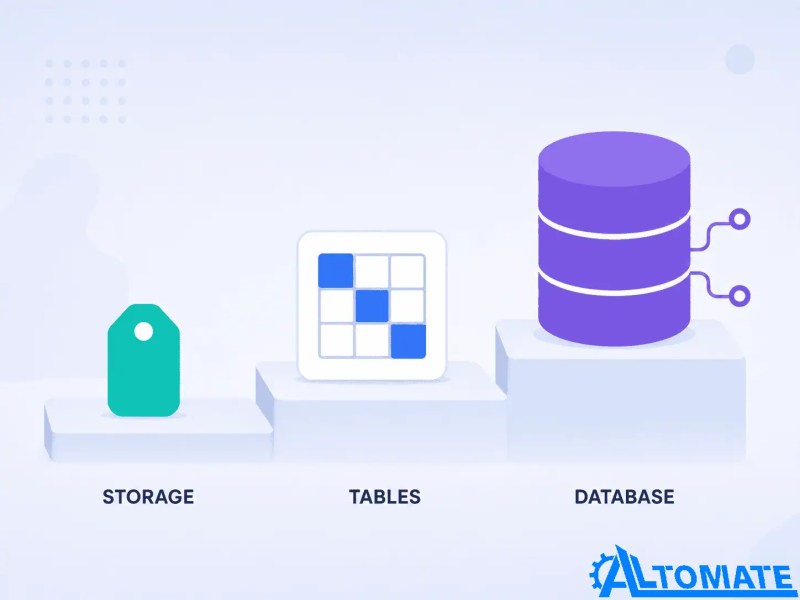
The comparison below illustrates where each storage option fits before workflow complexity forces an architectural change.
Choosing the Right State Layer as Complexity Grows
The operational rule is simple to state and easy to skip in practice: use the simplest storage layer that stays reliable as the workflow’s complexity and data volume increase — not the one that’s easiest to set up today. A single flag or counter, under a few hundred keys, with no need to query or filter: Storage by Zapier is genuinely the right call, and reaching for Tables or a database here is over-engineering a two-line problem. Structured records that need filtering, multiple fields, or will keep growing past a few hundred entries: Tables. Relational data, high write concurrency, or a system that needs to live outside Zapier’s UI entirely: a real database, integrated through a properly built automation layer rather than bolted on after the fact.
The upgrade path below summarizes when a workflow should move beyond Storage instead of stretching it past its intended role.

The mistake isn’t picking Storage — it’s picking it once and never revisiting the choice as the workflow’s shape changes.
Final Answer: Storage by Zapier is a lightweight key-value store for small pieces of state — counters, flags, lookup IDs — that a Zap can carry between runs or share across Zaps, available on Professional plans and above with no task-usage cost. It’s the right tool for simple, low-volume state, and the wrong one the moment a workflow needs to query records, hold multiple fields, or scale past a few hundred keys — at which point Zapier Tables or an external database is the more honest architecture.
Need a reliable system?
Related Resources
FAQs
Is Storage by Zapier included in the Free plan?
No. Storage by Zapier requires a Professional plan or higher. It’s not access-limited on Free — it’s simply unavailable to add as a step.
What happens to a stored value if nothing touches it for a while?
Zapier deletes keys that go untouched for two months. For anything seasonal or infrequently triggered, that’s worth planning around rather than discovering after the fact.
Can two separate Zaps read and write to the same store?
Yes, as long as both Zaps authenticate with the same store secret. That’s what makes cross-Zap shared state possible in the first place.
What’s the real difference between Storage by Zapier and Zapier Tables?
Storage holds single values you look up by an exact key you already know. Tables holds structured, multi-field records you can filter and search. If you need to ask “show me everything where X,” that’s a Tables question, not a Storage one.
Can I read or write Storage values without a Zap actually running?
Yes, through the Storage REST API at store.zapier.com, authenticated with your store secret — useful for connecting a script or external system to the same state a Zap uses.
Is there a limit on how many keys one store can hold?
Up to 500 keys per store, each key capped at 32 characters and each value capped at 25KB. Past that ceiling, the workflow needs a different storage layer, not a plan upgrade.
About the author

Miguel Carlos Arao is the Founder & CEO of Alltomate,
a Zapier Certified Platinum Solution Partner focused on Storage by Zapier state management, including key-value counters, cross-Zap lookup values, and Code step integration via the Storage REST API.
The patterns in this article come directly from building and troubleshooting Storage by Zapier-related systems across client engagements in recruitment intake pipelines and subscription billing operations.

Built by a certified Zapier automation partner
Explore more at
our Zapier platform guide,
Zapier Tables explained, and
our Zapier automation solutions.