
Published on July 10, 2026
Before connecting AI tools, use n8n automation services to scope the workflow, tool access, and approval points. For an existing workflow that already feels unstable, start with a free business process audit.
Quick Answer: n8n AI is reliable when the workflow controls what the model can see, decide, and execute. Use AI Agent nodes for bounded reasoning, Structured Output Parser nodes for predictable downstream data, MCP tools for controlled access, Chat Trigger and memory nodes for chatbot flows, and human approval before risky actions. The goal is not maximum autonomy. The goal is a workflow that validates inputs, limits tools, pauses when judgment is needed, and logs what happened.
For the underlying node controls, n8n’s Tools AI Agent documentation covers external tool use, specific output formats, max iterations, intermediate steps, and human review for tool calls.
Table of Contents
- Where n8n AI breaks after the demo works
- Which n8n AI pattern fits which workflow?
- Why the agent should not own the whole workflow
- How MCP changes access without removing guardrails
- Where chatbots and browser automation need stricter boundaries
- Where human review belongs in n8n AI workflows
- How model handoffs keep cost, speed, and judgment under control
- What production-ready n8n AI should leave behind
- Frequently asked questions
The mistake with n8n AI is treating the AI node as the product. A demo can summarize a lead, answer a chat message, trigger a tool, or scrape a page and look impressive in five minutes. However, production is where the uncomfortable questions show up: What happens when the lead record is missing context? What if the AI picks the wrong tool? Who approves the CRM update? Where does the model output go? What happens when the browser page changes, the MCP tool fails, or the customer asks something outside the prompt?
That is why practical n8n AI automation should start with workflow boundaries, not model excitement. If the platform itself is still new to you, start with what n8n is. Otherwise, the n8n workflow layer should control the trigger, validation, routing, retry behavior, approval path, and audit trail.
Where n8n AI breaks after the demo works
Most n8n AI demos fail to show the boring parts that decide whether the workflow survives real operations. During a demo, the prompt has clean input, the test record has the right fields, the chatbot question is predictable, and the tool call works once. Then the live workflow gets a half-filled form, a duplicated customer, an old CRM owner, an unexpected file format, a stale memory value, or a request that needs policy judgment instead of a generated answer.
Test Messy Inputs Before Launch
The breakdown usually starts when clean demo assumptions meet messy production inputs, as shown below.

In implementations we’ve built, the safest n8n AI systems treat the agent as a decision layer, not as the whole workflow. For example, a service business using n8n for inbound lead handling should not let the AI Agent create a deal, assign a rep, write the follow-up, and update the CRM without checks. Instead, the workflow should validate the source, confirm the contact record, retrieve the right context, ask the model to classify intent, and only then route the output into a controlled path.
This is the difference between “AI generated a response” and “the business can trust the response.” The first is simply a model result. By contrast, the second is an operating system with validation, permissions, fallback paths, and logs.
Which n8n AI pattern fits which workflow?
The fastest way to overbuild an n8n AI workflow is to use an agent for every decision. Some tasks need a full AI Agent with tools. Others only need a Basic LLM Chain, Text Classifier, Information Extractor, or Structured Output Parser. Once the business rule is clear, some tasks should not involve AI at all.
Match the AI Component to the Task
| n8n AI pattern | Use it for | Avoid using it for | Required control |
|---|---|---|---|
| AI Agent | Reasoning across approved tools and context | Unrestricted CRM updates, sends, or account changes | Tool limits, max iterations, review for risky tools |
| Structured Output Parser | Forcing predictable fields such as intent, confidence, summary, and next step | Loose natural-language output that another node must parse later | Schema, field validation, fallback branch |
| MCP Client Tool | Letting an n8n AI Agent call tools from an external MCP server | Broad external tool access without business rules | Credential scoping, approved tools, approval before write actions |
| MCP Server Trigger | Exposing selected n8n workflows or tools to MCP clients | Publishing broad internal workflows as callable tools | Authentication, narrow workflow tools, stable production URL behavior |
| Chat Trigger + Memory | Chatbot intake, triage, follow-up questions, and session context | Final policy, pricing, refund, or account decisions | Memory rules, source-of-truth lookup, escalation path |
| Ollama Chat Model | Local or lower-risk classification, internal drafting, testing, and privacy-sensitive experiments | High-stakes customer-facing actions without review | Model capability check, fallback model, approval before action |
This table matters because n8n AI reliability usually improves when the workflow uses the simplest capable AI component. For classification, do not automatically reach for a tool-using agent. For a CRM write, do not rely on a paragraph response from the model. Likewise, if a downstream node must act on the result, force the output into a predictable structure first.
Example structured output for a lead-routing workflow:
{
   "intent": "pricing_request",
   "confidence": 0.86,
   "summary": "Lead is asking for automation pricing and implementation timeline.",
   "recommended_owner": "sales_ops",
   "requires_human_review": true,
   "next_step": "draft_follow_up"
  }
This kind of output is easier for n8n to validate than a paragraph. The workflow can check whether the intent is allowed, whether confidence meets the threshold, whether human review is required, and which branch should run next.
Why the agent should not own the whole workflow
An n8n AI Agent can reason over input and use tools, but that does not mean it should be allowed to choose every business action. The agent should usually answer one constrained question: classify this request, choose the next allowed step, draft a response, extract fields, decide whether more context is needed, or call a specific tool from a limited set.
A fragile agent setup gives the model too many tools and too much responsibility. For example, it might search records, write notes, update a deal, send a message, and trigger a downstream workflow from the same reasoning step. That feels powerful until the model misunderstands a vague input and creates an operational mistake: a wrong owner assignment, a premature customer email, a duplicated ticket, or a CRM note that sounds confident but relies on partial context.
Separate Model Judgment From Execution
A stronger pattern is to split the AI step from the execution step. First, let the model produce structured output. Then let n8n validate that output before anything important happens. In a sales operations workflow, for example, the AI can classify a lead as “pricing request,” “support issue,” or “partnership inquiry.” n8n then checks whether the classification is allowed, maps it to the correct owner, and routes it through a normal workflow branch.
Practical split:
- AI decides: intent, confidence, summary, extracted fields, recommended next step.
- n8n controls: validation, permissions, CRM writes, notifications, retries, and escalation.
- Human approves: sensitive updates, customer-facing replies, exceptions, and low-confidence decisions.
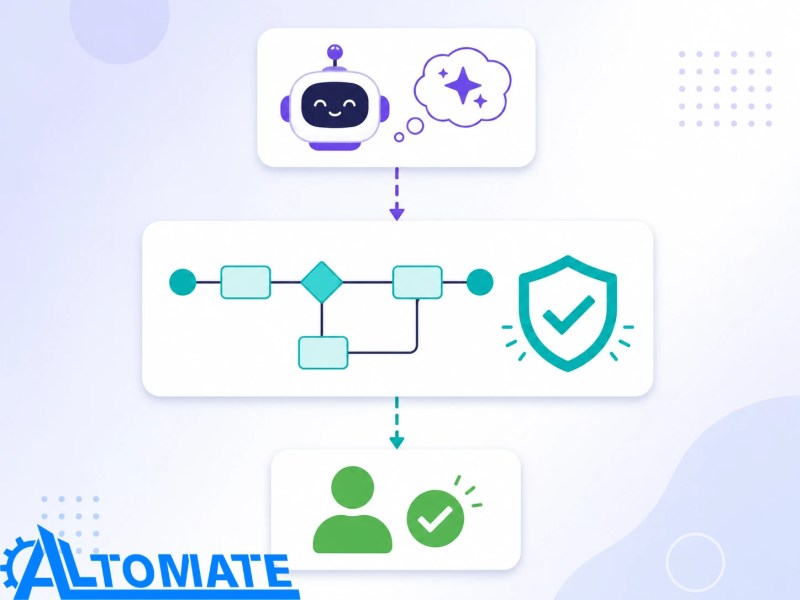
The safest pattern is to keep those responsibilities visibly separate before the workflow executes anything important.
Example approval payload before a CRM update:
{
   "proposed_action": "update_crm_owner",
   "record_id": "lead_18492",
   "current_owner": "unassigned",
   "recommended_owner": "sales_ops",
   "reason": "Lead asked for pricing and implementation timeline.",
   "requires_approval": true
  }
This gives the reviewer enough context to approve, reject, or reroute the action before n8n updates the CRM.
Across client workflows we troubleshoot, the most reliable AI Agent builds usually have boring constraints: short tool names, clear tool descriptions, scoped credentials, required output format, low max-iteration tolerance, and a fallback path when the model cannot produce usable structured output. Those controls do not make the workflow less intelligent. Instead, they make the intelligence usable.
How MCP changes access without removing guardrails
MCP can make n8n AI systems more flexible because it gives AI clients and agents a structured way to access tools. In n8n, there are two different directions to understand. The MCP Client Tool lets an n8n AI Agent connect to tools exposed by an external MCP server. The MCP Server Trigger lets n8n act as an MCP server so selected n8n tools or workflows can be called by MCP clients.
The direction of access matters because each side creates a different permission and validation problem. Therefore, the workflow should treat inbound tool access and outward workflow exposure as separate security decisions.

That distinction matters. With the MCP Client Tool, the production question is, “What external tools should this agent be allowed to call?” With the MCP Server Trigger, the production question is, “Which n8n workflows are safe enough to expose as callable tools?” Both sides need credential boundaries, narrow tool descriptions, predictable inputs, and logging.
Scope MCP Tools by Risk
MCP does not remove the need to define what a tool is allowed to do. For example, a tool that reads a CRM record has a different risk profile from one that updates a deal stage. Likewise, a tool that drafts a customer reply is different from one that sends it, while a tool that retrieves internal documentation is different from one that triggers account changes.
This is where the n8n workflow should act like a gate. The MCP-accessible workflow should expose narrow, named actions with predictable inputs and outputs. If the AI asks for “update customer status,” the workflow should still validate the customer ID, status value, requester context, and approval requirement before writing anything back.
For a deeper Claude-specific MCP setup, keep that as a separate build rather than crowding this page into a provider tutorial: n8n MCP Claude integration. If the workflow is more about coding assistance than MCP tool access, n8n Claude Code integration is the cleaner follow-up.
Where chatbots and browser automation need stricter boundaries
An n8n chatbot is usually safer when teams treat it as a triage layer, not a final authority. A Chat Trigger can collect the user’s question, pass it to an Agent or Chain, load relevant session context, ask follow-up questions, and return a response. That does not mean the chatbot should automatically promise pricing, approve refunds, change account status, or interpret policy exceptions.
Memory matters here. A chatbot that remembers context can produce a smoother conversation, but memory can also create stale assumptions. Therefore, the workflow should decide what it remembers, when it clears memory, and which facts it must revalidate against the source system. If a customer says “same address as last time,” the chatbot can use history to infer context, but n8n should still verify the address before triggering fulfillment or CRM updates.
Treat Browser Automation as a Fragile Data Layer
Browser automation adds another kind of fragility. n8n browser automation with Playwright-style patterns can be useful when a site has no clean API. However, the workflow now depends on page structure, load timing, selectors, authentication behavior, and anti-bot friction. That is not the same reliability profile as an API call.
A production browser step should capture enough evidence to debug the run later: target URL, selector used, extracted fields, timestamp, screenshot or raw HTML when appropriate, and a clear failure branch when an expected element is missing. This makes troubleshooting faster when the page structure changes. The AI should summarize or classify captured data after n8n confirms the page produced usable output. It should not freely browse, infer what changed, and trigger business actions without a validation layer.
A real-world example: a back-office team might use n8n to check a vendor portal, extract status updates, summarize exceptions with AI, and create internal tasks. The reliable version scopes the browser step, captures the raw result, compares it against expected fields, and asks AI to summarize only after n8n has confirmed the page produced usable data. For web-data workflows specifically, see n8n web scraping automation rather than turning every browser task into an AI agent.
Before adding another AI step: map the trigger, the system of record, the approval point, and the rollback path. If those are unclear, use business automation consulting to define the workflow logic before expanding the agent.
Where human review belongs in n8n AI workflows
Human-in-the-loop should not become a decorative “review later” step. Instead, place it at the point where a wrong action would create real business damage: sending a customer-facing message, updating a CRM field that affects ownership, approving a refund, changing a contract status, escalating a compliance-sensitive issue, or pushing data into another system of record.
A consistent pattern we see in this setup is that human review belongs before the expensive or irreversible action, not after the AI has already touched the CRM. For example, in a property-management-style support workflow, the AI can summarize a tenant message, classify it as maintenance, billing, lease, or complaint, and prepare a suggested response. The workflow should pause for review before sending the reply or updating the lease-related record.
Therefore, that approval checkpoint should sit directly before the action that would be hard to undo.

Give Reviewers Enough Context to Decide
The review step should also give the person enough context to decide quickly. For instance, a weak review task says, “Approve AI output?” A strong review task shows the original input, the extracted fields, the model’s confidence or reason, the proposed action, the affected record, and the fallback if rejected.
In n8n, this can mean requiring approval before specific AI Agent tool calls, routing the approval through a team channel, and only continuing the workflow after the reviewer accepts the proposed action. The human is not there to babysit every run. The human is there to handle risk where the model should not be trusted alone.
How model handoffs keep cost, speed, and judgment under control
Not every n8n AI workflow needs the strongest model for every task. Instead, a production setup can hand work between models based on risk and complexity. A local or self-hosted model path may be useful for lower-risk classification, internal drafting, or testing. A hosted chat model may be better for richer reasoning, customer-facing language, or complex extraction. A retrieval step might ground the answer before either model produces output.
The failure pattern is using one model as a universal worker. That usually creates either unnecessary cost or unreliable output. Simple routing logic, for example, does not need a premium reasoning model. Meanwhile, sensitive customer communication should not depend on a weak model with no review, and internal knowledge questions should not rely on memory alone when the answer needs source material.
Choose Models by Risk and Capability
For Ollama specifically, the safer wording is not “use Ollama for every agent workflow.” The practical question is whether the specific Ollama Chat Model node and model choice support the workflow pattern you need. If the task needs tool use, structured output, or agent behavior, confirm the node compatibility before designing the workflow around it. If the task is low-risk classification or internal summarization, Ollama can still be useful as part of a controlled model handoff.
For knowledge-heavy workflows, retrieval should be treated as its own system layer. The AI should answer from a controlled document set, not from loose assumptions. That is the cleaner boundary covered in n8n RAG workflow. In this article’s context, the important point is that retrieval, model selection, and action execution should stay separate enough that each can be tested independently.
A practical model handoff might look like this: n8n receives a form submission in n8n, checks required fields, uses a lower-cost model to classify intent, retrieves account context, sends the enriched prompt to a stronger model for draft response, pauses for review if confidence is low, then writes the approved summary back to the CRM. For CRM-specific OpenAI patterns, see n8n OpenAI CRM integration.
What production-ready n8n AI should leave behind
A reliable n8n AI workflow should leave behind more than a generated answer. Instead, it should keep a record of what came in, what context it used, what the AI decided, what the workflow validated, whether a person approved the action, what system it updated, and what happened when the run failed. For workflows that need a lightweight internal record layer, n8n data tables automation is a cleaner follow-up topic.
Keep a Complete Workflow Audit Trail
The final system should make each decision, approval, update, and failure visible after the run is complete.

This becomes more important as teams grow. One person can remember why a prompt was written a certain way. However, a team cannot rely on memory when workflows support sales, support, finance, or operations. The workflow needs naming conventions, ownership, test records, error alerts, version discipline, and clear escalation paths. For team-level workflow behavior, n8n for teams automation is the better next read.
The final test is not whether the AI step can produce an impressive answer. The test is whether the workflow behaves safely when the input is incomplete, the MCP tool fails, the browser page changes, the model is uncertain, the memory is stale, or the customer asks something the system should not answer automatically.
Final Answer: n8n AI is production-ready when AI is placed inside a controlled workflow instead of treated as the workflow itself. Use AI Agents for bounded reasoning, Structured Output Parser nodes for predictable downstream data, MCP Client Tool nodes for controlled external tool access, MCP Server Trigger nodes for exposing selected n8n workflows to MCP clients, Chat Trigger and memory nodes for chatbot flows, browser automation only where APIs are unavailable, model handoffs for cost and quality control, and human review before risky actions. The strongest setup is not the most autonomous one; it is the one that knows when to validate, pause, escalate, and log the result.
Need a reliable system?
Related Resources
- n8n Guide — for understanding how n8n workflows should be structured before adding AI.
- n8n OpenAI CRM Integration — for AI-assisted CRM updates, summaries, and record handoffs.
- n8n RAG Workflow — for grounding AI answers in controlled knowledge sources.
- n8n MCP Claude Integration — for a more specific MCP and Claude implementation path.
- n8n Web Scraping Automation — for browser and external-data workflows that need stricter reliability checks.
- n8n for Teams Automation — for scaling ownership, review, and operational workflow control.
Frequently asked questions
Can n8n AI agents safely update CRM records?
Yes, but only when the workflow limits what the agent can do. A safer setup has the AI Agent classify or draft the update, then n8n validates the record ID, required fields, confidence level, and approval requirement before writing to the CRM. For sensitive updates, human review should happen before the CRM action runs.
What is the difference between MCP Client Tool and MCP Server Trigger in n8n?
The MCP Client Tool lets an n8n AI Agent call tools from an external MCP server. The MCP Server Trigger lets n8n act as an MCP server so selected n8n tools or workflows can be called by MCP clients. The client pattern is about using outside tools; the server pattern is about exposing selected n8n capabilities.
Should n8n AI use a Structured Output Parser?
Use a Structured Output Parser when the AI result needs to feed another workflow step. It is especially useful for fields such as intent, confidence, summary, priority, requested action, and next owner. Without a structured output requirement, downstream nodes may receive a paragraph when they need reliable values.
Can n8n run an AI chatbot with memory?
Yes. n8n can run chatbot flows using Chat Trigger, Agent or Chain nodes, and memory nodes. The production issue is not whether memory works; it is whether the workflow knows what should be remembered, when stale memory should be ignored, and which facts must be checked against a source system before an action is taken.
Is Ollama useful in n8n AI automation?
Ollama can be useful for local or lower-risk AI tasks such as internal summarization, classification, and testing. Before using it in an agent workflow, confirm that the specific Ollama node and model choice support the behavior the workflow needs. For high-stakes customer-facing actions, use review, fallback logic, or a stronger model path.
Can n8n use Playwright for browser automation with AI?
Yes, but browser automation should be treated as a fragile data-capture layer, not as open-ended AI browsing. A safer Playwright-style workflow validates selectors, captures raw output or screenshots when useful, checks expected fields, and only then passes the result to AI for summarization, classification, or exception handling.
Where should human-in-the-loop approval go in an n8n AI workflow?
Human approval should happen before risky or irreversible actions, such as sending customer-facing messages, updating important CRM fields, changing account status, approving exceptions, or exposing sensitive data through a tool call. Reviewing after the action is already completed is usually too late.
About the author

Miguel Carlos Arao is the Founder & CEO of Alltomate,
a workflow automation consultancy and Zapier Certified Platinum Solution Partner that builds practical automation systems across Zapier, Make.com, and n8n, with a focus on n8n AI automation, including agent tool boundaries, MCP workflow access, structured model outputs, and human review checkpoints.
The patterns in this article come directly from building and troubleshooting n8n AI-related systems across client engagements in service operations and real estate operations.

Built by a certified Zapier automation partner
Explore more at
the n8n automation platform,
business automation consulting, and
n8n for teams automation.