
Published on
If you’re evaluating n8n alternatives for your business, start with automation consulting, explore our automation services, or request a business process audit to identify which platform fits your actual system requirements.
Quick Answer: Shortlist n8n alternatives by who will maintain the workflows and what the system needs to do. Consider Zapier for accessible app automation, Make for visual data processing, Activepieces for an open-source core with cloud and self-hosted options, Power Automate for Microsoft-centered processes, and Pipedream for workflows combining code and managed integrations. Test your required actions, failure recovery, and actual usage costs before migrating.
Table of Contents
- Why Teams Consider Leaving n8n
- Zapier: When Simplicity Is the System
- Make: Where Workflow Logic Gets Complex
- Activepieces: Open-Source Core with Hosting Choices
- Power Automate: The Microsoft Stack Default
- Pipedream and Developer-First Platforms
- How to Choose Based on System Fit, Not Feature Lists
- Final Answer
- Frequently Asked Questions
n8n gives teams a visual workflow builder, code-based customization, and a choice of managed cloud or self-hosted deployment. Its source is available under the Sustainable Use License, with separate enterprise licensing; it should not be described as unrestricted open-source software. For teams running their own instance, upgrades, backups, monitoring, and incident response are part of the ownership cost.
A useful comparison goes beyond connector counts and interface screenshots. Look at how each platform processes records, handles partial failures, stores state, and lets someone safely change a live workflow. A familiar interface does not mean the same automation will behave identically after migration.
This guide compares alternatives through those operational requirements. If you are new to the platform, start with what n8n is or our n8n automation guide. For a direct comparison of the three established platforms, see Zapier vs Make vs n8n. Here, the focus is deciding whether to replace n8n and what to test before choosing a replacement.
Why Teams Consider Leaving n8n
Consider a team whose workflows run reliably until a provider changes its API or a server fails during a critical sync. The migration question is then partly about ownership: who investigates the failure, restores service, and checks whether any records were missed or duplicated? Changing platforms helps only if it addresses the underlying problem.
For teams with infrastructure support, self-hosting n8n can provide useful deployment control and customization. Our n8n workflow examples and n8n’s official workflow template library show possible starting points. Templates still need testing, credentials, and an owner before they become dependable business processes.
When one developer also maintains the CRM and onboarding systems, infrastructure work competes with other priorities. Use the business process automation guide to define the process and its owner before choosing software. If hosting is the main problem, compare n8n Cloud with the cost of moving to another platform; staying with n8n may avoid an unnecessary rebuild.
Pricing can also prompt a review. n8n’s paid plans use workflow executions as their main usage measure, while other tools count tasks, credits, or compute. Compare the same workload across plans, including retries, polling, AI usage, and the features your team needs. Task counts and execution counts are not interchangeable.
Ownership check: Identify who monitors each workflow, maintains its credentials, and can recover a failed run. A growing workflow library needs clear ownership whether the platform is managed or self-hosted.
The operational failure pattern below shows what happens when workflow ownership, infrastructure maintenance, and debugging responsibility accumulate inside a growing automation system.

Not sure whether n8n is the right fit for your current stack? Explore our automation solutions and see how cross-platform workflow automation is typically structured before switching tools.
Zapier: When Simplicity Is the System
For a form submission that creates a CRM contact, a deal update that notifies a team, or a project milestone that starts an invoice, Zapier can be a practical option. Check that the connector supports the exact trigger and action you need. An app appearing in the directory does not guarantee every feature of its API is available.
Zapier’s visual editor and app integrations can make routine workflows easier for operations staff to maintain. The relevant test is whether the person who will own the workflow can understand its conditions, troubleshoot a failure, and make a safe change without relying on the original builder.
Zapier supports both conditional branching with Paths and repeated actions with Looping. It is not limited to linear workflows. Check the documented limits and test how branches, loop outputs, and shared records behave together before deciding whether a complex n8n workflow fits.
| Use Case | Zapier Fit | What to Check |
|---|---|---|
| Form → CRM entry | Strong | Duplicate handling requires extra logic |
| Invoice generation trigger | Strong | Approval rules, duplicate invoices, and the required app actions |
| Multi-step data transformation | Moderate | Loop limits, input mapping, and action usage per item |
| Complex branching with shared downstream steps | Test carefully | Whether shared logic needs reusable steps or a different workflow design |
Zapier’s plans include task allowances, so estimate the billable actions your workflow will perform. Repeated actions inside loops can increase usage even when the trigger count stays the same. See our cost of Zapier guide and Zapier automation examples. For team usability and implementation considerations, compare Make vs Zapier for business automation.
Make: Where Workflow Logic Gets Complex
Suppose an invoice contains several line items that need different downstream actions. Make’s Iterator can split the array into individual bundles for processing. You can then apply filters and route the bundles according to your business rules. Test an invoice with missing fields and an empty line-item list as well as the normal case.
Make provides a visual way to work with arrays, iterators, aggregators, and routing. That can suit workflows with variable-length input, but it does not make every design simpler. Check which data remains available at each step and where aggregation belongs in the flow.
The tradeoff is learning how bundles move through a scenario. Make has error-handling behavior and configurable recovery options; decide which errors should stop processing, be retried, or go to review. See Make vs Zapier for business automation for a business-focused comparison, or Zapier vs Make vs n8n for the broader platform decision.
Make now bills in credits. Many operations consume one credit, while some AI and advanced features use different amounts. Estimate consumption from a representative scenario, including each bundle processed and any AI-provider charges. A lower advertised plan price does not establish a lower cost for your workload.
Volume check: Test the expected number of records and the busiest likely batch. Inspect credit usage, provider rate limits, execution time, and recovery after a partially completed run. Compare those results with the same workload on your existing platform.
The diagram below illustrates how iterators, filters, and routing can organize the processing of variable input data.

Activepieces: Open-Source Core with Hosting Choices
Activepieces offers a core under the MIT open-source license, with commercial licensing for additional features. That distinction matters when comparing it with n8n’s licensing model. Check which edition includes the administration, collaboration, and governance features your team needs.
A managed cloud deployment can reduce infrastructure work. Self-hosting Activepieces still requires upgrades, backups, security, and operational monitoring; its deployment documentation makes those responsibilities part of the setup. Do not choose it on the assumption that self-hosting removes the maintenance burden.
Validate your integration requirements individually. Check the required trigger, action, authentication method, pagination, and error output for each connection. If an action is missing, determine whether an HTTP request or custom piece is feasible and who will maintain it. Connector totals and community popularity cannot answer those questions for your specific workflow.
For a fair comparison, build one representative workflow in Activepieces before committing to a migration. Include a normal run, incomplete input, a duplicate event, and a temporary API failure. Compare the results with your current n8n workflow and record any features or custom code that need rebuilding.
Power Automate: The Microsoft Stack Default
Power Automate is worth evaluating when your processes already depend on Microsoft 365 or Dynamics 365. Some existing subscriptions include limited automation rights, but that does not cover every scenario. Use Microsoft’s licensing FAQ to check the flow type, connectors, users, and application context. Premium access can be licensed through different arrangements; it is not a separate fee for every connector.
For SharePoint document routing, Teams notifications, and Outlook-based processes, assess Power Automate alongside your existing Microsoft administration and access policies. Test the exact connector actions and account permissions before treating it as the default. A Microsoft-centered workflow can still need additional licensing or custom integration work.
For a mixed software stack, map both Microsoft and non-Microsoft connections. Identify which connectors are standard or premium and whether a custom connector is needed. Check the full design against Microsoft’s user and capacity licensing options. Costs depend on the licensing arrangement and usage, rather than simply the number of third-party systems.
- Best fit: Microsoft 365 organizations automating internal approval flows, document routing in SharePoint, or Dynamics CRM updates
- Compare carefully: Your workflow spans several non-Microsoft systems or needs premium and custom connectors
- Watch for: The distinction between cloud flows and desktop flows — they have different execution models, different pricing, and different error behavior
Pipedream and Developer-First Platforms
Pipedream combines managed execution with prebuilt actions and custom code steps. Its workflow builder supports workflows using Node.js, Python, Go, or Bash alongside integrations. It has a visual builder; choosing it does not mean abandoning a workflow interface for code-only deployment.
For a team already writing substantial custom code in n8n, Pipedream is a candidate to test. Compare how it handles authentication, dependencies, state, execution limits, and recovery. Managed hosting reduces server administration, but it does not remove the need to maintain the code or respond when a provider changes an API.
The ownership tradeoff is how much of the business logic lives in code. Routine changes may require a developer if routing rules or thresholds are hard-coded. Exposing selected settings as inputs can make maintenance easier, but the team still needs clear responsibility for testing and deployment.
The illustration below shows a general approach to automation with code-managed logic, API events, and deployment controls. The balance between visual configuration and code depends on the platform and implementation.
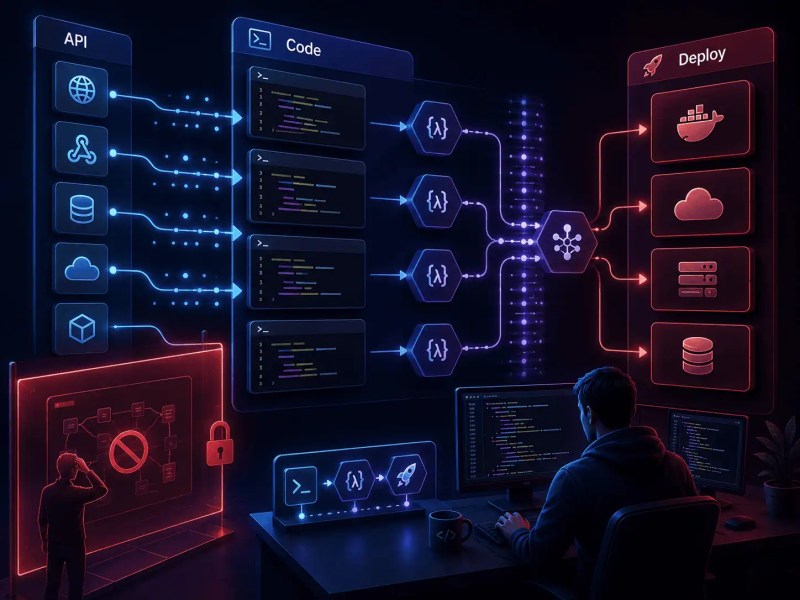
If AI steps are part of the requirement, evaluate them within the whole workflow: what happens when an output is incomplete, a model call times out, or a human needs to approve the result? Our AI vs traditional automation guide explains the distinction between model-driven steps and fixed business rules.
How to Choose Based on System Fit, Not Feature Lists
Use your existing workflows as the test cases for platform selection. A tool should support the actions you need, be maintainable by the assigned owner, and expose enough information to recover from failures. Assess those requirements before comparing interface preferences or connector totals.
Start with three questions. First, who will own maintenance: operations, an engineer, or an external partner? Second, what data must be handled, including arrays, files, missing fields, and duplicate events? Third, what must happen after a failed or partially completed run? Test each shortlisted platform against the same answers instead of assuming that a platform category guarantees the right fit.
Use the business process automation guide and our explanation of how to choose the right automation platform to structure the decision. Review common workflow automation mistakes and integration mistakes before rebuilding. If you need someone to maintain the resulting system, plan for ongoing automation support and optimization as part of the migration.
Migration check: Inventory triggers, credentials, custom code, stored state, dependencies, and connected workflows before estimating the effort. Migrate in controlled stages and reconcile outputs before retiring the old workflow. Workflow count alone does not provide a reliable migration timeline.
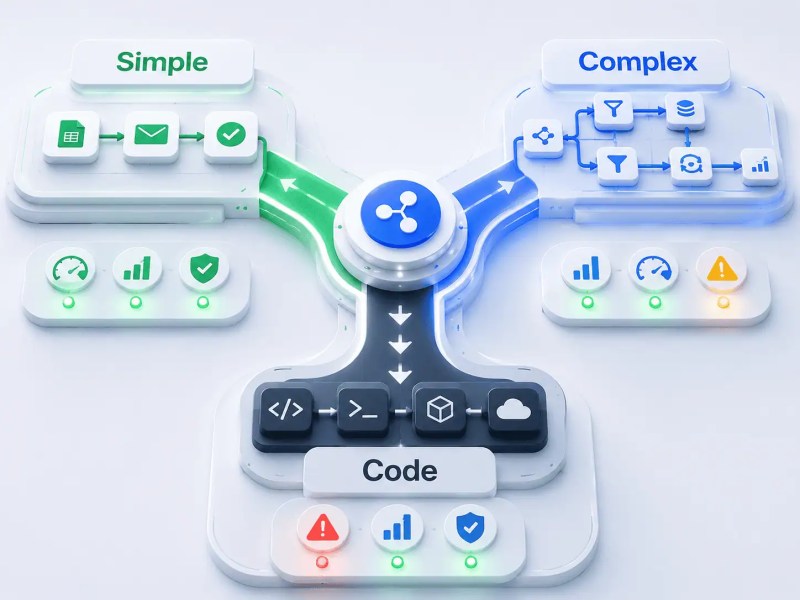
The framework below shows how different automation architectures fit different operational environments depending on workflow ownership, data complexity, and failure tolerance.
Final Answer: Choose an n8n alternative by testing the work your team actually needs to automate. Zapier is a candidate for accessible app workflows, Make for visual data processing, Activepieces for an open-source core with hosting choices, Power Automate for Microsoft-centered processes, and Pipedream for integrations that need custom code. Compare maintenance, licensing, usage costs, and failure recovery. If infrastructure is the only problem, evaluate managed n8n hosting before rebuilding on another platform.
Need a reliable system?
Start with a business process audit to identify which platform fits your operation before committing to a migration.
Related Resources
Frequently Asked Questions
Can I migrate existing n8n workflows to Make or Zapier without rebuilding them from scratch?
Plan to recreate and test the workflow logic. An n8n JSON export is useful documentation, but it is not a ready-to-run Make scenario or Zap. Check any migration tooling against your actual nodes, credentials, custom code, and stored state. Validate outputs and failure handling before switching production traffic.
Is Activepieces production-ready for business use, or is it still too early-stage?
Evaluate the edition and deployment against your business requirements. Check integration coverage, permissions, logging, support, backups, and recovery using a representative workflow. Managed hosting and self-hosting assign infrastructure responsibilities differently. A successful demo is not enough to establish suitability for a critical process.
At what workflow volume does Zapier’s per-task pricing become a problem?
There is no universal task threshold at which Zapier becomes uneconomical. Estimate billable actions per event, loop iterations, expected volume, and the plan features required. Compare that cost with implementation and maintenance on the alternatives. Set usage alerts against your own budget rather than relying on an arbitrary task-count cutoff.
What happens to my automations if I choose a platform that gets acquired or shuts down?
Keep a record of workflow logic, connected accounts, field mappings, and recovery procedures. Review export options and maintain backups of business data. Self-hosting can reduce dependence on a hosted runtime, but external APIs, licensing, updates, and security still need attention. An acquisition does not necessarily stop a service, and a large vendor does not guarantee permanent availability.
Do any n8n alternatives support AI agents or LLM-powered workflow steps natively?
Yes. For example, Make offers AI integrations and agent features. Check the specific model, action, and plan you need rather than assuming that every platform supports the same behavior. A model call and an agent that chooses tools are different designs. Test output validation, human approval, failure recovery, and total usage costs before using either in a critical process.
About the author

Miguel Carlos Arao is the Founder & CEO of Alltomate, a Zapier Certified Platinum Solution Partner focused on workflow automation platform selection and migration, including system-fit evaluation, execution model analysis, and cross-platform workflow design. This article is based on hands-on automation design, workflow systems, and real-world implementation experience.

Built by a certified Zapier automation partner
Explore the business process automation guide, compare Zapier vs Make vs n8n, or learn about our business automation consulting services.