
Published on May 26, 2026 • Last updated May 26, 2026
What Is No-Code AI? How It Works and Where It Fits in Business Automation
If your team is evaluating AI-powered workflows, explore Alltomate’s AI automation services or get a free business process audit to identify where no-code AI fits your operations.
Quick Answer: No-code AI is the use of AI capabilities — classification, extraction, generation, decision-making — inside visual workflow builders that require no programming. It lets operations teams deploy AI logic directly into business processes without engineering involvement. The risk isn’t whether it works; it’s whether the process underneath it is structured enough to support it.
Table of Contents
- What No-Code AI Actually Is
- How No-Code AI Works Inside a Workflow
- Where No-Code AI Fits in Business Operations
- Why Unstructured Inputs Break AI Steps
- Where Rule-Based Logic Ends and No-Code AI Begins
- When No-Code AI Creates More Work Instead of Less
- What to Evaluate Before Deploying No-Code AI
- Final Answer
- FAQs
Most teams hear “no-code AI” and assume it means dragging an AI block into a workflow and watching it think. The reality is more constrained — and more useful. No-code AI works when it’s placed inside a process that already has clean inputs, defined outputs, and a recovery path when the model returns something unexpected. Without that foundation, AI steps become the most expensive failure point in an otherwise stable workflow.
This guide explains what no-code AI is at the system level, how it behaves inside live workflows, and where it creates problems that aren’t obvious until the process is running at scale.
What No-Code AI Actually Is
No-code AI refers to AI capabilities — text classification, data extraction, content generation, decision logic — made available through visual platforms that don’t require custom code to operate. Instead of an engineer writing model inference calls, an operations lead configures a step: input goes in, AI output comes out, and the next action triggers.
The platforms that carry this capability — Zapier, Make, n8n, and others — expose AI steps the same way they expose any other app connector. You select the model, write a prompt, map the input fields, and define what happens with the response. The underlying API call is abstracted away. Zapier’s documentation on AI-powered automation covers how this configuration works inside their visual workflow builder.
What makes this operationally significant isn’t that AI is now accessible. It’s that the people who understand the business process — not the people who understand the model — can now control how AI fits into it. That shift changes who owns the workflow and how quickly it can be adjusted.
The failure mode that matters here is false accessibility. Because the interface is simple, teams underestimate what’s required for the AI step to produce reliable output. The visual simplicity of a platform hides the complexity of prompt design, output parsing, and edge case handling. That gap is where most no-code AI deployments stall.
This post covers no-code AI specifically — meaning AI accessed through visual builders without code. For the broader category of AI in business automation and where it fits in a system architecture, see What Is AI Automation.
Scale Effect: A single misconfigured AI prompt in a high-volume workflow doesn’t produce one bad output — it produces thousands. Because no-code AI steps run inside automated pipelines, errors propagate at the speed of the trigger, not the speed of human review.
How No-Code AI Works Inside a Workflow
A no-code AI step sits between two other steps: something that produces input and something that consumes output. The AI step’s job is transformation — taking unstructured or semi-structured data and returning something the next step can use.
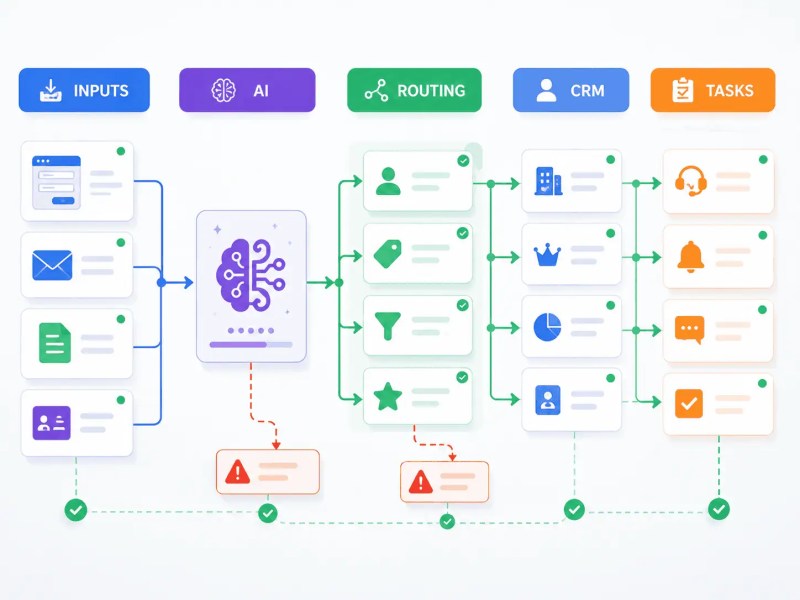
In practice, that looks like this: a form submission triggers a workflow. The form response goes into an AI step that classifies the request type and extracts key fields. The classified output routes to the right team, with the extracted fields written to the CRM. No manual triage. No copying between systems.
The mechanism underneath that is a prompt passed to a language model via API, with the form data injected as context. The model returns a response. The platform parses the response and maps it to the next step’s input fields.
Three things determine whether this works reliably: how well the prompt constrains the model’s output format, how consistent the input data is, and whether the next step can handle variability in what the AI returns. Most no-code AI setups get the first point partially right and ignore the other two entirely.
Operational note: If an AI step returns a response the next step can’t parse — wrong format, unexpected phrasing, missing field — the workflow either errors out silently or writes garbage data downstream. Neither outcome is visible unless there’s monitoring on the output, not just the trigger.
The architecture below shows where the AI step actually sits inside a workflow. The AI is not the workflow itself — it is a transformation layer between incoming data and downstream business actions.
If you’re mapping where AI steps belong in your current workflows, the AI automation guide covers the decision logic for when AI adds value versus when rule-based automation is sufficient.
Where No-Code AI Fits in Business Operations
The operational areas where no-code AI produces consistent results share a common characteristic: the input has enough signal for the model to work with, and the output feeds into a step that has clear acceptance criteria. When those conditions exist, no-code AI replaces a category of manual judgment — not all judgment, but the repetitive classification and extraction work that slows humans down.
| Use Case | What the AI Step Does | What Fails Without Structure |
|---|---|---|
| Support ticket routing | Classifies issue type, urgency, and department | Tickets routed to wrong queue when language is ambiguous |
| Invoice processing | Extracts vendor, amount, date, line items | Non-standard invoice formats return partial or hallucinated data |
| Lead qualification | Scores and segments inbound inquiries | Inconsistent form inputs produce inconsistent scores |
| Email triage | Categorizes, summarizes, and drafts replies | Tone mismatch or off-brand replies when prompt lacks constraints |
| Contract review intake | Flags missing fields, surfaces key terms | Model misses context-dependent clauses without domain-specific prompting |
These aren’t the only places no-code AI fits — but they’re the areas where the input/output relationship is clear enough to define success. The broader category of “use AI to make decisions” is where teams create problems, not solve them. For a deeper look at AI-specific use cases, what AI automation means at the system level covers where AI logic belongs in a broader automation stack, and these AI automation examples for business show how the use cases above play out across different operational contexts.
The question of which business functions benefit most from this kind of AI logic isn’t uniform — it depends on data volume, input consistency, and how well-defined the output criteria are. This breakdown of which business functions benefit most from AI automation maps the decision by department and workflow type.
Why Unstructured Inputs Break AI Steps
Start here: the most common reason no-code AI workflows fail isn’t the model. It’s what goes into the model.
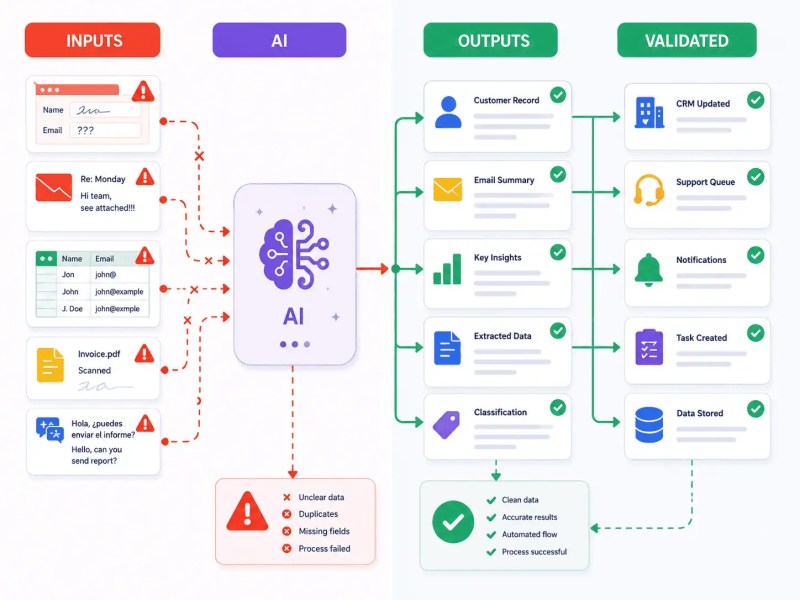
Language models produce probabilistic output — a characteristic OpenAI’s own text generation documentation addresses directly, explaining how output consistency depends on the clarity and structure of the input prompt and context. Give a model vague, inconsistent, or multi-format input and it returns vague, inconsistent output. That’s not a flaw — it’s how the technology works. The problem is that most no-code AI setups treat the AI step as the place where structure gets created, rather than the place where structure gets processed.
If a form allows free-text responses, if emails arrive in multiple languages and formats, if data comes from three different CRMs with inconsistent field conventions — the AI step inherits all of that variability and amplifies it. The output isn’t consistently structured because the input wasn’t.
The downstream effect is data that looks complete but isn’t. A CRM record gets written with fields that are partially AI-generated and partially wrong. A routed ticket goes to the right queue but with the wrong priority. Nobody catches it until a customer escalates or an audit reveals the pattern.
- Input validation should happen before the AI step, not after
- Prompts should explicitly constrain output format — JSON, labeled fields, fixed categories
- Output parsing should include a fallback: if the response doesn’t match the expected format, route to a human or halt the workflow
- Volume testing matters — prompts that work at 10 records often break at 1,000 with edge cases
Scale Effect: At low volume, a model returning slightly inconsistent output is a minor inconvenience. At high volume, it’s a data quality problem that costs hours of cleanup and erodes trust in the entire workflow.
The comparison below shows why input quality matters more than most teams expect. The same AI model can produce reliable automation or workflow failure depending entirely on the structure of the incoming data.
Where Rule-Based Logic Ends and No-Code AI Begins
Traditional automation follows rules. If field A equals “enterprise,” route to queue B. If date is past due, send reminder. The logic is deterministic — the same input always produces the same output. That predictability is the entire value proposition. For a full grounding in how rule-based workflows are structured, the workflow automation guide covers the underlying mechanics before AI enters the picture.
No-code AI introduces probabilistic logic into that system. Instead of “if field A equals enterprise,” the AI step reads the full context and infers the category. That’s useful when the input is too variable for fixed rules to handle. It’s a liability when deterministic logic would have worked fine.
The failure scenario that gets missed: teams replace rule-based routing with AI-based routing because the AI handles more cases. True. But it also introduces failure modes that rules don’t have — hallucinated categories, confidence drift over time, prompt sensitivity to phrasing changes. A rule either fires or it doesn’t. An AI step fires and returns something, even when that something is wrong.
The right system uses both. Rules handle what’s deterministic. AI handles what’s variable. The design question isn’t “AI or no AI” — it’s “which steps actually require judgment, and which steps just look like they do?” For a direct comparison of these approaches, this breakdown of AI vs. traditional automation maps the decision criteria clearly.
When No-Code AI Creates More Work Instead of Less
The assumption is that adding AI to a workflow reduces manual effort. Sometimes it does. But there’s a category of no-code AI deployments that creates a new class of manual work: reviewing AI output.
This happens when teams add AI to a process that doesn’t have clear success criteria. If no one can define what “correct” looks like for the AI step’s output, then someone has to check every output manually — which is more work than the original process, not less.
It also happens when the AI step is asked to do too much. A single AI call that classifies, extracts, summarizes, and scores in one prompt returns output that’s harder to validate than four separate steps with defined outputs. Each capability can fail independently, but they all fail together.
Watch for this pattern: If your team is spending time reviewing AI output before it can be trusted downstream, the AI step isn’t saving time — it’s shifting where the manual work happens. The fix is tighter prompt constraints and a defined confidence threshold, not more AI steps.
The no-code AI implementations that reduce workload are the ones where the AI step’s output is trusted enough to trigger the next step automatically — no human in the loop on every record. Getting there requires testing, iteration, and a process that was already reasonably consistent before AI touched it.
The failure pattern below appears when teams deploy AI before defining what success looks like. Instead of eliminating work, the workflow creates a growing review queue that becomes its own operational bottleneck.

What to Evaluate Before Deploying No-Code AI
Teams that deploy no-code AI successfully aren’t the ones with the most sophisticated tools. They’re the ones that evaluated the process before adding AI to it — specifically whether the process is structured enough for a visual, no-code AI step to handle reliably, without custom model logic or engineering support. The evaluation is simple in concept, but most teams skip it.
- Input consistency: Is the data entering the AI step clean and consistently formatted? If not, fix that first.
- Output definition: Can you write down exactly what a correct AI response looks like? If not, the step isn’t ready to be automated.
- Failure path: What happens when the AI returns something unexpected? Is there a fallback, or does the workflow silently continue with bad data?
- Volume behavior: Has the AI step been tested at realistic volume with real edge cases, not just ideal inputs?
- Review cost: If someone has to review every output, is the AI step saving time or just changing where the work happens?
This evaluation also determines which platform is appropriate. High-volume, structured data pipelines may outgrow consumer-grade no-code tools quickly. The AI workflow automation solutions page covers what implementation looks like at different operational scales. If the evaluation reveals process gaps before deployment, automation consulting is the right next step before committing to a build.
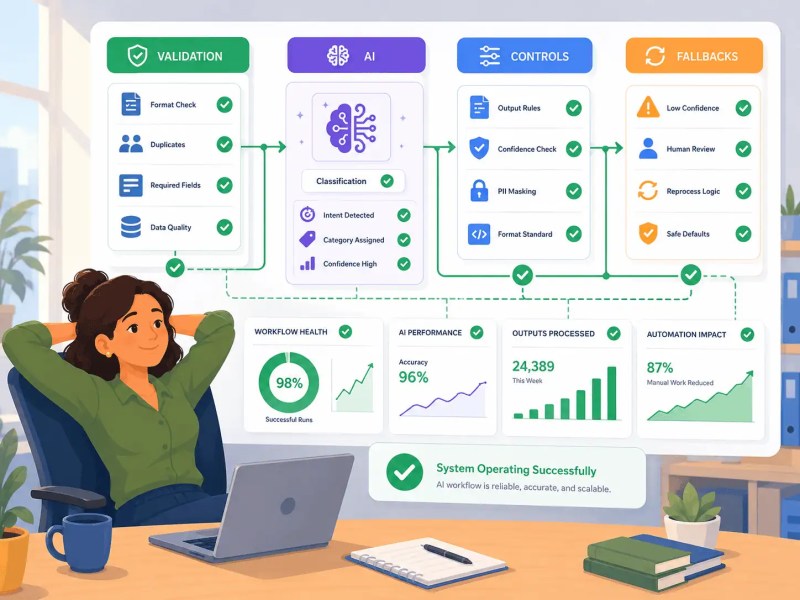
A successful deployment combines validation, AI processing, output controls, and fallback logic into a single operating system. Removing any one of these layers increases the chance of unreliable automation.
For teams already using Zapier or n8n, the AI capabilities built into those platforms are the fastest path to deployment — but only after the process underneath them has been reviewed. A common lesson across automation programs is that automating a flawed process often scales the flaw rather than fixing it. Process design should be reviewed before AI is added to the workflow.
Final Answer
Final Answer: No-code AI is the use of AI capabilities — classification, extraction, generation, decision logic — inside visual automation platforms that don’t require engineering to configure. It works when the process has consistent inputs, defined output criteria, and a fallback for unexpected responses. It creates problems when teams treat it as a substitute for process design rather than an addition to it. The platforms are accessible. The discipline required to use them reliably is not automatic — it has to be built into the workflow around the AI step.
Need a reliable system?
Get a free business process audit to identify where no-code AI fits your operations and what process work needs to happen first.
Ready to build now? Explore AI-powered automation services or work with an automation consultant to scope the right deployment for your team.
Related Resources
- AI Automation Guide
- Workflow Automation Guide
- AI vs. Traditional Automation
- What Is AI Automation
- When to Use AI in Workflows
- AI Automation Examples for Business
- Which Business Functions Benefit Most from AI Automation
- AI Workflow Automation Solutions
- AI Support Ticket Routing
- AI Data Extraction
- AI-Powered Automation Services
- Automation Consulting
FAQs
Does no-code AI replace the need for a developer entirely?
For workflow configuration, yes — platforms like Zapier and n8n handle the API layer. But for custom integrations, complex output parsing logic, or AI steps that need dynamic context injection, engineering involvement is still required. No-code covers the majority of business workflow use cases, not all of them.
Can no-code AI workflows handle sensitive or regulated data?
Depends on the platform and the model. Data passed to a third-party AI model goes through that provider’s infrastructure. Teams in regulated industries (healthcare, finance, legal) need to confirm whether the workflow is compliant before sending sensitive records through an AI step. Some platforms offer enterprise data handling agreements; most consumer-tier plans do not.
What’s the difference between an AI step and a rule-based step in a no-code workflow?
A rule-based step follows fixed conditional logic — the same input always produces the same output. An AI step interprets the input using a language model, which means it handles variation but introduces probabilistic output. The right architecture uses rules where the logic is deterministic and AI where genuine interpretation is needed.
Why do no-code AI prompts that work in testing fail in production?
Testing typically uses clean, representative inputs. Production introduces edge cases, typos, multi-language text, missing fields, and format variation. Prompts that aren’t written to constrain output format and handle variability produce inconsistent results when real-world data volume exposes inputs that weren’t in the test set.
How do you measure whether a no-code AI step is actually working?
Track output accuracy against a defined correct answer on a sample of records. If the AI step is classifying, compare its classifications to what a human would decide on the same inputs. If it’s extracting, verify the extracted fields against the source document. Accuracy below a defined threshold is a signal to refine the prompt or add a human review step before downstream automation continues.
About the author

Miguel Carlos Arao is the Founder & CEO of Alltomate, a Zapier Certified Platinum Solution Partner focused on no-code AI integration and business process automation, including AI step design, workflow validation logic, and operational deployment at scale. This article is based on hands-on automation design, workflow systems, and real-world implementation experience.

Built by a certified Zapier automation partner
Explore more at
AI-Powered Automation Services,
AI Automation Guide, and
AI Workflow Automation Solutions.