
Published on June 4, 2026
Quick Answer: Apollo.io data quality is not just about whether a record exists. The real issue is whether the contact stays accurate after enrichment, passes verification, and survives CRM sync without being stripped, duplicated, or downgraded by downstream rules.
Table of Contents
Check the cleanup workflow in CRM cleanup automation and verify the current process with a free business process audit.
Apollo.io data quality becomes a systems problem as soon as the data leaves Apollo. The contact may look complete inside the source tool, but the actual failure often appears later in the CRM, where required fields, dedupe rules, and formatting checks decide whether the record is usable.
What Apollo.io data quality breaks on first
The first break is usually not the headline field like email. It is the structure around the record: missing company metadata, inconsistent job titles, partial phone coverage, and contacts that were enriched from different snapshots of the same account. In implementations we have built for outbound teams, the record looks fine at the point of capture, but it becomes unstable once it enters a CRM that expects cleaner field logic.
That is why Apollo.io data quality should be judged by what survives the handoff. A contact that can be exported is not necessarily a contact that can be routed, assigned, scored, or sequenced without manual repair. Many organizations solve this through CRM update automation that continuously reconciles record changes before they create downstream issues. For a broader CRM lens, see the CRM automation guide.
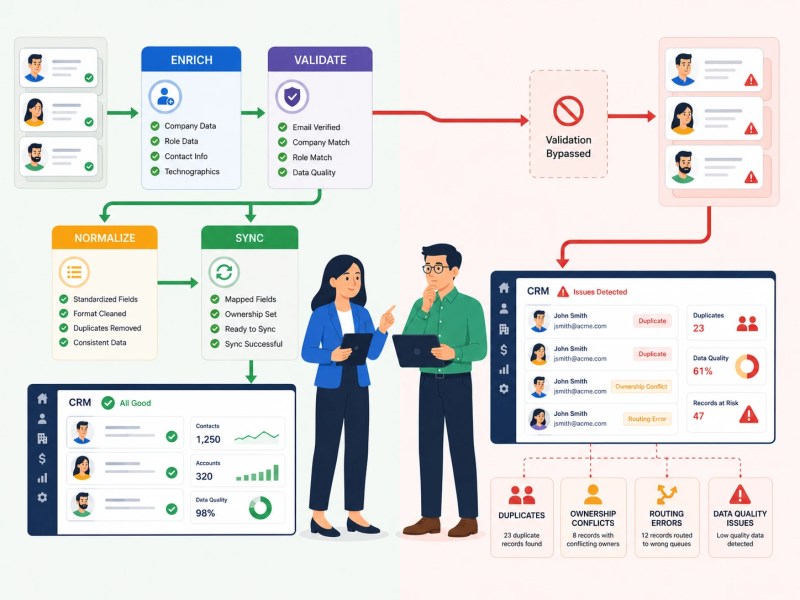
The contrast below illustrates why records that appear complete inside Apollo can still become problematic once CRM validation rules are applied.

Why stale records survive the import step
Stale data survives because import workflows rarely validate for business relevance. A record can still pass an email check while the person has changed roles, the company has changed domains, or the account has shifted out of the target market. HubSpot’s database decay research notes that 22.5% of B2B contact data becomes outdated every year, which helps explain why verification alone is rarely enough. Across the client work we have done in B2B SaaS and recruitment, that mismatch is what creates the false sense that the list is healthy.
This is where Apollo.io data quality becomes operationally expensive. Once stale records are mixed into active sequences, sales teams spend time on bad replies, bounced outreach, and manual cleanup. Salesforce’s State of Sales research reports that sales representatives spend only a minority of their time actively selling, making inefficient processes and manual data correction particularly costly. The closest adjacent problem is the one covered in CRM data cleanup strategies, but this article stays on the Apollo side of the handoff.
Need a reliable system?
Where enrichment, verification, and CRM rules diverge
Apollo can enrich a record, but enrichment is not the same thing as validation. As discussed in Apollo’s guide to RevOps data enrichment, enrichment is only one part of maintaining usable CRM records. Verification only answers a narrow question about whether one field appears usable. CRM rules ask a different question: does this record match the format, ownership, territory, lifecycle stage, and deduplication logic already in place?
In practice, that divergence is where Apollo.io data quality gets misread. A team assumes the platform is “bad” when the real failure is a mismatch between source enrichment and destination governance. This is a common pattern behind several CRM mistakes, where teams blame a source system instead of examining downstream validation and governance rules. This is the same kind of break we see in CRM migration work, which is why CRM migration and sales automation case study is relevant evidence rather than a side note.
What to check before trusting Apollo records
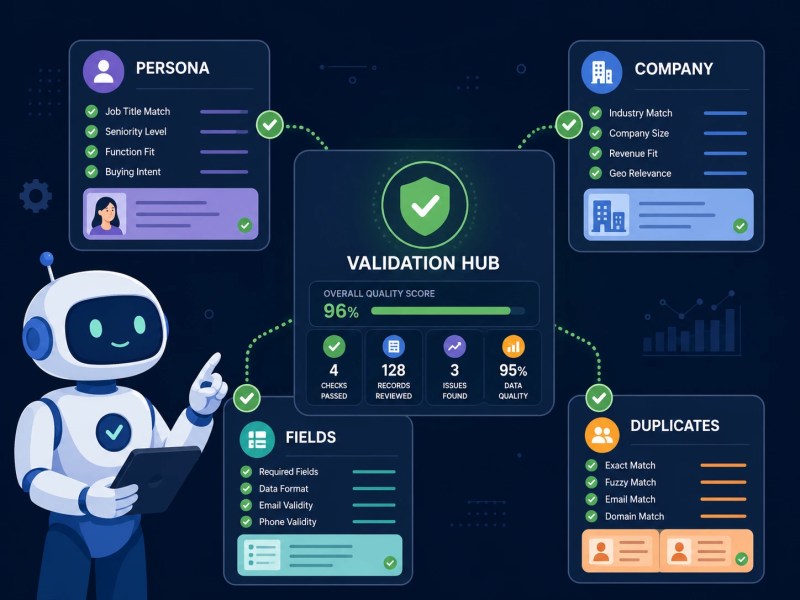
The check is simple, but it has to be applied in order. First, confirm that the contact still matches the target persona. Then check whether the company data is current enough to support routing. After that, compare the record against CRM-required fields and dedupe keys. If those three layers do not agree, the record should be treated as provisional, not ready.
| Check | What to Verify |
|---|---|
| Persona fit | Job title and role still match the target buyer profile. |
| Company relevance | Company domain, size, and industry are still current. |
| Required CRM fields | Ownership, lifecycle stage, and routing fields are populated. |
| Duplicate risk | Email, company domain, and record identifiers match existing records. |
A useful rule is to validate the fields that drive action, not every field equally. If a field does not affect routing, segmentation, or follow-up, it should not slow the workflow down. That is where Apollo.io data quality shifts from a data debate to a workflow decision.
The validation framework below highlights the four checks that have the greatest impact on downstream CRM quality.
How Apollo fits into a cleanup workflow
Apollo should sit upstream of a cleanup layer, not replace it. The best setup is usually: enrich, validate, normalize, then sync. Teams struggling with downstream record mismatches often discover the issue is not Apollo itself but how systems exchange data, which is covered in how to sync CRM systems. When that order is reversed, bad formatting and duplicate records spread into the CRM faster than anyone notices. In systems we have built for outbound and lead-gen teams, the issue rarely sits in one tool; it sits in the gap between them.
That is also where adjacent automation work belongs. If Apollo is feeding a wider CRM system, the next step is usually contact sync automation or CRM automation services, not more manual list review. For a practical outbound example, the pattern also appears in recruitment lead generation automation case study.
For example, an Apollo record may identify a contact as a VP of Marketing with a valid email address, but if the company has changed domains or already exists in the CRM under a different record structure, the import can create duplicate accounts, ownership conflicts, and incorrect routing. The issue is not that Apollo found the wrong contact. The issue is that downstream systems were not prepared to validate and reconcile the record before it entered active workflows.
The workflow below shows the difference between validating records before synchronization and allowing records to enter the CRM without quality controls.
Need Help Implementing Apollo Correctly?
Apollo.io data quality is often limited by what happens after the record leaves Apollo. As a certified Apollo implementation and automation partner, Alltomate helps businesses connect Apollo with CRM systems, automate enrichment workflows, reduce duplicate records, and improve downstream data quality.
If you’re evaluating Apollo or planning a rollout, you can start with Apollo.io and then use our free business process audit to identify potential data quality and CRM integration issues before they become operational problems.
Final Answer: Apollo.io data quality is only reliable when the record stays clean after enrichment, verification, and CRM sync. The main failure is usually not Apollo alone; it is the point where source data and CRM rules stop agreeing. Treat Apollo as an upstream input, then validate the fields that actually control routing, deduplication, and follow-up.
Need a reliable system?
Related Resources
FAQs
Is Apollo.io data quality good enough on its own?
No. It usually needs a validation and normalization layer before the data is trusted inside a CRM.
What is the biggest risk with Apollo records?
The biggest risk is not missing data alone. It is data that looks valid in Apollo but fails once CRM rules, dedupe logic, or routing logic are applied.
Can Apollo.io create duplicate records in a CRM?
Yes. Duplicate records can occur when imported contacts are not matched against existing CRM deduplication rules. This is especially common when records use different email formats, company domains, or field structures across systems.
What should be checked first?
Start with the fields that affect action: persona fit, company relevance, and CRM-required formatting.
About the author

Miguel Carlos Arao is the Founder & CEO of Alltomate, a Zapier Certified Platinum Solution Partner focused on Apollo.io data quality workflows, including contact verification, field normalization, and CRM sync checks. The patterns in this article come directly from building and troubleshooting Apollo.io data quality-related systems across client engagements in B2B SaaS and recruitment.

Built by a certified Zapier automation partner
Explore more at
CRM data cleanup strategies,
automate CRM cleanup, and
the CRM automation guide.