
Published on September 5, 2026
Quick Answer: Automation debt is the maintenance burden that builds up when business automations become undocumented, duplicated, ownerless, tightly coupled, or unnecessarily complex. It usually appears gradually: small fixes accumulate, dependencies become harder to trace, and workflows that once saved time begin consuming it. Reducing automation debt means identifying critical workflows, removing unnecessary complexity, documenting ownership and dependencies, consolidating duplicates, and improving governance without replacing everything at once.
Table of Contents
- What automation debt actually means
- Warning signs your automation estate is becoming brittle
- How automation debt accumulates
- The hidden cost is usually operational, not just technical
- Why platform sprawl makes maintenance harder
- Ownerless workflows are a governance problem
- How to reduce automation debt without disrupting operations
- Sometimes the correct fix is less automation
- Treat automations as systems with a lifecycle
- Frequently asked questions
Automation debt rarely begins with a bad automation. It usually begins with a useful one.
A team automates a repetitive handoff, adds another workflow when requirements change, creates a workaround for an exception, and eventually connects several more tools around the original process. Each individual change may be reasonable. The problem appears later, when nobody can confidently explain which workflows still matter, which ones duplicate each other, or what will break if a field, app, account, or business rule changes.
That accumulated maintenance burden is automation debt, sometimes described as workflow automation technical debt. It is less about whether an automation runs today and more about how difficult it will be to understand, repair, change, or retire tomorrow.
What automation debt actually means
Automation debt is the operational and technical burden created when automated workflows become harder to maintain than their original design anticipated.
A workflow can continue succeeding every day while still accumulating debt. For example, an automation might reliably move data between two systems but depend on a specific user account, undocumented field names, several filters, and a manually maintained lookup table. Nothing is technically broken yet. But the cost of safely changing that workflow has increased.
This is why automation debt should not be confused with a simple workflow failure. Failure is an event. Debt is a condition that makes future failures and changes harder to manage.
It also differs from the broader question of whether a company should automate a complete process or only individual tasks. That distinction matters because isolated workflows can eventually become part of a much larger operational dependency chain. The difference is explored further in workflow automation vs. process automation.
Warning signs your automation estate is becoming brittle
The clearest warning sign is not necessarily a high error rate. Mature automation debt often appears as hesitation.
Teams become reluctant to change a workflow because they are unsure what depends on it. A minor request such as renaming a CRM field turns into an investigation across several tools. An employee leaves and nobody knows whether automations are authenticated through that person’s account. Two workflows appear to perform the same task, but nobody wants to disable either one.
Other common warning signs include:
- No clear owner: a workflow is important, but no person is accountable for its behavior or maintenance.
- Duplicate logic: multiple automations perform similar filtering, routing, enrichment, or notification steps.
- Frequent patching: every change produces another condition, branch, lookup, delay, or workaround.
- Poor visibility: troubleshooting requires opening several platforms because there is no clear dependency map.
- Manual babysitting: staff regularly check whether an automation completed even though the workflow is supposed to reduce manual work.
- Unknown dependencies: changing a source field, API credential, user permission, or destination table can have unpredictable downstream effects.
- Fear of retirement: nobody can prove an old workflow is still required, but nobody is comfortable turning it off.
A workflow does not need to stop executing to be unhealthy. A changed field mapping, for example, may allow a run to complete while still producing incomplete or incorrectly routed data downstream. Reliable maintenance therefore needs visibility into expected business outcomes, not only whether an automation platform reports a successful run — as Zapier’s own run status documentation notes, a “Success” status confirms only that a step completed without a hard error, not that the resulting data was correct. The difference between the two failure modes is shown below. Where failure visibility itself is the gap, automated workflow error monitoring is a narrower fix than a complete governance overhaul.

These are workflow maintenance problems, but they are also signs that automation has moved beyond a collection of isolated conveniences and become operational infrastructure.
Automation debt grows one reasonable workaround at a time
Automation complexity usually increases incrementally.
Consider an illustrative sales operations example. A company creates a workflow that sends new form submissions into its CRM. Later, leads from one region need a different owner, so a routing condition is added. Then certain submissions need enrichment before assignment. Later, a second form uses different field names, so a transformation step is introduced. A spreadsheet becomes the temporary source for territory rules.
Six months later, the workflow may still function. But a simple lead-routing automation now depends on the form structure, CRM schema, enrichment service, territory spreadsheet, user permissions, and several branching rules. The progression is easier to see traced step by step, as shown below.

The automation did not suddenly become badly designed. Its environment changed, and each local adjustment increased the number of dependencies that must remain understood and maintained.
This is one reason automation maintenance needs to be considered during initial design rather than after something breaks.
The hidden cost is usually operational, not just technical
The obvious cost of brittle automation is repair time. The more significant cost can be uncertainty.
When a workflow’s behavior is unclear, routine business changes become more expensive. Teams spend time tracing dependencies before modifying processes. Staff create manual workarounds because they do not trust the automation. New employees struggle to understand why certain steps exist. Small changes require disproportionately careful testing.
Automation debt can therefore affect the total cost of automation long after the original workflow has been deployed. Licensing and implementation are only part of the equation; ongoing governance, troubleshooting, modification, monitoring, and replacement also matter. Those broader cost considerations are discussed in Alltomate’s business process automation cost guide.
Debt also compounds. An undocumented workflow copied to solve a second problem produces two systems that must eventually be understood. If both are then modified independently, their behavior drifts further apart.
Platform sprawl turns small workflow changes into dependency problems
Using several automation platforms is not inherently a problem. Different tools can legitimately serve different requirements.
Automation sprawl becomes risky when similar business logic is distributed across platforms without clear boundaries.
For example, one workflow might start in a SaaS application’s native automation feature, call another workflow in a general automation platform, update a spreadsheet, trigger a webhook, and finally invoke a separate process for notifications. Each individual component may be simple. The combined system is not.
Cloud automation makes these architectures practical, but it also creates more external dependencies to understand. Authentication, permissions, application schemas, webhook behavior, and connected accounts all become part of the maintenance surface — even a routine vendor-side change, such as a shortened OAuth token lifetime, can quietly affect a connected workflow if credential handling isn’t actively maintained. The broader mechanics are covered in the cloud workflow automation guide.
Many maintenance problems begin as common integration mistakes: duplicated logic, unclear system responsibilities, or dependencies that were never documented because the original workflow seemed simple.
The goal is not to force every workflow into one platform. It is to know why each platform is being used and where one system’s responsibility ends and another begins.
Ownerless workflows are a governance problem, not a documentation problem
Documentation helps, but documentation alone does not create accountability.
A critical workflow should have an identifiable owner who can answer three questions: What business outcome does this automation support? What systems does it depend on? Who decides whether it should be changed or retired?
Without that ownership, automation lifecycle management becomes reactive. Workflows are noticed only when they fail.
A basic governance record does not need to be complicated. For important automations, it can include:
- workflow name and purpose;
- business owner;
- technical maintainer;
- trigger and major downstream actions;
- connected systems and credentials;
- critical fields or data dependencies;
- known exceptions;
- failure notification path;
- last review date;
- retirement criteria.
The objective is not documentation for its own sake. It is to make future decisions cheaper and safer.
Before adding another workflow, check whether the process itself needs simplifying.
If automation keeps accumulating around exceptions, duplicate approvals, or unnecessary handoffs, compare process optimization vs. process automation. Removing a weak process step can be more durable than automating around it.
How to reduce automation debt without disrupting operations
The safest approach is usually not a complete rebuild. Replacing every automation at once can create more operational risk than the existing debt.
Instead, reduce debt in layers.
1. Inventory the workflows that matter most
Start with automations tied to revenue, customer communication, employee operations, financial processes, or high-volume data movement. Do not begin by documenting every minor notification workflow in the company.
For each critical workflow, identify the trigger, owner, connected systems, downstream dependencies, and failure path. A structured automation audit checklist can make this inventory step repeatable rather than ad hoc.
2. Find duplicate business logic
Search for repeated rules such as lead assignment, status mapping, naming conventions, approval thresholds, data normalization, or notification logic.
Duplicate logic is dangerous because fixes must be applied in several places. Consolidating it can reduce future maintenance even when the automation platform itself does not change.
3. Separate critical logic from convenience steps
A workflow that updates a core system of record should not necessarily be treated the same as one that posts a convenience notification.
Separating critical and non-critical behavior makes troubleshooting easier and can prevent optional steps from blocking essential data movement.
4. Simplify before migrating
Moving a brittle workflow from one tool to another does not remove automation debt if the same unnecessary branching and duplicated logic are recreated.
Platform choice still matters, particularly when deciding how much control maintainers need. The tradeoffs between visual simplicity and deeper customization are explored in low-code vs. no-code workflow automation.
5. Retire workflows deliberately
Do not delete questionable automations immediately. First identify whether they are still executing, what business event triggers them, and which systems they modify.
Where possible, disable or isolate a candidate workflow in a controlled way, monitor the effect, and keep a rollback path until its role is understood. Testing realistic scenarios before cutover reduces the risk of quietly recreating the same debt; the workflow automation testing guide covers that validation step in more detail.
Sometimes the correct fix is less automation
Automation debt often produces the instinct to add another automation.
A workflow fails, so another workflow is created to catch the failure. An exception becomes common, so another branch is added. A process is difficult to understand, so another layer is added to translate between two existing layers.
That can be appropriate, but it should not be automatic.
If a process has unnecessary approvals, duplicate data entry, inconsistent ownership, or outdated business rules, automating those problems more thoroughly may only make them harder to remove later.
Native application features may also be enough for simple requirements. A small team does not need an elaborate orchestration layer for every recurring task. Human review can also remain the safer choice when decisions are subjective, high-risk, or dependent on context that is not reliably represented in the workflow.
Treat business automations as systems with a lifecycle
The most useful shift is to stop thinking of automation as finished once it goes live.
Business rules change. Employees leave. Applications change. Permissions are reorganized. Processes expand. New systems become the source of truth. A workflow that was appropriate two years ago may still run while no longer reflecting how the business should operate.
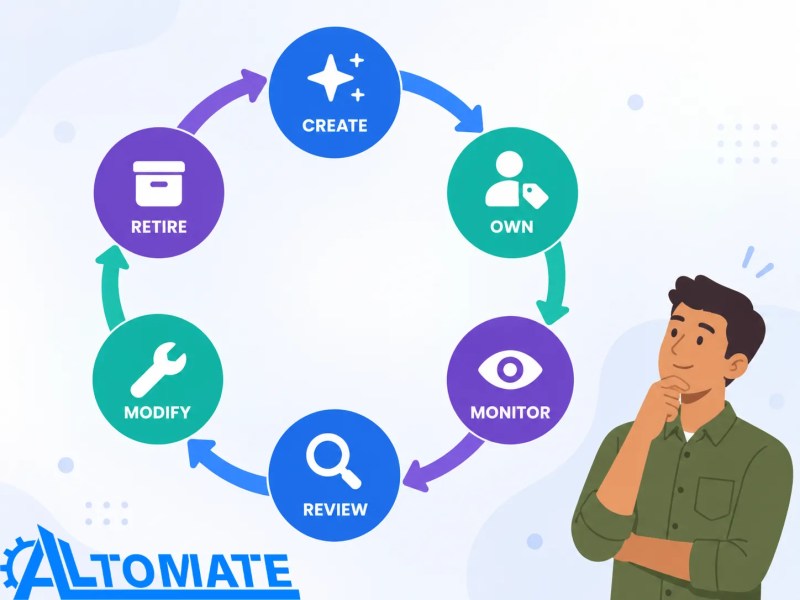
A practical automation lifecycle therefore includes creation, ownership, monitoring, review, modification, and retirement. That cycle is illustrated below.
As automation becomes operational infrastructure, the governance question changes. Automation governs how predefined parts of the work execute, while ongoing process management deals with how the underlying process is reviewed, controlled, and improved over time — Gartner defines BPM as the discipline of discovering, modeling, analyzing, and optimizing business processes, distinct from any single automated workflow. The distinction between business process automation and BPM becomes useful once workflow ownership expands into broader process governance.
When automation spans multiple systems and stages of work, the operating model may also need to move beyond isolated workflow ownership. Alltomate’s digital process automation guide provides additional context for structuring automation around end-to-end processes rather than disconnected tasks.
Final Answer: Automation debt becomes dangerous when teams can no longer confidently understand, change, or retire the workflows their operations depend on. The goal is not zero complexity; it is visible, intentional complexity with clear ownership. Inventory critical automations, document dependencies, consolidate duplicate logic, simplify processes before rebuilding them, and retire obsolete workflows deliberately.
Untangle automation debt before adding another workflow
If critical automations have become difficult to understand, change, consolidate, or retire, the next step is to map what exists and determine what should be simplified, monitored, rebuilt, or removed.
Related Resources
Frequently asked questions
What is automation debt?
Automation debt is the maintenance burden created when automated workflows become undocumented, duplicated, ownerless, tightly coupled, or unnecessarily complex. The workflows may still function, but understanding, changing, repairing, or retiring them becomes progressively harder.
Is automation debt the same as technical debt?
Automation debt is a form of technical and operational debt specific to automated business workflows. The framing borrows from the technical debt metaphor long used in software engineering, applied here to the accumulated maintenance burden of business workflows rather than code. It includes technical complexity, but it also includes ownership gaps, undocumented business rules, platform sprawl, unclear dependencies, and processes that have changed since the automation was created.
How do you know when an automation has become too complex?
Complexity becomes a problem when routine changes require significant investigation, teams are afraid to modify or disable workflows, failures are difficult to trace, or business logic is duplicated across several automations. The number of workflow steps alone does not determine whether an automation is too complex.
Should old automations be rebuilt from scratch?
Not automatically. A full rebuild can introduce unnecessary operational risk. A safer approach is usually to identify critical dependencies, remove obsolete or duplicated logic, document ownership, and simplify the workflow incrementally before deciding whether migration or replacement is justified.
How often should business automations be reviewed?
Review frequency should reflect business criticality and how often the surrounding process changes. High-impact workflows should be reviewed whenever important systems, business rules, permissions, or ownership change, rather than being treated as permanently finished after deployment.
About the author

Miguel Carlos Arao is the Founder & CEO of Alltomate, a Zapier Certified Platinum Solution Partner focused on multi-tool business automation and connected systems. Alltomate’s expertise spans APIs, webhooks, multi-tool automation, workflow dependencies, and the technical decisions involved in keeping connected automations understandable as requirements change.

Built by a certified Zapier automation partner
Explore more at
testing workflow changes before they go live,
managing dependencies across connected cloud tools, and
how workflow automation differs from process automation.