
Published on August 14, 2026
Want this built against your actual Salesforce org instead of read about it?
See our
document automation services,
or start with a
free business process audit.
Quick Answer:
A PandaDoc Salesforce integration can generate a proposal from a Salesforce Opportunity by passing Salesforce data, including products, pricing, and contact information, into a PandaDoc document and pricing table. PandaDoc’s Salesforce integration also supports two-way synchronization for document status and, depending on the configuration, updates to Salesforce records and Opportunity Products. The main implementation decisions are how Salesforce product and pricing data should map into the PandaDoc document, and whether proposal generation should happen automatically or require a rep to review and trigger it.
Table of Contents
- Why This Isn’t Just a Template Merge
- How an Opportunity Actually Becomes a Proposal
- Where Product and Price Book Mapping Goes Wrong
- Auto-Generate on Stage Change vs. Manual Send
- Tracking Document Status Back on the Opportunity
- What Should Update in Salesforce After Signing
- Where Template Governance Breaks Down at Volume
- FAQs
A rep closing a deal in Salesforce shouldn’t need to leave the Opportunity, rebuild a pricing table by hand in a separate tool, and hope the numbers match what’s actually in the CRM. That’s the gap a PandaDoc-Salesforce integration is designed to address — but treating the connection as a simple merge-field exercise only covers part of the workflow. Once products, pricing, recipients, document status, and post-signature updates are involved, the integration becomes a system rather than a simple field merge.
Why This Isn’t Just a Template Merge
The instinct is to treat this as “pull some Salesforce fields into a PandaDoc template” — company name, contact, deal amount. That covers the basic field mapping and misses the part that matters when the proposal contains products. Salesforce Opportunities can contain related Opportunity Products, while PandaDoc supports passing Salesforce products into a PandaDoc pricing table.
A proposal that only uses the Opportunity’s total amount gives the document less detail than one that maps the underlying products and pricing information. For proposals where the buyer needs to review an itemized purchase, mapping the product information into the PandaDoc pricing table is therefore an important part of the integration.
PandaDoc’s Salesforce development documentation describes the standard integration as supporting product information passed into PandaDoc pricing tables, along with Salesforce contacts as document recipients, plus two-way synchronization for Opportunity status and Opportunity Products.
See PandaDoc’s Salesforce integration documentation
for the documented integration capabilities.
How an Opportunity Actually Becomes a Proposal
In a working setup, a rep action in Salesforce — such as a button or another configured trigger — can initiate document generation. PandaDoc’s Salesforce integration also supports custom triggers, allowing Salesforce record events to be used to create PandaDoc documents. For more customized implementations, the PandaDoc API can be used directly or through middleware such as an automation platform.
This means the proposal can be populated from the Salesforce data associated with the Opportunity rather than requiring the rep to rebuild the document manually. Custom implementations can introduce another layer of field mapping: Salesforce currency fields, custom discount fields, calculated values, and other custom fields may need transformation before they’re used in a PandaDoc document. The exact handling depends on the Salesforce org, the PandaDoc configuration, and whether the standard integration or custom API workflow is being used.

Where Product and Price Book Mapping Goes Wrong

Product and pricing mapping is one of the areas that deserves the most attention because Salesforce product data is related to the Opportunity through its Opportunity Products and associated Price Book entries. A custom integration that relies on hard-coded product or Price Book identifiers can become harder to maintain when the Salesforce product catalog changes.
A common implementation risk is therefore not that Salesforce or PandaDoc automatically loses a product, but that the custom mapping logic doesn’t account for a new product, changed pricing configuration, or changed identifier. In that situation, the generated proposal may not reflect the Opportunity exactly as intended. Salesforce’s data model identifies the relationship between an Opportunity Line Item, its Opportunity, its Pricebook Entry, and its Product — for custom integrations, using those relationships rather than maintaining a manually duplicated product list can make the mapping easier to maintain.
The exact implementation should still be tested against the organization’s active Price Books, products, currencies, discounts, and custom pricing rules. A mapping strategy that works for one Salesforce org is not automatically correct for another.
Auto-Generate on Stage Change vs. Manual Send
There are two practical ways to trigger proposal generation, and they suit different sales motions. The first is automatic generation when an Opportunity reaches a configured stage or another Salesforce event. The second is manual generation when a rep deliberately starts the document after reviewing the Opportunity. Salesforce record events can be used as the trigger for automated document generation in a custom workflow.
Automatic generation can remove a manual step and keep a standardized sales process moving. It also means the trigger can happen before a rep has reviewed the final proposal. For deals involving custom pricing, negotiated discounts, unusual quantities, or other exceptions, a manual review step may therefore be more appropriate. The safer design is not necessarily “always manual” or “always automatic” — it’s defining which deal types can safely generate automatically and which ones require a human review before the proposal is sent.
The decision can be treated as a controlled split: standardized deals can follow the automated path, while exceptions can pause for human review before PandaDoc sends the proposal.
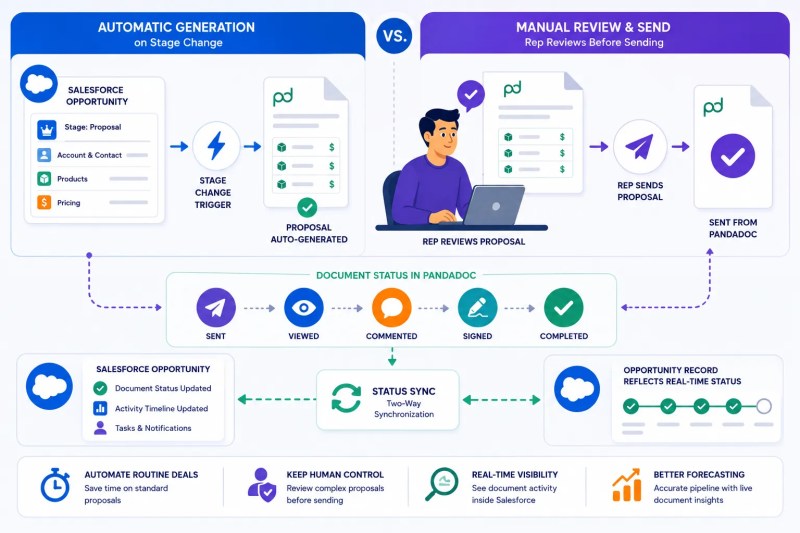
Deciding which deal types are safe to auto-generate and which need a review step first is usually the highest-leverage conversation to have before building this.
Get a free process audit
and we’ll help map that split for your pipeline.
Tracking Document Status Back on the Opportunity
A proposal that leaves the CRM without a status signal makes it harder for reps to understand what happened next. PandaDoc supports webhooks that notify an external application when document states change — states such as sent, viewed, and completed. In a Salesforce workflow, those events can be used to synchronize document status back to Salesforce, including updating Opportunity status when PandaDoc status changes.
Related PandaDoc documents can also be displayed on Salesforce Opportunities when the appropriate integration and two-way sync are configured, giving reps a way to see document activity from within Salesforce rather than managing the proposal entirely outside the CRM. For more advanced workflows, a custom integration can also record additional activity information, such as the most recent document event or event timestamp, so a team can distinguish between a proposal that was simply sent and one that has recently been viewed or completed.
Webhooks suit production workflows that need real-time notifications, while polling can work for simpler or prototype implementations.
What Should Update in Salesforce After Signing
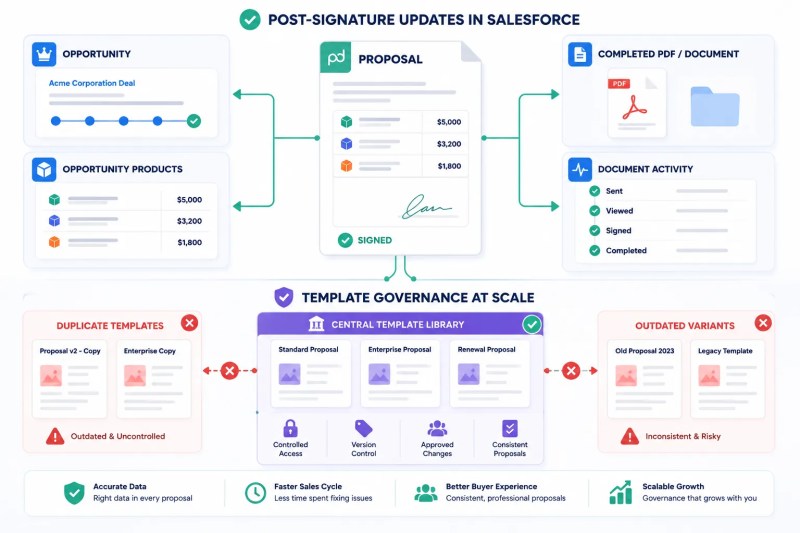
Once a PandaDoc document is completed, the Salesforce update should reflect the actual business process rather than assuming that one status field is enough. Depending on the workflow, this can include updating the Opportunity, recording the document status, saving the completed document or PDF, and synchronizing relevant product information — updating Opportunity status, saving document updates to Notes and Attachments, saving a PDF version, and updating Opportunity Products when the pricing table changes.
That distinction matters when the final signed proposal differs from the original Opportunity. If a custom workflow allows quantities or other pricing-table values to change during the proposal process, the integration should define whether those changes are allowed to flow back into Salesforce and under what conditions. In an implementation we built for an IT managed services provider, this exact gap was where a signed proposal’s line-item quantities occasionally diverged from what synced back to the Opportunity — the fix was defining explicitly which pricing-table edits were allowed to write back, rather than assuming every change should.
The exact post-signature behavior should therefore be treated as an explicit workflow decision rather than an assumption that every PandaDoc-Salesforce connection automatically changes every Salesforce field.
Where Template Governance Breaks Down at Volume
With a handful of reps and one or two templates, keeping PandaDoc templates aligned with Salesforce data is relatively manageable. As an organization adds sales teams, product lines, pricing variations, and templates, governance becomes more important. Template duplication can create maintenance problems when different versions begin to contain different fields, pricing logic, or document content — a rep may continue using an older template even after the underlying sales process has changed.
In implementations we’ve built for commercial equipment leasing companies, this is the exact spot where a proposal total can quietly stop matching the opportunity total, and nobody notices until finance reconciles at month-end. The solution at that scale is not simply more oversight — it’s reducing unnecessary template duplication, defining ownership for template changes, and keeping the Salesforce-to-PandaDoc mapping documented and testable.
At higher volume, governance becomes the control layer that keeps templates, Salesforce data, pricing, and completed documents aligned instead of allowing small inconsistencies to accumulate across the sales process.
Final Answer:
A working PandaDoc Salesforce integration can pass Salesforce Opportunity information, products, pricing, and contacts into PandaDoc, including product information in PandaDoc pricing tables. PandaDoc also supports two-way synchronization and webhook-based document status events for workflows that need Salesforce to stay updated. Whether proposal generation happens automatically or requires manual review should match the deal’s complexity, while post-signature behavior should explicitly define which Salesforce records and product information are synchronized.
Need a reliable system?
Related Resources
FAQs
Can PandaDoc pull line items directly from a Salesforce Opportunity, or only the total amount?
PandaDoc’s Salesforce integration supports passing Salesforce products into a PandaDoc pricing table. The exact fields and mapping depend on the integration configuration and Salesforce org. A custom workflow can also use Salesforce Opportunity Product and related pricing data when the standard setup doesn’t cover the required behavior.
Does this integration work with Salesforce multi-currency orgs?
It can be configured for organizations with more complex currency requirements, but the exact behavior depends on the Salesforce org configuration and the integration’s field and pricing mapping. Multi-currency workflows should be tested explicitly rather than assuming a single-currency mapping will handle every case automatically.
What happens if a rep edits pricing in PandaDoc after the document is generated?
That depends on the synchronization configuration. PandaDoc’s two-way synchronization can update Salesforce Opportunity Products when the PandaDoc pricing table is updated. A custom implementation should still define which edits are allowed to flow back to Salesforce and when that synchronization should occur.
Can I trigger proposal generation from a Salesforce flow instead of a rep clicking a button?
Salesforce events can be used as triggers for PandaDoc document generation in a custom integration. The exact trigger implementation depends on the Salesforce and PandaDoc configuration.
Does the signed document get attached to the Salesforce Opportunity automatically?
Not simply because the systems are connected. Supported configurations can save document updates and PDF versions to Salesforce’s Notes and Attachments, but the exact behavior depends on the Salesforce integration setup.
About the author

Miguel Carlos Arao is the Founder & CEO of Alltomate,
a Zapier Certified Platinum Solution Partner focused on document automation workflows, including PandaDoc Salesforce integrations, Opportunity product mapping, proposal generation, and post-signature record updates.
The patterns in this article come directly from building and troubleshooting PandaDoc Salesforce integration-related systems across client engagements in IT managed services and commercial equipment leasing.

Built by a certified Zapier automation partner
Explore more at
our document automation guide and
document automation services.