
Published on August 12, 2026
If you’re deciding between OpenAI and Claude for an automation build, most comparisons online won’t help you. See our broader
AI automation guide
for the fundamentals. Or get a
free business process audit
if you’re scoping a specific workflow.
- Where Structured Output Reliability Actually Breaks Down
- Context Windows Aren’t the Bottleneck Most Teams Think
- Tool Use: Where Each Model Forces a Different Workflow Shape
- The Pricing Math Changes Once You Add Retries and Validation
- Why Safety Controls Matter More at Automation Scale Than at Chat Scale
- Choosing Between Them for a Specific Workflow
- FAQs
Most “OpenAI vs Claude” content is written for people picking a chatbot. That’s different from choosing a model for an automation. The model may sit inside a Zap, Make scenario, or n8n workflow. It may run hundreds of times a day. In automation, the model cannot explain itself when something goes wrong. Its output must parse correctly into the next step. That changes almost every comparison point below.
Where Structured Output Reliability Actually Breaks Down
Both providers support structured outputs. OpenAI offers JSON mode and function-calling schemas. Anthropic supports tool-use definitions and explicit output formatting instructions. On paper, they look interchangeable. In practice, the failure mode appears with messy, real-world inputs. Clean test data rarely exposes these problems.
In implementations we’ve built for professional services firms, this is where problems often appear. A Zap or scenario may run correctly for weeks before throwing malformed-JSON errors. The input that breaks the schema may be a client note with unusual formatting. It could also be a blank field or an unexpected currency symbol. These cases often appear only after real volume runs through the workflow.
Anthropic’s models generally hold formatting instructions well across longer prompts with many extraction fields. OpenAI’s function-calling is mature and well documented. However, teams that skip strict schema enforcement may see more drift on edge-case inputs.
The practical takeaway isn’t to automatically pick one provider. Neither model removes the need for validation. You still need a validation step after the AI call. That step should run before data reaches your CRM or database. The real question is how often that validation catches an issue.

Context Windows Aren’t the Bottleneck Most Teams Think
Many buyers assume context window size is the deciding factor. They assume whoever can “read more at once” wins. That assumption is usually wrong for automation use cases. Most business workflows don’t need to process an entire document library in one call. They may only need to process one invoice, one lead record, one support ticket, or one contract.
These inputs fit comfortably inside either provider’s context window in many cases. Context length matters more for batch summarization or cross-document comparison. Examples include reconciling multiple contract versions or comparing long documents.
Even then, cost and latency often become the first constraints. Sending a 50-page document through a large context window on every scheduled run may be technically possible. It is often the wrong architecture. Chunking and retrieval can reduce both cost and processing time. They can also improve accuracy when the workflow runs daily.

Tool Use: Where Each Model Forces a Different Workflow Shape
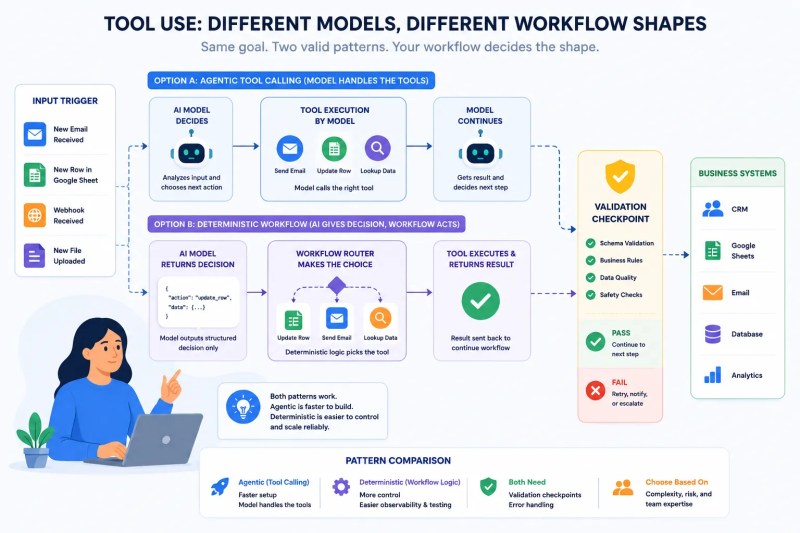
There are two common ways to let an AI model take actions inside a workflow. One approach lets the model call tools directly in a loop. This is the agentic approach. The other uses the model for reasoning or classification. Deterministic automation then handles the final decision through Zap steps, Make routers, or n8n nodes.
OpenAI’s ecosystem makes the first pattern easy to wire up. It offers tool-calling capabilities and many pre-built integrations across platforms such as Zapier and Make. Anthropic’s tool-use implementation is also capable. In our builds, it often appears in the second pattern. Teams that need tight control usually prefer deterministic automation to make the final decision.
We see this consistently in new installs that route AI output into CRM fields. The failure usually isn’t the model being wrong. The problem is the lack of a validation step. Without validation, one unexpected output can reach the system of record.
Full agentic tool-calling can work well for exploratory or internal tools. It works best when a human reviews the result. It is a worse fit for workflows that write directly to a system of record. A human or rules-based checkpoint should sit between the model and the business action.
roundup of AI tools for small business automation
breaks down where agentic tool use pays off versus where it adds risk.
The Pricing Math Changes Once You Add Retries and Validation
Sticker-price comparisons can be misleading. The number that matters on a client’s monthly bill is the effective cost per successful automated action. That’s different from the cost of a single API call.
A workflow with no retry logic or output validation may look cheap in a spreadsheet. It can become expensive in production. A malformed response may get written to a record. It may also cause a downstream step to fail. Cleanup can cost more than the token savings were worth.
Both providers offer batch-processing discounts for non-time-sensitive workloads. Examples include nightly enrichment jobs and bulk classification runs. This can matter more for cost control than the base per-token rate.
Sticker price and effective cost tell different stories. Retries, validation failures, and reprocessing can all change the final cost.

Why Safety Controls Matter More at Automation Scale Than at Chat Scale
In a chat interface, an occasional off-target response is a minor annoyance. A human usually catches it immediately. An unattended automation is different. It may run dozens or hundreds of times a day. A 1% error rate on a workflow that runs 500 times a month means five potentially wrong records.
Both OpenAI and Anthropic publish usage policies. Both also provide tools that can support safer workflow design. These tools can help with user-submitted content such as support tickets, form fields, and inbound email.
Anthropic has emphasized rule-based and constitutional guardrails in its model behavior. OpenAI also offers moderation capabilities that teams can add as a separate workflow step. Neither approach replaces human review for legal, financial, or compliance-sensitive actions. That decision belongs to the workflow design.

Choosing Between OpenAI and Claude for a Specific Workflow
A professional services firm needed an AI-assisted intake workflow for inbound client email. The original setup routed every email through one large model call. That call tried to classify intent, extract contact details, and draft a reply at the same time.
The setup worked during testing. It broke down at real volume. The model occasionally merged the extracted name with the wrong email thread on multi-person CC chains.
We split the workflow into separate stages. The first handled classification. It was cheap, fast, and high-confidence. The second handled extraction with a strict schema. The final step created a human-reviewed draft reply.
This reduced the error rate to a level the team could accept. The fix had nothing to do with which provider’s model was doing the work. It was a workflow architecture problem. Either model would have exposed the same weakness eventually.
That’s the main lesson from this comparison. Pick a model based on how it behaves inside your specific workflow. Do not rely only on benchmark leaderboards.
A workflow doing straightforward classification may favor the ecosystem with faster integrations for your existing tools. A workflow doing schema-heavy extraction from long or messy documents deserves direct testing against both providers.
Either way, the model choice matters less than the validation layer. Your workflow should assume the model will occasionally be wrong.
AI workflow automation solution
for how that layer typically gets built.
FAQs
Can I switch between OpenAI and Claude mid-project without rebuilding the whole workflow?
Usually yes for the AI-call step itself. Most automation platforms treat the model call as a single node. However, prompts tuned around one model’s formatting quirks still need testing. A credential swap alone is not enough.
Do I need to pick one provider for an entire automation stack, or can I mix them?
Mixing providers is common and can be the right approach. You might use a cheaper model for high-volume classification. A stronger model can handle lower-volume drafting tasks with higher stakes.
Which model is easier to connect to tools like Zapier or Make without custom code?
OpenAI’s integrations tend to be more numerous across no-code platforms. This is partly due to earlier and broader adoption. Claude connections are also available. Advanced use cases may still require an HTTP or webhook step instead of a native action.
Is one provider meaningfully cheaper for a typical small-business automation workload?
Rarely by enough to be the deciding factor at typical small-business volumes. The bigger cost lever is usually workflow design. Batching, caching, and avoiding unnecessary processing can have a larger impact than the provider’s per-token rate.
About the author

Miguel Carlos Arao is the Founder & CEO of Alltomate,
a Zapier Certified Platinum Solution Partner focused on AI model selection for business automation. His work includes structured output validation, tool-calling workflow design, and human-in-the-loop checkpoints.
The patterns in this article come from building and troubleshooting OpenAI vs Claude systems across professional services and document-heavy back-office operations.

Built by a certified Zapier automation partner
Explore more at
our AI automation guide and
AI-powered automation services.