
Published on August 14, 2026
Quick Answer: Apify Agent Skills are reusable instruction packages that help an AI coding agent choose and use Apify tools for a defined job, such as web scraping, data extraction, or Actor development. They improve task guidance, but they do not replace access controls, data validation, human review, or a dependable production workflow.
Table of Contents
AI coding agents can write code, follow instructions, and work through multi-step tasks, but they still need reliable context. That is where Apify Agent Skills fit. Instead of repeatedly explaining how to select an Actor, structure a scraping task, validate output, or deploy an Actor, a skill gives the agent reusable guidance for that domain.
That does not mean an agent can be given a vague request and trusted to create a production-ready system unattended. The practical value of a skill is narrower and more useful: it reduces avoidable tool-selection and process mistakes for a well-defined task. The business still needs to decide what data is permitted, what a valid result looks like, where the output goes, and when a person must review it.
What Apify Agent Skills Actually Change in an AI Agent Workflow
An Agent Skill is a package of instructions, typically centered on a SKILL.md file, that tells an AI agent how to approach a specific kind of work. It can also include supporting scripts, references, or assets. Apify’s official Agent Skills repository currently covers activities such as selecting the right scraping Actor, developing new Actors, and “Actorizing” existing scripts — with the exact skill set subject to change as Apify updates the collection.
The distinction matters because an AI agent with general coding ability may understand a goal without knowing the safest or most efficient way to use a particular platform. A skill narrows the decision space. It can tell the agent which workflow to follow, what inputs to inspect, which constraints to respect, and what to verify before it declares a task complete.
The diagram below shows how that guidance narrows scattered implementation choices into a more deliberate path.

For example, an operations team may need a one-time competitor-data review across several public sources. A suitable skill can guide the agent through selecting an appropriate extraction method, running a task, and returning structured output for review. The correct outcome is not “the agent scraped something.” It is a dataset whose required fields, source coverage, and exceptions can be checked before anyone makes a business decision from it.
Why an Apify Skill Is Not the Same as an MCP Connection
A common implementation mistake is treating skills and Model Context Protocol connections as interchangeable. They solve related but different problems.
| Layer | Primary job | What it does not solve |
|---|---|---|
| Apify Agent Skill | Guides the agent through a repeatable task and decision process. | Tool permissions, authentication, data policy, or downstream business logic. |
| Apify MCP server | Gives an agent access to selected tools and documentation.[1] | A reliable method for choosing, sequencing, and validating every tool call. |
| Business workflow | Defines approvals, output ownership, exceptions, and system handoffs. | The agent’s domain-specific operating instructions. |
[1] Per Apify’s documentation, the MCP server connects an agent to the Apify platform and includes tools to search and fetch documentation. Put simply: MCP gives an agent useful hands; a skill teaches it a task; the business workflow determines whether that task should happen and what comes next.
How to Install and Test Apify Agent Skills
Apify currently documents installation through the skills.sh command-line utility (see Apify’s Build Actors with AI documentation):
npx skills add apify/agent-skillsApify documents Agent Skills for environments including Claude Code, Cursor, Codex, and Gemini CLI (see Apify’s Apify for AI agents documentation). Installation is straightforward; validating that the skill fits the work is the important part.
- Install only the skills relevant to the job. Choose the appropriate Apify skill rather than adding broad instructions that the agent will not use.
- Choose project scope deliberately. Use project-scoped skills when the guidance belongs to a specific repository, client workflow, or approved operating context. Use global installation only when the same guidance is genuinely suitable across your work.
- Confirm the agent can discover the skill. Verify that the selected skill files appear in the intended project or agent skills directory, then give the agent one small task that falls within the skill’s scope. Review whether its proposed approach follows the expected Apify workflow before allowing it to run against real data.
- Run a bounded test. Use a small approved input, inspect the output, and confirm that the chosen Actor, fields, and exceptions match the intended result before expanding the task.
The install-and-test loop below keeps the first use of an Apify Agent Skill small enough to inspect before it affects a wider workflow.

Skills are versioned guidance, not a live connection. Apify’s own apify-cli documentation notes this directly for CLI-generated skill files: a copy is a snapshot at install time, and it needs to be re-run to refresh after the CLI itself is upgraded. The same caution applies more broadly: when the relevant CLI or skill changes, review the update and re-test meaningful workflows rather than assuming earlier instructions still match the current environment.
Start With One Bounded Job, Not an Autonomous Pipeline
The most useful Apify agent skills tutorial is not a long list of prompts. It is a disciplined rollout: give one skill one job, define the inputs, set a clear finish line, and inspect the output.
Consider a marketing team that wants public competitor-location data for a planning exercise. A sensible initial request might specify approved sources, target geography, required fields, an exclusion rule for incomplete records, and a CSV handoff for a human reviewer. The agent can use an appropriate skill to guide the extraction process, but it should not be authorized to enrich contacts, send outreach, or update a CRM merely because it can obtain business data.
If the need is an ongoing public-web lead-sourcing system rather than custom agent guidance for an exploratory task, see our Apify lead scraper solution. The decision is different: a repeatable lead workflow needs defined criteria, validation, ownership, and a controlled sales-review handoff.
That bounded-test approach also makes it easier to see when agentic work is genuinely useful and when deterministic automation is the better fit. An agent can be valuable when the path varies: perhaps it must select an appropriate data source, interpret pages with different structures, or explain why a request cannot be completed. Once the input, route, transformation, and output are stable, a deterministic automation may be more predictable and easier to monitor. Our overview of when to use AI in workflows can help teams decide which model fits the task.
This comparison makes the decision clearer: use structured, deterministic automation for stable paths, and use an agent only where judgment or route selection genuinely varies.
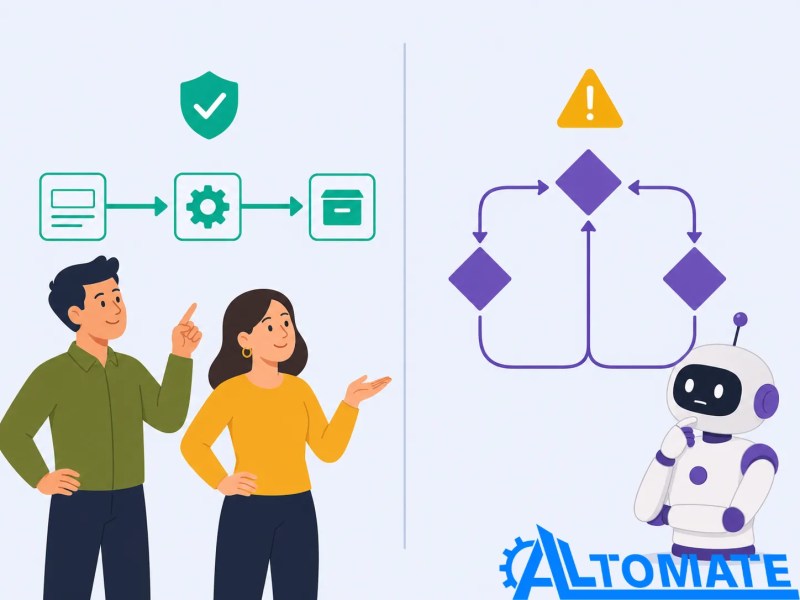
Do not let an exploratory result write to your CRM by default
Before extracted data creates or updates shared records, define required fields, duplicate checks, ownership rules, and a review path for uncertain results. The handoff needs its own controls, even when the agent completed the research task correctly.
The comparison below shows why a review checkpoint belongs between exploratory output and a shared CRM record.

Why Better Agent Instructions Do Not Guarantee Clean Business Data
A skill may help an agent select a suitable Actor and follow a better sequence of steps. It cannot establish that source data is complete, current, permitted for the intended use, or ready for downstream systems.
A failure pattern appears when a team treats structured output as validated output. A dataset may have the right column names while still containing duplicates, inconsistent geographic values, stale pages, partial records, or information that should not be used for a particular action. Sending those results straight into a CRM makes the data problem harder to unwind because records can be assigned, enriched, or acted on before anyone notices the quality gap.
For recurring extraction work, define a control layer outside the agent: required fields, duplicate rules, source and timestamp retention, exception handling, output sampling, and a review threshold. This is what turns a successful experiment into a workflow that another person can inspect and operate reliably.
When Apify Agent Skills Are Not the Right Answer
Apify Agent Skills are not necessary for every Apify task. If a team has one known Actor, a stable input schema, a scheduled run, and a clear output destination, a conventional API, webhook, or no-code automation can be the safer choice. For a run that needs to trigger a defined downstream process, an Apify webhook integration can provide a more explicit, repeatable handoff. It is easier to audit because the steps are visible and repeatable.
Skills are most useful when a coding agent needs structured guidance for exploratory, technical, or multi-step work. They are a poor substitute for policy where data sensitivity is high, a weak substitute for testing where failure has real cost, and a poor reason to automate a task that a person can complete safely in a few minutes.
The wider decision is not “AI or no AI.” It is whether the task has enough ambiguity to benefit from agent reasoning and enough controls to make the outcome dependable. For the broader planning framework, see our AI automation guide.
Final Answer: Apify Agent Skills are useful when an AI coding agent needs repeatable, domain-specific guidance for web data or Actor work. Start with a narrow, reviewable task, keep system permissions and data controls separate from the skill, and move to a production workflow only after the output is consistently trustworthy.
Turn agent experiments into reliable automation
If your team needs AI-guided work connected to approved systems, validation rules, and clear operational ownership, the implementation needs more than a skill installation.
Related Resources
FAQs
What are Apify Agent Skills?
Apify Agent Skills are reusable instruction packages that help AI coding agents perform specific Apify-related work, including web scraping, data extraction, Actor development, and Actorization. They guide the agent’s process; they do not replace the underlying tools, permissions, or business controls.
How do Apify Agent Skills differ from MCP?
MCP connects an AI agent to tools or documentation. An Apify Agent Skill provides reusable guidance about how to complete a particular task. They can work together: MCP can provide access, while the skill helps the agent make better use of that access.
How do I install Apify Agent Skills?
Apify documents installation through the skills.sh utility with npx skills add apify/agent-skills. Choose the relevant skills and target AI coding environment, then run a small, approved test before applying the skills to larger or shared workflows.
Can Apify Agent Skills safely update a CRM?
Not by themselves. Before an agent writes to a shared CRM, define validated inputs, duplicate rules, ownership rules, permission boundaries, exception handling, and a review process. A successful extraction run does not prove that every output record is ready for operational use.
About the author

Miguel Carlos Arao is the Founder & CEO of Alltomate, a Zapier Certified Platinum Solution Partner focused on AI-assisted workflow design, data extraction controls, and multi-tool automation. Alltomate’s content focuses on making automation systems useful in day-to-day operations without losing visibility into data quality, ownership, and exceptions.

Built by a certified Zapier automation partner
Explore more about planning AI automation systems, controlled extraction workflows, and AI automation implementation support.