
Most businesses think digitization means scanning documents into PDFs. That assumption is the root of the problem.
Digitization is not about converting paper into files—it’s about converting documents into structured, usable data that flows through your systems.
For example, scanning an invoice into a “Q3 Invoices” folder doesn’t remove work—it just moves the bottleneck from your desk to your system.
If that transformation doesn’t happen, inefficiency doesn’t disappear. It compounds. Explore how this fits into broader systems in automation guides and our blog hub.
Key takeaways
- Digitization is a data transformation problem, not a scanning task
- Unstructured documents create hidden operational drag
- Most failures happen after documents are digitized
- Systems—not tools—determine success
- Automation only works when structure exists
The real problem with document digitization
This breakdown is illustrated below:

Scanning solves visibility. It does not solve usability.
Documents become digital, but remain disconnected—stored across folders, inconsistently named, and detached from workflows. This recreates the same inefficiencies outlined in manual document processing problems.
The result is not transformation. It is displacement of friction.
Data & evidence
- Adobe Acrobat research shows that 48% of employees struggle to find documents quickly even in digital environments (source).
- McKinsey reports that employees spend nearly 20% of their time searching for internal information (source).
- IBM finds poor data quality and information management create significant operational and financial impact (source).
This shows the problem isn’t access—it’s organization and system design, as also emphasized by Gartner (source).
Where digitization actually breaks
Most businesses assume digitization ends at capture. In reality, that is where failure begins.
Typical flow:
- Scan document → store in folder → manually retrieve → manually re-enter data
No transformation occurs. No system connection is created.
Before vs After
| Before Digitization System | After Digitization System |
|---|---|
| Scanned PDFs in folders | Structured, searchable data that can trigger workflows |
| Manual retrieval | Automated routing and retrieval |
| Disconnected systems | Integrated processes across tools |
| Human-dependent tracking | System-driven visibility and status tracking |
This gap is why organizations remain stuck in hybrid inefficiency patterns described in paper vs digital workflows.
Symptoms of a broken digitization system
- Documents exist but are difficult to locate
- Duplicate files across teams and systems
- Manual data entry persists
- Approvals are delayed despite “digital” systems
- Teams rely on memory instead of process
Many of these issues originate from missing data extraction layers, as explained in OCR automation.
Hidden system effects (why this gets worse at scale)
This bottleneck is illustrated below:

Digitization without structure introduces compounding system problems:
- Search friction scales linearly: more files → more time wasted
- Data inconsistency multiplies: no unified source of truth
- Process breakdowns increase: handoffs become unclear
- Automation becomes impossible: no structured triggers. If a system cannot identify key fields like names, dates, or amounts, it cannot decide what action to take. A workflow cannot route a document it cannot read.
These issues don’t stay isolated. What starts as a document problem quickly spreads into reporting delays, finance inaccuracies, and operational bottlenecks across teams.
IDC and Seagate research shows unstructured data is growing significantly faster than structured data, meaning these problems intensify over time—not stabilize (source).
This is the point where companies begin exploring business process automation—often prematurely, because the underlying documents are still unstructured and cannot support reliable workflows.
Why most digitization efforts fail
Three systemic gaps consistently appear:
- No enforced document structure
- No data extraction layer
- No integration into workflows or CRMs
Harvard Business Review found that organizations often automate broken processes without redesigning them, resulting in minimal gains (source).
This explains why attempts to improve operations often lead to issues outlined in common document automation mistakes.
Solution direction: from files → data → workflows
The transformation process looks like this in practice:
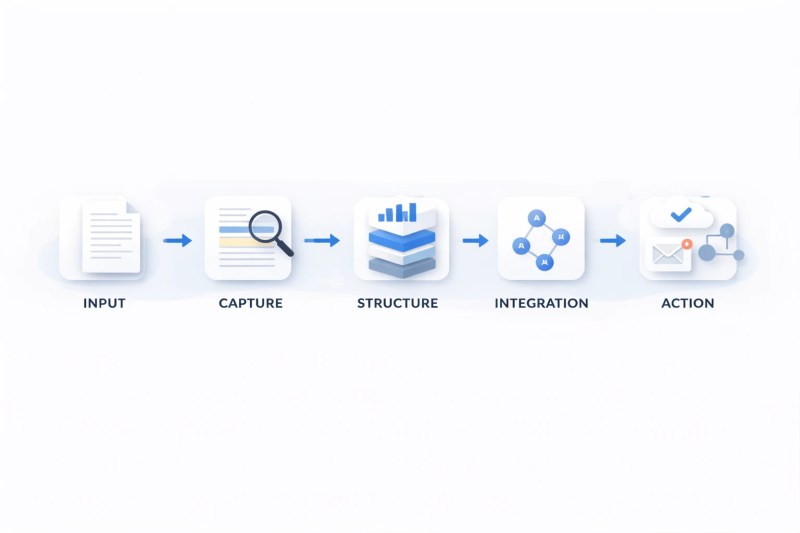
Effective digitization is a three-layer system:
Capture: Documents enter through scanning, uploads, or integrations. For example, an invoice arrives as a PDF via email or upload.
Structure: Data is extracted, normalized, and classified. OCR pulls key fields like vendor name, amount, and date, turning the document into usable data.
Integration: Structured data flows into systems. The extracted fields automatically populate your accounting or CRM system and trigger workflows like approvals or routing.
Once this system is in place, the process becomes repeatable and consistent—documents no longer depend on human intervention to move forward.
How a digitized document actually flows:
- Input: Document enters (email, upload, scan)
- Capture: System ingests the file
- Structure: OCR/AI extracts key data (name, date, amount)
- Integration: Data syncs into CRM or systems
- Action: Workflows trigger (approval, routing, updates)
For example: an invoice is received → key data is extracted → pushed into your accounting system → approval is triggered → payment is scheduled—without manual intervention.
At this stage, solutions like document processing automation, OCR data extraction, and automation solutions become viable.
Key insight: If your documents cannot trigger actions, they are not digitized—they are archived.
If you’re unsure whether your current setup can support automation, you can explore our automation services or evaluate your process here:
FAQ
Is scanning enough for digitization?
No. Scanning changes format, not usability. Without structure, documents remain static files that still require manual handling and review.
What makes a document truly digitized?
When its data is structured, searchable, and connected to workflows. This allows systems to act on the document automatically instead of relying on human input.
Do I need OCR for digitization?
Yes, especially for extracting usable data from unstructured documents like PDFs or images. Without it, automation cannot function because systems cannot interpret the content.
Do I need AI?
Not initially—but AI becomes critical at scale, especially in AI-powered automation, where documents vary in format and complexity.
When should automation happen?
Only after structure and integration are in place. Automating unstructured processes simply scales inefficiency and increases errors.
Conclusion
When implemented correctly, the outcome looks like this:

Digitization is not a storage upgrade. It is a system transformation.
If documents are not structured and integrated, inefficiency persists—just in a digital format.
To understand how these systems connect, explore document automation.
Next step
If your documents are digitized but still slowing down operations, the issue is not tools—it is system design.
Start with a structured evaluation here: