
Somewhere in your business right now, someone is manually copying data from a document into a system. It seems like a small task—but repeated across teams and processes, it quietly introduces delays, errors, and inconsistencies that compound across your entire operation.
Manual document processing is the handling of documents—such as invoices, forms, and contracts—through human interpretation, data entry, and routing, without structured automation or system-level validation.
Manual document processing is rarely seen as a system issue. Most businesses treat it as a minor inefficiency—something solved with more staff or better discipline.
In reality, it is a structural failure in how information moves across your business.
Every manual step introduces delay, inconsistency, and data loss—compounding across operations, finance, and customer workflows. According to McKinsey, manual processes are inherently time-consuming, inconsistent, and dependent on human interpretation—making reliable outcomes difficult to maintain at scale.
Key takeaways
- Manual document processing breaks data flow, not just speed
- Errors originate from system design, not human performance
- Unstructured inputs create downstream operational chaos
- Fixes fail when they address tasks instead of systems
- Automation restores consistency, traceability, and scalability
The real problem with manual document processing
Manual document processing is not just slow—it is unpredictable.
Each document requires human interpretation, decision-making, and routing. This introduces variability at every step, reducing consistency and increasing the likelihood of errors.
For example, a finance staff member manually entering invoice data may input different formats, miss fields, or interpret unclear values differently depending on context. Without validation rules or structured inputs, the same person produces inconsistent outputs—not because of skill, but because the system allows variability.
Instead of a system, you have a chain of human-dependent events.
For a deeper breakdown of how automated systems replace this, see what document automation actually means.
This bottleneck is illustrated below, where documents get stuck between steps without clear ownership or flow.

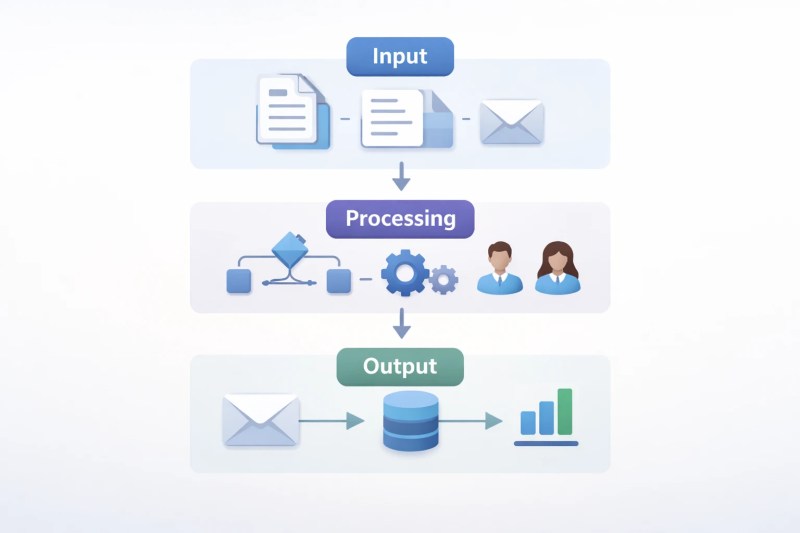
The 3 layers where manual document systems fail
Manual document processing does not fail in one place—it breaks across three layers:
- Input layer: Documents enter the system unstructured (PDFs, emails, scans), requiring human interpretation.
- Processing layer: Each step depends on human decisions—data entry, validation, routing—introducing variability.
- Output layer: Inconsistent data enters systems like CRM or accounting tools, creating downstream errors.
This layered failure is visualized below, showing how issues propagate across the system.
Data and evidence
According to McKinsey Global Institute, knowledge workers spend up to 20% of their time searching for and gathering information—a signal of how fragmented and inefficient internal data flows can become in manual systems.
Gartner reports that poor data quality costs organizations an average of $12.9 million annually, particularly in environments where data is manually entered, duplicated, or inconsistently managed across systems.
These are not isolated inefficiencies—they are systemic losses tied directly to how information is handled.
Where the system breaks
Manual document workflows fail at predictable points. These breakdowns are common in document workflow structures that rely on manual routing and validation.
- Data entry from PDFs, emails, or scanned files
- Routing documents between departments
- Approval delays due to unclear ownership
- Version mismatches across teams
Each step lacks structure, validation, and visibility.
Solutions like OCR-based data extraction address one layer—but the system failure extends beyond extraction.
Symptoms (what you actually see)
- Lost or missing documents
- Duplicate records in systems
- Delayed approvals
- Inconsistent data across tools
- Manual follow-ups to “check status”
Manual processes are a major contributor to data duplication and inconsistency. Research from HubSpot shows that duplicate records frequently originate from manual data entry and fragmented system workflows.
If your workflows resemble this, compare them with manual vs automated workflow comparison.
System effects (what it causes downstream)
Manual document processing does not stay contained—it spreads.
Unstructured data affects CRM accuracy, reporting reliability, and decision-making quality. As explained by Salesforce, poor handling of unstructured data directly reduces the accuracy of reporting and system-level decision-making.
This breakdown is illustrated below, where fragmented data spreads across disconnected systems.

For example, an accounts payable team processing invoices manually may enter the same vendor data differently across records, delay approvals due to email back-and-forth, and miss required fields. This leads to mismatched financial reports, delayed payments, and reconciliation issues at month-end.
- Incorrect invoice data impacts financial reporting, where even small inaccuracies can distort financial outputs, as noted by Harvard Business Review
- Delayed document approvals slow revenue cycles, particularly in workflows that rely on manual validation and routing, according to McKinsey
- Missing records break compliance trails, increasing regulatory exposure due to gaps in documentation and oversight
Over time, teams compensate with workarounds—creating shadow systems outside your core tools.
This is where integration becomes critical. Explore how automation services and automation integration services connect fragmented systems.
Why most fixes fail
Most businesses attempt surface-level fixes:
- Hiring more staff increases capacity but multiplies inconsistency—more people interpreting the same documents differently.
- Adding checklists reduces missed steps but still relies on human judgment at each stage, preserving variability.
- Standardizing templates improves inputs but does not fix how documents are processed, routed, or validated downstream.
The problem is not execution—it is system design.
If your workflows match even 2–3 of these failure points, your system is already degrading. Request a free process audit to identify where your document workflows are breaking.
Solution direction (without over-engineering)
You need structured document workflows when:
- Data from documents is manually re-entered into multiple systems
- Approvals depend on email follow-ups or unclear ownership
- Document status requires manual checking across teams
This is the foundation of automation guides and document automation systems.
What this looks like in practice
In contrast, the system below shows how automation creates a clean, uninterrupted workflow.

In a structured document workflow, documents are automatically captured, key data is extracted and validated against predefined rules, and information is routed to the correct systems without manual intervention.
This means the same input always produces the same output—removing variability and restoring consistency across operations.
For example, an invoice arrives via email, data is extracted automatically, validated against vendor records, and pushed into the accounting system. An approval workflow is triggered, and once approved, the system schedules payment—without manual intervention at any stage.
Before vs After
These structural changes directly transform how document workflows operate in practice:
| Manual System | Automated System |
|---|---|
| Human data entry | Automated extraction |
| Email-based routing | Rule-based workflows |
| No visibility | Real-time tracking |
| High error rates | Validated data |
For a practical example, see how invoice automation works in real workflows.
FAQ
Is manual document processing always bad?
Not at small scale. It becomes a problem when volume, complexity, or compliance requirements increase.
What is the biggest risk?
Data inconsistency. It affects reporting, decision-making, and customer experience.
Can automation fully replace manual work?
Not entirely. But it removes repetitive, error-prone steps and standardizes workflows.
Where should businesses start?
Start with high-volume, repetitive document types like invoices, contracts, or forms.
Conclusion
Manual document processing does not fail because people make mistakes—it fails because the system depends on people to interpret, decide, and route information at every step.
As volume increases, these small inconsistencies compound into operational delays, data errors, and unreliable reporting.
Fixing it is not about improving individual performance. It is about redesigning how information flows—so the system produces consistent results by default.
Next step
If your workflows still rely on manual document handling, the issues described here are already affecting your operations—whether visible or not.
You can also explore automation solutions or specific approaches like document processing automation.
Get a free business process audit and map where your document workflows are failing.
Read Next
Explore more: