
Published on August 12, 2026
Quick Answer: Human-in-the-loop AI automation means designing specific checkpoints — usually gated by a confidence score or an action’s downside risk — where a person reviews or approves an AI output before it takes effect, instead of either running everything unattended or reviewing everything manually. The design work is deciding which actions are cheap to get wrong (auto-approve), which are expensive to get wrong (route to a human), and building a record of what reviewers actually decided so the thresholds can be adjusted over time.
Table of Contents
- The Actions That Should Never Run Fully Unattended
- What Happens When There’s No Confidence Threshold at All
- How a Confidence Score Actually Decides Who Sees the Output
- Approval-Before-Send vs. Audit-After-Send
- Recording What a Reviewer Actually Decided
- Where Over-Gating Becomes Its Own Problem
- What Breaks in a Review Queue as Volume Grows
- FAQs
Ask ten teams building an AI workflow whether they’ve thought about human review, and most will say yes — they mean a person occasionally spot-checks the output. That’s not human-in-the-loop design, it’s hoping nothing goes wrong before someone happens to notice. Real human-in-the-loop automation, the kind covered in our broader AI automation guide, is a structural decision made before the workflow ships: which outputs a person sees before they take effect, which ones run on their own, and what threshold moves an item from one bucket to the other.
The Actions That Should Never Run Fully Unattended
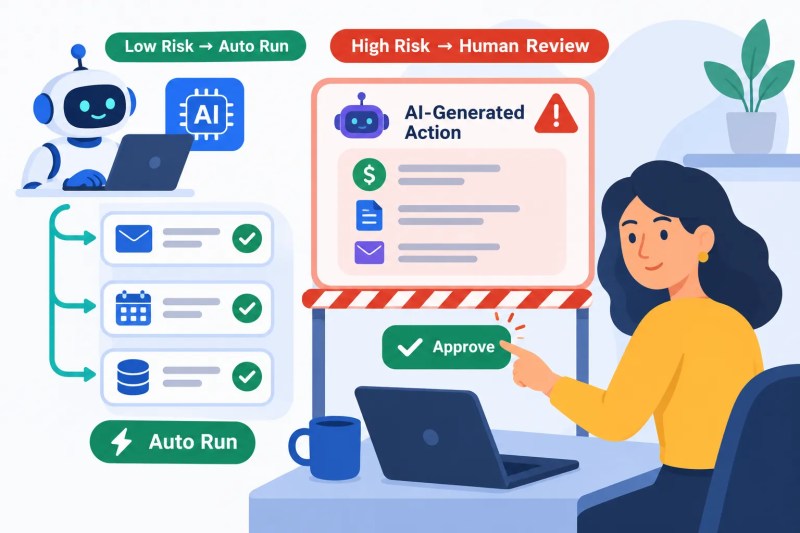
Some actions are structurally unsafe to fully automate regardless of how well the model performs on average, because the cost of a single wrong output is disproportionate to the time saved by skipping review. Anything that sends money, commits to a price or contract term, communicates directly with a customer in a way that’s hard to retract, or overwrites a field that other systems or people rely on as ground truth belongs in this category.
The test isn’t “how often does the model get this right” — a model can be 98% accurate and still be a bad candidate for full autonomy if the 2% failure mode is a client-facing commitment nobody can walk back. The test is closer to: if this output is wrong, how expensive and how reversible is that mistake? Cheap and reversible can run unattended. Expensive or irreversible needs a person in the path, no matter what the accuracy numbers say.
Sorting actions this way is what actually determines where a checkpoint belongs, rather than applying the same review policy to everything a workflow touches.
What Happens When There’s No Confidence Threshold at All
The most common version of this workflow we see in a first build has no threshold — every output either gets sent automatically or gets queued for review, with nothing in between. That’s not actually a design choice, it’s the absence of one, and it fails in one of two predictable directions: full autonomy produces the occasional bad output with no safety net, or full manual review buries a human in a queue of items that were never going to need their judgment in the first place.
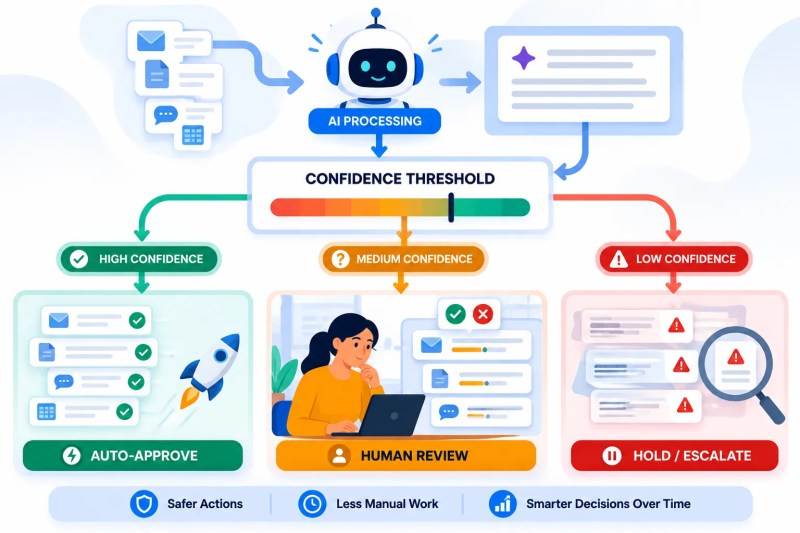
A confidence threshold is what turns that binary into an actual system. The model returns not just an output but a score representing how certain it is — how closely the input matched patterns it handles reliably. High-confidence outputs clear automatically. Low-confidence outputs route to a person. The threshold itself isn’t something you set once and forget; it’s a number you adjust based on what the review queue actually shows you over the first few weeks.
How a Confidence Score Actually Decides Who Sees the Output
In practice, the confidence score comes from one of two places: a probability the model itself returns alongside its output, or a rules-based check layered on top — does the extracted field match an expected format, does the classification fall into a category the system has handled reliably before, is the input length or structure within the range the prompt was actually designed for.

A pattern we’ve seen in legal services firms running this setup is contract clause extraction — pulling termination terms, renewal dates, and liability caps out of incoming vendor agreements. Standard boilerplate clauses clear automatically because the model has seen thousands of near-identical versions. Anything with unusual phrasing, a nonstandard clause structure, or a field the extraction can’t confidently locate gets routed to a paralegal for manual review before it’s logged. The threshold isn’t guessed — it was tuned after the first two weeks of review data showed which clause types the model handled reliably and which it didn’t. The same field-mapping discipline shows up in our AI document processing use cases breakdown, for teams working with similar unstructured inputs.
Approval-Before-Send vs. Audit-After-Send
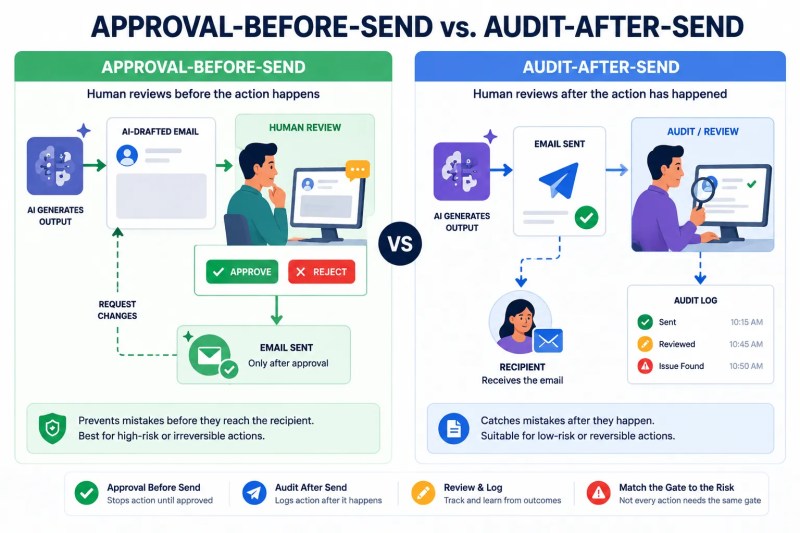
There are two structurally different places to put a human checkpoint, and they catch different kinds of mistakes. Approval-before-send holds the action until a person signs off — nothing goes out, updates, or executes until a reviewer clicks approve. Audit-after-send lets the action run immediately and logs it for a person to review afterward, catching mistakes after the fact rather than before.
Audit-after-send is faster and feels less like a bottleneck, which is exactly why teams default to it — right up until the action in question is one that can’t be walked back. In implementations we’ve built for freight brokerages, this is the exact point where teams either build the review step correctly the first time or rebuild it after a bad load confirmation goes out: an AI-drafted rate confirmation email sent automatically to a carrier, based on a load detail the model misread, can’t be un-sent once the carrier has it in writing. Moving that specific action to approval-before-send, while leaving lower-stakes internal notifications on audit-after-send, is what actually matches the checkpoint to the risk instead of applying one policy to every action in the workflow.
Mapping out which of your workflow’s actions need a hard stop versus a logged trail is usually the first real decision in a build like this.
Get a free process audit if you want a second set of eyes on where that line should sit for your workflow specifically.
Recording What a Reviewer Actually Decided
A review step that doesn’t log its own outcomes is a missed opportunity, not just a compliance gap. Every time a person approves, edits, or rejects an AI-generated output, that decision is data about whether the model — and the confidence threshold — is calibrated correctly. Without a record of it, “the model seems pretty reliable” stays a feeling instead of a number anyone can act on.
The minimum worth capturing per review: what the model originally produced, what the reviewer changed (if anything), and the final decision. Over enough reviews, this turns into a genuinely useful signal — if reviewers routinely edit the same field, that’s not a reviewer preference, it’s a sign the extraction prompt or the threshold for that field needs work. Teams that skip this logging step tend to leave the threshold wherever it was set on day one, because there’s no data suggesting it should move. This is the same feedback-loop principle behind our AI workflow automation builds more broadly.

Where Over-Gating Becomes Its Own Problem
It’s possible to overcorrect in the other direction — routing so much to human review that the automation stops saving anyone time. If every output requires sign-off regardless of confidence, the review queue becomes the new bottleneck, and the workflow ends up slower than doing the task manually in the first place, just with extra steps in between.
This is worth naming plainly: for a small team processing a handful of items a day, a fully automated confidence-threshold system with logging and calibration can be more infrastructure than the volume justifies — a simple rule of “always have someone glance at this before it goes out” gets you most of the safety with none of the engineering. The threshold-and-logging approach earns its complexity once volume or risk is high enough that manual review of everything is no longer realistic.
What Breaks in a Review Queue as Volume Grows
At low volume, a review queue of a dozen items a day gets cleared by whoever’s available. Past a few hundred a day, the queue itself becomes a system that needs its own design — without assignment logic, items sit unclaimed; without a priority order, a time-sensitive item can sit behind low-stakes ones for hours; without an SLA or escalation path, nobody notices when the queue is backing up until it’s already caused a delay downstream.
The fix isn’t a bigger review team — it’s routing logic on the queue itself: priority scoring based on how time-sensitive or high-stakes the pending action is, automatic escalation if an item sits unreviewed past a set window, and periodic re-review of the confidence threshold as the volume and mix of inputs change. A threshold tuned for fifty items a day doesn’t necessarily hold at five hundred, because the mix of edge cases the system encounters changes with scale even if the underlying model doesn’t.
Final Answer: Human-in-the-loop AI automation works by matching the checkpoint to the risk — auto-approving low-stakes, reversible outputs and routing high-stakes or irreversible ones to a person, using a confidence score to decide which bucket each output falls into. The design decisions that actually matter are picking approval-before-send versus audit-after-send per action type, logging every reviewer decision so the threshold can be recalibrated with real data, and being honest about when full manual review is simpler than building the system at all.
Need a reliable system?
Get a free business process audit
Related Resources
FAQs
How do I decide what confidence threshold to start with if I have no historical data yet?
Start conservative — route more to human review than you think you’ll need — and use the first few weeks of reviewer decisions to see which outputs were consistently approved without changes. Those are the ones you can safely raise the threshold on.
Does human-in-the-loop mean a person reviews every single AI output?
No — that’s full manual review, not human-in-the-loop design. The point of a confidence threshold is to route only the outputs that genuinely need judgment to a person, while letting high-confidence, low-risk outputs clear automatically.
Can the same action use different review rules depending on context?
Yes, and it often should. An AI-drafted email to an existing client with a long history might clear automatically, while the same drafting task for a brand-new contact could route to review — the action type isn’t the only variable that determines risk.
What’s the difference between a confidence score and a business rule check?
A confidence score usually comes from the model itself, reflecting how closely the input matches patterns it handles reliably. A business rule check is a separate, deterministic layer — does this field match an expected format, is this value within an allowed range — that catches issues the model’s own confidence score might miss.
How often should reviewer decision logs be used to adjust the threshold?
There’s no universal cadence — it depends on volume. A workflow processing hundreds of items a day generates enough review data to revisit the threshold within weeks; a lower-volume workflow may need a few months of logs before there’s enough signal to adjust it responsibly.
About the author

Miguel Carlos Arao is the Founder & CEO of Alltomate,
a Zapier Certified Platinum Solution Partner focused on human-in-the-loop AI automation, including confidence-threshold design, approval-before-send gating, and reviewer decision logging.
The patterns in this article come directly from building and troubleshooting human-in-the-loop AI automation-related systems across client engagements in legal services and freight brokerage.

Built by a certified Zapier automation partner
Explore more at
our AI automation guide and
business automation consulting.