
Published on August 6, 2026
Affiliate disclosure: Alltomate participates in Make’s Affiliate Program. This relationship does not affect our editorial recommendations or implementation guidance.
Quick Answer: Useful Make.com automation examples do more than connect two apps. They define when a scenario runs, how it identifies the correct record, which routes process the data, what happens when a module fails, and where human approval is still required. Strong starting points include lead routing, CRM synchronization, Shopify order processing, scheduled reporting, document intake, onboarding, support escalation, and approved social publishing.
Table of Contents
- What makes a Make workflow example usable?
- Which eight Make automations are covered?
- Lead management and CRM examples
- Ecommerce and reporting examples
- Document and internal operations examples
- Customer support and social media examples
- Why copied scenarios fail in production
- Frequently asked questions
The best Make.com automation examples are not recipes to copy module for module. They are operating patterns that show where data enters, how decisions are made, and which safeguards prevent a convenient shortcut from becoming a silent systems problem.
The eight examples below are illustrative designs, not client case studies. App choices can be replaced with equivalent tools, but the identity checks, routing rules, failure paths, and ownership decisions should remain explicit. For a documented example of related duplicate checking, data standardization, and create-or-update CRM logic, see Alltomate’s lead capture-to-CRM automation case study; it is not presented as one of these Make scenarios.
What Makes a Make Workflow Example Usable?
A Make scenario normally starts with an instant trigger, such as a webhook, or a scheduled trigger that checks for new data. The scenario then maps fields between modules, applies filters, and may use a router to send different bundles down different routes. Make’s official documentation explains that webhooks usually trigger scenarios immediately, while routers process filtered routes in a defined sequence.
Use a router when one bundle may need to follow multiple matching routes. When exactly one owner, checklist, or outcome should be selected, use mutually exclusive router filters or, where available, Make’s If-else module so only the first valid condition runs.
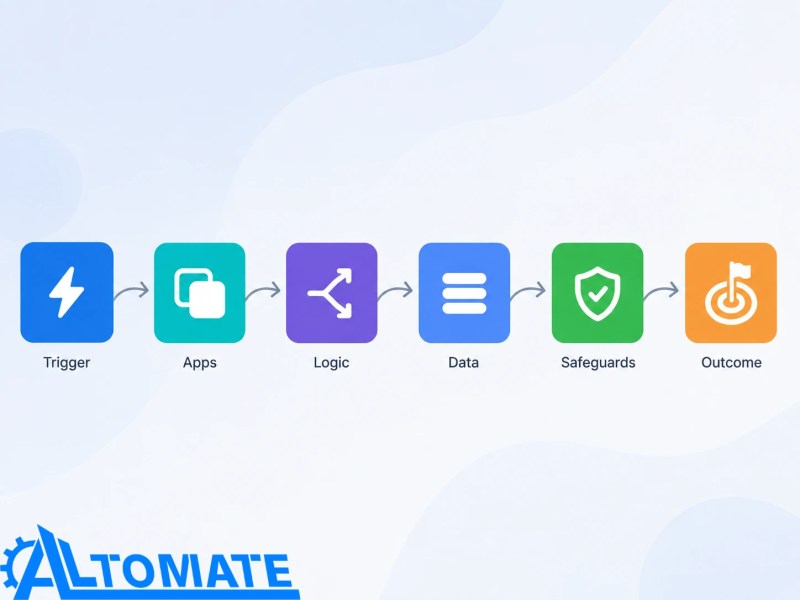
Before adapting any of these Make automation samples, define six elements:
- Trigger: the event or schedule that starts the scenario.
- Applications: the source, destination, and any approval or notification tools.
- Logic: filters, routers, searches, transformations, and fallback paths.
- Data: the identifiers and fields transferred between systems.
- Safeguards: duplicate checks, validation, error handling, and human review.
- Outcome: the operational state the workflow should create, not merely the fact that it ran.
The diagram below shows how these six elements work together as one operating system rather than a loose sequence of connected applications.
For the underlying design model, use the Make Automation Guide for scalable scenario architecture. This article stays focused on practical use cases rather than recreating that broader guidance.
Which Eight Make Automations Are Covered?
This quick comparison shows the event that starts each scenario and the control that matters most before it goes live.
| Example | Trigger | Key safeguard |
|---|---|---|
| New lead routing | Form submission or webhook | Search stable identifiers before creating a CRM record |
| Closed-won handoff | CRM stage change | Check destination IDs and make single-outcome routes exclusive |
| Shopify order processing | Paid order | Use the order ID for idempotency and separate refunds |
| Daily performance digest | Fixed schedule | Set the timezone and distinguish zero results from a failed query |
| Document approval | Email, form upload, or folder event | Check duplicate references and retain human approval |
| Onboarding checklist | Approved source record | Wait for final approval and limit access-granting automation |
| Support escalation | New or updated ticket | Prevent repeat alerts and keep a fallback path |
| Social publishing | Approved content status | Lock the approved version and validate media requirements |
Make.com Workflow Examples for Lead Management and CRM
1. Route a New Form Lead Without Creating a Duplicate
Trigger and apps: A website form or Typeform submission triggers Make, which searches HubSpot or another CRM and sends an alert through Slack or email.
Scenario logic and data: Normalize the work email and phone number, search for an existing contact, and apply lead-routing rules for territory and fallback ownership based on match status, service interest, and consent. Transfer the source, campaign, form answers, contact details, and submission timestamp.
The decision path below shows where the scenario must search before choosing between updating an existing contact and creating a new record.

Safeguards and expected outcome: Reject or queue records without a usable identifier, update an existing contact instead of blindly creating one, and use stable matching rules to prevent duplicate leads in the CRM. Send unmatched routing conditions to a fallback owner. The expected result is one traceable CRM record assigned according to current rules. If webhook submissions may arrive close together, ordered processing or an idempotency key may be needed because instant webhook runs can otherwise overlap.
2. Turn a CRM Stage Change Into Coordinated Work
Trigger and apps: A CRM deal reaches “Closed Won,” then Make creates a project in ClickUp or Asana, a folder in Google Drive, and a welcome task or message.
Scenario logic and data: Search each destination for the CRM deal ID before creating anything. Mutually exclusive filters or, where available, an If-else module select the correct service or regional path, while mapped fields carry the client name, owner, package, start date, signed-document URL, and source record ID.
Safeguards and expected outcome: Require mandatory onboarding fields, store destination IDs back in the CRM, and prevent the same stage update from creating a second project. The expected outcome is a connected handoff with shared identifiers, not several disconnected records that happen to have the same client name.
Ecommerce and Reporting Automations That Need Different Timing
3. Process a Shopify Order Across CRM and Operations
Trigger and apps: A paid Shopify order triggers Make, which updates HubSpot, logs fulfillment data in Google Sheets or an operations system, and notifies the responsible team in Slack.
Scenario logic and data: Search by customer email and Shopify order ID, iterate through line items, and route orders by product category, fulfillment method, or value threshold. Map customer details, SKUs, quantities, discounts, tax, payment status, and order value.
Safeguards and expected outcome: Treat the order ID as the idempotency key, separate refunds and cancellations from paid-order logic, and avoid marking fulfillment complete until the source confirms it. The expected outcome is consistent order and customer context across systems. The Make–Shopify order automation page covers the ecommerce-specific implementation path in more depth.
4. Build a Daily Performance Digest Instead of Sending Every Event
Trigger and apps: A scheduled scenario collects data from a CRM, advertising platform, ecommerce store, or spreadsheet and sends a digest through Gmail or Slack.
Scenario logic and data: Search records inside a fixed reporting window, calculate totals, group results by owner or channel, and use an aggregator to combine multiple bundles into one report. Transfer record counts, values, exceptions, date boundaries, and source links.
Safeguards and expected outcome: Use an explicit timezone, distinguish zero results from a failed query, and flag late source data. The expected outcome is a concise operational snapshot with drill-down links. Make documents that aggregators merge several bundles into a single bundle, which is useful here because the workflow should send one digest rather than one message per record.
The timing comparison below shows why immediate operational events and consolidated reporting should not automatically use the same execution schedule.

Not sure which example should come first?
Use business automation consulting to map the process, ownership, and failure cost before selecting a scenario. The highest-volume task is not always the safest or most valuable first build.
Document and Internal Operations Examples Where Review Still Matters
5. Capture an Incoming Document and Route It for Approval
Trigger and apps: A PDF arrives by Gmail, form upload, or cloud folder. Make stores it in Google Drive or SharePoint, creates a review task, and records its status in Airtable, a spreadsheet, or an operations database.
Scenario logic and data: Validate the file type, rename the document with a stable reference, extract available metadata, and route it by document category or amount. Transfer the sender, received time, file URL, reference number, approval owner, and status.
Safeguards and expected outcome: Check for duplicate file hashes or reference numbers, restrict access to the correct folder, and require human review when extraction is incomplete or approval carries financial or legal consequences. These controls are central to document approval automation with validation and escalation. The expected result is a document with clear custody and status, not an automatically approved guess.
The approval path below shows how automation can prepare and validate a document while a person retains responsibility for the consequential decision.

6. Create an Onboarding Checklist From an Approved Record
Trigger and apps: An approved employee, contractor, or client record triggers Make to create tasks in ClickUp or Asana, schedule internal reminders, and provision only the requested setup steps.
Scenario logic and data: Mutually exclusive filters or, where available, an If-else module select the correct checklist by role, service package, or location. Map the approved start date, manager, department, requested access, and source record ID; do not move sensitive fields into tools that do not need them.
Safeguards and expected outcome: Start only after approval status is final, search for an existing onboarding project, and assign access-granting tasks to a person rather than letting Make issue unrestricted permissions. This creates client onboarding automation with approval checkpoints instead of an uncontrolled provisioning sequence. The expected outcome is a consistent checklist with visible accountability.
Customer Support and Social Media Automations Need Escape Routes
7. Escalate a Support Request Using Explicit Conditions
Trigger and apps: A new ticket in Zendesk, HubSpot, or another help desk triggers Make, which enriches the operational context and alerts Slack or creates an engineering task.
Scenario logic and data: Route by priority, account tier, issue category, language, or SLA deadline. Transfer the ticket ID, requester, summary, urgency, previous-contact link, and assigned owner rather than copying an entire conversation into every destination.
Safeguards and expected outcome: Keep a fallback route for unclassified tickets, prevent repeated alerts when the ticket is edited, and require a human to confirm ambiguous or high-risk classifications. The expected outcome is faster visibility for the right team while the help desk remains the source of truth.
8. Publish Approved Social Content Without Automating Approval Away
Trigger and apps: A content item changes to “Approved” in Airtable, Notion, or a spreadsheet. Make sends it to the supported publishing tool and records the returned post ID and status.
Scenario logic and data: Filter for approved records with a scheduled time, route by platform, format each caption, and map the media URL, campaign, account, alt text, and publish time.
Safeguards and expected outcome: Validate media requirements, lock the approved version, account for timezone differences, and route unsupported formats to manual publishing. The expected result is controlled distribution with a clear audit trail. Content judgment and final approval remain human responsibilities.
Why Copied Make Scenarios Fail in Production
Most Make automation ideas look linear on a diagram. Production systems are not. Records arrive twice, APIs reject requests, fields are renamed, scheduled windows overlap, and one route succeeds while another fails. Reliable operations therefore need workflow error monitoring across Make and other platforms, not only a success notification.
The duplicate-record failure below illustrates what can happen when a scenario lacks stable matching and idempotency controls.

A production-ready version should define:
- the source of truth and stable identifier for every object;
- whether repeated events should create, update, ignore, or queue a record;
- whether execution order matters when webhook runs overlap;
- which errors can retry safely and which require review;
- what evidence confirms that the intended business outcome occurred; and
- who owns the scenario when credentials, apps, or business rules change.
Make’s incomplete executions can preserve unfinished runs when enabled, while its error handlers can retry, substitute, skip, or stop work depending on the failure. Those choices have different data consequences. Use the Make.com error-handling guide for the deeper recovery design rather than adding the same generic handler to every module.
Final Answer: The strongest Make.com automation examples begin with a clear business event and end with a verifiable operating state. Choose one workflow, define its identifiers and ownership, add duplicate and failure controls, and test exceptions before expanding it across more apps or departments.
Turn the right example into a production-ready Make scenario
Alltomate can map the trigger, data model, routing, error recovery, and handoff requirements before building the workflow across your actual tools.
Explore Make automation services and scenario implementation
Related Resources
Frequently Asked Questions About Make.com Automation Examples
What is a good first Make.com automation?
A good first Make.com automation has a clear trigger, one source of truth, a stable identifier, and a reversible outcome. A scheduled report or notification workflow is often safer than a scenario that immediately changes financial, customer, or access data.
Can Make.com automate workflows across several apps?
Yes. A Make scenario can connect several supported apps and use routers, filters, iterators, aggregators, webhooks, and API modules to move and transform data. The practical limit is usually maintainability, data quality, API behavior, or plan capacity rather than the number of boxes on the canvas.
Should every Make workflow run instantly?
No. Instant processing suits time-sensitive events, but scheduled processing is often better for reports, controlled batches, and APIs with strict rate limits. The decision should reflect urgency, event volume, ordering requirements, and how the destination handles repeated requests.
When should a Make.com workflow include human review?
Include human review when the workflow makes an irreversible decision, handles ambiguous source data, grants access, approves spending, publishes sensitive content, or cannot validate a required field confidently. Automation can prepare and route the work without making the final decision.
About the author

Miguel Carlos Arao is the Founder & CEO of Alltomate and an automation consultant specializing in Make scenario architecture, multi-app data mapping, and error-aware workflow design. His work centers on translating operational rules into maintainable automations with clear triggers, ownership, and recovery paths. Alltomate is also a Zapier Platinum Solution Partner.

Alltomate is also a Zapier Platinum Solution Partner
Explore more at
the Make Automation Guide,
the Make platform overview, and
Make automation services.