
Published on May 26, 2026
If you are evaluating Zoho CRM for your sales or operations team, explore our CRM automation services or join the free business process audit waitlist to review your current process.
Quick Answer: Zoho CRM is a cloud-based customer relationship management platform for organising leads, contacts, accounts, deals, activities, and sales reporting. It also supports workflow rules, integrations, and process controls, with availability and limits that vary by edition. Its usefulness depends on how well the data model, pipeline stages, permissions, automation, and team practices match the business process.
Table of Contents
A CRM implementation can begin with imported contacts and a basic pipeline, but those pieces do not guarantee reliable reporting or consistent follow-up. The team still needs shared definitions, clear ownership, suitable permissions, and a routine for keeping important records current.
Understanding what Zoho CRM provides and which decisions remain with your team is a useful starting point for evaluating or improving a deployment.
What Zoho CRM Is
Zoho CRM is a cloud platform for managing customer and sales information. Standard modules can store leads, contacts, accounts, deals, tasks, meetings, calls, and related records. Teams can use views, reports, dashboards, workflow rules, and integrations to support their sales process.
The platform can be used as a simple record system or configured to guide more of the process. For example, workflow rules can send notifications, create tasks, update fields, call webhooks, or perform other supported actions when defined conditions are met. Zoho’s workflow-rule documentation describes the available action types and notes that some actions and limits depend on the edition.
Zoho CRM does not define your sales process for you. Your team decides what each stage means, which fields are required, how records are assigned, who may edit them, and what should happen after an important change. Defaults can provide a starting structure, but they still need to be reviewed against the real process.
Evaluate the system using business outcomes and data quality: whether new enquiries receive ownership, whether deal stages reflect agreed criteria, whether required activities are visible, and whether reports answer the questions they were designed to answer. See our CRM automation guide and guide to using a CRM effectively for related planning.
Core Modules and What They Represent
Zoho CRM uses modules to organise related types of records. The standard modules below are common in sales setups, although terminology, layouts, permissions, and custom modules may differ between organisations.
| Module | Typical purpose | Setup question |
|---|---|---|
| Leads | People or organisations that have not yet been converted into contact, account, or deal records | What qualifies a lead for conversion, rejection, or further follow-up? |
| Contacts | Individual people with whom the organisation has a relationship | How will duplicates be identified and which fields own contact details? |
| Accounts | Companies or organisations associated with contacts and deals | Which identifier prevents the same organisation from being created twice? |
| Deals | Sales opportunities with stages, values, owners, and expected dates | What evidence is required to enter and leave each stage? |
| Activities | Tasks, meetings, and calls associated with records | Which activities must be recorded, and can any be captured through supported integrations? |
| Reports and dashboards | Views based on selected CRM records and fields | Are the source fields, filters, stage definitions, and dates suitable for the question? |
The diagram below illustrates relationships among several standard modules. Exact relationships can change when a team adds custom modules, fields, or layouts.

Deal stages deserve clear definitions because they influence pipeline views and may trigger other actions. For example, “Proposal Sent” could require a sent date and proposal reference, while “Closed Won” could require an agreed value and close date. Choose criteria that match your process rather than relying only on the stage name.
When the team agrees on those criteria, automated deal tracking can support reminders, field checks, and downstream tasks. Automation should reinforce an agreed process and preserve a review route for exceptions.
If the pipeline does not reflect current work, first check stage definitions, ownership, required fields, integrations, and team use. See how automated CRM updates may reduce suitable manual steps.
How Zoho CRM Fits Into a Sales Workflow
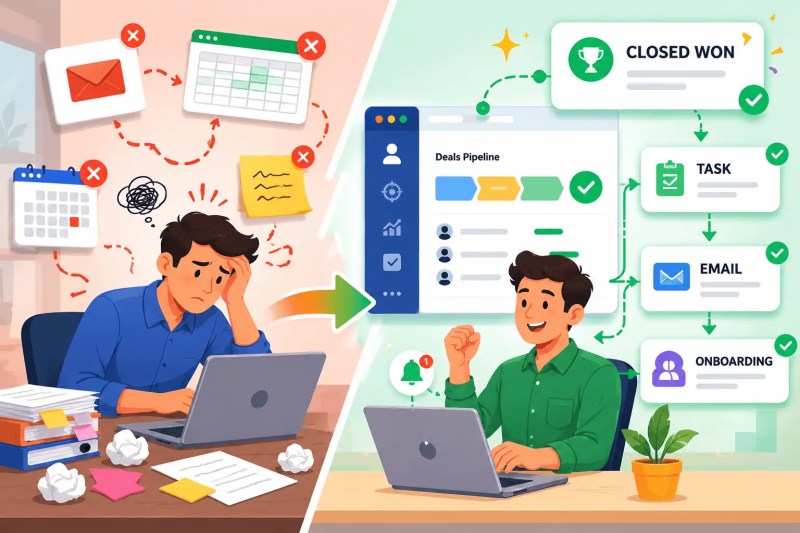
Consider an illustrative handoff. A rep marks a deal as won, but the onboarding team does not receive the agreed information. The issue may be a missing update, an unclear stage requirement, an automation that did not run, or a handoff that was never defined.
Zoho CRM workflow rules can associate actions such as tasks, field updates, notifications, webhooks, functions, and record creation with defined conditions, subject to edition availability and limits. A “Closed Won” change might create an onboarding task or notify another system, but only after the team specifies the trigger, required data, recipient, duplicate handling, and failure path.
Zoho CRM can serve as the source for selected sales statuses and identifiers when that ownership is explicitly defined. Email, calendar, proposal, finance, and delivery tools may read from or write to those records through supported integrations. Decide which system owns each important field and how conflicts, deletions, and repeated events should be handled. Our guides to an automated CRM update system and contact synchronisation cover related considerations.
When the CRM is disconnected from the tools the team uses, updates may be delayed or duplicated. Integration can reduce selected manual work, but it also introduces mapping, permission, monitoring, and recovery requirements. See what CRM automation involves before connecting business-critical actions.
The illustration below compares a manual handoff with a workflow in which a deal-stage change can initiate defined follow-up actions.
Common Problems in a Zoho CRM Setup
The following issues can appear when ownership, data entry, and follow-up rules are unclear:
- Unassigned or ageing leads. A lead enters the system without an owner or next action. Check every intake route, assignment conditions, working hours, reassignment rules, and the queue used when no condition matches. See our lead management automation guide.
- Incomplete activity history. Calls, meetings, emails, or notes may be missing when capture depends entirely on manual updates or an integration is misconfigured. Decide which activities matter and verify what each connected tool records.
- Duplicate records. Forms, imports, integrations, and manual entry can create separate records for the same person or organisation when matching rules and stable identifiers are absent. Review duplicate lead causes before merging records.
- Stale deal stages. An opportunity may remain in the same stage after the real situation changes. Use agreed review routines, reports, tasks, or automation based on the process and the consequence of a stale record.
Illustrative example: a team reviews inbound leads twice a day and assigns each one manually. Before replacing that step, measure how often leads wait, document valid routing criteria, decide what happens when no rep qualifies, and test for duplicate submissions. A monitored assignment workflow may then reduce waiting time without hiding unmatched records. See how to automate lead assignment.
The effect of these issues depends on volume, process complexity, and the importance of the affected fields. Track the number of unassigned leads, records without a next action, duplicates, overdue opportunities, and automation exceptions so the team can prioritise verified problems.
The illustration below brings together several failure points that can reduce confidence in CRM reporting.

How to Evaluate Zoho CRM
Compare CRM products using the workflows, controls, integrations, administration effort, and total cost your organisation actually needs. A feature list alone does not show whether the product fits the way your team sells and serves customers.
Zoho CRM is part of a broader Zoho product ecosystem and also connects with third-party applications through its marketplace, APIs, and tools such as Zoho Flow. Zoho’s CRM integrations page describes these connection options. A listed integration does not automatically mean every field synchronises in both directions, so confirm triggers, actions, supported objects, limits, and edition requirements for each connection.
When comparing Zoho CRM with HubSpot, Salesforce, or another CRM, evaluate the exact editions being considered. Review pipeline requirements, permissions, reporting, automation limits, APIs, email and phone integration, sandbox or testing needs, support, implementation resources, and expected growth. Product interfaces and plan features change, so validate current documentation and run a representative pilot.
Configuration effort is part of the decision. Custom fields, modules, pipelines, workflows, and integrations can make the system fit a process, but each customisation also needs an owner, documentation, testing, and maintenance. See these common CRM mistakes and the guide to synchronising CRM systems.
What It Takes to Maintain Zoho CRM at Scale
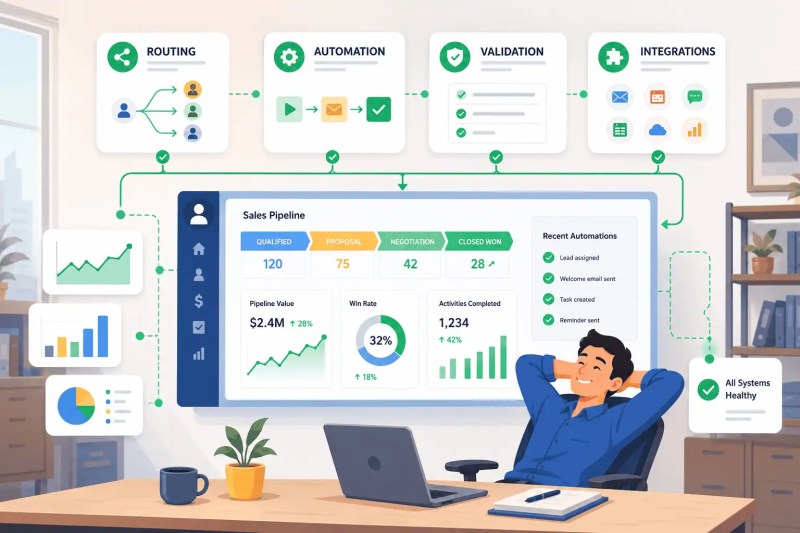
As the number of users, records, pipelines, and integrations grows, administration becomes an ongoing responsibility. Document the design, test changes, monitor exceptions, and review whether the system still matches the process.
Six decisions deserve explicit ownership:
- Record ownership and routing: define assignment criteria, fallback queues, reassignment, and coverage during absences.
- Pipeline definitions: state the evidence, required fields, and permitted transitions for important stages.
- Workflow actions: document triggers, conditions, actions, recipients, limits, duplicate protection, and failure handling.
- Data quality: define required fields, field owners, formats, matching rules, duplicate review, and archive or deletion procedures.
- Integration architecture: record which system owns each value and how credentials, retries, conflicts, and unavailable destinations are handled. See our business process automation guide.
- Change management: use representative tests, communicate changes, train affected users, and verify the live result after deployment.
The diagram below illustrates how routing, workflows, validation, and integrations contribute to a maintained CRM system.
Build and test changes in an order that limits cleanup risk. Start with the data model and process definitions, then add suitable controls and integrations. Before an automation sends messages or changes external records, test normal cases, missing data, duplicate events, permission failures, and recovery. Our guide to CRM pipeline problems covers related symptoms.
If your team needs help scoping the work, explore business automation consulting and pipeline management automation.
Final Answer
Final Answer: Zoho CRM is a cloud-based platform for managing leads, contacts, accounts, deals, activities, and sales reporting. It supports workflow rules and integrations, with features and limits that vary by edition. A successful setup requires agreed pipeline definitions, appropriate permissions, reliable data, tested automation, and ongoing ownership. Evaluate it against your actual workflows and a current edition comparison rather than assuming one CRM is universally best for a particular company size.
Need help reviewing your CRM setup?
Join the free business process audit waitlist to discuss manual work, data gaps, and pipeline visibility.
Related Resources
- What Is CRM Automation?
- How to Use a CRM Effectively
- CRM Pipeline Problems
- Manual CRM Data Entry Problems
- CRM Automation Use Cases
- How to Reduce CRM Manual Entry
- Common CRM Mistakes
- CRM Data Cleanup Strategies
- How to Sync CRM Systems
- Lead Management Workflow
- Automate CRM Data Entry
- Automate Pipeline Management
- CRM Data Migration
- CRM Automation Services
- CRM Automation Guide
- Lead Management Automation Guide
Frequently Asked Questions
Is Zoho CRM free to use?
Zoho’s current CRM pricing page lists a free edition for up to three users. It includes core CRM features and limited workflow automation. Features, limits, currencies, and plan names can change, so compare the current edition details with your required workflows before choosing a plan.
How is Zoho CRM different from Zoho One?
Zoho CRM is an individual CRM product. Zoho One is a broader suite of Zoho applications for multiple business functions. Compare licensing terms, included applications, administration, and the actual products your team will use rather than choosing the bundle only because it contains more software.
Can Zoho CRM replace a spreadsheet-based sales process?
It can replace or reduce many spreadsheet-based tracking steps if the CRM is configured for the real process and the team adopts it. Before migration, define record relationships, pipeline stages, ownership, required fields, duplicate handling, reports, and archive rules. Reconcile record counts and important values after import. See our CRM data migration solution.
Does Zoho CRM integrate with tools outside the Zoho ecosystem?
Yes. Zoho provides marketplace extensions, APIs, and other integration options for third-party applications. The available objects, triggers, actions, sync direction, limits, and edition requirements vary by integration. Verify the exact connection and test it with representative records before relying on it.
Why do Zoho CRM implementations run into problems?
Problems can come from unclear processes, weak ownership, unsuitable permissions, inconsistent stage definitions, incomplete migration, low adoption, duplicate records, or integrations and workflows that were not tested. Measure the observed issue first, then correct the relevant process, configuration, training, or connection.
About the author

Miguel Carlos Arao is the Founder & CEO of Alltomate, a Zapier Certified Platinum Solution Partner focused on CRM automation and sales workflow systems, including pipeline configuration, lead assignment, and CRM integrations.

Built by a certified Zapier automation partner
Explore CRM automation services, the CRM automation guide, and CRM data entry automation.