
Published on May 26, 2026
Quick Answer: A Zap is the automation workflow itself. A Task is the unit of usage consumed when action steps inside that workflow execute successfully. One Zap run can consume multiple Tasks depending on how many actions complete successfully.
Table of Contents
- What a Zap Actually Is
- What a Task Actually Is
- How Tasks Are Counted — and Where People Get It Wrong
- Multi-Step Zaps and the Task Multiplication Problem
- When Zap Structure Directly Affects Task Spend
- What Breaks When You Treat Tasks Like Zaps
- Designing Zaps With Task Efficiency in Mind
- Final Answer
- FAQs
Most people who use Zapier can build a working automation within minutes. But most people also reach their task limit earlier than expected, hit billing surprises they didn’t anticipate, or discover that a workflow that worked fine at low volume breaks silently when data starts flowing at scale. The reason, almost always, comes down to not understanding the difference between what a Zap is and what a Task is — and treating the two as interchangeable.
They are not the same thing. They don’t behave the same way, they don’t scale the same way, and they don’t fail the same way. This post explains how Zapier Tasks and Zaps differ operationally, how task usage is actually calculated, and why misunderstanding that distinction creates real workflow automation mistakes.
If you’re already running multi-step workflows in Zapier, see how our Zapier consulting service approaches task-efficient automation architecture. You can also request a free business process audit to review existing workflows before task usage scales further.
What a Zap Actually Is
A Zap is the automation rule — the configured workflow that tells Zapier what to watch for, what to do when it sees it, and in what order. Every Zap has at minimum one trigger and one action. The trigger is the event that starts the workflow (a new row in Google Sheets, a form submission, a deal stage change in a CRM). The action is what Zapier does in response (send an email, create a record, update a field, post a message).
When you build a Zap, you’re defining logic: if this happens in system A, do that in system B. The Zap itself sits idle until the trigger condition is met. It doesn’t cost anything while it’s waiting. It exists as a configured rule, turned on or off, ready to fire when data arrives.
The structure of a Zap matters operationally. A single Zap can contain multiple steps — filters, formatters, conditional paths (Paths), and several actions chained together. This means a single Zap can do a significant amount of work in one trigger event. How that work is structured has direct consequences for workflow automation architecture, including how many Tasks get consumed, how errors propagate, and how easy the Zap is to debug when something goes wrong.
Most businesses running Zapier don’t have one Zap. They have dozens — sometimes hundreds — each handling a specific workflow segment. A Zap for new leads. A Zap for invoice creation. A Zap for internal notifications. The collection of Zaps across an account represents the automation system; each individual Zap is one rule inside that system.
As Zap count grows, the risk of redundant logic, conflicting triggers, and unmaintained workflows increases significantly. A Zap that no one remembers building can still run, still consume Tasks, and still create bad data. Workflow hygiene becomes increasingly important as automation systems expand.
What a Task Actually Is
A Task is not a workflow. A Task is a unit of usage — specifically, one successful action completion inside a Zap run. Every time a Zap fires and successfully completes an action step, that step consumes one Task from your plan’s monthly allotment.
This is where the distinction becomes operationally important. A Zap run is the event of the Zap executing. A Task is the output of each action within that run. If your Zap has three action steps and it runs once, that’s one Zap run and three Tasks consumed — assuming all three steps succeed.
Trigger steps do not consume Tasks. Filter steps (steps that stop the Zap if a condition isn’t met) do not consume Tasks when they halt the run. Formatter steps — Zapier’s built-in data transformation tool — also do not consume Tasks. According to Zapier’s official task usage documentation, trigger steps, filter steps, Paths steps, and certain built-in tool steps do not count toward task usage — only successful action steps do.
Failed steps don’t consume Tasks either. If an action fails partway through a Zap run, the steps that completed before the failure will have consumed Tasks, but the failed step and any steps after it won’t. This sounds like a safety feature, but it creates a different problem: partial completion. Data can move through some steps but not others, leaving systems out of sync unless you’re actively monitoring your Zap history. If Zapier’s autoreplay feature is enabled, later retries that succeed can still consume Tasks during replay attempts.
The relationship between Zap runs, successful actions, and Task consumption is illustrated below.

If your Zapier account is burning through Tasks faster than expected, the issue is usually structural. Our Zapier consulting team audits Zap architecture before task limits become a billing problem.
How Tasks Are Counted — and Where People Get It Wrong
The most common misunderstanding: people assume that one Zap run equals one Task. It doesn’t. One Zap run equals as many Tasks as there are successful action steps in that run.
Here’s a concrete example. A business sets up a Zap that triggers when a new contact is added to their CRM. The Zap then: (1) creates a task in their project management tool, (2) sends a welcome email, and (3) posts a Slack notification to the sales team. Three action steps. Every time a new contact is added, three Tasks are consumed — not one.
If that business adds 200 contacts per month, they’re consuming 600 Tasks from that single Zap — not 200. If they’re on a plan with 1,000 Tasks per month and they have four Zaps with similar structures running simultaneously, their actual capacity is far smaller than the plan number suggests.
The table below shows how Task consumption changes based on Zap structure:
| Zap Actions per Run | Monthly Runs | Tasks Consumed |
|---|---|---|
| 1 | 500 | 500 |
| 3 | 500 | 1,500 |
| 5 | 500 | 2,500 |
| 3 (with conditional Paths logic) | 500 | 1–3 depending on branch logic |
The number on your Zapier plan is a Task ceiling, not a run ceiling. Plan selection needs to account for the average step depth of your Zaps, not just the number of triggers you expect to fire. This is also one reason businesses eventually compare Zapier vs Make vs n8n once task consumption begins scaling aggressively across multiple workflows.
Multi-Step Zaps and the Task Multiplication Problem
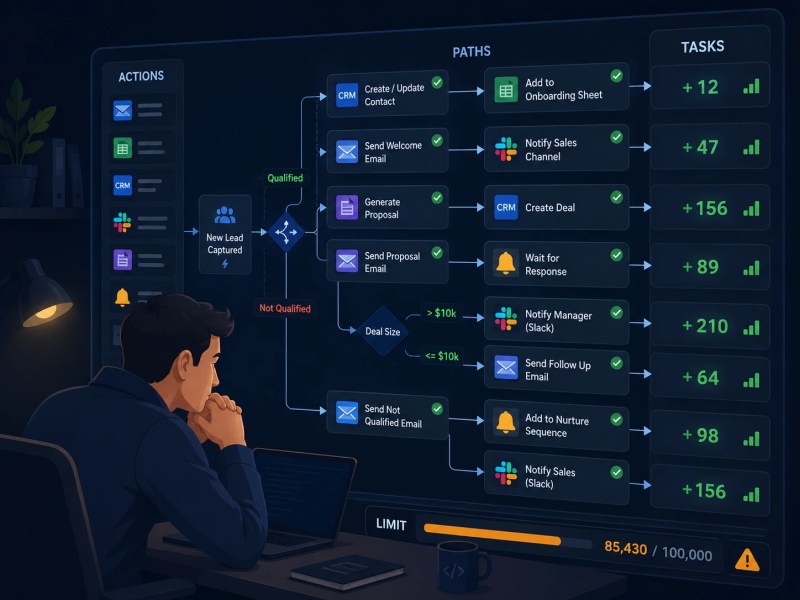
Multi-step Zaps are where most of the confusion — and most of the billing surprises — happen. When a Zap has five, seven, or ten action steps, each run multiplies Task consumption proportionally. This is expected behavior. The problem is that most people building the Zap are thinking about the workflow, not about the downstream cost of running it at volume.
Consider a lead intake Zap for a marketing agency. When a form is submitted: (1) the lead is created in the CRM, (2) a deal is created in the sales pipeline, (3) an owner is assigned based on region, (4) a proposal document is generated, (5) a notification is sent to the account team, (6) a follow-up task is created, and (7) the lead is tagged in the email marketing platform. Seven actions. Seven Tasks per submission.
At 300 leads per month, that’s 2,100 Tasks from a single Zap. This is not a problem of bad design — the workflow logic is correct. The problem is failing to model Task consumption at production volume. A 2,000-Task-per-month plan runs out in the first week if that Zap fires at expected volume.
There’s also a structural consideration specific to Paths (Zapier’s conditional branching feature). Each Paths branch can contain its own set of action steps, and the branch that executes determines how many Tasks are consumed during that run. According to Zapier’s documentation on Paths task counting, action steps inside the branch that runs consume Tasks just like any other action step. This means businesses projecting task usage based only on their “typical” path often underestimate real consumption when less-common branches contain additional actions.
Multi-step Zaps that operate comfortably within task limits at low volume often exceed those limits as workflow activity grows — not because the Zap changed, but because the execution volume did. Task planning needs to be built into Zap architecture from the beginning, which is one reason many growing teams eventually hire a Zapier expert once workflow complexity increases.
This scaling effect becomes much more obvious once multi-step workflows start running at production-level volume.
When Zap Structure Directly Affects Task Spend
Two Zaps can accomplish the same business outcome with very different Task costs depending on how they’re structured. This is the part of Zapier architecture that most how-to guides skip over entirely.
Zap structure starts affecting Task spend most noticeably when filters and conditional logic are involved. A single Zap with a filter early in the workflow — before several expensive action steps — can stop the run before unnecessary actions execute. No Tasks are consumed for the blocked steps. In higher-volume workflows, this alone can reduce monthly Task usage substantially.
By contrast, splitting the same logic into multiple independent Zaps without centralized filtering can create unnecessary runs and higher Task consumption. Each Zap may still trigger, evaluate data, and execute action steps even when the workflow should have stopped earlier in the process.
Structure also affects maintainability. A business might build one Zap with five coordinated actions — updating the CRM, creating internal records, sending notifications, and logging activity — or split the same workflow across five separate Zaps. Task cost may remain identical, but operational behavior changes significantly, especially in larger complex integration workflows. A consolidated Zap is usually easier to trace and debug, while separate Zaps can isolate failures more effectively.
Filter placement is one of the most underused cost-control levers in Zapier. Putting a filter before a cluster of action steps can reduce Task consumption dramatically when a meaningful percentage of triggers don’t actually need to proceed through the full workflow.
The structural difference between inefficient and optimized workflow design is shown below.

This is also covered in more detail in our Zapier automation guide, which walks through Zap architecture patterns for different workflow types.
What Breaks When You Treat Tasks Like Zaps
Here’s a failure pattern that shows up frequently in audits: a business builds five Zaps to handle a multi-stage onboarding process. Each Zap covers one stage. The business thinks of each Zap as “one automation” and assumes their Task usage is roughly equal to their Zap count times the number of new clients per month.
What’s actually happening: each Zap has between three and six action steps. At forty new clients per month, the actual Task consumption is somewhere between 600 and 1,200 Tasks — not the 200 the business expected based on Zap count. They hit their monthly limit in week two and Zaps start failing silently. No one knows until a client complains that their onboarding materials never arrived.
This is the downstream consequence of treating Task count as a proxy for Zap count. A more accurate planning model is: average successful action steps per Zap run × total expected monthly trigger runs across all Zaps. That calculation gives a much clearer picture of where Task consumption actually comes from.
There’s a second category of breakage. When a business correctly understands Tasks but miscounts steps — forgetting that Paths branches each carry their own action steps — their projection is still off. A Zap with one trigger and multiple Paths branches may consume very different numbers of Tasks depending on which branch executes and how many action steps that branch contains. A business counting complex multi-branch workflows too simplistically can still underestimate real Task consumption significantly.
Note: Zapier’s analytics dashboard can show task usage by Zap, app, date, and member depending on account permissions and plan configuration, but it does not provide step-level task breakdowns. For detailed troubleshooting, reviewing individual Zap run histories is still the most reliable way to understand where Tasks are being consumed. See Zapier’s analytics dashboard documentation for current reporting capabilities.
Designing Zaps With Task Efficiency in Mind
The decision of how many Zaps to build, how many steps to include in each one, and where to place filters is not just an organizational preference — it has direct consequences on Task efficiency, error handling, and debuggability at scale.
Several principles apply consistently across well-structured Zapier systems:
- Filter early, not late. If a meaningful portion of your trigger events don’t actually need to complete the full action chain, put a filter before the expensive steps. Tasks consumed on filtered-out runs are Tasks wasted.
- Consolidate logically related actions. If five steps always need to run together in response to one trigger, keeping them in one Zap simplifies debugging. Five separate Zaps that must all succeed for the workflow to complete correctly are five failure points instead of one.
- Use Formatter steps freely. Formatter steps don’t consume Tasks. If you need to transform, split, or reformat data before passing it to an action, a Formatter step is cost-free and reduces the risk of errors in subsequent steps.
- Audit Paths branches carefully. Each branch is a potential Task multiplier. If a branch only fires occasionally, confirm that its task cost is accounted for in your projections — not just the “typical” path.
- Review inactive Zaps regularly. Zaps that are on but no longer in active use still consume Tasks if their triggers fire. Quarterly Zap audits prevent usage leakage from workflows no one is maintaining.
For businesses that are running Zapier at any meaningful scale, Task efficiency is not an afterthought — it’s a design constraint. Build it in from the start rather than engineering around it after hitting a billing ceiling. Our Zapier automation examples post shows how this plays out across different workflow types, and our Zapier automation solutions page covers how we structure these systems for clients.
Well-structured automation systems become significantly easier to maintain, monitor, and scale over time.

Final Answer: A Zap is the configured automation rule — the trigger-and-action workflow that defines what Zapier watches for and what it does in response. A Task is the unit of usage that gets consumed each time an action step in a Zap successfully completes. One Zap run can consume multiple Tasks depending on how many action steps it contains. The two concepts operate at different layers: Zaps define structure and logic; Tasks track execution cost. Confusing them leads to under-planned task budgets, billing surprises, and automation systems that fail silently at volume. Designing Zaps with task efficiency in mind — through filter placement, step consolidation, and accurate volume projections — is how you build a Zapier system that scales without unexpected cost.
Need a reliable system?
Related Resources
FAQs
Does turning a Zap off stop Task consumption?
Yes. A Zap that is turned off will not run, and therefore will not consume any Tasks. If you need to stop a Zap from running temporarily — without deleting it — turning it off is the correct approach. Tasks are only consumed during active runs of enabled Zaps.
Do failed Zap runs consume Tasks?
Partially. Steps that completed successfully before the failure do consume Tasks. The step that failed and any steps after it do not. This means partial completions are possible: some systems update while others don’t. Monitoring Zap run history is the only way to catch these failures before they cause data inconsistencies.
Does a Paths step count as a Task?
The Paths step itself does not consume a Task. However, action steps inside the branch that executes do consume Tasks just like any other action step. Paths can still increase per-run Task consumption significantly because different branches may contain different numbers of actions.
If I replay a failed Zap run, does that consume additional Tasks?
Yes. Replaying a Zap run counts as a new run, and any successful action steps in that replay consume Tasks. Zapier’s official replay documentation confirms that replayed runs count toward task usage even if the original run already consumed Tasks. This is relevant when replaying runs in bulk after fixing an error — the replay cost is additive to your monthly Task usage.
Do Formatter steps consume Tasks?
No. Zapier’s built-in Formatter steps — used for text manipulation, number formatting, date conversion, and similar operations — do not consume Tasks. They can be used freely without affecting Task usage, making them a useful tool for preparing data before it reaches an action step.
Is there a way to see which Zaps are consuming the most Tasks?
Zapier provides task usage reporting in its analytics dashboard, including breakdowns by Zap, app, date, and member depending on account permissions and workspace configuration. However, step-level task attribution is not available, so reviewing individual Zap run histories is still the most reliable way to diagnose unusually high task consumption.
About the author

Miguel Carlos Arao is the Founder & CEO of Alltomate, a Zapier Certified Platinum Solution Partner focused on Zapier workflow architecture, including Zap structure design, task efficiency planning, and multi-step automation systems. This article is based on real-world Zapier implementation work involving multi-step workflow systems, task-efficiency planning, CRM automation, and operational process design for growing businesses.

Built by a certified Zapier automation partner
Explore more about
practical Zap architecture strategies,
our approach to Zapier architecture,
how Alltomate works with Zapier.