
Published on June 5, 2026
Use our AI-powered automation services to scope the workflow, then start with a free business process audit if you need to confirm the fit.
Quick Answer: Apify MCP Claude Code is a setup where Claude Code uses MCP to call Apify tooling, so the model can retrieve live web data instead of relying only on pasted context. Apify’s MCP server lets AI applications discover and run Actors, access stored results, and support coding assistants like Claude Code (Apify Docs). Claude Code can also connect to external tools and live data sources through MCP (Claude Code Docs). The system breaks when teams treat connection as the hard part; the real failure point is extraction quality, field consistency, and repeated execution under changing site conditions.
Table of Contents
- Why the demo works and the workflow still fails
- What Apify MCP changes inside Claude Code
- How the Apify MCP Claude Code connection actually works
- Where extraction quality becomes the bottleneck
- A real operational use case: web research for lead generation
- Why scale changes the behavior of the system
- Why not just use a traditional scraper?
- When this stack is the right choice
MCP is an open protocol for connecting AI systems to external context and tools (Anthropic), and Claude Code is designed to use that protocol to reach data sources instead of depending only on pasted material (Claude Code Docs). That part is straightforward. The real question is whether the source data stays usable once the workflow runs repeatedly.
A system can look correct in a demo and still fail in production because the upstream data is incomplete, the target site changes, or the model is asked to interpret more than the extractor actually captured.
For the broader system context, see our AI automation guide and our Zapier MCP Claude article.
Why the demo works and the workflow still fails
The demo usually succeeds because the page is clean, the target data is obvious, and the operator is present to correct the output in real time.
Production is different. In implementations we’ve built, the first break is rarely the model. It is the point where the workflow assumes the website will stay structurally stable long enough for extraction to remain reliable.
A consistent pattern we see in this setup is that teams overestimate the value of the final answer and underestimate the cost of bad inputs. Once the extractor misses a field or pulls partial records, Claude Code has to reason from an unstable source. That produces confident output that looks usable until the workflow is repeated at scale.
This is why the stack needs a retrieval layer, a reasoning layer, and a validation layer. If those responsibilities collapse into one step, troubleshooting becomes guesswork.
In practice, the validation layer is often simple. Teams check whether required fields exist, whether output matches an expected schema, and whether critical values were actually extracted before Claude sees the data. That step catches many failures before they become reasoning problems.
The difference between a successful demo and a production workflow is illustrated below.

What Apify MCP changes inside Claude Code
Apify’s MCP server gives AI applications a structured way to discover and run Actors, access storage, and work with results (Apify Docs). Claude Code can connect to external tools and data sources through MCP, which means the model can act on live systems rather than only on text you paste into the conversation (Claude Code Docs).
That separation matters. Apify handles retrieval. Claude handles interpretation. When those responsibilities blur, teams usually blame the model for a problem that started in the extraction layer.
This mirrors the purpose of MCP itself: a standardized way to connect models to tools and context, instead of building a one-off integration every time.
The system architecture is shown below.
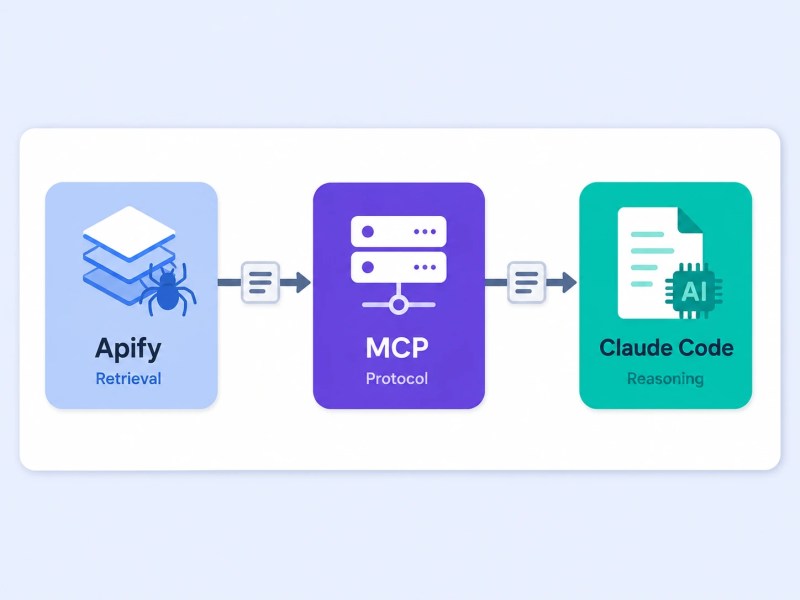
For related implementation context, see our AI data extraction solution. In practice, extraction quality and validation usually become larger challenges than the MCP connection itself—a pattern we’ve repeatedly seen as an Apify Expert Partner.
How the Apify MCP Claude Code connection actually works
At a high level, the workflow is straightforward. Claude Code connects to an MCP server, the MCP server exposes available Apify capabilities, and Claude can invoke an Actor when it needs external web data (Apify Docs).
A typical flow looks like this: Claude receives a research request, identifies that external data is needed, invokes the appropriate Apify Actor through MCP, receives the extracted result, and then reasons over that structured output before producing a response.
The connection step is usually the easiest part of the project. The harder question is whether the data returned by that Actor will remain reliable enough for downstream use once websites change, extraction targets expand, and usage volume increases.
That distinction matters because most implementation failures happen after the connection is working, not before.
Where extraction quality becomes the bottleneck
The hard part is not asking Claude to use Apify. The hard part is making sure the retrieved output is predictable enough for Claude to trust. This is the same challenge discussed in our AI data extraction solution, where retrieval quality ultimately determines downstream automation quality.
In real workflows, we see three failure modes repeatedly: missing fields, inconsistent naming, and source pages that present the same information in different layouts. None of those problems are solved by the MCP layer itself.
That is why a system can appear clean on the first run and become noisy after the tenth. The extractor may still succeed technically, but the output format stops being consistent enough for downstream reasoning.
A practical check is simple: if the extracted output cannot be validated by structure before the model sees it, the workflow is already too loose for production.
The most common failure patterns are shown below.

Across the client work we’ve done in lead generation and market research, the trigger is usually the same: analysts are spending too much time collecting public web data by hand, then copy-pasting fragments into AI tools. This mirrors patterns we’ve seen in recruitment automation projects such as our lead-generation automation case study. The moment retrieval becomes structured, the workflow improves; the moment source quality drifts, the output starts failing in ways that are harder to notice.
Midpoint note: If you are evaluating this stack for a live workflow, the next decision is not “Can it connect?” It is “Can the output survive repeated use without manual repair?”
A real operational use case: web research for lead generation
A business development team does not usually need “AI research” in the abstract. It needs a repeatable way to collect company names, service pages, contact signals, and qualification clues without filling a rep’s day with manual browsing.
Many teams use these workflows as the retrieval layer behind systems such as AI lead scoring, where structured research data feeds qualification and prioritization workflows.
We’ve also seen similar patterns in broader AI automation examples for business, where external data collection is combined with downstream decision-making and workflow automation.
That is where Apify MCP Claude Code is useful. Apify can gather the source material, Claude Code can interpret it, and the workflow can route only the structured result into the next step. The system becomes more valuable when the researcher is not the person doing the browsing.
This is also where the implementation details become visible. In setups like this, the main risk is not the first extraction run. It is the second one, when the site changes and the downstream logic still expects the old shape.
We see this consistently in new installs: once the team depends on the workflow, the system must be treated as a pipeline with validation, not as a prompt with a browser attached.
When implemented correctly, the workflow produces structured research output that can move directly into qualification and sales processes.

For a broader view of adjacent tooling, see our n8n MCP Claude integration article.
Why scale changes the behavior of the system
At small volume, a slightly messy extraction can be tolerated because a person can repair the output. At scale, that same mess becomes a structural problem.
When the workflow runs repeatedly, small inconsistencies compound. One missing field can break a qualification rule. One changed page structure can shift the meaning of the extracted record. One unvalidated result can propagate into downstream CRM or reporting systems. This becomes even more important when retrieval workflows are connected to larger AI workflow automation systems where bad data can affect multiple downstream processes.
This is where the architecture matters more than the prompt. Teams evaluating whether AI belongs in a process at all may find our guide on when to use AI in workflows useful. MCP gives Claude Code access to external tools, but it does not guarantee that the content coming back from those tools is stable, normalized, or fit for automation.
If the goal is reliable automation rather than occasional research assistance, the workflow needs control points after retrieval. That is the difference between a useful assistant and a dependable system.
The compounding effect of small extraction errors becomes much more visible as volume increases.

Why not just use a traditional scraper?
Traditional scrapers collect data. Apify MCP Claude Code combines retrieval with reasoning. The difference matters when the workflow must interpret results, qualify leads, summarize findings, or route information into downstream systems rather than simply export raw records.
For example, a scraper may collect company information successfully, but a Claude-powered workflow can evaluate that information against qualification criteria, categorize businesses, and prepare structured output for sales or operations teams.
If the requirement is only data collection, a simpler scraper may be enough. If the requirement includes interpretation and decision support, Apify MCP Claude Code becomes significantly more valuable.
When this stack is the right choice
Apify MCP Claude Code is a good fit when the work depends on live web data, repeatable retrieval, and a reasoning layer that can interpret structured results.
If you’re evaluating broader implementation approaches, see our comparison of AI automation vs traditional automation.
It is not the right choice when the problem is already solved by a simpler source, when the target site is too unstable to extract reliably, or when no downstream validation exists. In those cases, adding Claude only increases the number of places where failure can hide.
If the workflow needs broader automation around intake, routing, or follow-up, link it into a larger system instead of treating it as a standalone prompt. Our automation integration services page covers that layer.
Final Answer: The technical connection between Apify, MCP, and Claude Code is usually the easy part. The real challenge is maintaining reliable extraction quality as websites change and usage scales. Teams that treat the stack as a complete system—with retrieval, validation, and reasoning operating as separate responsibilities—are far more likely to build workflows that remain dependable in production.
Need a reliable system?
Use our automation audit checklist to evaluate your workflow before implementation.
Related Resources
FAQs
What is Apify MCP Claude Code?
Apify MCP Claude Code is a setup where Claude Code uses the Model Context Protocol (MCP) to access Apify tools and retrieve live web data during execution.
How does Apify work with Claude Code?
Apify provides the retrieval layer through Actors and data extraction tools, while Claude Code interprets and reasons over the retrieved results.
When should you use Apify MCP Claude Code instead of a traditional scraper?
Apify MCP Claude Code is most useful when extracted web data needs to be interpreted, categorized, summarized, or routed into downstream workflows. Traditional scrapers are often sufficient when only raw data collection is required.
Can Claude Code scrape websites?
Claude Code does not perform web scraping by itself. It typically relies on connected tools such as Apify to retrieve website data.
What is the biggest risk in an Apify MCP Claude Code workflow?
The biggest risk is inconsistent extraction quality. If the retrieved data becomes incomplete or structurally inconsistent, the reasoning layer inherits those problems immediately.
About the author

Miguel Carlos Arao is the Founder & CEO of Alltomate, a Zapier Certified Platinum Solution Partner and an official Apify Expert Partner focused on AI automation, data extraction workflows, and business process systems. The patterns in this article come directly from building and troubleshooting Apify MCP Claude Code-related systems across client engagements in lead generation and market research.

Built by a certified Zapier automation partner
Explore more at
AI-powered automation services,
AI data extraction, and
Zapier MCP Claude.