
Published on June 9, 2026
If you’re connecting HubSpot to external tools, explore our automation and integration services or start with a free business process audit.
Quick Answer: HubSpot webhooks let you push real-time data to external systems the moment a trigger fires inside your CRM — a deal stage change, a form submission, a contact property update. Unlike polling, webhooks don’t wait. But they fail silently, don’t retry by default, and expose data integrity problems you won’t see until something downstream breaks. Understanding where they fail is as important as knowing how to configure them.
Table of Contents
- What HubSpot Webhooks Actually Do (and Don’t Do)
- Where Webhook Triggers Break Inside HubSpot
- Webhook vs. Polling: The Architecture Decision That Matters
- Building Reliable Webhook Flows Across Connected Systems
- Real-Time CRM Sync: What Breaks at Scale
- Common HubSpot Webhook Patterns We See in Practice
- FAQs
Most HubSpot webhook problems aren’t configuration problems. They’re architecture problems disguised as configuration problems. A webhook fires, nothing happens downstream, and the natural instinct is to check the URL, check the headers, retest the trigger. But the real issue is usually upstream — a workflow condition that misfires, a payload that arrives without the field the receiving system expects, or a CRM record that was updated in a way the workflow doesn’t recognize as a trigger event.
What HubSpot Webhooks Actually Do (and Don’t Do)
A HubSpot webhook is an outbound HTTP POST request. When a specified condition is met inside HubSpot — a contact property changes, a deal moves to a new stage, a form is submitted — HubSpot sends a JSON payload to a URL you’ve defined. That’s the complete transaction from HubSpot’s side. What happens next is entirely your responsibility.
HubSpot does not provide a durable delivery guarantee. If a webhook receives a successful 2xx response, HubSpot treats the event as delivered. Retry behavior exists, but it is conditional rather than guaranteed. According to HubSpot’s webhook documentation, 5xx errors can trigger retries with exponential backoff, while most 4xx responses are treated as permanent failures. This differs significantly from a dedicated message queue designed for guaranteed event delivery.
This matters because developers often build the receiving endpoint first — the URL that accepts the payload, parses the JSON, and triggers downstream logic — and then discover much later that events were dropped during a deployment window or an endpoint timeout. The sending side (HubSpot) had no way to tell you, and the receiving side had no way to recover the missed events.
HubSpot webhooks are available through two distinct surfaces: the Workflows tool (no-code, inside a workflow action) and the Apps/Webhooks API (developer-level subscriptions to object-level events). As explained in HubSpot’s developer guidance on webhooks and APIs, workflow webhooks fire based on workflow enrollment logic, while API-level subscriptions fire on object changes regardless of workflow enrollment. Confusing these two surfaces is one of the most common sources of unexpected duplicate payloads in HubSpot integrations.
The basic event flow is illustrated below. Notice that HubSpot’s responsibility ends once the webhook is delivered to the receiving endpoint.

Where Webhook Triggers Break Inside HubSpot
The most reliable-looking part of a HubSpot webhook setup is usually the first thing to break under real conditions: the trigger itself. Most setups fail not because the webhook destination is wrong, but because HubSpot never fires the event — or fires it more than once.
Re-enrollment logic is the most common culprit. HubSpot workflows, by default, only enroll a contact or deal once. HubSpot’s workflow enrollment documentation confirms that records do not automatically re-enter a workflow unless re-enrollment is explicitly configured. If a deal returns to a previous pipeline stage and then advances again, the workflow won’t fire a second time unless re-enrollment is explicitly enabled. In implementations we’ve built for sales and field service teams, this single gap accounts for the majority of “missing webhook” reports that come in after go-live. The record was updated. The webhook URL is correct. But the workflow didn’t fire because the contact was already enrolled.
This failure mode is one of the easiest to miss because everything appears configured correctly until a record re-enters the same business process.

Property-based triggers have a specificity problem. If your webhook fires on “Deal Stage is any of Closed Won,” and your team uses multiple pipelines with stages of the same name, the trigger may fire on stages you didn’t intend — or miss stages you did. The receiving system gets a valid payload from HubSpot, but for the wrong pipeline context. This produces data that looks correct on arrival and surfaces as a logic error only later.
Workflow delays and timing windows create payload ordering issues. If a webhook action is placed after a delay step, and the triggering record is updated again before the delay resolves, you may receive payloads in the wrong sequence at the destination. The receiving system sees the second state of the record reflected in the first payload, depending on whether HubSpot uses the record state at the time of action execution or at enrollment. This is a known behavior difference between workflow action types and matters significantly for bidirectional sync setups.
Understanding these failure patterns is what separates a webhook setup that works in testing from one that holds under production load. For a deeper look at how these gaps appear across integrated systems, this breakdown of common integration mistakes covers several that originate at the trigger layer. Many of the same issues also appear in broader workflow automation mistakes, particularly when trigger conditions and re-enrollment rules are poorly defined. Teams reviewing an existing implementation can also use our automation audit checklist to identify common trigger, routing, and delivery risks before they become production issues.
Building a HubSpot integration and need the trigger logic to hold?
Start with a free business process audit — we’ll map the failure points before you build.
Webhook vs. Polling: The Architecture Decision That Matters
Before committing to a webhook-based integration with HubSpot, it’s worth understanding why polling — the alternative approach — is often chosen first and replaced second. Polling asks HubSpot’s API on a schedule: “Has anything changed since I last checked?” Webhooks invert that: HubSpot notifies your system the moment something changes. The operational tradeoffs are not symmetrical.
Polling is tolerant of endpoint downtime. If your receiving system goes down for 20 minutes, the next poll picks up everything it missed. Webhooks don’t have that property. If your endpoint is unavailable when HubSpot fires the event, you need to have built your own recovery mechanism — or accept that the event is gone.
Webhooks, on the other hand, are the only viable approach for genuinely real-time workflows. A workflow that needs to notify a technician the moment a deal reaches “Scheduled” in HubSpot cannot wait for the next polling interval. A payment confirmation that must immediately update a HubSpot contact and trigger a fulfillment action can’t tolerate a 5-minute lag. In those contexts, polling is architecturally wrong — not just slower.
The right call is determined by your latency tolerance and your ability to handle delivery failures. If the downstream action is time-sensitive and you can build a reliable receiving endpoint with proper error handling, webhooks are correct. If the downstream system has variable uptime or you’re operating without engineering support, a polling-based approach through an iPaaS tool like Zapier or Make is often more stable in practice — even if it’s slightly slower. We see this tradeoff play out regularly in client setups where a webhook approach was technically correct but operationally fragile given the team running it. If you’re evaluating orchestration platforms for webhook-driven workflows, our comparison of Zapier vs Make vs n8n breaks down the operational differences.
Building Reliable Webhook Flows Across Connected Systems
A reliable HubSpot webhook flow has three layers that most setups only partially implement: the sending configuration inside HubSpot, the receiving endpoint’s validation logic, and the downstream system’s handling of the data.
The reliability model below shows where most production failures originate and why focusing only on the webhook action itself is rarely sufficient.
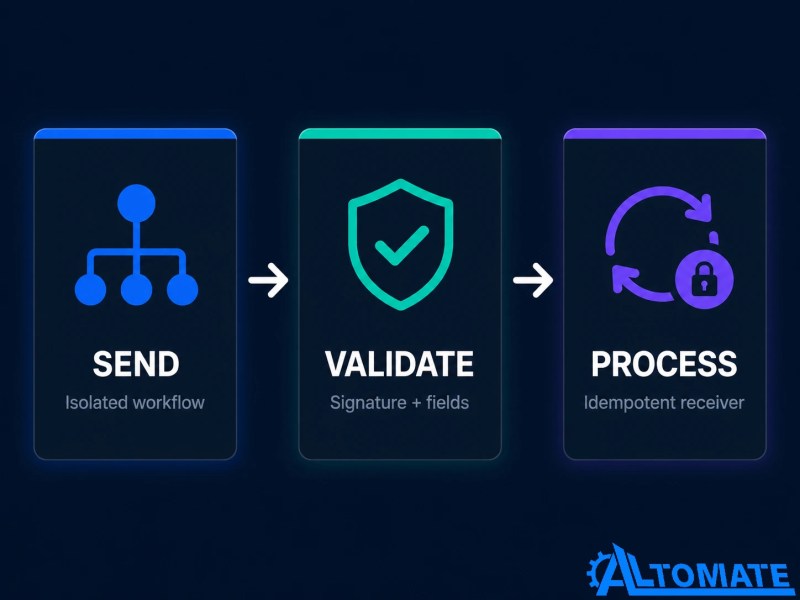
On the sending side, reliability starts with workflow structure. The webhook action should be isolated — not buried inside a multi-step workflow that also sends emails, updates properties, and creates tasks. When a webhook action sits alongside unrelated steps, a failure in any step can suppress the webhook or create unclear audit trails. Single-purpose workflows that exist to send a webhook and nothing else are far easier to debug when something goes wrong. This becomes even more important when implementing complex business rules automation that depends on multiple conditional paths.
On the receiving side, the first thing to implement is payload validation. HubSpot’s request validation documentation describes the X-HubSpot-Signature header, which allows you to verify that the webhook originated from HubSpot rather than an arbitrary source. Many integrations skip this step and only discover the gap during a security review. Beyond signature validation, the receiving endpoint should verify that required fields are present before triggering downstream logic — not assume they will be. HubSpot’s payload structure for contacts, deals, and companies differs, and missing fields don’t always produce errors; they produce silent data gaps.
On the downstream side, idempotency is the design requirement most often skipped. If a webhook fires twice for the same event (which happens when HubSpot retries after a slow response, or when both a workflow webhook and an API subscription are active simultaneously), the receiving system should produce the same result regardless of how many times it processes the same payload. Without idempotency, duplicate records and double-triggered actions are a matter of when, not if.
We’ve built webhook-based integrations connecting HubSpot to PSA tools, billing systems, and field service platforms. The setups that stay stable over time consistently share these three properties. The setups that generate ongoing support tickets are usually missing one of them — typically idempotency, because it’s the one that doesn’t surface as a problem in any test environment.
If you’re evaluating implementation partners, you can also review our HubSpot Solutions Partner profile, which highlights our experience building CRM automations, integrations, and webhook-driven workflows across multiple industries.
Real-Time CRM Sync: What Breaks at Scale
A webhook integration that handles 50 deals a month will not behave the same way at 2,000. The failure modes are different, the error patterns are harder to trace, and the systems that absorb the payload start exhibiting behavior that looks like data quality problems but are actually throughput problems.
The most common scale-related failure is event volume collision. At higher volumes, webhook bursts triggered by bulk imports, list-based workflow enrollments, or batch property updates can overwhelm downstream systems that aren’t designed to absorb spikes in traffic. The result is a backlog of payloads arriving out of sequence, with the receiving system processing them in delivery order rather than event order. A deal that moved through three stages in 60 seconds may arrive with stage 3’s payload processed before stage 1’s.
A consistent pattern we see in higher-volume HubSpot integrations is that teams add a queue layer between HubSpot’s webhook delivery and the downstream processing — something like a serverless function that accepts the payload, writes it to a queue with a timestamp, and processes events in order. This adds latency (usually a few seconds) but eliminates the ordering and throughput issues entirely. For most business workflows, a 3-second processing delay is invisible. Data arriving in the wrong order is not. Similar architectural patterns appear in larger-scale multi-system integration environments where multiple applications depend on synchronized event delivery.
The tradeoff is illustrated below. A small amount of latency often produces dramatically higher reliability at scale.
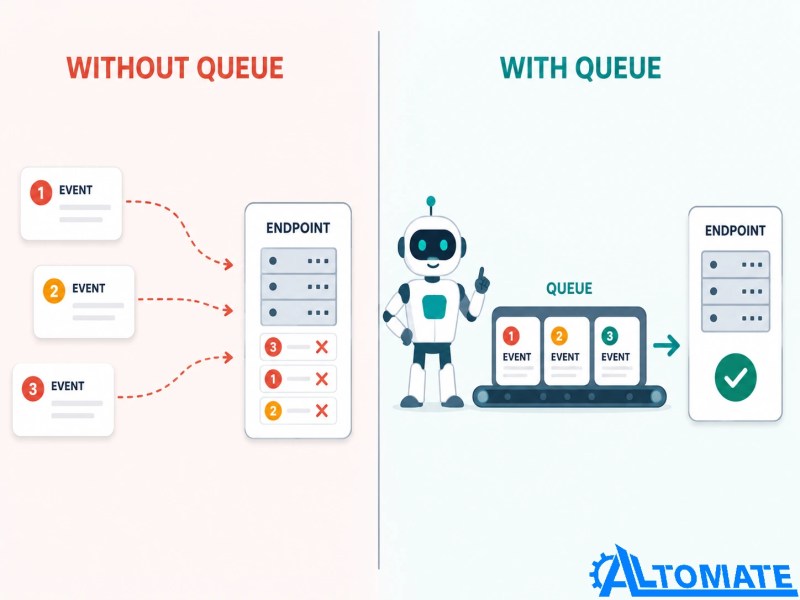
The Halo PSA integration we built for a managed services client is a direct example of this: HubSpot deal events needed to create and update service records in real time, but the PSA had strict validation rules that rejected out-of-sequence updates. Adding an ordered queue between HubSpot’s webhook output and the PSA’s API eliminated the validation failures entirely. You can read the full case study here: HubSpot Halo PSA automation case study.
Common HubSpot Webhook Patterns We See in Practice
The pattern you’re building determines what will eventually break — and each pattern tends to fail in a different place. Most HubSpot webhook implementations fall into a small number of recurring architectures, each with its own operational risks.
Deal stage → external system action. A deal moves to “Closed Won” and HubSpot fires a webhook to trigger invoice creation, project onboarding, or a fulfillment action in another system. This is the highest-value pattern and the one most likely to have downstream financial consequences if it misfires. The critical design requirement here is a response confirmation back to HubSpot — storing a reference ID from the downstream system as a HubSpot property — so you can audit whether the action actually completed. The webhook firing and the downstream action completing are two separate events; treat them that way.
Form submission → multi-system routing. A HubSpot form submission fires a webhook that routes lead data to a CRM, a project tool, and a notification service simultaneously. The failure mode here is fan-out — if any one destination fails, the others may succeed, leaving the lead partially registered across systems. Building a central router that handles the fan-out and tracks completion per destination is more robust than firing three separate webhooks from one workflow step.
Contact property change → sync trigger. A contact property update in HubSpot (subscription status, lifecycle stage, custom field) fires a webhook to keep an external system in sync. This pattern is vulnerable to update loops if the external system can also write back to HubSpot. A contact updated in HubSpot fires a webhook to System B, System B updates and fires back to HubSpot, HubSpot updates and fires again. Loop detection — usually a “last modified by” field or a timestamp comparison — is required. Without it, bidirectional sync setups will eventually produce an infinite update loop that burns through your API quota before anyone notices.
For teams routing HubSpot data through an iPaaS layer before it reaches the final destination, the business process automation guide covers how to structure those intermediate layers cleanly. Teams migrating away from manual handoffs may also benefit from understanding the tradeoffs between manual and automated workflows. If you need implementation support, our CRM automation service handles the design and build for teams that need it done reliably.
Final Answer: HubSpot webhooks are a reliable real-time automation mechanism when the surrounding system is built correctly — with single-purpose workflows, payload validation, idempotent receivers, and delivery failure handling. The most common failure points are re-enrollment logic, missing idempotency, and payload ordering at volume. Getting those three right determines whether a webhook integration stays stable or generates ongoing incidents. If your setup is producing intermittent failures or silent data gaps, the problem is almost always in one of those layers — not in HubSpot’s delivery mechanism itself.
Need a reliable system?
Related Resources
- Business Process Automation Guide
- Common Integration Mistakes to Avoid
- Common Workflow Automation Mistakes
- How to Connect Multiple Systems
- Business Rules Automation Explained
- Zapier vs Make vs n8n
- Webhook to Send Email Automation
- Case Study: HubSpot and Halo PSA Automation
- Case Study: HubSpot and Stripe Automation
- Automation Audit Checklist
- CRM Automation Services
FAQs
Does HubSpot retry webhook deliveries if the endpoint is down?
HubSpot’s workflow webhook action has limited retry behavior, but it is not a durable delivery guarantee. If your endpoint is unavailable for an extended period, events fired during that window may not be recovered. For high-consequence workflows, you should implement your own delivery confirmation logic — storing a response identifier back in HubSpot — so you can audit which events completed downstream.
What’s the difference between HubSpot workflow webhooks and API webhook subscriptions?
Workflow webhooks fire based on workflow enrollment logic — they trigger when a record meets workflow conditions and the webhook action executes. API webhook subscriptions fire on object-level changes regardless of any workflow. Both can be active simultaneously, which is a common source of duplicate payloads. If you’re receiving events twice, check whether both surfaces are configured for the same object type.
Why is my HubSpot webhook not firing for updated deals?
The most likely cause is re-enrollment settings. By default, HubSpot workflows only enroll a contact or deal once. If the record was previously enrolled and the deal updates again, the workflow won’t fire unless you’ve explicitly enabled re-enrollment. Check your workflow’s enrollment settings and confirm the re-enrollment trigger conditions match your expected event.
How do I prevent duplicate records when HubSpot fires the same webhook twice?
Build idempotency into your receiving endpoint. Use a unique identifier from the HubSpot payload — the object ID plus the event timestamp, or a unique transaction ID if your workflow generates one — and check whether that identifier has already been processed before executing the downstream action. This is standard practice for any webhook receiver handling business-critical events.
Can HubSpot webhooks cause update loops in bidirectional sync setups?
Yes, and this is one of the more damaging failure modes in bidirectional CRM integrations. If HubSpot fires a webhook that updates an external system, and that external system writes back to HubSpot via API, HubSpot may treat that write as a new trigger event and fire another webhook. The loop continues until API rate limits are hit. Prevent this by adding a “source” marker to updates — a property or header that identifies whether the change originated from HubSpot or the external system — and configuring each side to skip updates that originated from itself.
About the author

Miguel Carlos Arao is the Founder & CEO of Alltomate, a Zapier Certified Platinum Solution Partner focused on HubSpot webhook automation, including workflow trigger configuration, payload validation logic, and real-time CRM-to-system event routing. The patterns in this article come directly from building and troubleshooting HubSpot webhook-related systems across client engagements in managed services and field service operations.

Built by a certified Zapier automation partner
Explore more at
Automation & Integration Services,
HubSpot Halo PSA Case Study,
CRM Automation, and our
HubSpot Solutions Partner profile.