
Published on June 11, 2026
If you’re automating client or employee onboarding, start by auditing what’s currently breaking before building anything new — automation integration services or a free business process audit can help identify where your current intake flow is leaking.
Quick Answer: Onboarding chatbot automation is the practice of using conversational flows — triggered at a defined entry point — to collect intake data, apply conditional logic, and route new users or clients into the right system without manual intervention. The chatbot is not the product. It’s the front end of a workflow that spans form capture, CRM update, task creation, and handoff notification. When the underlying automation is built correctly, the chatbot delivers a consistent onboarding experience regardless of volume.
Table of Contents
- Where Most Onboarding Chatbots Break Down
- The Intake Layer: What the Chatbot Actually Captures
- Conditional Routing Logic: Why Static Scripts Fail at Scale
- CRM Sync and Record Creation Without the Manual Step
- Handoff Triggers: When Automation Ends and a Human Begins
- How Onboarding Chatbots Behave Differently Across Business Types
- Final Answer
- FAQs
Onboarding is one of those processes that looks simple from the outside — someone signs up, they get welcomed, they’re shown around. But underneath that surface, most businesses are patching together a manual sequence: someone checks a form submission, copies data into a CRM, sends a welcome email, creates a task in a project tool, and schedules a call. That sequence fails regularly and differently depending on who’s doing it that week.
Poor onboarding creates friction early in the relationship — whether the new arrival is a client, employee, or user. Workplace research has long connected onboarding quality with engagement and retention outcomes (Gallup). Chatbot automation changes the entry point of that sequence — but only if the chatbot is backed by a workflow that actually handles the downstream steps. This article covers how that system is built, where it breaks, and what it takes to get it running reliably across client types, employee categories, or intake scenarios.
Where Most Onboarding Chatbots Break Down
The failure usually isn’t the chatbot itself — it’s what happens after the conversation ends. Most implementations treat the chatbot as a standalone tool: it asks questions, collects answers, and stops. Whatever happens next depends on someone checking a dashboard, exporting a CSV, or manually forwarding the response. This is one of the most consistent common integration mistakes seen across chatbot-adjacent workflows — the connection between the front-end tool and the backend system is assumed, not built.
That gap — between chatbot output and downstream action — is where onboarding breaks. A new client completes a 12-question intake flow at 9 PM on a Friday. The chatbot marks it complete. But nothing routes that data into the CRM, no task is created for the account manager, and no confirmation email goes out. The client assumes they’ve been ignored. The account manager doesn’t know the client even exists until Monday morning when someone manually checks the form submissions.
The second failure pattern is at the logic layer. The chatbot asks flat questions — same sequence, same options, regardless of who’s answering. A solo freelancer and an enterprise procurement team get the same onboarding flow, which means neither gets an experience that actually fits their context. This isn’t a chatbot design problem — it’s a routing problem. The chatbot has no instructions for what to do when the answers vary.
In implementations we’ve built for professional services firms, the most common issue isn’t missing data — it’s unprocessed data. The chatbot collected everything correctly. The automation just wasn’t there to act on it. Understanding this distinction is important before deciding what to build: the chatbot needs to be a trigger, not a destination. For onboarding workflows that involve AI-powered decisioning at the routing layer, AI-powered automation services cover how that layer is built. For a broader look at how these failures compound across full workflows, the common workflow automation mistakes breakdown covers the downstream effects in detail.
The Intake Layer: What the Chatbot Actually Captures
The chatbot’s job at the intake layer is precise: collect the minimum data set required to route the user correctly and create a complete record downstream. This is a constraint, not a limitation. Every question added to an intake flow is a potential drop-off point — form completion research consistently shows that shorter, clearer intake experiences perform better, a pattern that applies equally to conversational flows (Typeform). The goal is to capture what the system needs — not what would be interesting to know.
For most onboarding workflows, the essential intake fields fall into three categories: identity (name, email, company if applicable), context (what they signed up for, how they found you, their primary goal), and routing signals (business size, industry, urgency, or specific service type). That last category is the one that most chatbot builds skip — and it’s the one that determines everything downstream.
A routing signal is any field whose answer changes what happens next. If a user selects “agency” as their business type and that selection changes which onboarding sequence they enter, which CRM pipeline they land in, and which team member gets notified — that’s a routing signal. If the field doesn’t change any downstream behavior, it doesn’t belong in the intake flow.
The intake difference is clearer when the chatbot fields are treated as routing inputs instead of general information capture.

Want to map the right intake fields for your onboarding flow?
A free business process audit will identify which questions are creating routing signals — and which are adding friction without function. You can also work through the automation audit checklist to assess your current intake flow before the call.
Conditional Routing Logic: Why Static Scripts Fail at Scale
A static onboarding chatbot asks the same questions in the same order to everyone. That design works at low volume when a human is reviewing every response anyway. It breaks when volume increases and when the diversity of incoming users grows — because the system has no way to adjust what happens next based on what it just learned.
Conditional routing means the chatbot’s path — and more importantly, the automation triggered after the conversation — changes based on specific answer combinations. This isn’t about making the chat feel more personalized. It’s about ensuring the right downstream workflow fires for each user type without requiring a human to triage every submission.
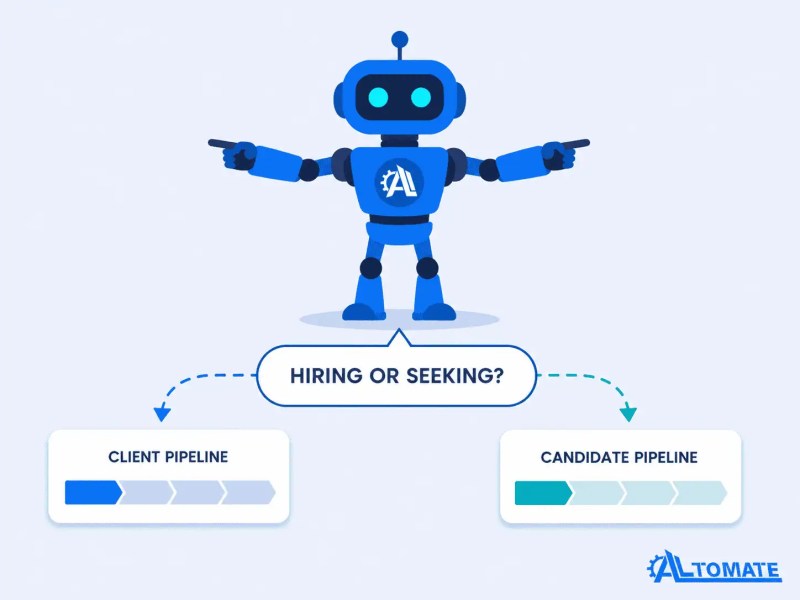
Consider a recruiting firm that uses a chatbot to onboard both hiring managers and job candidates from the same landing page. A static script fails immediately — the questions required to route a hiring manager into a client pipeline are fundamentally different from those needed to qualify a candidate. Conditional routing solves this at the first question: one field (“Are you hiring or job seeking?”) splits the flow entirely. From that point, each path captures different data, triggers a different automation, and writes to a different CRM object. The chatbot looks the same from the outside; the workflow behaves completely differently depending on the answer. This is the exact routing architecture behind the recruitment lead generation automation case study — where intake branching at the first question determined every downstream action.
That first routing question acts like a system switch: one answer sends the user into a client workflow, while the other sends them into a candidate workflow.
At scale, this matters for a different reason. When a business grows from 50 to 500 onboarding events per month, manual triage of submissions becomes the bottleneck. Conditional routing built into the automation layer means each submission is already pre-sorted by the time it enters the CRM — no human decision required to assign it to the right team, sequence, or pipeline. The business process automation guide outlines how this kind of pre-sort logic applies across intake-heavy workflows.
CRM Sync and Record Creation Without the Manual Step
Once the chatbot conversation ends and the routing decision is made, the automation layer needs to execute three things in the right order: create or update a CRM record, set the correct pipeline stage and associated properties, and trigger any follow-on actions (task creation, email sequence enrollment, internal notification). For teams connecting the chatbot output to more than one downstream system, the guide on how to connect multiple systems covers the sequencing logic that prevents partial writes and dropped records.
The most common failure at this layer is a duplicate record problem. The chatbot captures an email address that already exists in the CRM — but the automation is set to create a new contact on every submission rather than search first and update if found. The result is two records for the same person, split data, and a broken contact history. The fix requires a search-before-create step using the email field as the lookup key. If a match is found, update. If not, create. This is a known data integrity issue documented in CRM platforms including HubSpot, where contact deduplication relies on explicit lookup logic rather than automatic matching at record creation (HubSpot). This sounds obvious — but it’s skipped more often than not in initial builds.
The failure point appears before the CRM write happens: the automation must search first before deciding whether to update or create.

Pipeline stage assignment is the second area where records go wrong. Contacts land in the CRM but with no stage set, or they default to the first stage regardless of the routing signals captured during intake. A user who answered “ready to start within 30 days” should land in a different pipeline stage than one who said “just exploring” — and that routing needs to be built into the automation, not handled manually after the fact.
This mirrors a system we set up for a home services business where the chatbot distinguished between existing customers requesting a new service and net-new leads. Existing customers triggered an update to their active record and enrolled them in a service-specific sequence. Net-new leads created a fresh contact, set the pipeline to “New Inquiry,” and assigned to the sales rep covering their region. Without the search-before-create logic and the conditional stage routing, both paths would have created duplicate records with no stage assignment — unusable for the team working the pipeline. For a close parallel in a real implementation, the CRM migration and sales automation case study shows how this kind of dual-path CRM logic was built across a full sales workflow.
Handoff Triggers: When Automation Ends and a Human Begins
The boundary between automated onboarding and human involvement isn’t a style preference — it’s an operational decision with direct impact on how reliable the handoff actually is. Defining that boundary incorrectly is one of the most common causes of onboarding failures in otherwise well-built systems.
A handoff trigger is a condition — or combination of conditions — that ends the automated path and creates a human action item. The automation handles everything up to that point; after the trigger fires, a human takes over. The trigger needs to be specific enough to fire only when human judgment is actually required, and broad enough that it doesn’t miss edge cases that genuinely need review.
Common handoff triggers in onboarding systems: a user selects a high-value service tier (auto-assign to senior account manager), a user reports an issue during intake that falls outside the standard workflow (flag for support review), or intake data fails a validation check (incomplete required field or mismatched format). Each of these fires a notification — Slack, email, or task creation in a project tool — with enough context for the human to act without re-reading the entire chatbot transcript.
Where this breaks: the handoff fires correctly, but the notification contains no context. “New onboarding submission” with a link to the CRM record forces the recipient to open the record, parse the intake data, and figure out why they were notified. That’s friction that compounds fast when multiple handoffs are happening daily. The notification itself needs to include the routing reason — why this specific submission required a human — not just that a submission occurred. For teams building this kind of alert logic into multi-platform workflows, the Zapier automation solutions page outlines how notification routing is structured across tools.
A useful handoff notification shows the reason, account context, and required action inside the alert itself so the human can respond without reverse-engineering the workflow.

One pattern we see consistently in new installs: intake forms are designed by marketers who want to segment audiences, not by operators who need to route workflows. The result is a 15-question chatbot with six fields that duplicate CRM data already captured at signup, and zero fields that trigger downstream logic. Stripping that back to four or five fields with clear routing function almost always improves both completion rate and workflow reliability.
How Onboarding Chatbots Behave Differently Across Business Types
The same underlying automation architecture — intake, route, sync, handoff — produces very different operational behavior depending on the business type it’s built for. That variation isn’t cosmetic. The intake fields change, the routing conditions change, the CRM objects change, and the definition of a successful handoff changes.
In a B2B professional services firm, onboarding chatbot automation typically routes by company size and service type, writes to a company object in the CRM in addition to the contact, and triggers a proposal sequence rather than a welcome email. The handoff usually happens when a qualified lead hits a threshold — deal value estimate, company size, or service complexity — that requires a sales call rather than a self-serve onboarding path.
In a subscription-based or SaaS context, the chatbot is often post-signup — the user has already converted and the chatbot handles product setup questions or feature selection. Routing here isn’t about sales qualification; it’s about matching the user to the right onboarding sequence based on their stated use case. A user who says they’re managing a team of 20 gets a different product tour than a solo user — and that difference is built into the automation, not presented manually by a customer success rep.
In a field service or trades business, onboarding often means qualifying a new job lead from a homeowner. The chatbot captures location, job type, timeline, and budget range — and the routing logic decides whether to auto-schedule an estimate, assign to a specific crew based on region, or flag the lead for manual review because the scope is unclear. This is a pattern we’ve built across multiple field service implementations, where the chatbot serves as the first filter in a lead management system that previously relied entirely on a human dispatcher. The Jobber and Zapier integration case study shows how this kind of chatbot-to-dispatch routing was built for exactly that context.
Across all three contexts, the chatbot is doing the same structural job: collect, route, sync, hand off. What changes is the domain logic — the specific conditions, thresholds, and downstream systems that vary by business type. Building one without understanding the other produces a chatbot that asks the right questions but doesn’t know what to do with the answers. For teams thinking through which automation platform best supports this kind of conditional intake logic, the Zapier vs Make vs n8n comparison outlines platform-level differences in how each handles branching workflow logic.
Final Answer: Onboarding chatbot automation only works when the chatbot is the entry point to a complete system — not the system itself. The intake layer needs to capture routing signals, not just user data. The routing logic needs to be conditional, not static. The CRM sync needs to include search-before-create and pipeline stage assignment. The handoff trigger needs to include context, not just notification. When those four layers are built correctly, onboarding runs at volume without manual intervention — and the handoff, when it happens, is clean. When any layer is missing or misconnected, the chatbot creates the appearance of automation while the actual work still falls to a human.
Need a reliable onboarding automation system?
If your chatbot collects data but your team still has to copy, route, assign, or follow up manually, the workflow is not finished yet. Get a free business process audit to identify where your onboarding process is leaking time.
Related Resources
Frequently Asked Questions
What is the difference between a chatbot and an onboarding chatbot automation system?
A chatbot is an interface — it presents questions and collects answers. An onboarding chatbot automation system is that interface connected to a backend workflow: routing logic, CRM record creation, email sequence enrollment, task assignment, and handoff triggers. The chatbot without the backend is a data collection form with a conversational skin. The automation is what makes collected data actionable without manual intervention.
How do I decide which intake fields to include in my onboarding chatbot?
Include only fields that either create a CRM record or change downstream routing behavior. A field that doesn’t affect what happens next — which workflow fires, which pipeline stage is set, which team member is notified — doesn’t belong in the intake flow. Every additional field increases drop-off risk. The optimal set is usually four to six fields capturing identity, context, and routing signals.
What causes duplicate contacts when a chatbot syncs to a CRM?
Duplicate contacts occur when the automation is configured to create a new record on every chatbot submission rather than first searching for an existing record by email address. The fix is a search-before-create step: if a match is found, update the existing record; if not, create a new one. This is a configuration decision in the automation platform — not a chatbot limitation — and it needs to be explicitly built into the workflow.
When should the onboarding automation hand off to a human?
Handoff should be triggered by specific conditions, not by volume or time. Common triggers include: a high-value service tier selected during intake, incomplete or mismatched data that fails validation, a service type outside the scope of the automated onboarding path, or an explicit request for a call or custom scope. The handoff notification itself must include the routing reason — why this submission required human review — so the recipient can act immediately without revisiting the full chatbot transcript.
Can the same chatbot onboarding system work for both clients and employees?
Yes, but only if the routing logic accounts for the distinction from the first question. Client onboarding and employee onboarding touch different CRM objects, different task systems, and different notification paths. A single chatbot can handle both entry points if the intake flow branches immediately based on user type — with entirely separate automation paths triggered for each. Sharing the same chatbot without that branch means one type gets an incorrectly routed workflow.
About the author

Miguel Carlos Arao is the Founder & CEO of Alltomate, a Zapier Certified Platinum Solution Partner. He works primarily on intake routing architecture, CRM sync logic, and automated handoff systems across client engagements in professional services, field services, and operations-heavy businesses.

Built by a certified Zapier automation partner
Explore more at
Automation Integration Services,
CRM Automation, and
the Business Process Automation Guide.