
A lead that stopped replying after a pricing call, a webinar registrant who never booked, and a six-month-old closed-lost record cannot be treated as the same silence. Lead reactivation automation turns their last meaningful activity and lifecycle stage into a timed recovery path, so stalled opportunities do not remain invisible until someone happens to search the CRM.
If dormant opportunities are sitting in your CRM without a defined recovery path, talk with Alltomate about lead management automation services.
System Snapshot
- Problem: Inactive leads are grouped together despite having different histories, buying signals, and owners.
- Core System: Lifecycle-aware triggers segment dormant records and coordinate email, SMS, tasks, and sales notifications.
- Key Risk if Missing: Reps either overlook recoverable opportunities or send irrelevant follow-ups that conflict with active sales work.
- Primary Outcome: Stalled records re-enter a controlled sales path only when their status and channel eligibility support it.
Silence is not a single status in a CRM
This solution covers the recovery of leads that have become inactive after a known interaction, using their previous activity and lifecycle stage to determine whether, when, and how to re-engage them. It is most useful once old records are numerous enough that manual review is inconsistent; it does not replace active lead follow-up for open conversations or lead qualification automation for deciding whether a new prospect is a fit.
The failure point is shown below: one inactive status can conceal very different reasons for silence.

Start the clock at the last meaningful activity, not the last field update
A reactivation trigger should measure events that signal real engagement, such as a reply, meeting outcome, form submission, meaningful call disposition, or a page action that the business has chosen to treat as intent. If a background sync or a sales rep editing a note resets the timer, genuinely dormant leads can be hidden indefinitely, so the workflow must ignore administrative field changes.
The inactivity window also changes by lifecycle stage: a lead who requested a demo may need review after days, while a closed-lost opportunity may wait months before a relevant recovery path becomes appropriate. This keeps a delayed response from being mistaken for disengagement and prevents every old record from entering the same sequence at once.
- Inactivity scan → evaluate last meaningful activity and lifecycle stage → queue an eligible lead for reactivation (missing activity date → route to review)
A no-show demo, unresponsive trial, and closed-lost deal need separate exits
Segmentation determines the recovery action, not merely the message copy. A no-show demo may create a short rescheduling task, an unresponsive trial may receive a time-bound email path, and a closed-lost record may require a sales-owner notification before any customer-facing outreach begins.
Without those exits, a record can receive an offer that ignores its previous objection, ownership, or current status. That is how “reactivation” turns into duplicated outreach and creates distrust inside the sales team. When uncertain identity data creates multiple possible records, duplicate leads in CRM systems can cause conflicting outreach before a salesperson ever sees the issue — a risk HubSpot’s own sync documentation confirms happens automatically during CRM integrations.
The stage-aware exit map below shows why dormant leads cannot share one generic recovery sequence.

When response events race against scheduled sends
Delayed reply events and CRM syncs can arrive after the next message has already been scheduled. The system needs a response event to cancel pending sends, update the record’s reactivation state, and assign the next action before an outdated sequence continues.
It also needs a clear exception path for records that appear eligible but have no owner, conflicting lifecycle values, or an existing active sequence. When a record has no owner or conflicting ownership, CRM lead assignment automation governs the fallback path; reactivation waits for confirmed ownership rather than assigning a rep itself. Treating those records as safe to send is how a recovery workflow collides with live sales activity.
Control Layer
- A meaningful-activity validator excludes background field updates that would falsely reset inactivity.
- A suppression check stops reactivation when an active follow-up sequence, open task, or recent reply is present.
- A response event cancels queued messages and routes the record back to its sales owner before the next send.
- An exception queue holds records with missing owners, conflicting stages, or unavailable channel data for human review.
When stalled leads are treated as a tool problem instead of a system-design problem, duplicate contact and lost ownership become predictable outcomes. Alltomate can map the recovery logic, suppressions, and handoffs before dormant records begin receiving automated outreach.
One dormant demo request can change status three times in a week
Consider a prospect who requested a demo, missed the meeting, opened a follow-up email, then replied after the sales owner had marked the record inactive. The reactivation path should move the record from dormant to engaged, stop the remaining scheduled messages, notify the owner, and create a task with the prior interaction history rather than restarting the prospect at the top of the funnel.
The status progression below shows how a single record can change state quickly without losing its sales context.

Alltomate’s lead generation automation project for recruitment shows the same need for coordinated CRM history, segmentation, and meeting follow-up; its connected workflows were estimated to reclaim more than 40 team hours per month. That result covers the broader lead-generation system, not reactivation alone, but it demonstrates why recovery logic should preserve context rather than operate as an isolated message sequence.
Suppressions have to run before any recovery sequence fires
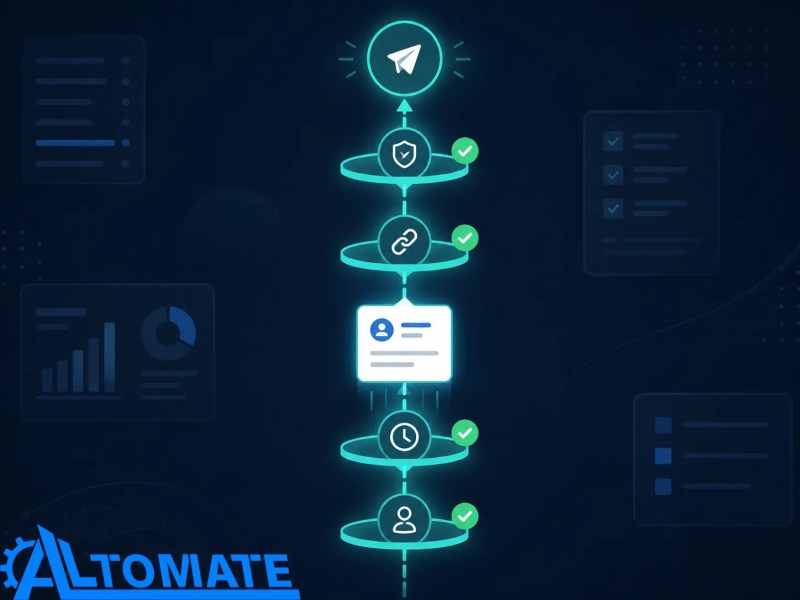
A trigger checks for an existing owner, recent sales activity, open deal status, and active-sequence membership before it creates a recovery message or task. If that validator runs after the send is queued, a rep can contact the same person manually while the automation delivers a conflicting message.
A stage-mapping rule also translates the CRM’s actual lifecycle values into reactivation states, because free-text labels and legacy stages can otherwise send records into the wrong branch. Records that do not match a trusted state are held for review instead of being forced through a generic path.
The gate below shows why every recovery send needs a suppression check before it can leave the queue.
The recovery path needs a stable source of truth for status
Reactivation depends on a reliable record identifier, current lifecycle stage, last meaningful activity date, ownership field, and channel eligibility. If multiple tools overwrite those values without a clear source of truth, the workflow can reactivate an already-active record or leave a recoverable one untouched.
The system therefore uses the CRM record as the decision point and treats late-arriving updates as events to reconcile, not as a reason to duplicate outreach. That distinction is especially important when sales teams update records after calls rather than immediately.
For teams using HubSpot, lifecycle-stage automation shows why conflicting workflow writes and incomplete suppression rules must be resolved before lifecycle data can control reactivation. HubSpot’s own record deduplication documentation outlines the underlying mechanics — automatic matching by email or domain, and manual review for everything else — that make lifecycle data unreliable without a control layer.
Email, SMS, CRM tasks, and alerts fail on different identifiers
Email actions require a deliverable email address, SMS actions require a valid phone record and usable permission status, and CRM tasks require a current owner or escalation rule. A missing identifier should remove only the affected channel, not cause the entire recovery workflow to fail silently.
CRM schemas also vary: one system may use a lifecycle stage while another stores a custom status or last-contact field. The automation must map those fields deliberately, because an API update to the wrong property can make a recently engaged lead look dormant again.
Open rates hide whether a stalled lead actually re-entered sales work
The useful measurement is not simply how many messages were opened, because an open event does not confirm that the record became actionable. A stronger view tracks eligible records, suppression rate, response rate, owner-task completion, reactivated opportunities, and records that required exception handling.
That reporting exposes issues the workflow cannot solve alone, such as sales owners not completing reactivation tasks or old lifecycle fields being updated inconsistently. A high send count with no ownership action is a queue problem, not a successful recovery system.
Sales needs an off-ramp for records the rules cannot interpret
Human review remains necessary when a lead has a recent reply without a clear disposition, conflicting account ownership, or a reason for loss that should block automated outreach. The system should surface the context that caused the exception, because a vague “review needed” task simply recreates the manual research problem.
Sales can then decide whether to reopen, archive, change the lifecycle stage, or exclude the record from future reactivation. That decision becomes a controlled input to the workflow instead of an unrecorded exception.
The handoff below shows where automation stops and a salesperson takes over when the record cannot be interpreted safely.

Reactivation sits behind the rest of the lead lifecycle
Lead reactivation works best as one part of a broader lead management automation system. When a recovered prospect becomes active again, the next step may move into a separate lead follow-up workflow rather than remain in a dormant-lead sequence.
For the operational failure pattern behind this page, see why leads are not being followed up. If the issue is sequence timing and ownership after re-engagement, follow-up sequence automation is the adjacent system to examine.
Frequently asked questions
How does lead reactivation automation decide that a lead is inactive?
It uses a deliberate inactivity rule based on meaningful activity, lifecycle stage, and time since the last qualifying event. Background field edits or delayed CRM updates must be excluded, or active records can be incorrectly marked as dormant.
Can lead reactivation automation use both email and SMS?
Yes, when the record has the correct contact identifier and the channel is eligible for use. Missing phone data, unavailable permission status, or a recent reply should suppress that channel rather than trigger an incomplete or conflicting outreach path.
What happens if a reactivated lead replies?
A reply event should cancel pending recovery messages, update the reactivation state, and create or update a task for the responsible salesperson. Without that cancellation step, scheduled messages can continue after the lead has already re-engaged.
Is lead reactivation the same as lead follow-up?
No. Lead follow-up manages current conversations and next steps, while reactivation recovers records that have passed an inactivity threshold and need a new, stage-aware decision path.
Why Alltomate
Alltomate designs automation around the points where lead records become unreliable: unclear lifecycle stages, late updates, duplicate sequences, and ownership gaps. The work starts by exposing those decision rules and exceptions before a recovery workflow is allowed to send, suppress, or assign anything.
If your CRM contains stalled opportunities with no dependable route back to sales, start with a business process audit to identify the lifecycle gaps before selecting the automation build.
About the solution designer

Miguel Carlos Arao is the Founder of Alltomate and a Zapier Certified Platinum Solution Partner specializing in automation systems, workflow architecture, and real-world implementation.

Built by a certified Zapier automation partner
Explore more at
Lead Management Automation,
Lead Follow-Up Automation, and
Lead Management Automation Services.