
Published on August 23, 2026
Trying to figure out which fits your specific workflow rather than in general? See our
business automation consulting,
or start with a
free business process audit.
Quick Answer: PandaDoc is built document-first — strong at generating a proposal or quote from CRM data with dynamic pricing tables, with eSignature as one step in that document’s lifecycle. DocuSign is built signature-first — its core strength is complex, compliant, multi-party signing workflows, with document generation as a secondary capability layered on top. If your workflow starts with “we need to build a proposal,” PandaDoc’s generation tools usually fit better. If it starts with “we need this contract legally executed by several parties in a specific order,” DocuSign’s signing infrastructure is the stronger foundation.
Table of Contents
- The Question That Actually Decides Which Tool Fits
- Document Creation and Templates: Two Different Starting Points
- eSignature Depth: Where DocuSign’s Roots Show
- CRM Integration: Both Connect, But Not the Same Way
- Approval Workflows Before the Document Ever Goes Out
- Where Pricing Models Quietly Change the Math
- Reporting and Automation Flexibility at Scale
- FAQs
Most comparisons between these two treat it as a feature checklist — who has more templates, whose signature flow looks nicer. That misses the actual fork in the road: PandaDoc and DocuSign were built to solve different problems first, and the feature each one bolted on afterward is noticeably less mature than what it built natively. Knowing which one is native and which is bolted-on for your specific use case matters more than either company’s full feature list.
The Question That Actually Decides Which Tool Fits
Before comparing features, it’s worth asking where the actual work in your process happens: is the hard part building the document — pulling in the right pricing, the right product mix, the right terms — or is the hard part getting the document signed correctly by the right people in the right order once it exists? Teams whose bottleneck is document creation (sales proposals, quotes with variable line items) tend to be better served by PandaDoc. Teams whose bottleneck is signature complexity (multi-party contracts, compliance-heavy agreements, documents that already exist as finished PDFs) tend to be better served by DocuSign.
This isn’t a rule with no exceptions — both platforms do both things to a reasonable degree — but it’s the filter worth applying before getting into individual features, because it’s the difference that actually shows up in day-to-day use.
Document Creation and Templates: Two Different Starting Points
PandaDoc’s template system is built around dynamic content blocks and pricing tables that pull from variables — product name, quantity, unit price — and calculate totals inside the document itself. That’s the feature that makes it a strong fit for CRM-triggered proposal generation, where line items differ deal to deal.
DocuSign’s template system exists, but it’s oriented around structuring where signature fields, initials, and date stamps go on a mostly-finished document, not around generating variable pricing content from scratch. A pattern we’ve seen consistently across the contract and proposal work we’ve built is that trying to build a fully dynamic, itemized quote inside DocuSign’s template editor takes noticeably more manual configuration than the same task in PandaDoc — it’s not that DocuSign can’t do it, it’s that the tool wasn’t designed around that use case first.
The difference becomes clearer when the two document-preparation approaches are viewed side by side.

eSignature Depth: Where DocuSign’s Roots Show
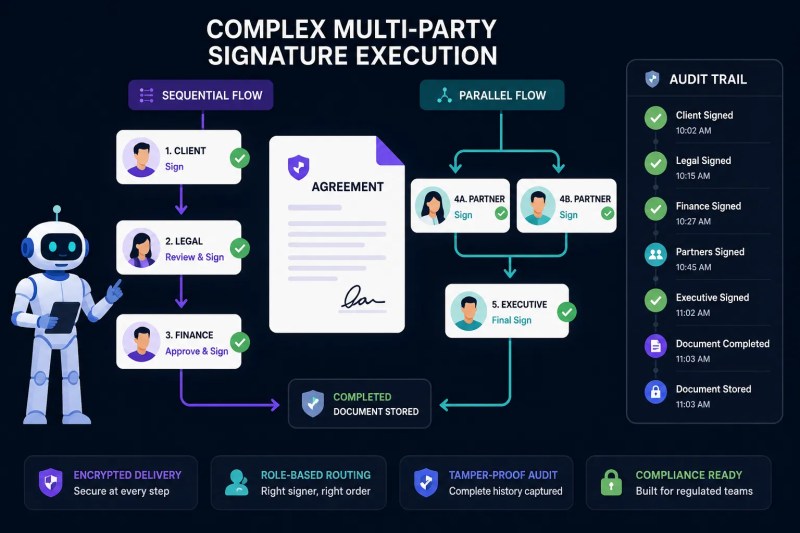
Reverse the lens and DocuSign’s advantage shows up clearly: sequential and parallel routing across multiple signer roles, detailed audit trails built for legal defensibility, and signing options built specifically around regulatory requirements in industries where document execution needs to hold up to scrutiny. PandaDoc supports multi-signer documents too, but its routing configuration and audit trail depth are generally less granular — adequate for most standard B2B agreements, less battle-tested for complex, compliance-heavy signing chains.
Neither platform’s signature capability is objectively “better” in isolation — a two-person NDA doesn’t need DocuSign’s full audit trail depth, and an eight-party syndicated agreement is exactly the case where that depth stops being optional.
The important distinction appears when several parties need to sign in a defined sequence or when the execution history needs to be clearly documented.
CRM Integration: Both Connect, But Not the Same Way
Both platforms connect to HubSpot and Salesforce, and both can be triggered from a CRM record. The practical difference shows up in what data each integration is built to pull cleanly: PandaDoc’s CRM integrations are oriented around pulling product, pricing, and line-item data into a document at generation time — because that’s the workflow it’s built for. DocuSign’s CRM integrations are oriented around triggering an existing document for signature and writing envelope status back onto the CRM record — because that’s its native strength.
If your workflow needs both — generate a dynamic quote from CRM data and route it through a complex, multi-party signing chain — that’s often where teams end up using both tools together rather than picking one: PandaDoc or a CRM-native quoting tool for generation, DocuSign for the signature-heavy final step.
Approval Workflows Before the Document Ever Goes Out
Internal approval — a manager sign-off before a proposal or contract reaches the prospect — is supported by both platforms, but the way it’s configured differs in a way that matters for larger teams. PandaDoc’s approval workflows are integrated closely with its document-editing environment, making it straightforward to route a document for internal review while it’s still being built. DocuSign’s approval routing is more oriented around the final execution chain rather than a pre-send editorial review step.
For a workflow that genuinely needs “manager approves the pricing before it goes to the client, then client and manager both sign,” this distinction is worth testing directly against your own approval chain rather than assuming either platform’s default configuration matches your process out of the box.
The complete handoff becomes easier to understand when CRM data, document creation, approval, client delivery, and signature are viewed as one connected process.

Mapping your actual approval chain against each platform’s default configuration is worth doing before committing to either one.
Book a free process audit
if you want a second opinion on which fits your specific chain.
Where Pricing Models Quietly Change the Math
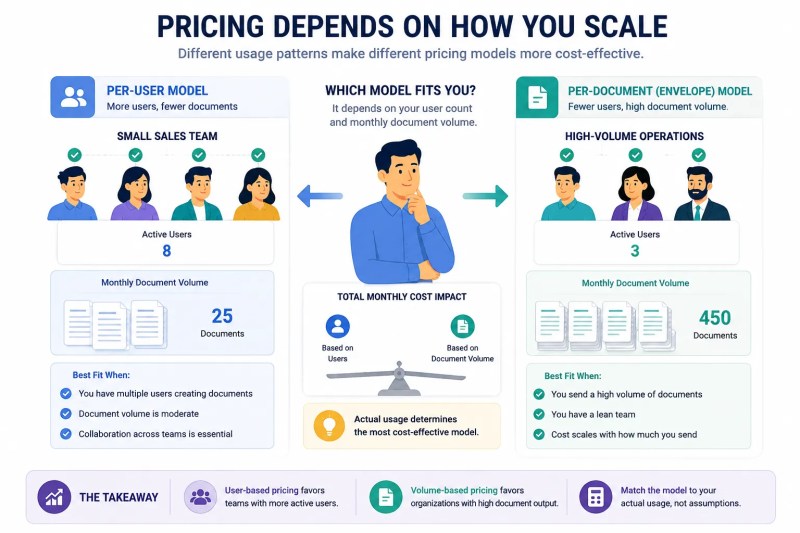
PandaDoc’s pricing is generally structured around per-user seats with document volume bundled in, while DocuSign’s core eSignature plans are often structured around envelope volume with user seats layered differently depending on the plan tier. At low volume, this distinction barely matters. In implementations we’ve built for multi-entity franchise operators, this is the exact point where per-envelope pricing on one platform and per-user pricing on the other stop being a rounding error and start being a real line item — a franchise sending hundreds of location-specific agreements a month hits DocuSign’s envelope-based costs very differently than a single sales team sending a few dozen proposals.
Neither pricing structure is inherently worse — it depends entirely on whether your bottleneck is the number of people who need access or the number of documents going out the door, and that’s worth modeling against your actual monthly volume rather than a list price comparison.
The practical difference becomes clearer when the pricing model is compared against the operating scale of the document workflow.
Reporting and Automation Flexibility at Scale
Both platforms expose APIs and webhook events that Zapier, Make, or a custom build can consume, so neither is a dead end for automation. The difference at scale tends to show up in reporting depth: DocuSign’s native reporting leans toward compliance and audit-trail detail — who signed what, when, from where — while PandaDoc’s native reporting leans toward document performance — which proposals get opened, how long a prospect spends on which section, which templates convert. Teams that need both usually end up exporting data from each into a shared dashboard rather than relying on either platform’s native reporting alone.
On raw API and webhook flexibility, both are mature enough to support custom automation logic — the constraint is rarely the platform’s API and almost always the middleware layer’s design, which is where reliability at volume actually gets built or lost regardless of which tool sits underneath it.
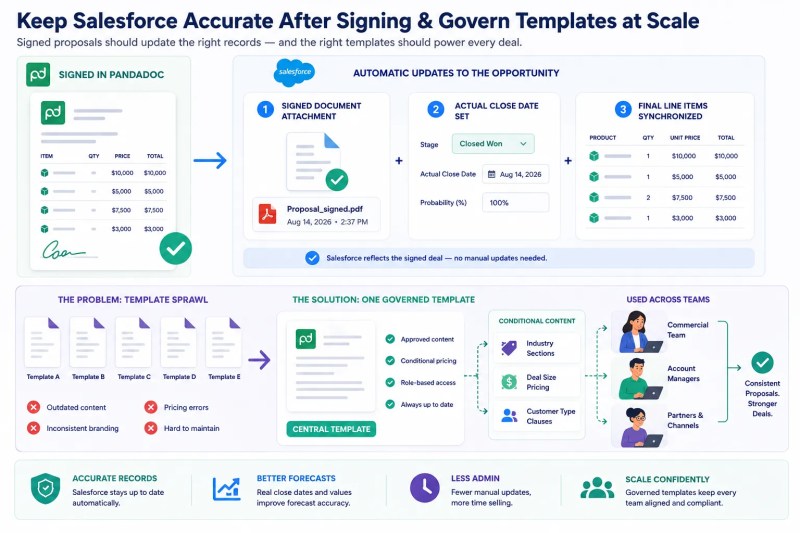
When those pieces are connected, document generation, approval, signature execution, automation, and reporting can operate as one workflow rather than a series of disconnected steps.
Final Answer: PandaDoc wins for teams whose core need is generating dynamic, itemized documents from CRM data. DocuSign wins for teams whose core need is complex, compliant, multi-party signature execution. Both integrate with major CRMs and both support custom automation through Zapier, Make, or a direct API build — the right choice depends on which half of the document lifecycle is actually your bottleneck, not which platform has the longer feature list.
Need a reliable system?
Get a free business process audit
Related Resources
FAQs
Can I use PandaDoc and DocuSign together in the same workflow?
Yes — some teams generate the document in PandaDoc for its dynamic pricing tables, then route it through DocuSign specifically for a complex, multi-party signing chain, rather than treating it as an either/or choice.
Which platform is better for a small team sending a handful of proposals a month?
At low volume, either can work well — the deciding factor is usually whether the team’s real friction is building the document or managing a compliant multi-signer process, not the volume itself.
Does DocuSign support dynamic pricing tables the way PandaDoc does?
It can be configured to, but it takes more manual setup than PandaDoc’s native pricing table feature, since DocuSign’s template system wasn’t built around variable line-item pricing first.
Is one platform more compliant than the other for regulated industries?
DocuSign’s audit trail and signing infrastructure is generally more mature for regulatory and compliance-heavy use cases, given its origins in legally binding signature execution — but the right choice still depends on specific regulatory requirements.
How do the two platforms compare on API access for custom automation?
Both expose mature APIs and webhook events suitable for custom builds through Zapier, Make, or direct integration — the reliability of the automation depends more on how the middleware layer is designed than on which platform’s API is used.
About the author

Miguel Carlos Arao is the Founder & CEO of Alltomate,
a Zapier Certified Platinum Solution Partner focused on PandaDoc vs DocuSign
automation comparisons, including template-based document generation,
signature routing configuration, and CRM-triggered document workflows.
The patterns in this article come directly from building and troubleshooting
document generation and eSignature systems across client engagements in
franchise operations and B2B professional services.

Built by a certified Zapier automation partner
Explore more at
our document automation guide,
business automation consulting,
and
free business process audit.
“`