
Published on June 16, 2026
If you’re building HR automation on Zapier, Zapier automation solutions shows what a structured implementation looks like — or free business process audit to map your existing workflows first.
Quick Answer: The most effective Zapier HR automation use cases are candidate intake routing, employee onboarding sequences, time-off request handling, offboarding access revocation, and compliance document logging. Each works because HR has clearly defined triggers — a form submission, a status change, a date — that Zapier can act on reliably. The breakdown usually isn’t in the trigger. It’s in the downstream steps where data formats don’t match or tool permissions aren’t pre-configured.
Table of Contents
- Why HR Is One of the Best Fits for Zapier Automation
- Candidate Intake and Recruitment Routing
- Where Onboarding Automation Breaks
- Time-Off and Leave Request Handling
- Offboarding: The Use Case Most Teams Automate Too Late
- Compliance Document Logging and Certification Tracking
- Performance Check-In Sequences
- When Zapier Is the Wrong Tool for HR Automation
HR teams have one structural advantage that most other departments don’t: almost every important event in the employee lifecycle has a defined trigger. A candidate submits an application. An offer is accepted. A start date passes. A contract expires. A resignation is submitted. These aren’t ambiguous business events — they’re discrete, timestamped, and tied to specific tools. That makes HR one of the strongest use cases for Zapier, because Zapier is fundamentally a trigger-action platform. When the trigger is clear and consistent, the automation holds.
This article covers the specific use cases where Zapier HR automation delivers the most operational value — and the points in each workflow where implementations typically break down.
Why HR Is One of the Best Fits for Zapier Automation
Most business functions have some ambiguity in their trigger logic. A sales lead might need qualification before routing. A support ticket might need triage. HR workflows — particularly at the intake and offboarding ends — tend to have cleaner triggers: a form is submitted, a field is updated, a date is reached.
That specificity is what makes Zapier effective here. The platform handles trigger-action logic reliably at any scale, and HR has no shortage of use cases where a defined trigger should fire a predictable set of downstream actions across multiple tools — your ATS, HRIS, Slack, email, Google Drive, and payroll platform.
The practical limitation is that Zapier is stateless — each Zap executes linearly and doesn’t natively track workflow state across time (Zapier’s own platform documentation confirms the environment is stateless by design). For complex conditional onboarding sequences (for example, different paths for contractors versus full-time employees, or by department), that statelessness requires careful Zap architecture — typically using Paths, Filter steps, and Zapier Tables or a connected spreadsheet to hold state. Understanding that constraint upfront determines which HR use cases Zapier handles well out of the box versus which require more deliberate design. See our how Zapier handles business automation for a breakdown of how that architecture differs across workflow types, or our business process automation for the broader operational context. If you’re new to Zapier Tables specifically, our how Zapier Tables works as a state layer covers how it functions as a state layer for more complex Zap sequences.
Candidate Intake and Recruitment Routing
Recruitment is where Zapier HR automation tends to deliver the most immediate ROI, because the volume of repetitive actions is highest and the cost of delay is visible. The intake flow below shows how a single form submission branches into three simultaneous automated actions — no manual handoff required.

In implementations we’ve built for recruitment-heavy businesses, the most common trigger is a Typeform or Jotform submission. From there, the Zap creates a record in the ATS (Greenhouse, Breezy HR, or a Google Sheet acting as a lightweight tracker), sends a templated acknowledgment from a Gmail alias, and posts a structured Slack message to the hiring channel with the candidate’s role, experience summary, and resume link. That three-step sequence takes under ten minutes to build. (Each action step consumes a task against your plan — how Zapier tasks and Zaps are counted matters at volume.) It eliminates the lag that causes candidates to disengage — research from SmartRecruiters citing Talent Board data shows 54% of candidates have abandoned a recruitment process due to poor communication, making response speed one of the highest-leverage points in the intake workflow.
Where this breaks: when the application form collects data in formats that don’t match the ATS field requirements. A date field formatted as “June 2026” doesn’t map to an ISO date field without a Formatter step. A comma-separated skills field doesn’t split cleanly into individual ATS tags without a Text step. These mapping failures aren’t obvious at build time — they surface when the first real application comes through and the ATS record is incomplete or the Zap errors out. Mapping every field before activating the Zap, not after, is the step most implementations skip.
At higher application volumes — several hundred per month — the Zap also needs a deduplication step. Candidates who submit through multiple channels (direct site form and LinkedIn Easy Apply, for example) create duplicate records that corrupt your tracking. A lookup step against the ATS before creating a new record prevents that.
Running a high-volume hiring operation?
Get a free audit of your current recruitment workflow to identify where Zapier can take over the repetitive steps.
Where Onboarding Automation Breaks
Most onboarding automation gets built from the wrong end. Teams start by automating the welcome email — the most visible step — and work backward. The failure pattern below shows exactly why that order produces a worse first-day experience than no automation at all.

The correct trigger for onboarding automation is the HRIS record creation — not the offer letter signature, not the start date, and not the welcome email. For BambooHR and Gusto, Zapier has native integrations that support this trigger directly. For Rippling, which has its own internal automation layer (Workflow Studio), teams typically connect to Zapier via webhooks or API rather than a native app trigger — check Zapier’s app directory for current support status before building. From that HRIS trigger, the downstream sequence should fire: provisioning requests to IT via a form or ticketing system, a Google Workspace or Microsoft 365 account creation (via direct integration where supported), creation of an onboarding task list in Asana or ClickUp, a Slack welcome to the team channel, and a calendar invite sequence for orientation sessions.
A consistent pattern we see in new installs is that teams have the HRIS trigger configured correctly but have provisioning and task creation as manual steps that “someone will do.” Those manual steps are exactly what Zapier is built to replace. The automation that most reduces first-day friction is the one that ensures IT provisioning is requested before the employee’s start date — not after they’re already sitting at their desk.
For businesses with different onboarding paths by role or employment type, Zapier’s Paths feature handles branching logic: contractors follow one path (no system provisioning, different task list, different Slack channel), full-time employees follow another, part-time a third. The branching condition is typically a field in the HRIS record — employment type, department, or location. For more on how branching logic works across integration platforms, see our how Zapier, Make, and n8n handle branching logic differently. For teams building onboarding flows that include chatbot-driven intake or self-service steps, onboarding chatbot automation covers how that layer connects to the same HRIS trigger.
Time-Off and Leave Request Handling
Time-off request handling is the HR use case where manual processing most consistently creates friction — not because the individual steps are hard, but because they span multiple approvers and tools. An employee submits a request. The manager needs to approve it. Payroll needs to be updated. The team calendar needs to reflect the absence. HR records need to be updated. In most companies without automation, that four-step process involves at least two emails, one Slack message, and a manual HRIS entry.
Zapier can compress that sequence significantly. When a time-off request is submitted through your HRIS (or through a Google Form or Typeform where no HRIS native flow exists), the Zap routes an approval notification to the direct manager with a one-click approve/decline link — the same pattern covered in our how to send emails via webhook in Zapier. On approval, it updates the HRIS record, creates a Google Calendar block on the shared team calendar, and sends a confirmation to the employee. The full loop — submission to confirmation — can happen in under five minutes without any manual intervention.
The failure point here is almost always the approval step — and the diagram below shows where the bottleneck sits in an otherwise automated chain.
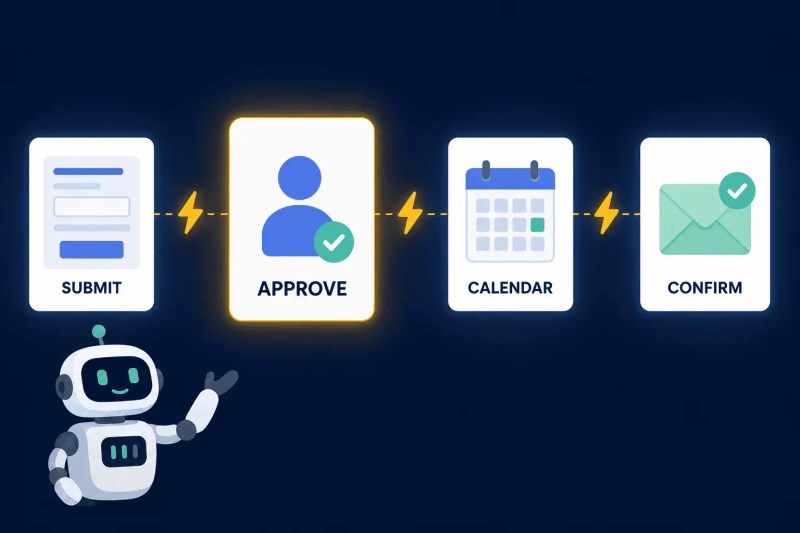
Zapier now has a Human in the Loop action that can pause a Zap pending manager review — but the workflow still needs fallback logic built around it. If the manager doesn’t respond within the expected window, the request needs to escalate automatically: a follow-up notification to the manager, a flag to an HR admin, and a record of the pending state in the HRIS or a tracking sheet. Without that escalation layer, the approval sits in limbo with no visibility regardless of which mechanism initiated it.
Offboarding: The Use Case Most Teams Automate Too Late
Offboarding is consistently the least automated HR workflow and the one with the highest operational risk. The diagram below shows what a properly automated offboarding sequence looks like — one HRIS status change firing four simultaneous actions that would otherwise each require a separate manual step.

The risk isn’t hypothetical. In staffing and professional services firms, where staff turnover is higher and system access is broader, incomplete offboarding creates real exposure: former employees with live email accounts, active SaaS logins, or continued payroll entries. Research cited by The Hacker News found that 63% of businesses may have former employees who still have access to organizational data — we’ve seen this pattern consistently enough in our own client engagements that offboarding automation is now a default recommendation in any HR workflow engagement we take on, not an optional add-on. For a breakdown of where these gaps typically originate, see our common workflow automation mistakes that cause offboarding gaps.
A Zapier offboarding sequence triggers on a departure date or a status field change in the HRIS (for example, Employment Status → Terminated). From there, it posts a structured offboarding checklist to the HR admin’s project management tool (Asana or ClickUp), sends a system access revocation request to IT, removes the departing employee from active Slack channels, and creates an exit interview scheduling task. What it cannot do natively is directly revoke Google Workspace or Microsoft 365 access — that requires an integration with those platforms’ admin consoles, either directly or via a tool like SyncHR or Rippling. Zapier initiates the request; the revocation itself happens in the destination system.
The offboarding Zap should also trigger a final payroll notification to finance and a benefits termination alert to the relevant vendor. These are the steps that get missed in manual offboarding because they’re handled by different teams — and Zapier’s value here is specifically that it fires all of them from a single trigger, regardless of who’s managing the departure.
Our how we built trigger-based recruitment automation for a staffing client shows how trigger-based sequencing across HR and operations tools produces the kind of consistent execution that manual processes can’t replicate at volume.
Compliance Document Logging and Certification Tracking
Two failure modes dominate HR compliance in growing companies: documents that exist but aren’t logged in a retrievable format, and certifications that expire without advance notice. The system structure below shows how a single document upload creates a timestamped log entry and arms the expiration date field to fire automated reminders.

For document logging, the most effective pattern is a Zap triggered by file uploads to a shared Google Drive folder or a form submission that includes a file attachment. The Zap records the document type, employee name, upload date, and expiration date (where applicable) into a compliance tracking sheet or HRIS record. This creates a timestamped audit trail automatically, without requiring HR staff to manually log every document received.
For certification tracking, the expiration date captured at upload time becomes the trigger for a scheduled Zap. Zapier’s Schedule trigger or a date-based Zap using Zapier Tables can fire reminders at 60, 30, and 7 days before expiration — sent to both the employee and their manager. This pattern applies directly to certifications like food handler permits in hospitality, professional licenses in healthcare staffing, and equipment operator certifications in construction — the kind of compliance tracking we implemented in our construction workflow automation with expiration date tracking and our cleaning business automation with compliance scheduling, both of which required structured expiration date logic across a distributed workforce. In those industries, a missed renewal isn’t a paperwork gap — it’s a compliance violation.
The architectural requirement is that expiration dates are stored in a structured, date-formatted field that Zapier can read and calculate against. If your current compliance tracking lives in a PDF or an unstructured notes field, those dates aren’t parseable by Zapier. The remediation is a one-time data migration into a structured sheet or HRIS field — and once that’s done, the reminder automation runs indefinitely without manual intervention.
Performance Check-In Sequences
Performance review and check-in automation is an area where teams frequently overbuild. The instinct is to automate the entire review cycle — survey distribution, response collection, manager scoring, calibration sessions, and outcome notifications — in a single connected system. That architecture is possible, but it introduces more failure points than it eliminates for most small and mid-sized businesses.
The more effective approach is to automate the high-friction edges of the process: scheduling and reminders. A date-based Zap fires 30 days before an employee’s review date (stored in the HRIS), sends a self-assessment form link to the employee, and creates a review preparation task for their manager in ClickUp or Asana. A second Zap fires 7 days before as a reminder if the form hasn’t been submitted. A third Zap triggers when the form is submitted, notifies the manager, and schedules a calendar block for the review meeting.
That three-Zap system handles the coordination overhead without trying to automate the judgment component of performance reviews. The insight from implementations across professional services firms is that automation works best here when it’s solving a scheduling and accountability problem — not trying to replace the qualitative conversation. Teams that try to automate scoring and calibration through Zapier typically end up with a system that creates more manual cleanup than the original process.
For businesses using Zapier automation examples across operations, performance check-in sequences tend to be a natural extension of an existing employee data Zap — adding date-triggered branches to a Zap that’s already connected to the HRIS. Our how small businesses prioritize automation sequences covers how to prioritize which HR sequences to build first when budget and task limits are constraints.
When Zapier Is the Wrong Tool for HR Automation
Two scenarios consistently push beyond what Zapier handles well for HR: multi-step conditional approval chains and real-time bidirectional sync across HR platforms.
Multi-step approvals — where an onboarding request requires sign-off from a department head, then finance, then IT, each with different conditions — require workflow state to be tracked across time. Zapier’s Paths handle single-branch logic well, and Zapier’s Human in the Loop feature can pause a Zap for individual approvals. But stateful multi-approver flows — where each stage has different conditions, different approvers, audit requirements, and exception paths — still need more deliberate architecture than a standard Zap provides. Make (formerly Integromat) handles this kind of complex logic more natively, and for certain HR platforms, a dedicated workflow tool within the HRIS itself is the right answer. Our Zapier vs Make, Zapier vs n8n, and Zapier alternatives all cover where that architectural decision point sits depending on your team’s technical capacity and budget.
Real-time bidirectional sync — where a change in BambooHR should update Workday and a change in Workday should update BambooHR — is also outside Zapier’s reliable scope. Zapier is unidirectional by design: a trigger fires, actions execute. True bidirectional sync introduces loop risk (each update triggers the other system, which triggers the first) and requires conflict resolution logic that Zapier doesn’t handle natively. If your HR stack requires live sync across two source-of-truth systems, that’s an iPaaS or middleware problem, not a Zap problem. Our how to connect multiple HR systems without bidirectional sync conflicts covers how to architect that layer correctly regardless of which platform you use.
For everything else — sequential HR workflows with clear triggers, multi-tool notification routing, scheduled reminders, and document logging — Zapier is the right fit. The key is scoping implementations to what it actually does reliably, not what automation generically promises. Our Zapier automation in HIPAA-regulated HR environments shows how that same scoping discipline applies when HR automation intersects with regulated data environments.
Final Answer: The strongest Zapier HR automation use cases are candidate intake routing, onboarding sequencing, time-off request handling, offboarding access revocation, and compliance document logging. Each works because HR events have clearly defined triggers — form submissions, HRIS status changes, and date fields — that Zapier can act on reliably. Implementations break when data format mismatches aren’t caught before activation, when approval flows lack fallback or escalation logic, or when teams try to automate judgment-based steps without a clear source of workflow state. Scope your automation to the trigger-action logic Zapier handles cleanly, and those systems are easier to maintain with less manual cleanup.
Need a reliable system?
Related Resources
- Zapier Automation Examples
- Zapier for Business Automation
- Integration Automation Examples
- Common Integration Mistakes
- Zapier Automation Solutions
- Zapier Platform Overview
- Zapier vs Make: Which to Use
- Zapier vs n8n: Which to Use
- Zapier HIPAA Compliance
- Recruitment Automation Case Study
- Construction Automation Case Study
- Cleaning Business Automation Case Study
- Zapier Tables Explainer
- Business Process Automation Guide
- Manual vs Automated Workflows
- Automation Audit Checklist
- Free Zapier Setup
- Automation Assessment
- Automation Integration Services
- Zapier Cost Breakdown
- Why Hire a Zapier Expert
- Zapier Solution Partner Benefits
- Zapier Alternatives
- Custom Workflow Automation Case Study
- Automation ROI Calculator
- CRM Automation Services
- AI-Powered Automation Services
- Free Business Process Audit
Frequently Asked Questions
Can Zapier automate the full employee onboarding process?
Zapier can automate the sequential, trigger-based parts of onboarding — HRIS record creation triggering provisioning requests, task list creation, welcome messaging, and calendar scheduling. It can also support individual approval checkpoints via Human in the Loop, but complex multi-approver onboarding still requires clear state tracking, escalation rules, and often an HRIS-native workflow for the judgment-heavy stages. The practical approach is to automate the repeatable handoffs and keep exception handling clearly assigned.
What’s the best trigger for HR automation in Zapier?
HRIS record events — new employee created, status field updated, departure date reached — are the most reliable triggers for HR automation. Form submissions (for intake, time-off requests, compliance documents) are the second strongest. Date-based triggers work for scheduled reminders but require date fields to be stored in a structured, parseable format.
Does Zapier work with BambooHR, Rippling, or Gusto?
Zapier has native integrations with BambooHR and Gusto. Rippling is different — it has its own internal automation engine (Workflow Studio), and native Zapier support has been limited; most teams connect Rippling to Zapier via webhooks or API, or use Rippling’s native workflows instead. Always check Zapier’s app directory for current Rippling support status before building, as this can change. The depth of integration varies across all HRIS platforms.
How do you prevent offboarding tasks from being missed in Zapier?
The safest approach is to trigger a checklist creation in a project management tool (Asana, ClickUp) on the offboarding Zap — not rely on individual Zap steps to cover every action. The checklist creation is guaranteed; the individual steps within it can be tracked and assigned to the right people. This also gives HR visibility into which tasks have been completed and which are outstanding.
What’s the difference between using Zapier for HR automation vs using an HRIS’s built-in automation?
HRIS-native automation is stronger for logic that lives entirely within that platform — approval chains, payroll triggers, built-in reporting. Zapier’s advantage is cross-platform: connecting your HRIS to Slack, Google Workspace, ClickUp, or a payroll tool the HRIS doesn’t natively integrate with. In most implementations, both run in parallel — the HRIS handles intra-platform logic, Zapier handles the cross-system bridges.
Can Zapier handle HR automation for remote or distributed teams?
Yes — and it’s arguably more valuable in remote settings, where the informal in-person nudges that fill coordination gaps don’t exist. Automated Slack notifications, scheduled check-in reminders, and calendar-blocked onboarding sequences replace the visibility that proximity provides in office environments. The architecture is the same; the operational dependency on it is higher.
About the author

Miguel Carlos Arao is the Founder & CEO of Alltomate, a Zapier Certified Platinum Solution Partner focused on HR automation workflows, including candidate intake routing, onboarding sequencing, and compliance document logging systems. The patterns in this article come directly from building and troubleshooting Zapier HR automation systems across client engagements in recruitment and professional services.

Built by a certified Zapier automation partner
Explore more at
Zapier HR automation solutions,
how Zapier is used for business automation, and
our free business process audit.