
Published on June 25, 2026 · Last reviewed June 25, 2026
Before committing to a Zapier plan, map your likely workflow volume, action steps, and maintenance needs. If you’d rather have that modeled for you, see our Zapier automation services or book a free process audit.
Quick Answer: Zapier is worth it if you’re non-technical, running automations under roughly 1,000 tasks per month, and need to connect tools quickly without engineering help. It stops being worth it once task volume scales, workflows require complex branching, or your monthly bill exceeds what a more capable platform would cost. The decision hinges on three variables: your task volume, your team’s technical comfort, and how many workflow steps you actually need.
Table of Contents
- The Question Behind the Question
- Where Zapier Genuinely Earns Its Cost
- The Task Count Trap: Where ROI Inverts
- When to Stay on Zapier’s Free Plan
- The Three Signals That Say It’s Time to Leave
- A Real-World Decision: Pay for Zapier, Stay Manual, or Choose Another Platform
- How to Make the Call for Your Business
- FAQs
Most “is Zapier worth it” articles answer the wrong question. They describe features, list pricing tiers, and conclude with “it depends.” That’s not a framework — it’s a hedge. The real question most buyers are asking is narrower: given my specific situation, should I pay for this, stay on free, or look elsewhere? That question has a real answer, and it comes from the decision points that actually determine Zapier’s value — not its feature set.
This post is a diagnostic, not a review. If you want a pricing breakdown, the cost-of-Zapier breakdown covers that in detail. If you want to understand what Zapier can do for a business operationally, that’s a separate conversation. What follows is a structured framework for deciding whether Zapier belongs in your stack — and at what tier.
The Question Behind the Question
A pattern we see consistently across new client onboarding is that the first question isn’t “what can Zapier do” — it’s “why is my bill higher than expected.” By that point, the buying decision has already been made on incomplete information. The person who asked “is Zapier worth it” before subscribing either found a generic yes/no answer or got lost in a feature comparison that didn’t reflect how their workflows would actually behave at volume.
The core of the decision comes down to three variables that most buyers underestimate at the start:
- Task volume — Zapier charges per action step, not per Zap run. The trigger never counts. A 6-step workflow (1 trigger + 5 actions) running 200 times a day consumes 1,000 tasks daily.
- Workflow complexity — Multi-path logic, conditional branching, and data transformation are possible in Zapier but cumbersome compared to Make’s visual canvas.
- Technical capacity — Zapier’s ease-of-use premium is real. The question is whether your team needs that premium, or whether you’re paying for it when you don’t.
Get these three variables right before deciding, and the rest of the decision follows logically. Get them wrong, and you’ll be revisiting the question six months into a paid plan.
Where Zapier Genuinely Earns Its Cost
Zapier’s value proposition is speed to working automation, not cheapest cost per task. For the right team, that’s a premium worth paying. The clearest cases where Zapier earns its cost:
Non-technical teams connecting mainstream SaaS tools. Zapier’s integration library covers more apps than any competing platform — over 9,000 apps at last count, compared to Make’s 3,000+. For a small ops team connecting HubSpot, Slack, Google Sheets, and a CRM without any developer involvement, the time saved on setup alone justifies the Professional plan within the first month. There’s no learning curve, no scenario canvas to navigate, no JSON mapping required.
Simple 2–4 step workflows at moderate volume. If your automations are straightforward — new form submission creates a CRM contact, sends a Slack notification, and logs to a sheet — and you’re running under roughly 1,000 tasks per month, Zapier’s per-task cost usually stays manageable. Zapier’s Professional plan currently starts at $19.99/month on annual billing, with monthly billing priced higher. For most small businesses running 5–10 Zaps at moderate frequency, the deciding factor is not the sticker price alone; it is whether the expected task volume leaves enough headroom.
Speed of deployment over cost efficiency. When a team needs automation running this week — not after a two-week learning curve — Zapier’s value is in the setup time, not the task price. A Zapier Certified partner can have a functioning multi-step workflow live in hours. That speed has real business value when the alternative is a delayed project or a manual process continuing to consume time.
Integration availability for niche tools. If your stack includes a less common industry tool — a niche field service CRM, a specialized invoicing platform, an industry-specific scheduling system — Zapier is more likely to have a native integration than Make or n8n. Building a custom connector on either of those alternatives takes developer time that often costs more than a year of Zapier subscriptions.
The Task Count Trap: Where ROI Inverts
Zapier’s pricing model punishes scale in a way that’s easy to miss until you’re already past the inflection point. The core rule: successful action steps consume tasks; the trigger itself does not. Zapier’s own billing documentation covers which built-in utilities are excluded and how newer step types such as AI and code steps are counted — and those rules have changed as the platform has evolved, so checking Zapier’s current task-counting page directly is the most reliable reference. What matters for the decision: a workflow with one trigger and four successful app actions running 500 times a month consumes roughly 2,000 tasks. At a 750-task tier, that exceeds the base allowance quickly.
For a deeper explanation of how Zapier counts usage, see our Zapier tasks vs. Zaps guide; this section focuses only on how task volume affects the worth-it decision.
The multiplication effect is easiest to see when one trigger turns into several successful action steps.
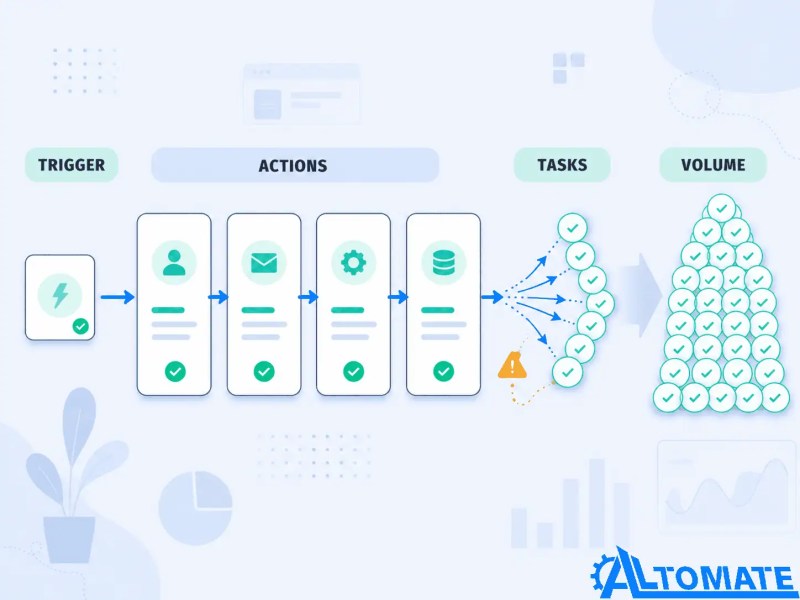
The overage structure compounds this. Tasks beyond your plan limit bill at 1.25x your per-task rate, capped at 3x your included limit before Zaps pause entirely. For a team that hits overages regularly, the effective monthly cost can be significantly higher than the plan price suggests. This is where the ROI calculation breaks.
Make charges per operation differently — every step counts, including triggers — but the base cost per operation is substantially lower, and the free tier includes 1,000 operations per month with full multi-step capability. At equivalent workflow volume, Make typically runs significantly cheaper. Using published annual pricing as of June 2026: Zapier’s Professional plan at 2,000 tasks runs roughly $49/month; Make’s Core plan at 10,000 operations — a comparable workload given Make counts triggers — runs around $10.59/month on annual billing. Verify both at zapier.com/pricing and make.com/en/pricing before making a decision, as both platforms adjust tiers periodically. At higher volumes the gap widens further. The tradeoff is setup complexity: Make’s visual canvas has a genuine learning curve, and teams without technical capacity often spend more time on configuration than they save on cost.
The math flips for most teams somewhere between 1,000 and 2,000 tasks per month. Below that threshold, Zapier’s ease-of-use premium is often worth it. Above it, the savings from migrating to Make typically offset the migration effort within two to three months — particularly for workflows that are already stable and well-understood.
Working out whether your current or planned workflows will hit this threshold? Our team can map your workflow volume and run the cost projection. See how we approach Zapier automation engagements.
When to Stay on Zapier’s Free Plan
The free plan is not a scaled-down version of Professional — it’s a structurally different product. At 100 tasks per month and two-step Zaps only, it handles one trigger and one action per workflow. That rules out most meaningful business automations, which require at least three steps to produce a complete outcome.
What the free plan is genuinely useful for: testing whether a specific app connection works before committing to a paid plan, running a single low-frequency notification Zap (weekly digest, once-a-day alert), or evaluating Zapier’s interface before comparing it to alternatives. For a full breakdown of what the free plan actually includes and where it caps out, our free plan guide covers the exact limits.
Think of the free plan as a constrained testing space, not as a full production automation environment.

Staying on free makes sense if you have one or two genuinely simple, infrequent automations that don’t require multi-step logic. It stops making sense the moment you need a workflow that does more than connect two apps with a single action — which is most real business use cases.
The Three Signals That Say It’s Time to Leave
Zapier isn’t the right long-term platform for every team, and staying past the point where it fits costs more than just the subscription. These are the three clearest signals that a migration conversation is worth having:
1. You’re regularly hitting task limits or paying overages. If your monthly bill is climbing due to overages, or you’re manually throttling Zap frequency to stay within limits, the platform is constraining your operations rather than supporting them. This is the most common trigger for migration conversations we have with clients.
2. Your workflows need complex branching that Zapier’s Paths feature can’t cleanly handle. Zapier’s Paths feature supports conditional logic, but it becomes difficult to maintain as branches multiply. Teams building workflows with more than three or four conditional paths typically find Make’s node-based canvas significantly easier to manage and debug. The visual representation alone reduces the error rate when modifying live workflows.
3. You have a developer on staff who’s comfortable with self-hosting. For teams with technical capacity, n8n self-hosted on a VPS costs roughly the server fee — typically $5–$20 per month — with no per-task pricing. If the main reason you’re on Zapier is ease of use, and you have someone who can manage a self-hosted instance, the cost difference over twelve months is substantial. Migrating from Zapier to n8n is a structured process, not a lift-and-shift, but for the right team it’s the correct move.
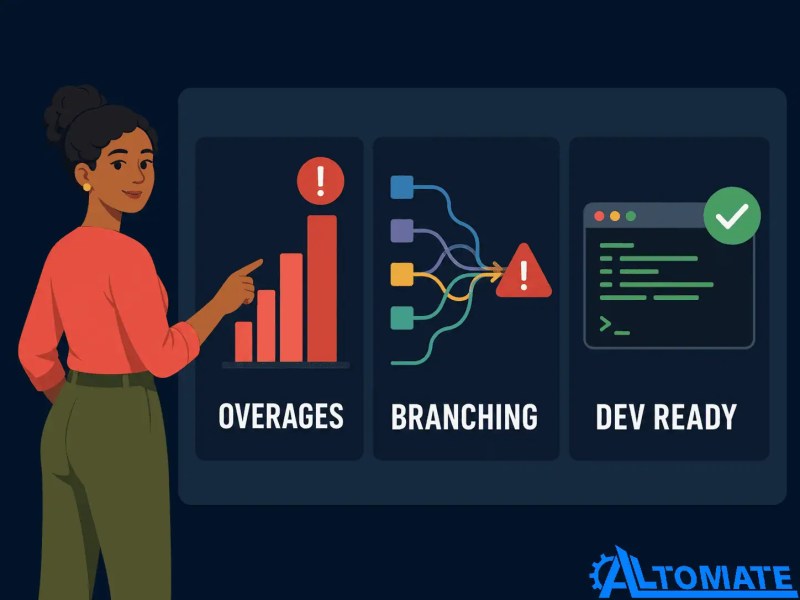
The migration decision usually becomes clear when these signals appear together rather than in isolation.
A Real-World Decision: Pay for Zapier, Stay Manual, or Choose Another Platform
In client work across professional services and e-commerce, the teams that get the most durable ROI from Zapier share one trait: they never optimize task counts. They pick the automation that solves the workflow problem cleanly, confirm the task math fits their plan, and leave it running. The teams that struggle are the ones who underestimate their volume at the start, hit overages at month two, and then face a choice between upgrading to a significantly more expensive tier or migrating to a different platform under time pressure.
A useful example from field service: a Jobber-based operations team needed Zapier to handle job completion notifications, invoice triggers, and CRM updates — a five-step workflow running on every completed job. At roughly 150 jobs per month, that’s 750 tasks — exactly at the Professional plan limit, with no headroom. The right decision wasn’t to proceed at that tier; it was to either build the workflow with fewer steps or price the next task tier up before committing. Getting that decision wrong would have meant hitting overages within the first month. You can see how we approached the full setup in the Jobber-Zapier integration case study.
The task ceiling becomes obvious when the workflow is mapped against real monthly job volume.

The “doing nothing” option is also real and often underweighted. If the automation you’re considering saves 30 minutes a week and the Professional plan costs $30/month, the break-even is roughly 2 hours of saved time per month. For many small teams, that’s a clear yes. For teams whose manual process takes 5 minutes and runs infrequently, the math doesn’t justify a paid plan — and the free tier or a different tool entirely is the right call.
How to Make the Call for Your Business
The decision framework reduces to four questions asked in sequence:
1. Do you need multi-step automation? If yes, the free plan is not viable. If no, start on free and upgrade only when volume demands it.
2. What is your estimated monthly task volume? Count action steps per workflow run, multiply by estimated monthly runs. If the result is under 750, Professional covers it. If it’s between 750 and 2,000, model the cost against Make before committing. Above 2,000, Make or n8n is almost certainly cheaper.
3. Does your team have the technical capacity to use Make? If yes, and if your volume exceeds 1,000 tasks per month, the migration cost is likely recovered within a quarter. If no, Zapier’s ease-of-use premium is real and worth paying — provided the task math fits.
4. Do any of your required integrations exist only in Zapier’s library? If you’re connecting a niche tool that Make or n8n doesn’t support natively, Zapier may be the only practical option regardless of cost. Check integration availability before assuming a cheaper alternative is actually viable for your stack.
For teams unsure how their specific workflows map to any of these variables, a structured audit of the workflow design and task math is the fastest way to a defensible decision. Our Zapier automation guide covers how to approach this assessment from the workflow level.
Final Answer: Zapier is worth it for non-technical teams running straightforward automations under roughly 1,000 tasks per month who need fast deployment and broad integration coverage. It stops being worth it when task volume scales past that threshold, when workflow complexity demands visual branching logic, or when a developer on your team could manage a self-hosted alternative at a fraction of the cost. The decision is not about Zapier’s features — it’s about whether your task volume, team capacity, and workflow structure align with the pricing model. Run the task math before committing to any tier, and revisit the decision when task volume, branching complexity, or maintenance time starts rising faster than the value created.
Need a reliable system?
Related Resources
- Alltomate Blog — Browse more automation strategy, platform comparison, and integration guides
- Zapier Resource Hub — Central hub for Zapier guides, comparisons, integrations, and automation services
- Zapier Automation Guide — Full operational guide to Zapier setup and workflow design
- Cost of Zapier — Detailed pricing breakdown and task-volume cost analysis
- Zapier Tasks vs. Zaps Explained — Understand how Zapier usage is counted before choosing a plan
- Is Zapier Free? — Exact limits of the free plan and when to upgrade
- Zapier for Business Automation — When Zapier creates real operational value for growing teams
- Zapier vs. Make — Direct comparison for teams choosing between Zapier and Make
- Zapier vs. n8n — Compare Zapier with a more technical, self-hostable alternative
- Zapier vs. Make vs. n8n — Three-way comparison for platform selection
- Make vs. Zapier for Business Automation — Business-focused comparison of workflow automation platforms
- Migrating from Zapier to n8n — When and how to move off Zapier
- Jobber + Zapier Integration Case Study — Real-world example of workflow design and task math in field service
- Zapier Alternatives — Side-by-side comparison of Make, n8n, and other platforms
- Free Zapier Setup — Get help evaluating or setting up your first Zapier workflows
FAQs
Is Zapier worth it if I only need two or three automations?
It depends on whether those automations require multi-step logic. If each one is a simple two-app trigger-action, the free plan may be sufficient. If any requires three or more steps, the Professional plan is usually the first paid tier to evaluate — and whether that cost is justified depends entirely on the time saved, expected task volume, and current billing option.
At what task volume does Zapier stop being cost-effective?
The inflection point is typically around 1,000–2,000 tasks per month, where the cost difference between Zapier’s Professional or Team tiers and Make’s equivalent plans becomes significant enough to justify the migration effort. Above 2,000 tasks, Make or n8n almost always produces a lower total cost of ownership.
Is Zapier worth it for a solopreneur or freelancer?
Often yes, specifically because the time-to-working-automation is fast and the tool requires no technical background. A freelancer automating client onboarding, invoicing, and follow-up emails can typically cover all of it within the Professional plan’s task limit. The caveat is that if their client base grows and task volume scales, the cost will scale with it.
Is Zapier worth it compared to hiring someone to build automations manually?
For most small teams, Zapier is significantly cheaper than manual development for standard SaaS-to-SaaS connections — provided the integrations you need exist natively. Where the comparison shifts is on complex custom logic: a developer building a bespoke integration once may cost more upfront but produces no recurring per-task cost. Zapier’s ongoing subscription cost is a permanent line item; custom-built automation is a one-time build with a maintenance cost. For teams running under 10 workflows on mainstream tools, Zapier almost always wins on total cost. For teams with highly specific data transformation requirements or proprietary internal systems, the build-vs-subscribe calculation is worth running explicitly before defaulting to Zapier.
Can I switch to Make later if Zapier stops making sense?
Yes, but there’s no automated migration tool. Each workflow needs to be rebuilt manually in Make. Simple Zaps typically take 10–20 minutes to recreate; complex multi-path workflows take longer. For teams with 10–20 Zaps, a planned migration over two to three days is realistic. The operational disruption is manageable if the migration is structured properly rather than done under cost pressure.
About the author

Miguel Carlos Arao is the Founder & CEO of Alltomate,
a Zapier Certified Platinum Solution Partner focused on Zapier cost evaluation and automation platform selection, including task volume analysis, plan-tier decision frameworks, and Zapier-to-Make migration planning.
The patterns in this article come directly from building and troubleshooting Zapier platform decisions across client engagements in professional services and field service operations.

Built by a certified Zapier automation partner
Explore more at
Zapier automation services,
the Zapier automation guide, and
Zapier alternatives comparison.