
Published on May 14, 2026
Quick Answer: n8n Google Gemini automation combines workflow orchestration with AI-assisted reasoning, classification, extraction, and content generation inside operational systems. The challenge is not connecting Gemini into n8n. The challenge is controlling where AI outputs enter business workflows, how errors are validated, and how failures are prevented from spreading across CRM systems, approvals, customer communications, and downstream automations.
Table of Contents
- Why AI Workflow Reliability Breaks Faster Than Most Teams Expect
- What n8n Google Gemini Automation Actually Does Inside Operations
- Where AI Classification Pipelines Commonly Fail
- Why Human Review Layers Still Matter in AI Workflows
- How AI Errors Spread Across Connected Systems
- What Stable Gemini Workflow Architecture Usually Includes
- When Businesses Should Avoid AI-Assisted Automation
- How Teams Gradually Expand AI Workflow Usage Safely
n8n Google Gemini automation is increasingly used for document processing, lead qualification, ticket triage, internal summaries, AI-assisted routing, and operational decision support. The appeal comes from combining flexible workflow orchestration with large language model reasoning inside one automation environment.
The difficult part appears later. Most failures are not caused by the Gemini model itself. They come from unstable workflow design, unclear validation logic, missing fallback handling, and uncontrolled AI outputs entering production systems without safeguards.
If you are evaluating broader implementation strategy, this
AI automation guide
covers where AI-assisted workflows fit inside business operations.
Need structured AI workflow implementation?
Review our
AI-powered automation services
or request a
free business process audit.
Why AI Workflow Reliability Breaks Faster Than Most Teams Expect
A common misconception is that adding Gemini into n8n automatically creates intelligent automation. In practice, AI introduces probabilistic behavior into systems that previously depended on deterministic logic.
Traditional workflows usually fail in predictable ways. A field is missing. An API returns an error. A webhook stops responding. AI-assisted workflows behave differently because the system may continue operating while producing partially incorrect outputs that appear structurally valid.
For example, a workflow may classify invoices correctly for weeks before gradually misclassifying edge-case vendor formats. The workflow itself still executes successfully, which makes the failure harder to detect operationally.
This creates a major distinction between workflow execution success and workflow outcome accuracy.
Operational Reality: Most AI workflow failures are
silent failures. The automation continues running while quality slowly degrades across downstream systems.
Businesses exploring
when to use AI in workflows
often underestimate how quickly unreliable outputs compound once AI becomes embedded into routing, approvals, or customer-facing processes.
The diagram below shows how small AI interpretation errors can gradually spread across connected business workflows and downstream platforms.

What n8n Google Gemini Automation Actually Does Inside Operations
n8n acts as the orchestration layer while Gemini performs reasoning-oriented tasks inside the automation system. The workflow coordinates inputs, processing rules, integrations, validation steps, and output handling.
Gemini is typically used for:
- email intent detection
- document summarization
- support ticket categorization
- lead qualification analysis
- OCR cleanup and interpretation
- AI-assisted response drafting
- knowledge extraction from unstructured data
The actual business value comes from combining AI interpretation with structured operational controls around the workflow.
For example, a support workflow may:
| Workflow Stage | Gemini Role | n8n Role |
|---|---|---|
| Inbound email | Intent interpretation | Trigger handling |
| Ticket analysis | Priority estimation | Conditional routing |
| CRM updates | Field extraction | System synchronization |
| Escalation handling | Context summarization | Human assignment |
The workflow becomes unstable when businesses rely on Gemini outputs without defining confidence thresholds, structured formatting expectations, or validation constraints.
In practice, many teams reduce workflow instability by forcing Gemini outputs into structured JSON schemas before downstream n8n nodes are allowed to update CRM fields, trigger automations, or execute customer-facing actions.
Scale Effect: As workflow volume increases, even small interpretation inconsistencies become operationally expensive because downstream systems assume AI outputs are correct. VentureBeat describes how early-stage AI workflow errors can propagate silently across orchestration chains and downstream business systems.
The orchestration structure below shows how AI reasoning layers are separated from validation, synchronization, and downstream execution systems.

Need help designing AI workflow systems?
Explore AI workflow automation solutions
Where AI Classification Pipelines Commonly Fail
Many AI automation failures originate from weak foundational workflow architecture rather than model quality alone. McKinsey notes that
agentic AI systems require stronger operational foundations, governance, and system controls before scaling reliably.
A workflow that processes invoices, emails, contracts, or CRM notes may appear stable during testing because the sample data is predictable. Production environments introduce inconsistent formats, incomplete records, unexpected phrasing, screenshots, forwarded emails, and multilingual content.
The AI layer then starts making assumptions to compensate for missing structure.
Consider a lead qualification workflow:
A Gemini prompt may attempt to classify inbound leads into sales-ready categories. The workflow works well until vague submissions begin arriving from referral channels or copied form data enters the pipeline. The model still returns classifications, but confidence quality drops substantially.
The downstream effects are operational rather than technical:
- sales teams receive poor-fit leads
- priority routing becomes inconsistent
- response timing metrics become distorted
- follow-up automations trigger incorrectly
- reporting accuracy deteriorates
This is one reason many businesses combine AI processing with structured workflow constraints rather than fully autonomous execution.
For broader CRM automation architecture, this
CRM automation overview
explains how workflow consistency affects downstream systems.
Why Human Review Layers Still Matter in AI Workflows
Decision-first workflow design usually performs better than full automation-first design.
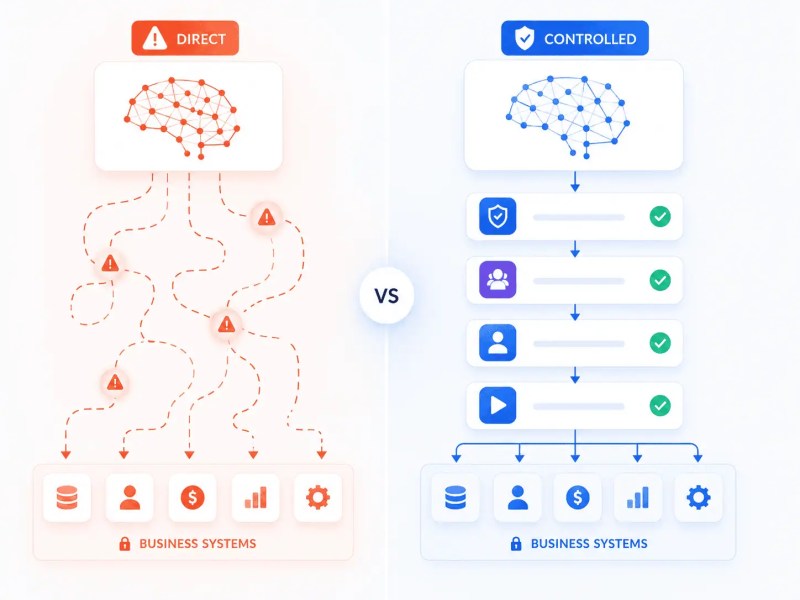
Many businesses initially attempt to remove humans from the workflow entirely. Operationally, that creates a risk concentration problem because AI interpretation errors become production actions immediately.
Stable systems instead separate:
- AI-generated recommendations
- workflow execution authority
- high-risk operational decisions
For example, Gemini may draft contract summaries or support responses, but approval remains inside a controlled review layer before outbound delivery.
This approach improves reliability because:
- AI handles repetitive interpretation tasks
- operators review ambiguous edge cases
- business rules remain enforceable
- high-impact actions stay controlled
The misconception is that human review means automation failure. In practice, review layers often increase total workflow throughput because operational correction costs decrease substantially.
Scale Effect: Removing
review checkpoints too early usually causes larger cleanup workloads later as AI-generated errors accumulate across customer records and transactional systems.
Common Pattern: Businesses often start with AI-assisted recommendations, then gradually automate lower-risk decisions only after observing stable workflow behavior over time.
The comparison below highlights the operational difference between uncontrolled AI execution and workflows protected by review checkpoints.
How AI Errors Spread Across Connected Systems
The most damaging failures in n8n Google Gemini automation are usually propagation failures.
A single incorrect interpretation can spread through:
- CRM records
- customer communication systems
- ticket routing queues
- analytics dashboards
- task management platforms
- reporting workflows
Once synchronization workflows distribute the incorrect data, rollback becomes difficult because multiple systems inherit the same assumption simultaneously.
A real-world example is AI-assisted CRM enrichment.
Suppose Gemini incorrectly extracts company size or service intent from inbound emails. n8n then updates CRM fields automatically, triggers lead scoring adjustments, assigns the account to the wrong sales queue, and launches incorrect follow-up sequences.
The technical workflow succeeded perfectly. Operationally, the business process degraded.
This distinction becomes critical in
cross-platform workflow automation
where multiple systems continuously exchange synchronized data.
What Stable Gemini Workflow Architecture Usually Includes
Reliable n8n Google Gemini automation systems are usually built around containment rather than unrestricted execution. Gartner recommends strengthening
guardrails and observability before Gemini-powered agent workloads move into production at scale.
This becomes increasingly important in larger
enterprise automation environments where AI-assisted workflows interact across multiple operational systems.
That means workflow architecture intentionally limits where AI outputs can directly affect production systems.
Operationally mature workflows often include:
- structured input normalization
- confidence-based branching logic
- schema validation layers
- human escalation checkpoints
- restricted write permissions
- separated approval workflows
- audit visibility across execution stages
The workflow is designed assuming imperfect AI behavior rather than assuming permanent model accuracy.
This is especially important in document-heavy environments where AI-generated structure must interact with accounting systems, legal workflows, or operational databases.
Businesses implementing
n8n RAG workflows
often encounter similar architectural requirements because retrieval quality directly affects downstream automation behavior.
When Businesses Should Avoid AI-Assisted Automation
Not every workflow benefits from Gemini integration.
Businesses often force AI into processes that already operate efficiently with deterministic automation. This adds unnecessary variability without improving operational outcomes.
AI-assisted automation usually performs poorly when:
- inputs are already highly structured
- business rules are fixed and deterministic
- compliance requirements prohibit ambiguity
- transaction accuracy requirements are extremely high
- workflow speed matters more than interpretation flexibility
For example, syncing approved invoice totals between systems generally does not require AI reasoning. Traditional workflow logic is more stable, more explainable, and easier to audit.
A deterministic workflow can simply validate approved totals against predefined accounting rules before updating downstream systems. Adding AI interpretation into that process often increases failure surface area without improving operational outcomes.
Misconception-first implementations often create unnecessary complexity because teams assume AI improves every workflow category equally.
In many cases, the better architecture is:
- traditional automation for structured execution
- AI only for interpretation-heavy stages
This balance is discussed further in
AI automation vs traditional automation.
How Teams Gradually Expand AI Workflow Usage Safely
The most stable AI automation environments usually expand incrementally rather than attempting full operational replacement immediately.
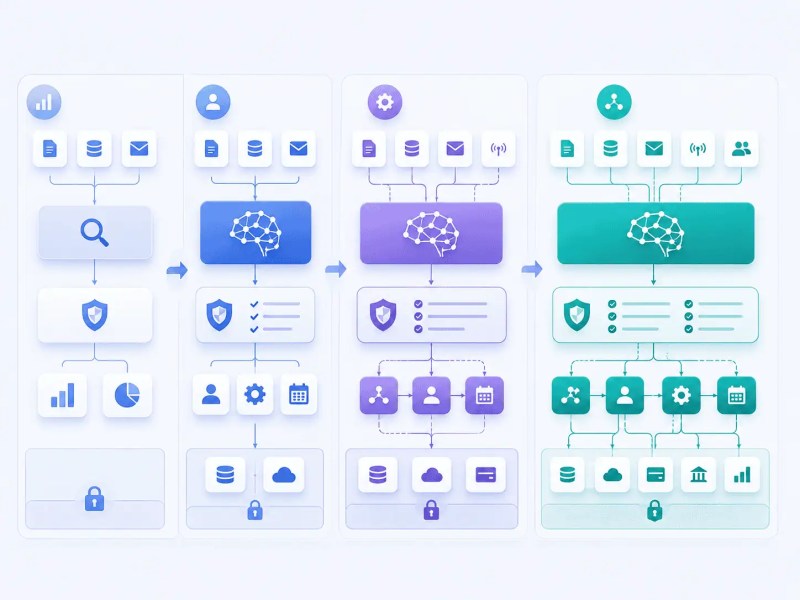
A common progression looks like this:
| Phase | Workflow Behavior |
|---|---|
| Observation | AI generates recommendations only |
| Assistance | AI drafts outputs requiring review |
| Conditional automation | Low-risk actions execute automatically |
| Scaled orchestration | AI workflows coordinate across systems |
This staged approach allows businesses to observe edge-case behavior before AI outputs directly affect operational systems at scale.
It also helps teams understand where workflow instability originates:
- prompt structure
- input quality
- system integration gaps
- workflow branching logic
- human process inconsistency
The objective is not maximum automation volume. The objective is stable operational behavior under production conditions.
The progression below shows how stable AI automation environments typically expand through controlled operational stages instead of immediate autonomous execution.
Final Answer: n8n Google Gemini automation is most effective when AI reasoning is combined with controlled workflow orchestration, validation systems, and operational safeguards. The technical integration is usually straightforward. The difficult part is designing workflows that prevent AI interpretation errors from spreading across connected systems. Businesses that treat Gemini as a contained processing layer rather than an autonomous decision engine typically build more reliable long-term automation environments.
Need a reliable system?
Get a free business process audit
Related Resources
Frequently Asked Questions
Can Google Gemini automate workflows directly?
Gemini itself is not a workflow orchestration platform. It performs reasoning and language-processing tasks. Platforms like n8n coordinate workflow execution, integrations, triggers, routing logic, and operational controls around Gemini outputs.
What types of workflows work best with Gemini inside n8n?
Interpretation-heavy workflows usually benefit most. Examples include email classification, support triage, document summarization, OCR cleanup, AI-assisted routing, and extracting structured information from unstructured inputs.
Why do AI-assisted workflows fail in production?
Most failures come from inconsistent inputs, silent interpretation errors, missing validation logic, uncontrolled downstream propagation, and workflows that trust AI outputs without operational safeguards.
Should businesses fully automate AI decisions?
Usually not initially. Most stable systems begin with AI-assisted recommendations and gradually automate lower-risk decisions after observing workflow behavior under real production conditions.
Is n8n suitable for enterprise AI workflow orchestration?
n8n is commonly used for complex workflow orchestration because it supports flexible integrations, conditional logic, API connectivity, and self-hosted deployment options. Enterprise suitability depends on workflow governance, security requirements, scaling architecture, and operational controls.
About the author

Miguel Carlos Arao is the Founder & CEO of Alltomate, a Zapier Certified Platinum Solution Partner focused on AI workflow automation, operational orchestration, and cross-platform business systems. This article is based on hands-on experience designing AI-assisted workflow systems and operational automation environments for businesses.

Built by a certified Zapier automation partner
Explore more at
AI Automation Services,
AI Automation Guide, and
n8n Automation Platform.