
An automated workflow can report a successful run while individual records remain unprocessed because a required field was blank, an API rejected an update, a policy rule needed human judgment, or a retry created another failure. Without a controlled exception lifecycle, those records disappear into logs, inbox alerts, and manual spreadsheets.
Exception management automation gives every failed item a traceable state: detect the failure, capture its context, classify the cause, assign the correct owner, retry only when safe, record the resolution, and resume the original workflow without duplicating completed actions.
If failed records are still reconstructed from scattered alerts and workflow logs, see how Alltomate designs recoverable cross-system workflows.
System Snapshot
- Problem: Failed records become invisible or unowned when workflows log errors without creating a controlled recovery state.
- Core System: One exception lifecycle detects, classifies, routes, resolves, retries, escalates, resumes, and audits failed work.
- Key Risk if Missing: Teams lose records, repeat side effects, retry permanent failures, and close processes with unresolved work.
- Primary Outcome: Every exception has a cause, owner, priority, resolution path, recovery status, and complete history.
Successful Runs Can Hide Failed Records
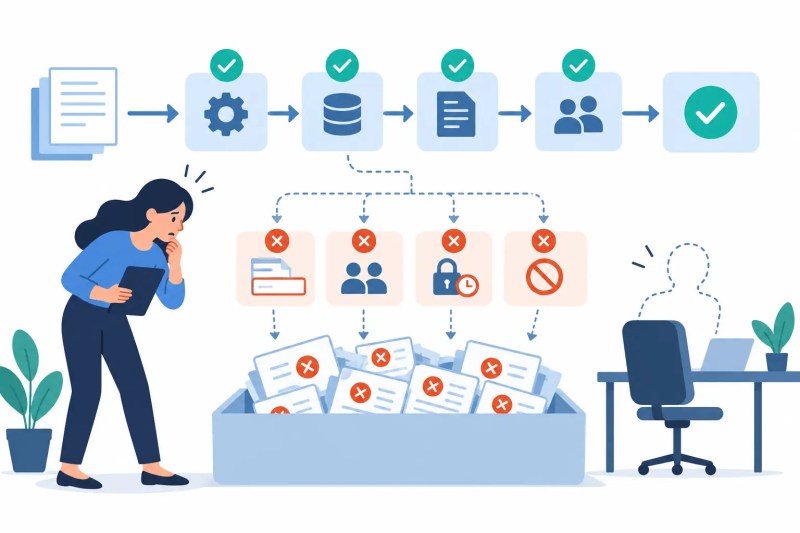
This solution fits automated processes where some records can fail while the remaining batch, scenario, integration, or parent workflow continues. A green run status is unreliable when rejected records were skipped, a webhook payload lacked required data, or a downstream API accepted only part of an update.
A simple workflow with one visible failure notification may not need a separate exception system. Exception management becomes necessary when volume, multiple failure types, several owners, retries, policy decisions, or cross-system recovery make an inbox alert insufficient.
The hidden failure state appears below: the primary workflow continues while invalid and rejected records accumulate outside its visible success path.
One Exception Lifecycle From Detection to Recovery
The exception record must preserve the original workflow item, failed step, source payload, error response, timestamp, prior successful actions, and current recovery state. Without that context, a reviewer may correct the symptom but cannot safely return the record to the right point.
Resolution does not end when someone marks an exception complete. The system must verify that the corrected record resumed successfully or reached an approved terminal state without repeating earlier actions.
- Detect → identify failed or invalid item → capture context (missing record ID → quarantine)
- Classify → map cause and recoverability → select handling path (unknown error → triage queue)
- Assign → route by source, severity, and expertise → confirm owner (unaccepted item → escalate)
- Resolve → correct data or approve policy decision → record evidence (incomplete evidence → remain open)
- Retry → rerun only the safe failed action → verify response (retry limit reached → escalate)
- Resume → continue from the correct checkpoint → confirm completion (downstream failure → new linked exception)
The full recovery path is shown below, including the branch where human judgment must resolve a policy exception before automation resumes.

The exception lifecycle operates inside the broader process architecture covered by the business process automation guide. The parent workflow owns the intended business outcome; exception management owns the failed item until it can safely rejoin that process.
Once failed items require manual reconstruction, repeated retries, and individual follow-up, the problem is a recovery-design failure rather than a notification problem. Define the exception architecture before more automated work becomes untraceable, because another alert channel will not create ownership or safe recovery.
Different Failures Require Different Recovery Paths
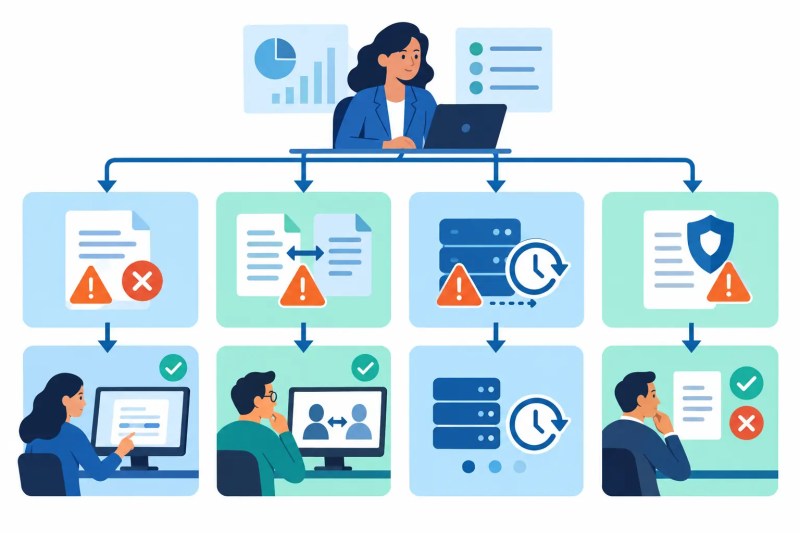
Validation failures, missing data, duplicate records, temporary integration outages, permission errors, policy exceptions, and unsupported business states cannot share one generic retry rule. Retrying missing customer data will not create the missing value, while sending a duplicate payment request again can create financial damage.
Classification should identify the failed component, business impact, recoverability, responsible team, retry eligibility, and required evidence. If no approved category fits, the system should route the item to triage rather than guess a recovery action.
| Exception type | Correct response | Unsafe behavior |
|---|---|---|
| Missing or invalid data | Request correction and revalidate | Retry unchanged data repeatedly |
| Duplicate or conflicting record | Hold for identity or ownership review | Create or update another record automatically |
| Temporary integration failure | Retry with limits and backoff | Retry indefinitely without checking side effects |
| Permission or credential failure | Escalate to the system owner | Continue attempts with an invalid connection |
| Policy exception | Route to an authorized decision-maker | Invent an approval from technical conditions |
The classification model below shows why each failure type requires a different correction, retry, or decision path.
The Exception Queue Must Control Ownership and Aging
An exception queue should show the affected record, source process, failure class, severity, owner, age, retry state, and next required action. A shared inbox cannot reliably distinguish a new critical failure from a low-priority duplicate alert or prove whether anyone accepted responsibility.
Ownership rules must handle unavailable users, team changes, queue overload, and exceptions approaching an operational deadline. If an owner does not acknowledge the item within the defined window, the system escalates it instead of assuming notification equals action.
Control Layer
- Every exception receives a stable ID linked to the original workflow item and failed step.
- Error categories control ownership, severity, retry eligibility, and evidence requirements.
- Duplicate failure events update the existing exception instead of creating parallel queue items.
- Queue aging and acknowledgment thresholds trigger escalation when ownership fails.
- Retry limits, delays, and backoff rules vary by exception class and external platform constraint.
- Idempotency keys prevent a retry from duplicating payments, messages, records, or documents.
- Human decisions record the reviewer, timestamp, reason, and supporting evidence.
- Resolved items remain open until workflow resumption or approved closure is verified.
The queue structure below replaces disconnected notifications with visible priority, ownership, aging, retry eligibility, and escalation.

Retries Must Not Repeat the Damage
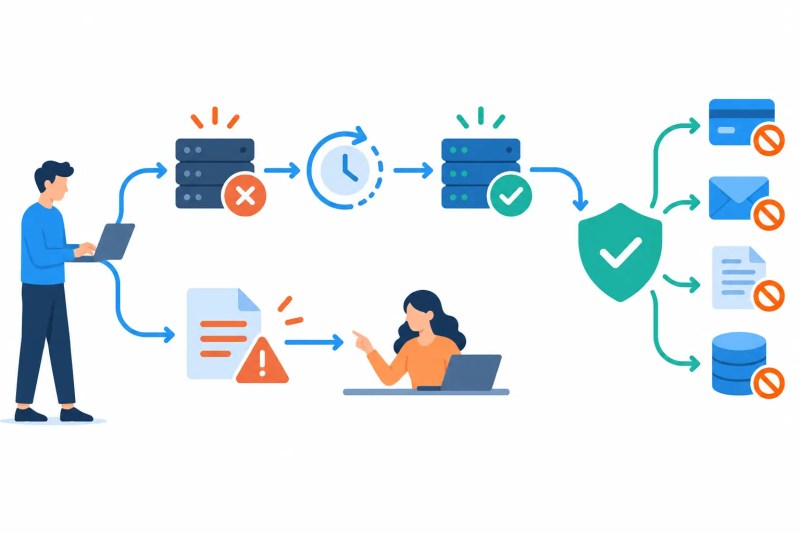
Retries are appropriate for temporary timeouts, rate limits, and unavailable services only when the action can be repeated safely. Validation failures, rejected policy states, and permanent permission errors require correction or escalation because another identical attempt cannot change the outcome.
Before retrying an action with side effects, the workflow checks whether the destination already created the record, charged the payment, sent the message, or updated the status. Without an idempotency key or destination lookup, a successful action followed by a lost response can be repeated as though it failed.
The difference between safe and unsafe retry behavior appears below.
Example: A Customer Record Fails During Account Creation
Consider an onboarding workflow that validates a customer submission, creates an account, generates documents, and sends a welcome message. If the account API rejects the record because a required identifier is missing, continuing to document generation would create files for an account that does not exist.
The exception system captures the rejected payload, classifies the missing identifier, assigns the record to the data owner, and pauses only that customer’s downstream steps. After correction, validation runs again and the workflow resumes from account creation rather than repeating completed intake actions.
APIs and Automation Platforms Expose Uneven Failure Context
Exception management can receive errors from Zapier, Make, n8n, CRMs, accounting systems, document platforms, databases, webhooks, and internal APIs. Some sources return structured error codes, while others provide only a message, partial response, timeout, or generic failed-run status.
Rate limits, delayed webhooks, expired tokens, incomplete pagination, and schema changes can also produce failures that resemble missing business data. The capture layer must preserve the raw response and workflow context so classification does not convert an integration problem into an incorrect data-correction request.
Monitoring Finds the Failure; Exception Management Owns the Record
Workflow error monitoring detects failed runs, missing events, retry spikes, and unhealthy process behavior. Exception management creates and owns the individual failed work item until it is resolved, resumed, or closed with an authorized reason.
Reconciliation mismatches remain within reconciliation automation when their meaning depends on matching populations, tolerance rules, and financial or operational differences. Only the resulting recovery work should enter the general exception lifecycle.
Metrics That Reveal Unresolved Process Risk
Useful measures include exceptions created, unresolved count, aging by severity, average acknowledgment time, resolution time, retry success rate, repeat failure rate, manually reopened items, unowned items, and resumed-workflow success. A falling error count is misleading if failed records are being dropped before exceptions are created.
Rules should also be reviewed when categories and one-off recovery branches multiply. Undocumented exception logic becomes automation debt when maintainers can no longer explain why similar failures follow different paths.
Result: Failed records remain visible from detection through recovery, while retry controls, human decisions, ownership changes, escalations, and workflow resumption stay auditable.
Where Human Judgment Must Remain
Automation can classify known failures, apply approved retry rules, assign queue ownership, enforce escalation thresholds, and resume work from saved checkpoints. It should stop when an exception requires a policy waiver, disputed data interpretation, security decision, irreversible correction, or approval outside predefined authority.
Human reviewers should choose from controlled resolution outcomes and provide a reason and supporting evidence. Allowing someone to delete, close, or relabel an exception without explanation breaks the audit history and can hide unresolved business impact.
Frequently Asked Questions
What creates an automated exception?
An exception begins when a workflow item fails validation, integration, policy, timing, or completion rules and receives a stable exception ID. If the original item cannot be identified, it should be quarantined instead of entering an untraceable queue.
Should every workflow error retry automatically?
No. Temporary technical failures may retry, but bad data, duplicates, permission failures, and policy exceptions require correction or human judgment because repeating the same request can worsen the failure.
How are exceptions assigned to the correct person?
Routing uses the source process, failure category, severity, required expertise, and current availability. If the assigned owner does not acknowledge the item, an escalation rule must prevent it from aging silently.
How does a resolved exception resume the workflow?
The system returns the corrected item to a saved checkpoint and verifies the next action before continuing. Restarting from the beginning can repeat messages, payments, documents, or record creation.
Is exception management the same as process monitoring?
No. Monitoring identifies unhealthy runs and system patterns, while exception management owns the specific failed record, its resolution, and its verified return to the workflow.
Why Alltomate
Alltomate is a Zapier Certified Platinum Solution Partner founded by Miguel Carlos Arao. Reliable exception management requires more than sending error notifications: each failure needs context, classification, ownership, safe recovery logic, escalation, workflow resumption, and an audit trail.
If failed records still depend on someone reading logs and remembering the next step, start with a free business process audit to identify where exception ownership and recovery controls are missing.
About the solution designer

Miguel Carlos Arao is the Founder of Alltomate and a
Zapier Certified Platinum Solution Partner specializing in automation
systems, workflow architecture, and real-world implementation.

Built by a certified Zapier automation partner
Explore more at
business process automation resources,
workflow reliability monitoring, and
automation maintenance guidance.