
An automated process can keep producing successful run logs while records wait indefinitely in a queue, an expected event never arrives, or repeated retries consume capacity without moving work forward. By the time a customer, employee, or finance team reports the delay, the original failure may be buried across several platforms.
Business process monitoring maintains a current operational state for each workflow: capture expected events, track movement between stages, detect missing or delayed work, evaluate thresholds, create incidents, route alerts, and verify that recovery restores normal processing.
If workflow health is still checked by opening individual tools and comparing logs manually, see how Alltomate connects and monitors cross-system automation.
System Snapshot
- Problem: Process failures remain hidden when each platform reports only its own execution state instead of the outcome of the complete workflow.
- Core System: A monitoring layer tracks events, workflow stages, queues, retries, thresholds, incidents, alerts, ownership, and recovery.
- Key Risk if Missing: Stalled records, missing events, growing queues, and repeated failures can continue until they cause SLA breaches or operational backlogs.
- Primary Outcome: Teams can see which processes are healthy, degraded, stalled, or recovering and who owns each active incident.
Processes Can Fail Without Producing a Visible Error
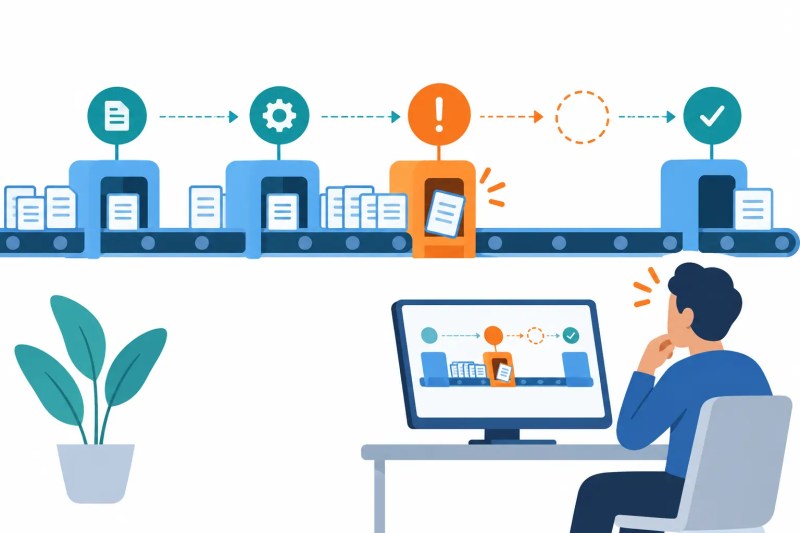
This solution fits automated workflows that span multiple stages, systems, queues, scheduled runs, or asynchronous events. A process may degrade even when no individual automation reports a hard failure because an expected webhook never arrived, a record stopped between systems, or throughput fell below incoming volume.
A short workflow with immediate, visible results may not need a separate monitoring layer. Monitoring becomes necessary when process completion depends on several tools, delayed events, background queues, retries, or deadlines that cannot be assessed from one platform’s run history.
The hidden failure pattern appears below: one item stops between stages while later work continues arriving and forms a growing queue.
One Monitoring State From Event Capture to Recovery
The monitoring system begins by defining the events and stage transitions that prove a workflow is progressing. It records when each item entered a stage, which event should occur next, how long that transition normally takes, and which system owns the current state.
An abnormal condition becomes an incident only after the system validates context and suppresses duplicate signals. Recovery remains unverified until the stalled item advances, the queue returns to an acceptable range, or the missing event is reconciled against the source system.
- Capture → collect workflow events and state changes → update process state (missing identifier → quarantine signal)
- Evaluate → compare state, age, volume, and retries with expected behavior → classify health (insufficient context → observation)
- Detect → confirm stall, missing event, threshold breach, or failure pattern → create incident (duplicate signal → merge)
- Route → assign by system, process, severity, and impact → notify owner (unacknowledged incident → escalate)
- Investigate → attach source events, errors, queue state, and affected records → select recovery action (unclear cause → specialist review)
- Verify → confirm process movement and restored thresholds → close incident (continued degradation → remain open)
The complete monitoring cycle is shown below, including the incident path and the verification required before the process returns to a healthy state.
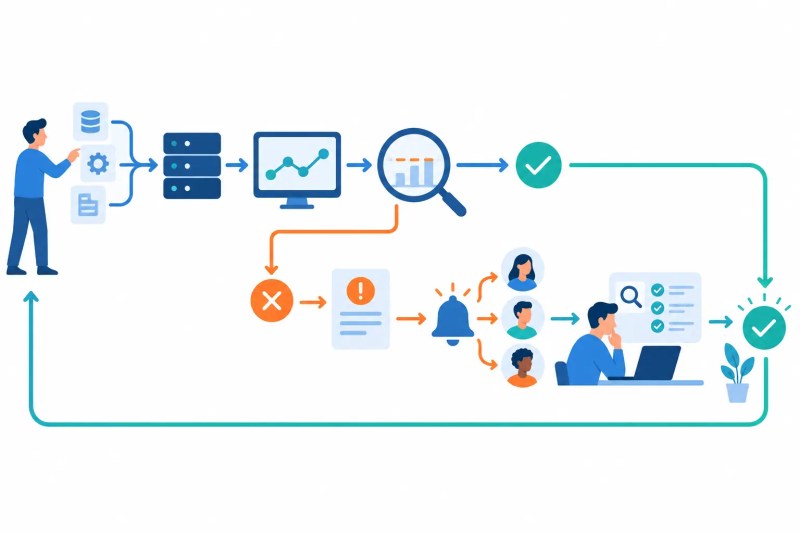
This monitoring lifecycle supports the broader architecture described in the business process automation guide. The underlying process performs the business work; monitoring determines whether that work is moving, delayed, degraded, stalled, or complete.
When teams discover problems only after users complain, the issue is process observability rather than another missing notification. Define the monitoring architecture before hidden delays become recurring operational failures, because more alerts will not establish reliable health rules or ownership.
Queue Growth and Retry Spikes Reveal Falling Throughput
A queue can grow even when workers or automations continue completing items successfully. If incoming volume exceeds completion capacity, the process is degrading and will eventually breach deadlines unless capacity, routing, or the blocked stage changes.
Retry spikes create a similar warning because repeated attempts may inflate activity while successful throughput falls. Monitoring must separate new work, completed work, retry attempts, permanent failures, and aged items instead of treating every execution as productive activity.
The comparison below shows how a stable queue differs from a process where backlog and retries rise around a bottleneck.

Thresholds Must Reflect Process Behavior, Not Arbitrary Numbers
A useful threshold accounts for normal volume, processing time, business hours, priority, and expected variation. A fixed alert for every item older than one hour will create noise if one workflow legitimately waits overnight but miss a ten-minute delay in a time-sensitive process.
Thresholds should distinguish warning, degraded, and critical states and record which rule triggered each incident. If thresholds change without versioning, historical incidents become difficult to explain because the same process behavior can appear healthy under one rule and critical under another.
Control Layer
- Every monitored item uses a stable process and record identifier so events from different systems can be correlated.
- Expected transitions define which event should occur next and how long the process may remain in each state.
- Queue thresholds account for incoming volume, completed volume, age, priority, and available processing capacity.
- Retry monitoring separates transient recovery attempts from repeated permanent failures.
- Duplicate or repeated signals update an existing incident instead of creating alert floods.
- Severity rules combine operational impact, affected volume, duration, deadline risk, and recovery status.
- Unacknowledged incidents escalate to a secondary owner or team lead.
- Incident closure requires verified process recovery rather than a dismissed notification.
Alert Routing Must Preserve Context Without Creating Noise
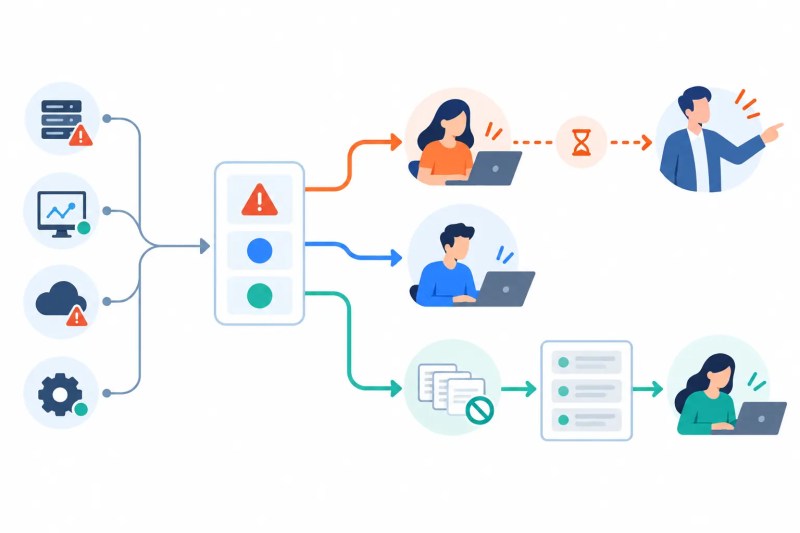
An alert should include the affected process, failed or delayed stage, incident start time, impacted records, queue state, recent retries, related system errors, current owner, and next action. A message that only says a workflow failed forces the recipient to rebuild the incident before deciding whether it matters.
Repeated signals for the same condition should be grouped into one active incident, while lower-priority observations can move into a digest. Critical SLA risk or widespread failure should escalate if the primary owner does not acknowledge it within the required window.
The routing model below separates urgent escalation, ordinary ownership, and suppressed duplicate noise.
Example: An Approval Workflow Stops After Submission
Consider a request workflow that validates a submission, creates an approval task, waits for a decision, updates the source system, and notifies the requester. The initial automation can run successfully even if the approval task is never created or the decision webhook never returns.
The monitoring layer records the expected transition and detects that the request remained in the waiting state beyond its allowed window. It creates an incident with the request ID, last confirmed event, expected event, current owner, and deadline risk so the team can recover the specific item without restarting the complete process.
APIs and Automation Platforms Expose Different Pieces of Process Health
Monitoring can combine workflow-platform run data, API responses, webhook events, database states, CRM records, task queues, notification results, and reporting systems. These sources may use different identifiers, timestamps, status names, retention periods, and levels of error detail.
Some APIs provide only current state, while delayed or out-of-order webhooks can make a completed stage appear unfinished. The monitoring layer must reconcile incoming events against stored process history and account for polling delays, rate limits, pagination, and timezone differences before declaring a missing event.
Monitoring and Exception Management Own Different Problems
Process monitoring identifies stalled workflows, missing events, growing queues, retry spikes, integration failures, and systemic degradation. Exception management automation owns the individual failed records that require classification, correction, retry, or human resolution.
Reconciliation automation remains responsible when the issue is whether two record populations agree under defined matching and tolerance rules. Monitoring can detect that reconciliation is late or incomplete without deciding whether a specific difference is an acceptable match.
Dashboards Must Retain the Evidence Behind Process Health
A dashboard should show current health, throughput, queue depth, oldest item, retry volume, incident severity, SLA risk, ownership, and recovery status. Summary colors are unreliable if users cannot open the underlying event history and see why a process became degraded.
The audit trail should preserve state transitions, thresholds, alerts, acknowledgments, ownership changes, investigation notes, recovery actions, and closure verification. If an unresolved incident remains, the process should not display a clean completion state merely because other records succeeded.
The monitored outcome and supporting history appear below.

Result: Teams can identify degraded processes before they become operational backlogs and retain the evidence needed to explain each incident and recovery.
Metrics That Distinguish Activity From Healthy Processing
Useful measures include completed throughput, queue growth rate, oldest-item age, stalled-item count, missing-event count, retry volume, failure rate, incident acknowledgment time, recovery time, repeated-incident frequency, SLA-risk volume, and unresolved critical incidents. Execution count alone can rise while actual completed work falls because retries inflate activity.
Monitoring rules also require maintenance as processes and platforms change. Undocumented thresholds, stale owners, and abandoned alerts become automation debt when teams stop trusting the monitoring system.
Where Human Judgment Still Matters
Automation can detect abnormal states, calculate thresholds, group duplicate signals, route incidents, and verify measurable recovery. It should stop when someone must judge business impact, prioritize competing incidents, approve a risky recovery action, or determine whether the expected process behavior itself should change.
Those decisions should record the responsible person, reason, and evidence. Silently dismissing an alert or changing a threshold to hide recurring failures destroys the operational history monitoring is intended to preserve.
Frequently Asked Questions
What does automated process monitoring detect?
It detects stalled items, missing events, growing queues, retry spikes, integration failures, threshold breaches, and deadline risk. A condition should become an incident only after the system confirms the affected process and suppresses duplicate signals.
How can monitoring identify a stuck workflow?
The system compares the item’s current stage and last confirmed event with the expected next transition and allowed duration. If identifiers or stage history are missing, the signal requires reconciliation before the process is declared stuck.
Is process monitoring the same as workflow error monitoring?
Process monitoring evaluates end-to-end business state, including delays that produce no technical error. Workflow error monitoring focuses more directly on failed runs, jobs, integrations, and execution recovery.
How are monitoring alerts prevented from becoming noise?
Signals are grouped by incident, classified by impact, and routed according to severity and ownership. Duplicate alerts should update the active incident or enter a digest instead of repeatedly notifying the same people.
When should a process incident be closed?
An incident should close only after the affected workflow advances or its health measurements return to an approved state. Dismissing the alert without verifying recovery can leave the underlying process stalled.
Why Alltomate
Alltomate is a Zapier Certified Platinum Solution Partner founded by Miguel Carlos Arao. Reliable process monitoring requires more than dashboards: events, state transitions, queues, thresholds, incidents, alerts, owners, escalations, and recovery evidence must remain connected across the workflow.
If process problems are still discovered through complaints or manual log checks, start with a free business process audit to identify where monitoring coverage, ownership, and recovery controls are missing.
About the solution designer

Miguel Carlos Arao is the Founder of Alltomate and a
Zapier Certified Platinum Solution Partner specializing in automation
systems, workflow architecture, and real-world implementation.

Built by a certified Zapier automation partner
Explore more at
business process automation resources,
exception management automation, and
automation maintenance guidance.