
Published on May 15, 2026
Businesses planning large-scale automation can review AI automation services or request a free business process audit before replacing manual workflows.
Quick Answer: Fully automated business examples usually combine workflow automation, system integrations, validation logic, and exception handling across multiple operational layers. The businesses that succeed with automation do not remove humans entirely. Instead, they automate repetitive coordination tasks while keeping approval, monitoring, and correction systems in place.
Table of Contents
- Why Fully Automated Businesses Usually Fail at Scale
- Lead Management Automation Across Multiple Systems
- How Automated Document Operations Reduce Processing Delays
- Where AI-Assisted Automation Actually Fits
- What Happens When CRM Automation Has No Validation Layer
- The Difference Between Automated Tasks and Automated Operations
- How Businesses Gradually Transition Into High-Automation Models
- FAQs
Most businesses searching for “fully automated business examples” are not trying to remove employees entirely. They are usually trying to reduce operational bottlenecks caused by repetitive coordination, fragmented systems, delayed approvals, manual data movement, or inconsistent follow-up handling.
The challenge is that many automation projects focus too heavily on tools instead of operational logic, which is one reason many businesses encounter workflow automation mistakes during implementation. A workflow can automate data transfer perfectly while still creating downstream failures if validation, routing, escalation, or exception handling are missing.
For businesses still evaluating automation maturity, this guide on business process automation systems explains how automation workflows are usually structured before implementation begins.
Why Fully Automated Businesses Usually Fail at Scale
One of the most common misconceptions is that automation means eliminating operational oversight. In practice, businesses that attempt to automate everything immediately often create invisible operational failures that compound over time.
For example, a lead routing workflow may initially appear successful because leads are automatically assigned across sales reps. But if routing logic ignores territory conflicts, duplicate records, inactive users, or incomplete submissions, the automation quietly distributes bad data throughout the CRM.
The issue is not the automation itself. The problem is that automation scales both efficiency and mistakes simultaneously. McKinsey’s research on agentic infrastructure notes that automated systems can execute actions at machine speed, which also means operational errors can propagate just as quickly when validation and oversight layers are missing. McKinsey
A fully automated business usually depends on:
- Reliable input validation
- Structured workflow conditions
- Clear ownership rules
- Exception management
- System synchronization
- Monitoring visibility
Without those layers, businesses often end up spending more time fixing automation-related failures than they previously spent doing the manual work.
Scale Effect: Small workflow errors that affect 3–5 records per day can become hundreds of corrupted transactions per week once automation volume increases.
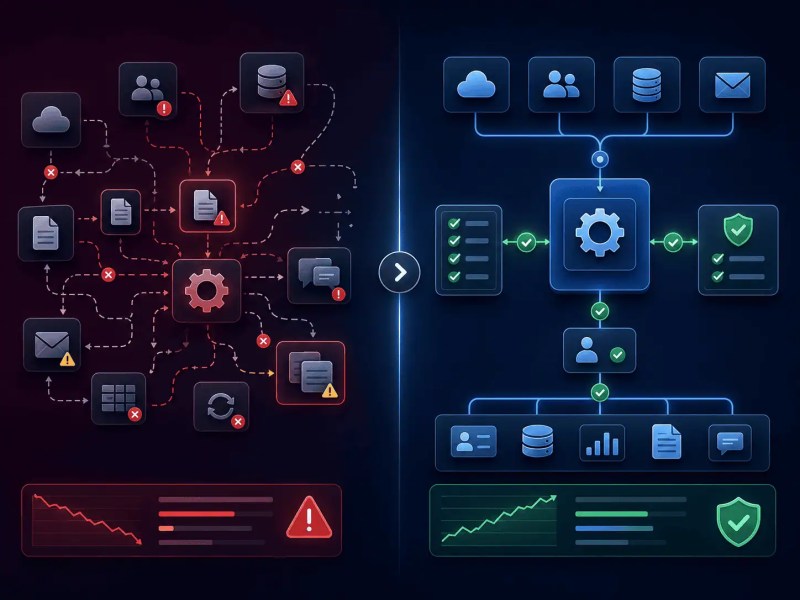
This operational risk is illustrated below, where unstable automation systems create cascading failures while structured workflows maintain controlled synchronization and validation.
Lead Management Automation Across Multiple Systems
Lead management is one of the clearest examples of high-value business automation because the workflow usually involves repetitive coordination across forms, CRMs, calendars, email systems, enrichment tools, and internal notifications.
A common automated lead workflow may look like this:
The workflow below demonstrates how lead automation systems coordinate validation, qualification, CRM synchronization, and follow-up handling across multiple operational stages.

The automation becomes fragile when businesses assume all leads behave identically. International leads, duplicate submissions, invalid contact data, or existing customers often require different handling rules.
This is why workflows designed around operational branching usually outperform “simple automation” setups.
Businesses building these systems often combine routing, qualification, and follow-up workflows similar to the approaches covered in:
Operational Reality: Most lead automation failures are caused by missing business rules, not missing software features. McKinsey notes that automation programs often fail when treated as technology projects instead of operational process redesign initiatives. McKinsey
How Automated Document Operations Reduce Processing Delays
Document-heavy businesses often experience operational drag because approvals, uploads, reviews, and extraction tasks are spread across disconnected systems, especially in businesses still dependent on manual document processing.
Legal teams, accounting departments, healthcare administrators, and service businesses frequently rely on employees to manually rename files, extract information, request approvals, and move records between systems.
The delay compounds because document workflows usually involve waiting states rather than processing states.
A properly automated document pipeline can:
- Extract structured information from uploads
- Route documents to reviewers automatically
- Track approval status
- Store files in organized systems
- Trigger downstream workflows after approval
But many businesses underestimate how inconsistent documents can be. OCR extraction may fail when invoice layouts change. Approval chains may stall when managers are unavailable. File naming conventions may become inconsistent across departments.
The businesses that stabilize these workflows typically create operational rules around document states instead of relying purely on extraction tools.
For deeper examples, these related resources expand on document automation structures:
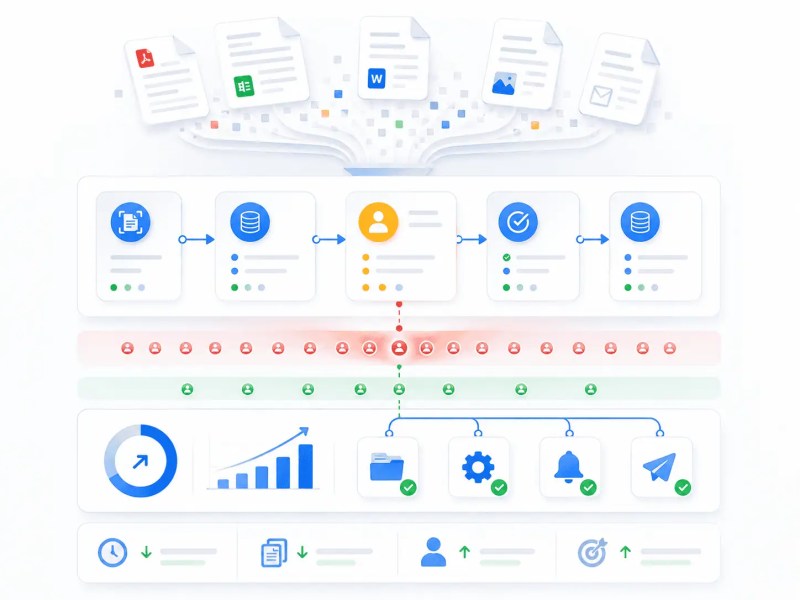
The document workflow below shows how extraction, approvals, routing, and downstream processing are coordinated inside structured automation systems.
Scale Effect: As document volume increases, even minor extraction inconsistencies can create approval bottlenecks that delay entire operational pipelines.
Still relying on disconnected manual workflows?
Explore workflow automation support or request a free business process audit to identify operational bottlenecks before they scale across systems.
Where AI-Assisted Automation Actually Fits
Many businesses now associate full automation with AI systems making independent decisions across operations. In reality, AI works best when handling interpretation-heavy tasks rather than executing unrestricted business actions.
This distinction matters because deterministic automation and probabilistic AI behave very differently.
Traditional automation works well for:
- Structured routing
- Status updates
- Data synchronization
- Rule-based triggers
AI-assisted workflows are more useful for:
- Email classification
- Document summarization
- Support ticket categorization
- Sentiment analysis
- Lead qualification assistance
The failure usually happens when businesses allow AI systems to bypass operational validation entirely.
For example, an AI-generated support response workflow may accidentally issue incorrect instructions, misclassify urgency, or trigger actions based on ambiguous inputs if there is no review layer.
This is why AI-assisted automation systems are usually strongest when AI acts as a recommendation engine rather than a fully autonomous executor.
Businesses exploring this area often compare operational approaches in:
What Happens When CRM Automation Has No Validation Layer
CRM automation failures rarely appear immediately. They accumulate quietly until reporting, forecasting, and sales operations become unreliable. Research analyzing CRM implementation failures describes how rushed deployments and accumulated technical debt gradually degrade reporting accuracy and operational trust over time. CRM implementation failure analysis
A business may automate:
- Contact creation
- Pipeline stage movement
- Task assignment
- Lifecycle updates
- Activity logging
At first, this improves operational speed. But if the workflow lacks duplicate management, field validation, ownership logic, or synchronization rules, the CRM gradually becomes operationally corrupted.
A common failure scenario involves multiple systems updating the same contact simultaneously. Marketing tools, support platforms, and sales CRMs may overwrite fields inconsistently depending on sync timing.
The downstream impact affects:
- Sales forecasting
- Reporting accuracy
- Customer segmentation
- Automation triggers
- Revenue attribution
This is why mature automation systems prioritize data governance before scaling workflow complexity.
Businesses dealing with CRM fragmentation often implement structures similar to:
The Difference Between Automated Tasks and Automated Operations
Many businesses believe they have a fully automated operation because they use workflow tools to automate isolated tasks. In practice, disconnected automations often create new operational fragmentation.
Automating an email notification is not the same as automating a business process.
A real operational system usually requires:
- Cross-platform coordination
- Shared operational states
- Centralized visibility
- Consistent business rules
- Error handling paths
For example, a customer onboarding process may involve:
- Contract signing
- Payment confirmation
- Account provisioning
- Internal task generation
- Training coordination
- Support activation
If those workflows operate independently, delays in one system may never propagate correctly to others, which is a common issue in businesses lacking proper cross-system integration.
The result is often hidden operational debt where employees manually reconcile automation failures behind the scenes.
Key Distinction: Task automation reduces individual workload. Operational automation coordinates business state across systems.
The operational architecture below illustrates how coordinated automation systems maintain synchronized workflows across multiple connected platforms.

How Businesses Gradually Transition Into High-Automation Models
The most reliable fully automated business examples are usually built incrementally rather than deployed all at once.
Businesses often begin with operational bottlenecks that meet three conditions:
- High repetition
- Clear decision rules
- Consistent process flow
Typical starting points include:
- Lead assignment
- Invoice processing
- CRM updates
- Status notifications
- Document approvals
- Customer onboarding coordination
Over time, businesses gradually layer:
- Validation systems
- Conditional routing
- Cross-system synchronization
- AI-assisted processing
- Operational monitoring
The companies that scale successfully usually treat automation as operational infrastructure rather than isolated workflow shortcuts, especially when building large-scale integration automation systems. Common fully automated business examples include lead routing, invoice processing, CRM synchronization, document approvals, and AI-assisted support triage.
Businesses evaluating automation maturity often compare orchestration approaches across platforms such as:
Final Answer: Fully automated business examples work best when automation is treated as a coordinated operational system instead of a collection of isolated tasks. The businesses that scale automation successfully focus on workflow reliability, validation logic, exception handling, and cross-system consistency before attempting full operational autonomy.
Not sure if your current automation setup can scale safely?
Many workflow failures remain invisible until reporting errors, duplicate records, missed follow-ups, or synchronization problems begin compounding across systems.
Request a free business process audit to identify operational gaps, validation risks, and workflow failure points before they become expensive to fix.
Related Resources
- Workflow Automation Guide
- Automated Business Examples
- Workflow Automation Support
- What Is Workflow Automation?
- Automate System Integration
FAQs
Can a business become fully automated without human review?
Most businesses can automate significant portions of repetitive operational work, but fully autonomous operations are rare because approvals, exception handling, customer escalation, and strategic decisions still require human oversight. Deloitte’s enterprise AI research similarly notes that even highly mature organizations continue to retain humans for judgment-heavy decisions and exception management. Deloitte
What types of businesses benefit most from automation?
Businesses with repetitive operational workflows, large document volume, multi-step approvals, CRM-heavy processes, or cross-platform coordination usually benefit the most from automation. Industries such as legal services, healthcare administration, home services, agencies, and B2B operations often see the highest operational impact.
What usually breaks in large automation systems?
The most common failures involve poor validation logic, inconsistent data structures, missing exception handling, fragmented integrations, and unclear operational ownership. In many cases, businesses do not notice the problems until reporting errors, duplicate records, or missed customer follow-ups begin affecting operations at scale.
Is AI required for business automation?
No. Many reliable automation systems use deterministic workflows without AI. AI becomes useful when workflows require interpretation, classification, or summarization.
About the author

Miguel Carlos Arao is the Founder & CEO of Alltomate, a Zapier Certified Platinum Solution Partner focused on business automation systems, workflow orchestration, and cross-platform operational integration. This article is based on hands-on automation design, workflow systems, and real-world implementation experience.

Built by a certified Zapier automation partner
Explore more at
Automation Consulting,
Business Process Automation Guide, and
What Is Business Process Automation?.