
Published on June 3, 2026
If you’re setting up event-driven email notifications, see our automate system integrations or get a free business process audit to identify where your current setup is breaking down.
Quick Answer: A webhook to send email works by receiving an HTTP POST request from an external system, extracting data from the payload, and passing it to an email action — either directly through an email API (like SendGrid or Mailgun) or via an automation platform like Zapier or n8n. The reliability of this setup depends almost entirely on how you handle payload validation, error states, and retry logic — not on which tool you choose.
Table of Contents
Most teams treat the webhook-to-email connection as a simple plumbing task — point a trigger at an email action, map a few fields, and call it done. That works until the source system sends a malformed payload, the email provider rate-limits the endpoint, or a missing field causes the entire workflow to fail silently. The system isn’t hard to build. It’s hard to build in a way that holds up once it’s running.
This article covers how webhook-to-email automation actually works at the system level — including where it fails, how payload structure shapes the output, and which platform choices affect long-term reliability.
What a Webhook-to-Email System Actually Does
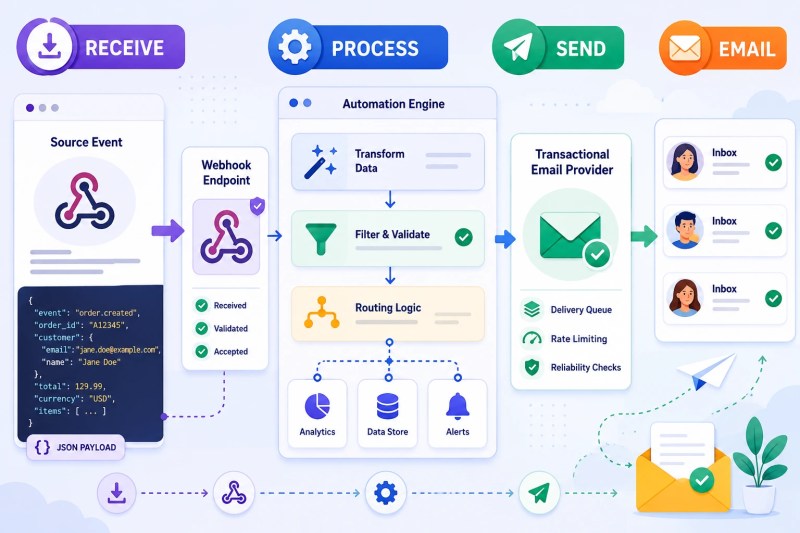
At its core, a webhook-to-email workflow is a three-stage pipeline: receive, process, send. This is a practical example of workflow automation, where a system event triggers a downstream business action without manual intervention. A source system fires an HTTP POST to a webhook URL whenever a defined event occurs — a form submission, a payment confirmation, a status change in a CRM. That POST carries a JSON payload containing the event data. Your automation layer receives it, extracts the relevant fields, constructs the email, and sends it through whatever email provider is downstream.
The webhook itself is passive — it doesn’t poll, it doesn’t initiate, it waits. The source system is responsible for calling it. That’s an important distinction, because it means the reliability of your email notifications is partially tied to the reliability of the system sending the webhook. If the source system drops events, buffers them, or sends them out of order, your email automation inherits those problems. For organizations building multiple event-driven workflows, business process automation provides the broader framework for how these systems fit together.
Between the receive and send stages sits the processing layer — and this is where most of the real complexity lives. Field extraction, conditional logic (does this event warrant an email, or should it be filtered?), dynamic subject lines, recipient routing, and payload normalization all happen here. The processing layer is also where most implementations are underbuilt. Teams focus on making the happy path work and don’t design for what happens when the payload doesn’t look the way they expected.
A useful way to think about it: the webhook is the trigger, the email provider is the output layer, and everything in the middle is your system. How robust that middle layer is determines whether you’re running automation or running a fragile script.
The system below shows how webhook events move through the receive → process → send pipeline before an email is delivered.
Where These Setups Break Before the Email Sends
The failure points in a webhook-to-email system cluster in predictable places. Understanding them before you build saves considerable rework.
Missing or null fields in the payload. The most common cause of silent failure is a field that’s sometimes present and sometimes not. A webhook payload from a CRM might include a contact_email field on new lead events but omit it on update events. If your automation maps directly to that field without a fallback check, the email action either throws an error or sends with a blank recipient. In implementations we’ve built for SaaS companies with complex event models, the first thing we do is audit every payload variation the source system can produce — not just the one documented in the API docs. This is one of the most common examples of the failures covered in our guide to workflow automation mistakes. When multiple applications are involved, this becomes a broader system integration problem rather than an email problem.
No authentication on the webhook endpoint. A public webhook URL with no signature verification will eventually receive junk — test pings from developers, replayed events, or in worse cases, spoofed payloads. When your automation can’t distinguish a legitimate event from noise, you end up sending emails triggered by garbage data. Proper implementations verify the request signature against a shared secret before processing anything. As noted in Stripe’s webhook documentation, webhook signatures should be verified before processing incoming events — a pattern that applies across webhook integrations, not just payment systems.
Timeouts on slow email providers. Some webhook sources have a response timeout — if your automation layer doesn’t acknowledge the incoming request within a few seconds, the source system marks it as failed and may retry. If your email provider is slow to respond, the whole chain stalls. This is especially common when using SMTP-based senders routed through automation platforms rather than a purpose-built email API. According to Svix’s webhook reliability guide, major providers often impose strict response windows before triggering retries, making fast acknowledgment a core reliability requirement.
Retry storms creating duplicate emails. When a source system retries a failed webhook delivery and your automation doesn’t deduplicate on event ID, the downstream email sends multiple times. For transactional emails — order confirmations, password resets, invoice receipts — duplicate sends are a real customer experience problem. This is one of the first things to design for, not patch later.
We’ve seen this exact pattern in e-commerce setups where payment confirmation webhooks from Stripe were being retried after a slow response from the automation layer, resulting in customers receiving three or four confirmation emails for a single order. The fix wasn’t the email provider — it was idempotency handling at the webhook processing layer. Both Stripe and Shopify recommend tracking previously processed event IDs and ignoring duplicates to prevent repeated downstream actions when webhook retries occur. For context on how integration mistakes like this play out more broadly, see our overview of common integration mistakes.
The most common failure points appear before the email provider is ever involved, as illustrated below.

Already have a webhook setup but emails are inconsistent? Our free business process audit will surface where the processing layer is breaking down.
Choosing Your Email Delivery Layer
The email delivery layer sits at the end of the pipeline, and the choice here has more operational implications than most teams account for upfront. There are three main approaches, and each comes with different tradeoffs around control, deliverability, and maintenance overhead.
Transactional email APIs (SendGrid, Mailgun, Postmark). These are purpose-built for programmatic sending and offer the most control over deliverability, bounce handling, and send logs. As explained in Mailgun’s webhook guide, dedicated email infrastructure is designed to process events programmatically and trigger downstream actions such as transactional email delivery. When a webhook triggers an email through one of these providers, you get full visibility into whether it was delivered, opened, or bounced — data that generic automation platforms don’t surface well. The tradeoff is setup complexity: you’re managing API keys, domain authentication (SPF, DKIM, DMARC), and template logic separately. For organizations evaluating whether custom API logic or no-code automation is the better long-term approach, see custom API vs no-code automation.
Automation platform email actions (Zapier’s Gmail action, n8n’s Send Email node). These use an authenticated account — typically Gmail or Outlook via OAuth — to send email directly. They’re faster to set up and work well for internal notifications or low-volume alerts. Where they fail is at scale and deliverability: emails sent from a shared Gmail account through an automation platform don’t benefit from proper transactional sender reputation, and you’ll hit sending limits sooner than expected in high-volume workflows.
Direct SMTP relay. Some teams route emails through their own SMTP server, which gives full control but adds infrastructure responsibility. This is rarely the right choice unless you already have SMTP infrastructure in place and a reason not to use a managed API.
The decision rule is straightforward: if the email is customer-facing or transactional, use a dedicated API with domain authentication. If it’s internal — a Slack-equivalent notification to a team inbox — a platform email action is usually sufficient. Mixing these up is a common mistake; customer-facing emails routed through a personal Gmail account tend to land in spam under load.
The diagram below compares the three primary delivery approaches and where each fits best.

How Payload Structure Determines Email Quality
Two webhook setups using identical platforms and email providers can produce wildly different email quality — and the difference almost always comes down to how the payload is structured at the source. This is worth thinking about before you write a single line of automation logic.
A well-structured webhook payload includes all the data the email needs, cleanly namespaced and consistently typed. A poorly structured one bundles everything into a flat object, uses inconsistent field names across event types, or encodes important data as a stringified JSON blob inside a string field. When you’re mapping payload fields to email variables — recipient, subject line, body content — a messy payload forces you to add transformation logic at every step. That transformation logic is brittle; it breaks when the source system changes its output format.
In practice, the quality of the emails your automation sends reflects the quality of the data coming in. A contact record missing a first name produces an email that opens with “Hi ,” — technically delivered, practically broken. A timestamp formatted inconsistently across events produces subject lines with raw Unix timestamps or malformed date strings.
A consistent pattern we see in this setup is teams over-investing in the email template and under-investing in payload normalization. The template looks polished in testing, where the sample payload is clean. In production, with real events from a messy source system, the same template starts producing embarrassing output. The fix is to build a normalization step into your automation — a layer that validates and cleans the incoming payload before any email logic runs. Think of it as data hygiene before the email even gets a chance to send.
This is also where working closely with the team that owns the source system pays off. If you can influence how the webhook payload is structured — even adding a few consistent fields — you eliminate significant processing complexity downstream.
The difference between clean and inconsistent payload structures becomes obvious when comparing the resulting email outputs.

Platform Options: Zapier, n8n, and Direct API
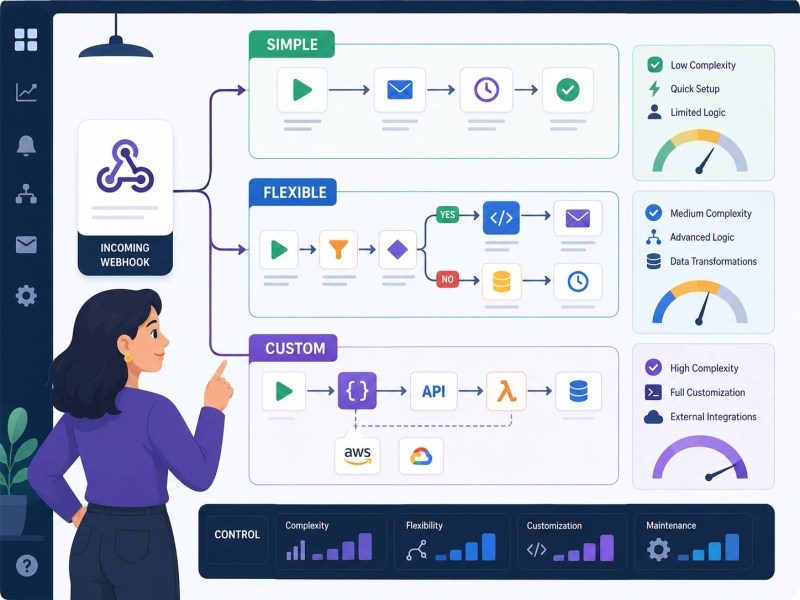
The platform choice for the middle layer — where the webhook is received and processed before the email sends — affects flexibility, cost at scale, and how much custom logic you can apply. Here’s how the main options compare for this specific use case.
Zapier is the fastest path from webhook to email for standard use cases. The Webhooks by Zapier trigger receives the payload, and a subsequent Gmail, Outlook, or SendGrid action sends the email. The constraint is that complex conditional logic — send this email only if the payload meets three conditions, route to different recipients based on event type — gets expensive to model in Zapier’s step-based interface. You end up with either a sprawling multi-branch Zap or a series of separate Zaps that are hard to maintain. For teams already using Zapier, the Zapier webhooks integration covers the foundational setup well.
n8n handles conditional routing and payload transformation more naturally, because the visual workflow editor exposes code-level logic (JavaScript functions, conditional branches, loop nodes) without requiring you to leave the platform. A webhook-to-email workflow in n8n can include payload normalization, deduplication checks, and multi-recipient routing in a single workflow that’s still readable. The tradeoff is higher setup friction for non-technical users. For a deeper look at how n8n handles webhooks specifically, see n8n webhooks explained. If email delivery is the primary use case, see n8n email automation.
Direct API integration — building a lightweight serverless function (AWS Lambda, Vercel, Cloudflare Workers) that receives the webhook and calls an email API directly — gives the most control and the lowest per-send cost at volume, but requires engineering capacity to build and maintain. This approach makes sense when the webhook-to-email logic is complex enough that no-code platforms become a maintenance liability, or when send volume is high enough that per-task pricing on automation platforms becomes significant.
For most small to mid-sized businesses, n8n self-hosted or Zapier covers the majority of webhook-to-email use cases without requiring engineering resources. The direct API path is worth evaluating once volume or logic complexity crosses a threshold your current platform can’t handle cleanly.
The architecture comparison below highlights the tradeoffs between automation platforms and custom integrations.
What Happens When Volume Increases
A webhook-to-email workflow that runs perfectly at 50 events per day can develop serious problems at 500 — and the issues are usually not where teams expect them.
The first thing that changes at scale is the visibility problem. At low volume, you can spot a failed email by noticing a missing notification. At higher volume, individual failures disappear into the noise. A workflow that silently drops 2% of webhook events is nearly invisible unless you’re logging every incoming event and reconciling against email delivery receipts. Without that logging layer, you’re operating blind.
The second pressure point is rate limiting — both on the automation platform and the email provider. Automation platforms typically process tasks sequentially within a workflow, which means a burst of 200 webhook events can create a queue that takes minutes to clear. If the source system expects fast delivery (say, a transactional confirmation email that a customer is waiting on), queue delay becomes a customer-facing issue. Email providers impose their own rate limits on the send side; exceeding them triggers soft or hard bounces that can damage sender reputation.
A recurring pattern we’ve seen in recruitment automation projects handling high-frequency candidate status updates is the need for a queue buffer between the webhook receiver and the email send step — batching low-priority notifications and prioritizing time-sensitive ones. This required moving off a standard automation platform onto a custom queue-backed architecture, but it solved both the rate limit and the delivery order problem. The lead generation automation work referenced in our recruitment automation case study shows how this kind of sequencing decision plays out in a real system.
The broader point: design the system for the volume you expect to reach in 12 months, not the volume you have today. The cost of rebuilding a webhook-to-email pipeline mid-growth is substantially higher than building it with headroom from the start. For teams evaluating whether their current setup can scale, the business process automation guide covers the decision framework for when to rebuild versus extend. This is one of the key considerations in long-term automation strategy.
As event volume grows, queue management and prioritization become critical parts of the architecture.

Final Answer: A webhook-to-email system is a receive-process-send pipeline. The webhook is just the trigger — the reliability of what you build depends on how well the middle layer handles payload validation, deduplication, conditional routing, and error states. For most use cases, n8n or Zapier handles this without engineering resources. For high-volume or complex conditional logic, a lightweight serverless function calling a transactional email API directly gives more control with lower operational cost at scale. Build for the failure cases first: missing fields, malformed payloads, and retry storms are where these systems break, not in the happy path.
Need a reliable system?
Related Resources
FAQs
Can a webhook send an email without a third-party automation platform?
Yes. A webhook endpoint can be a serverless function (Lambda, Cloudflare Workers) that directly calls a transactional email API like SendGrid or Postmark. No Zapier or n8n required. This approach gives more control and scales better at volume, but requires code to build and maintain. For teams without engineering resources, an automation platform is the practical path.
Why do webhook-triggered emails sometimes send multiple times?
Duplicate sends are almost always caused by webhook retries from the source system. If your automation layer is slow to acknowledge the incoming request, the source system assumes delivery failed and retries — triggering another email send. The fix is idempotency handling: check the event ID before processing, and skip events you’ve already handled. This needs to be built in, not added after complaints start coming in.
What’s the difference between using a webhook trigger versus a polling trigger for email automation?
A webhook trigger fires the moment an event occurs — email sends in near real-time. A polling trigger checks for new events on a schedule (every 5, 15, or 30 minutes depending on the platform). For time-sensitive emails like order confirmations or password resets, polling introduces unacceptable lag. For low-urgency internal notifications, polling is acceptable and simpler to set up. The tradeoff is latency versus infrastructure complexity.
How do you prevent sensitive data in a webhook payload from being exposed in email logs?
Automation platform logs typically store the full payload of every webhook event. If the payload includes personally identifiable information (PII) or payment data, that data sits in your platform’s logs — often longer than intended. The mitigation is to strip sensitive fields from the payload before logging, or to route sensitive webhook events through a custom processing layer that logs only what’s necessary. This is worth addressing at setup, not after a data audit.
Is a webhook email notification the same as a transactional email?
Operationally, yes — both are event-triggered, recipient-specific emails sent in response to a system action rather than a scheduled campaign. The distinction matters for how you configure your email provider: transactional emails should be sent through a dedicated transactional sender (not a shared marketing IP), authenticated with SPF and DKIM, and tracked for delivery status. Using a marketing email setup for webhook-triggered notifications is a common deliverability mistake.
About the author

Miguel Carlos Arao is the Founder & CEO of Alltomate, a Zapier Certified Platinum Solution Partner focused on webhook-triggered email automation systems, including payload validation logic, transactional email delivery routing, and event-driven notification workflows. The patterns in this article come directly from building and troubleshooting webhook-to-email systems across client engagements in e-commerce operations and recruitment platform automation.

Built by a certified Zapier automation partner
Explore more at
n8n Webhooks Explained,
System Integration Automation, and
Automation Integration Services.