
Published on July 1, 2026
Quick Answer: A Zapier webhook lets one system send event data directly into Zapier through a webhook URL, or lets Zapier send data out to another URL during a Zap. Use a Catch Hook when an outside app needs to trigger a Zap. Use a send webhook action when Zapier needs to push data to an external system or API. Webhooks are useful for form submissions, payment events, CRM signals, and operational alerts, but production workflows need careful handling around payload size, authentication, field mapping, event filtering, rate limits, and failed requests.
Table of Contents
- What a Zapier Webhook Actually Does
- Where to Find the Zapier Webhook URL
- Catch Hook vs. Send Webhook: The Direction Matters
- How to Set Up a Zapier Catch Hook Without Creating a Mess
- Where Webhook Workflows Break in B2B Operations
- Zapier Webhook Limits That Change the Design
- When a Webhook Build Needs More Than a DIY Zap
- Final Answer
- FAQs
A Zapier webhook looks simple from the outside: copy a URL, paste it into another tool, send a test request, and watch the Zap trigger. That is the part most teams get right.
The problems usually start after the first successful test. The payload changes. The source app sends nested JSON instead of flat fields. A payment event fires twice. A CRM record exists already, but the Zap creates a duplicate. Someone pasted the webhook URL into the wrong environment. Suddenly, the “simple” webhook is now a production dependency.
This guide focuses on how Zapier webhooks behave inside real workflows — not just how to create one. For the broader Zapier platform context, Alltomate’s Zapier resource hub covers where Zapier fits across business automation systems.
What a Zapier Webhook Actually Does
A webhook is an event-based HTTP request. In plain terms, one system says, “Something happened,” and sends data to another system immediately. In Zapier, that usually means an external app sends data to a Zapier webhook URL, and that request becomes the trigger for a Zap.
The important distinction is that a webhook is not the same as a normal Zapier app trigger. A normal trigger often depends on a built-in app integration, such as “new row in Google Sheets” or “new contact in HubSpot.” A webhook trigger is more open-ended. It can accept data from tools that do not have the exact Zapier trigger you need, internal systems, forms, checkout platforms, portals, or custom apps.
That flexibility is why webhooks become useful in B2B operations. A lead form can send submission data into Zapier. A payment platform can notify Zapier when an invoice is paid. A CRM can send a deal-stage signal to start onboarding. A job-management system can trigger follow-up tasks after a job is marked complete.
The tradeoff is that Zapier receives whatever the sending system provides. If the source sends clean, consistent data, the Zap can route it reliably. If the source sends inconsistent fields, missing IDs, duplicate events, or oversized payloads, Zapier will not know the business rule behind the data automatically. The system has to be designed for that.
Where to Find the Zapier Webhook URL
The Zapier webhook URL appears inside the Zap editor when you choose Webhooks by Zapier as the trigger app and select a webhook trigger such as Catch Hook. Zapier generates a unique URL for that Zap. That is the URL you paste into the external system that will send the data.
The URL is effectively the address that can trigger your Zap. If someone has it, they can send requests to it. In production workflows, treat the webhook URL like a secret — see Is Zapier Safe? for a broader look at security practices.
On webhook builds we’ve reviewed for sales and field-service teams, the first preventable failure is usually environment confusion: a staging form sends into production, or a live form keeps using an old test hook after the Zap changes ownership. The Zap may still respond, but the wrong system receives real business events.
The fix is boring but critical: label the Zap clearly, document which environment owns the webhook URL, and run test payloads that are visibly fake. A test lead named “John Smith” is easy to miss. A test lead named “TEST WEBHOOK DO NOT PROCESS” prevents someone from wondering why a fake deal landed in the sales pipeline.
Catch Hook vs. Send Webhook: The Direction Matters
Most Zapier webhook confusion comes from mixing up the direction of the request. Before setting up anything, decide whether Zapier is receiving the event or sending data out.
Catch Hook means Zapier is receiving data. An outside system sends a request to Zapier’s webhook URL, and that request starts the Zap. This is the right setup when a form, app, CRM, payment platform, or internal system needs to trigger automation inside Zapier.
Send webhook means Zapier is sending data out. The Zap has already started from another trigger, and one of the action steps pushes data to an external URL. This is useful when the receiving system has an API endpoint but no clean Zapier action.
| Webhook type | Direction | Best fit |
|---|---|---|
| Catch Hook | External system → Zapier | Triggering a Zap from form submissions, payment events, CRM updates, or custom app events |
| Send Webhook | Zapier → External system | Sending processed data to an API, internal endpoint, external database, or custom notification system |
This direction changes the failure point. With Catch Hook, the source system controls the payload. With Send Webhook, Zapier controls what gets sent out. A Catch Hook workflow needs to inspect incoming data before downstream steps run. A Send Webhook workflow needs to shape the outgoing request correctly before it hits the receiving API.
The difference is easier to understand when the two webhook directions are separated visually.

How to Set Up a Zapier Catch Hook Without Creating a Mess
The setup steps are simple. The discipline around the setup is what keeps the webhook from becoming fragile later.
- Create a new Zap and choose Webhooks by Zapier as the trigger app.
- Select Catch Hook as the trigger event when an outside system needs to send data into Zapier.
- Copy the webhook URL generated by Zapier and paste it into the sending system.
- Send a test payload from the source app so Zapier can detect the fields.
- Map only the fields the workflow actually needs instead of passing the entire payload downstream.
- Add filters or paths before action steps so only the right event types continue.
- Test failure cases, including missing email addresses, duplicate IDs, canceled payments, skipped optional fields, and incomplete CRM records.
The most common DIY mistake is testing only the happy path. A clean form submission with every field filled out does not prove the Zap is production-ready. It only proves that one perfect payload can move through the workflow.
For a sales operations team, a better test is to send one complete lead, one lead missing a phone number, one lead with an existing CRM email, and one lead marked as low intent. That shows whether the webhook system can route, update, or stop records correctly instead of creating noise for the sales team.
Where Webhook Workflows Break in B2B Operations
The first test payload usually behaves nicely because someone designed it for testing. Production payloads are less polite.
A form submission might send optional fields only when the user fills them out. A payment processor might send separate events for payment created, payment succeeded, and payment failed. A CRM might send a deal update every time any field changes, not only when the stage changes. If the Zap treats each event as equally meaningful, the workflow starts doing too much.
Across webhook workflows tied to lead routing and job updates, the pattern that causes the most noise is not the webhook itself; it is missing event discrimination before CRM and task actions run. The Zap receives the webhook, then immediately creates a task, sends a Slack message, updates the CRM, and emails the account owner. That works until the source sends non-actionable events. Then the team receives duplicates and false urgency.
That failure pattern usually looks like one webhook event spreading into several downstream actions before the system checks whether the event should continue.
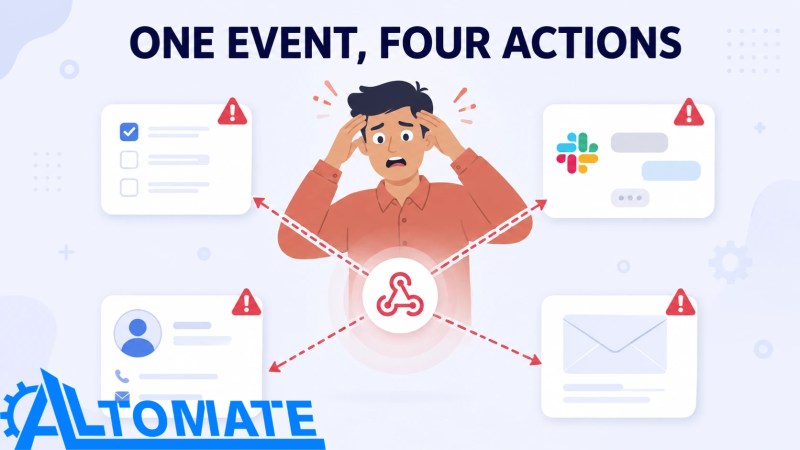 Without event filtering, one webhook can create duplicate tasks, alerts, CRM updates, and emails from a single non-actionable signal.
For example, a field service company using ServiceTitan or Jobber may only want automation when a job is completed. If the source system sends updates for scheduled, rescheduled, dispatched, completed, and canceled events, the Zap needs a filter before the action steps. Otherwise, every operational status becomes an automation trigger.
This is where Jobber and Zapier integration work becomes relevant. In the Jobber Zapier integration case study, the real value was not simply connecting two tools. The system had to decide when records should sync, how customer data should match across systems, and how estimate details should move without manual double entry. Webhooks require that same discipline: the trigger is only useful when the business rule behind the event is clear.
Check the trigger logic before scaling the workflow.
If one webhook can create, update, notify, invoice, or assign work, map the event types and failure paths before launch. Use Zapier consulting and automation services when the workflow is tied to revenue, customer onboarding, or operational handoffs.
Zapier Webhook Limits That Change the Design
Webhook limits are not edge cases. They are design constraints.
Business webhook builds usually need multi-step Zaps, filtering, formatting, error handling, task usage, monitoring, and sometimes higher-volume processing.
| Constraint | Zapier limit or behavior | Design impact |
|---|---|---|
| Webhook trigger payload | Up to 10 MB | Large nested payloads, documents, or arrays should be trimmed before reaching Zapier. |
| Catch Raw Hook payload | Up to 2 MB | Use raw hooks only when you actually need the unparsed request body and headers. |
| Send webhook action payload | Up to 5 MB | Send record IDs, file URLs, and compact event data instead of full files or bulky objects. |
| Webhook rate limit | 20,000 requests every 5 minutes per user | High-volume campaigns, imports, or payment batches need queueing and failure visibility. |
| Legacy webhook route rate limit | 1,000 requests every 5 minutes per Zap | Older webhook URLs may throttle sooner and should be reviewed before scaling traffic. |
| Short-burst webhook activity | Zapier may throttle or delay processing during high webhook activity | Sudden spikes should be buffered, retried with exponential backoff, or queued before hitting business-critical actions. |
Sources: Trigger Zap workflows from webhooks, Troubleshoot webhooks in Zapier, Zap limits, and Webhooks by Zapier rate limits — Zapier Help Center.
The limits table works like a gate: compact webhook events can pass through cleanly, while oversized or high-volume requests need to be trimmed, queued, or redesigned before they reach business-critical actions.
 Payload and rate limits act as a gate, allowing compact events through while oversized or high-volume requests require redesign.
The safer design is to send the event and identifiers, not the entire world. For example, instead of sending a complete PDF, send the file URL, record ID, customer ID, event type, and timestamp. Let the workflow fetch or route the file later if needed. That keeps the webhook payload focused on what Zapier needs to decide the next step.
Polling intervals are also often misunderstood. A Catch Hook is an instant-style trigger because the source pushes data to Zapier. Polling intervals matter when the Zap depends on polling triggers from other apps, or when the source system itself does not send events in real time. If the workflow mixes webhook triggers with polling-based steps, the slowest dependency can still affect the operational outcome.
Rate limits matter at scale. A webhook workflow that behaves perfectly at ten events per day can behave very differently during a campaign launch, import, payment batch, or CRM cleanup. If the source system sends hundreds or thousands of events quickly, the design needs queueing, deduplication, and clear retry behavior.
When a Webhook Build Needs More Than a DIY Zap
Not every webhook needs outside help. A low-volume form that sends clean fields into a spreadsheet can be a simple Zap.
The decision point is not technical complexity alone. It is operational consequence. If a failed webhook means one internal note is delayed, the fix can be lightweight. If a failed webhook means a paid lead is not routed, an invoice is not created, a customer onboarding task is missed, or a duplicate CRM record corrupts reporting, the system needs stronger design.
A reliable webhook-based Zapier system usually needs four layers:
- Validation: Check that required fields exist before actions run.
- Filtering: Trigger only on the event types that matter.
- Deduplication: Prevent repeated events from creating repeated records.
- Recovery: Make failures visible so the team can correct them.
A reliable webhook workflow should pass through those layers in order before it creates records, sends alerts, or assigns work.
 A reliable webhook system validates, filters, deduplicates, and recovers before downstream business actions run.
This is also where a webhook Zap begins to overlap with broader business process automation architecture. If the workflow touches CRM records, payment status, documents, and internal task management, the build is no longer “just a webhook.” It is an integration system with a webhook entry point. Alltomate’s Zapier automation systems page covers this failure-resistant layer in more detail, especially where incomplete payloads and API errors can cause downstream gaps.
For broader workflow planning beyond webhooks, the Zapier for business automation guide explains how triggers, actions, filters, and workflow structure work together across operations.
Final Answer
Final Answer: A Zapier webhook is best used when a system needs to send event data into Zapier or when Zapier needs to push data out to an external endpoint. Use Catch Hook for incoming events and send webhook actions for outgoing requests. The setup is simple, but production reliability depends on payload design, event filtering, field validation, deduplication, rate-limit awareness, and recovery handling. For low-volume workflows, a DIY Zap may be enough. For B2B workflows tied to leads, payments, CRM changes, onboarding, or job status updates, the webhook should be treated as part of a larger automation system.
Need a reliable system?
Related Resources
- Zapier Resource Hub — Broader context on where Zapier fits in business automation systems.
- Zapier Automation Systems — Failure-resistant Zapier design with validation, retries, and recovery paths.
- Jobber Zapier Integration Case Study — Real-world example of connecting operational systems through Zapier.
- Free Zapier Setup — A guided starting point if you’re building your first webhook-based Zap.
FAQs
Where do I find the Zapier webhook URL?
Create or edit a Zap, choose Webhooks by Zapier as the trigger app, then select Catch Hook. Zapier will generate a unique webhook URL for that Zap. Copy that URL into the external system that will send the event data.
Are Zapier webhooks free?
A free-plan test may help you validate the concept, but it is not a reliable operating model for production webhook workflows. Business webhook systems usually need multi-step Zaps, filtering, formatting, task usage, error handling, and monitoring. For a full breakdown of whether Zapier is free across each plan tier, see our dedicated guide.
What is the difference between a Zapier trigger and a webhook?
A Zapier trigger is the event that starts a Zap. A webhook can be one type of trigger. Standard app triggers come from Zapier’s built-in app integrations, while webhook triggers let external systems send event data directly to a Zapier URL.
Why is my Zapier webhook not triggering?
The most common causes are an empty payload, the wrong webhook URL, test data sent to the wrong environment, the source app not firing the event, payload size issues, rate-limit throttling, delayed processing, or a Zap that is not turned on. Check the source system’s webhook logs and Zapier’s Zap history before changing the workflow logic.
What happens if a Zapier webhook payload is too large?
If the payload is too large, the webhook request or action can fail before the workflow logic runs. The safer pattern is to send compact event data, record IDs, and file URLs instead of full files, large arrays, or complete document bodies.
Should I use a webhook or a native Zapier app integration?
Use the native integration if it supports the exact trigger or action you need and provides clean fields. Use a webhook when the native integration does not expose the right event, when the source is a custom system, or when you need to send data to an API endpoint that Zapier does not support directly.
About the author

Miguel Carlos Arao is the Founder & CEO of Alltomate,
a Zapier Certified Platinum Solution Partner focused on Zapier webhook workflows, including Catch Hook trigger design, webhook payload validation, and webhook-to-CRM routing logic.
The patterns in this article come directly from building and troubleshooting Zapier webhook-related systems across client engagements in field service and B2B operations.

Built by a certified Zapier automation partner
Explore more at
Zapier Resource Hub,
Zapier Consulting Services, and
Zapier for Business Automation.