
An SLA can be breached even when every workflow step technically ran, because the clock kept counting while ownership changed, a request waited on external input, or a due-date rule was calculated from the wrong calendar. A dashboard that only compares created and closed timestamps cannot reconstruct those conditions after the fact.
SLA tracking automation gives each qualifying workflow item one authoritative timing state: capture the start event, calculate the correct deadline, monitor remaining time, pause only for valid reasons, resume from the right timestamp, warn before risk becomes breach, escalate when ownership fails, and retain the full clock history through closure. Automated SLA tracking is therefore less about sending reminders and more about preserving correct deadline state while the underlying workflow changes.
If deadlines are still reconstructed from inboxes, task dates, spreadsheets, and platform timestamps after something is already late, see how Alltomate connects multi-system automation workflows before adding another layer of standalone SLA alerts.
System Snapshot
- Problem: SLA timers drift when timestamps, owners, business calendars, pause states, and reopened work are tracked differently across workflow systems.
- Core System: One deadline engine calculates, monitors, pauses, resumes, warns, escalates, and audits the SLA clock from qualifying event to final closure.
- Key Risk if Missing: Teams receive late or duplicate alerts, misclassify legitimate pauses as breaches, or report compliance from timestamps that no longer reflect the real workflow state.
- Primary Outcome: Every tracked item has a current due time, remaining-time state, responsible owner, escalation path, and auditable explanation of how the clock reached closure.
Where SLA Clocks Drift Between Status Changes and Real Deadlines
This solution fits workflows where a request, case, approval, handoff, or operational item carries a measurable response or completion commitment and where that commitment can change while the work is still open. The risk appears when one tool owns the created timestamp, another owns the current status, a manager changes the assignee manually, and the dashboard still assumes the original due date is valid.
The pattern below shows how that mismatch surfaces once separate systems each hold a different piece of the same deadline.
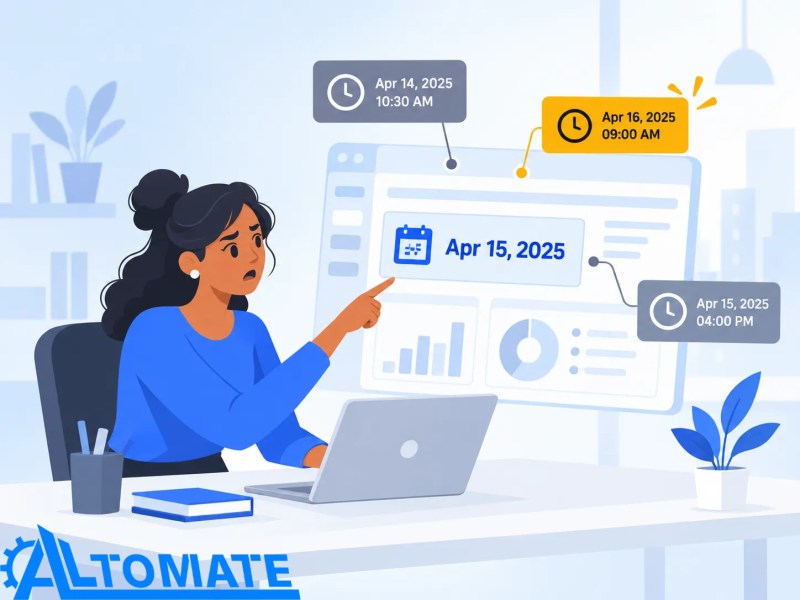
A single task with one fixed due date may not need a separate SLA engine if the native tool already calculates and reports the deadline reliably. Once timing spans several states or systems, the difference between workflow automation and task automation matters because a completed task can coexist with an SLA that is still running elsewhere.
One Authoritative SLA Clock From Trigger to Closure
The SLA clock begins only when a qualifying event carries enough information to select the correct service-level rule, responsible owner, start timestamp, and working calendar. The timer then remains attached to the same tracked item while statuses, systems, or assignees change so a transfer does not silently create a second deadline or discard elapsed time.
Completion is also explicit: a notification sent, ticket reassigned, or workflow step completed does not stop the SLA unless the tracked process has reached an approved terminal state. If the source system reports an ambiguous or unsupported status, the timer remains unresolved rather than guessing that the obligation has ended.
- Qualifying event → validate item ID, SLA tier, owner, start time, and calendar → create timer state (missing rule or timestamp → hold for review)
- Due-date calculation → apply duration, working hours, and exclusions → store deadline (invalid calendar → exception)
- Active monitoring → calculate remaining time against current state → update risk status (stale source event → reconciliation check)
- Pause or resume → validate allowed reason and timestamp → preserve elapsed time (unsupported pause → clock continues)
- Risk alert → warn owner before threshold → confirm ownership (unacknowledged alert → escalation)
- Closure → verify terminal status → stop clock and retain history (reopened item → resume under policy)
The full sequence appears as one continuous timer identity below.

The SLA timer is only one control inside the wider process architecture described in the business process automation guide. The underlying workflow still owns the work itself; this system owns whether the time commitment attached to that work is still healthy, at risk, breached, paused, or complete.
Business Hours, Pauses, and Reopened Work Change the Deadline
SLA monitoring automation becomes unreliable when elapsed clock time is treated as the same thing as service time. A four-business-hour commitment can cross lunch periods, weekends, holidays, or regional calendars, while a legitimate “waiting on requester” state may pause one SLA tier but remain chargeable time under another.
Reopened work creates a second failure point because the system must know whether the original clock resumes, a new SLA begins, or the reopened item follows a different policy. Without that rule, the same ticket can be reported as both compliant and breached depending on which timestamp the dashboard happens to use.
Control Layer
- Start timestamps are tied to the qualifying event rather than whichever system happened to receive the item first.
- SLA tiers are validated before deadline calculation so priority changes do not silently inherit the wrong duration.
- Business-hour and holiday calendars are versioned so a rule change does not retroactively rewrite historical deadlines.
- Pause transitions require an allowed status, reason, and timestamp; unsupported pauses keep the clock running instead of hiding elapsed time.
- Resume events preserve the original timer identity and remaining-time history rather than creating a second SLA record.
- Owner changes trigger reassignment checks so risk alerts do not continue going to a former queue or inactive user.
- Duplicate webhook events or repeated polling responses are deduplicated before alerts or escalations are created.
- Repeated notification or synchronization failures route to an exception owner instead of silently suppressing the approaching breach.
The distinction between a valid pause and continued elapsed time is illustrated below.

A workflow can execute every automation successfully and still violate its deadline, while another workflow can suffer an execution error without yet threatening its SLA. Workflow error monitoring owns failed runs and recovery visibility; this page owns the separate timing state that determines whether the service commitment itself is at risk.
Once different departments, systems, and calendars disagree about when the clock started or whether it should still be running, the issue is no longer a reminder configuration problem. Business automation consulting for cross-system processes can map the timer source, pause rules, ownership transitions, and escalation path before another deadline is calculated from inconsistent state.
Example: A Four-Hour SLA Pauses for Customer Input, Then Reopens
Consider a request with a four-business-hour completion SLA that starts at 10:00 AM and moves to “waiting on customer” after ninety minutes of active work. If that status is an approved pause state, the timer must record the pause timestamp and remaining service time rather than simply replacing the original due date with a new four-hour window.
When the customer responds the next morning, the same SLA record resumes with the remaining time under the applicable business calendar. If the request later closes and reopens, the system checks the reopen policy before restarting anything; otherwise the workflow can accidentally receive a fresh SLA and erase the time already consumed before closure.
Clock Sources, Owners, and Pause Reasons Required Before the Timer Starts
The trigger validator should reject any SLA event that lacks a stable item identifier, applicable service-level rule, authoritative start timestamp, current owner or queue, and valid working calendar because any one of those gaps can produce a deadline that looks precise but is operationally wrong. If the source system sends only a display status or human-readable priority name, the mapping layer must resolve it to the internal SLA rule before the countdown begins.
Pause and resume components also need explicit state transitions rather than inferring inactivity from the absence of updates. A queue that simply stops receiving events cannot be assumed to be paused; without a recorded pause reason and timestamp, the system must either keep counting or surface an exception for human review.
Timer logic also needs change control. When SLA durations, thresholds, or exclusion rules are edited without versioning, the resulting hidden branches become the kind of automation debt that makes historical compliance impossible to explain consistently.
APIs, Queues, and Dashboards Must Agree on the Same Remaining Time
Cross-system SLA workflow automation often depends on a case or task platform for status, an integration layer for event handling, a notification channel for reminders, and a reporting system for current compliance. Those systems may expose different timestamp precision, timezone formats, status schemas, or API fields, and some APIs provide only current state rather than the full transition history needed to reconstruct a pause accurately.
Polling can also delay state recognition when APIs enforce rate limits, while webhooks can arrive late, duplicate, or out of order. The timer therefore stores its own normalized event history and reconciles external updates against the last accepted state instead of trusting arrival order as proof of what happened first.
This reconciliation process is shown below.

For environments where the SLA state moves across several SaaS tools, the broader cloud workflow automation guide covers the integration constraints around distributed triggers, platform limits, and recovery paths. The SLA layer remains responsible for one question: what time is still owed on this specific commitment right now?
Alerts Before Breach and Escalation After Risk Becomes Real
SLA breach alerts should be tied to remaining-time thresholds and current ownership, not to a fixed sequence of scheduled reminders created when the item first entered the workflow. If the clock pauses, the owner changes, or the due date recalculates, stale scheduled alerts can warn the wrong person at the wrong time.
A practical escalation path can warn the current owner at an early risk threshold, escalate to a queue lead when the remaining window narrows, and record an actual breach only when the authoritative SLA clock crosses zero. If an escalation is not acknowledged or the notification channel fails, the system needs a secondary owner or exception path rather than assuming that sending the message resolved the risk.
HR Requests, Onboarding Tasks, and Back-Office Queues Share the Same Deadline Problem
The timer can sit underneath different processes without owning those processes. In recurring HR workflows, it can track response or approval commitments; in employee onboarding automation, it can monitor time-sensitive Day-One dependencies; and in back-office automation, it can expose queues where invoices, requests, records, or handoffs are aging beyond an agreed service window.
The rule set should remain specific to each process because a valid pause in one department may be a breach condition in another. Centralizing the timer engine does not mean forcing every team onto the same duration, calendar, escalation threshold, or definition of completion.
Metrics That Separate Fast Work From Hidden SLA Debt
Useful measurements include percentage of items within SLA, at-risk volume, actual breach count, median remaining time at escalation, time spent paused, number of manual timer corrections, reopened-item compliance, owner-reassignment frequency, duplicate-alert suppression, and unresolved items with no valid timer state. Average completion time alone can look healthy while a small group of high-priority commitments repeatedly breaches because their pause rules or ownership transitions are wrong.
Reporting should separate operational duration from SLA-counted duration and preserve the policy version used for each calculation. Without that distinction, historical dashboards can change after rule edits and create compliance numbers that no longer match what teams actually saw while the work was active.
Every Pause, Escalation, and Breach Must Survive Into the Audit History
When an item closes, the system should be able to show when the SLA started, which rule was applied, how the due date was calculated, every valid pause and resume event, which warnings and escalations fired, who owned the work at each transition, and whether the commitment closed healthy, at risk, or breached. If any event is missing or contradictory, the record should remain auditable as an exception rather than being silently normalized into a clean result.
Result: Teams see one explainable deadline state from trigger through closure, while legitimate pauses, ownership changes, reopen events, and failed notifications remain visible instead of being hidden behind a single due-date field.
The resulting audit trail looks like this at closure.
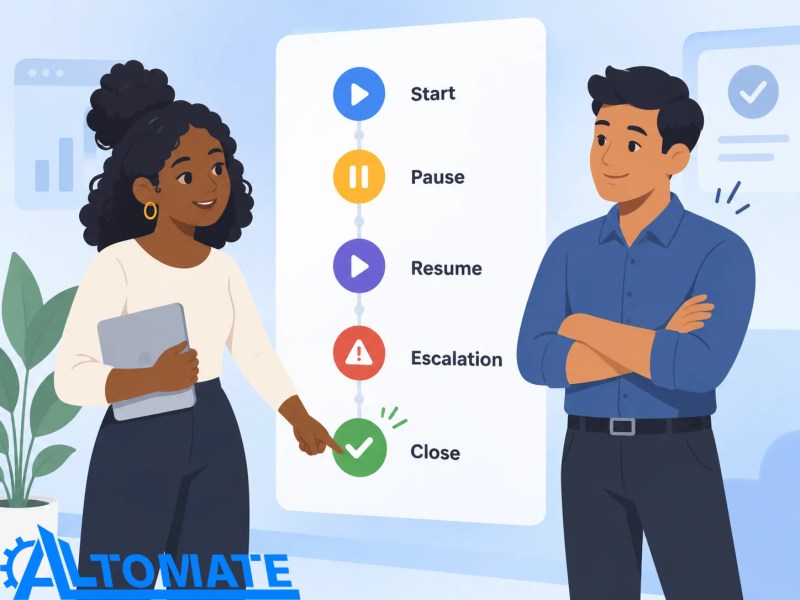
The value is not simply faster reminders. It is a timing record that can explain why a deadline moved, why an alert fired, and why a particular item did or did not count as a breach even after the workflow has already closed.
Where SLA Automation Stops and Human Judgment Takes Over
Automation can calculate deadlines, apply approved pause rules, detect approaching breaches, escalate based on predefined thresholds, and retain audit history. It should stop when someone needs to decide whether an unusual delay qualifies for an exception, whether a disputed status should pause the clock, whether an SLA waiver is justified, or whether a service-level policy itself should change.
Those decisions need a named human owner and an auditable reason rather than an automatic timer correction. Silently editing the clock to make an overdue item appear compliant would destroy the exact history the SLA system is meant to protect.
Frequently Asked Questions
What starts an automated SLA timer?
The timer should start from a defined qualifying event with a stable item ID, SLA rule, timestamp, owner, and working calendar. If any of those inputs are missing or conflicting, starting the countdown can create a precise-looking but incorrect deadline.
Can SLA tracking automation pause the clock automatically?
Yes, but only for approved workflow states with an explicit pause reason and timestamp. Treating silence or missing updates as a pause can hide genuine elapsed service time and underreport breaches.
How are business hours and holidays handled in SLA tracking?
The deadline engine applies the working calendar assigned to the relevant SLA rule rather than assuming continuous elapsed time. If the calendar or timezone is missing, the calculation should be held or flagged instead of defaulting to a deadline that may be wrong.
What happens when an SLA-tracked item is reopened?
The system checks the reopen policy to determine whether the original remaining time resumes, a new commitment begins, or the item requires review. Automatically granting every reopened item a fresh SLA can erase previously consumed time and distort compliance reporting.
Is an SLA breach the same as a workflow automation error?
No; a workflow can run successfully and still exceed its service commitment, while an automation error may occur before the SLA is at risk. SLA tracking owns the timing obligation, while execution-error monitoring owns failed runs and recovery state.
Why Alltomate
Alltomate is a Zapier Certified Platinum Solution Partner, and reliable SLA tracking depends on more than attaching a due date to a task. The system has to preserve authoritative timestamps, service-level rules, pause history, calendar logic, ownership changes, alerts, escalations, and closure state even when external systems deliver delayed, duplicated, or incomplete updates.
If teams cannot explain why an SLA timer moved, paused, breached, or escalated without reconstructing the history manually, start with a free business process audit to identify where deadline rules, ownership transitions, and timer state are becoming unreliable.
About the solution designer

Miguel Carlos Arao is the Founder of Alltomate and a Zapier Certified Platinum Solution Partner specializing in automation systems, workflow architecture, and real-world implementation.

Built by a certified Zapier automation partner
Explore more at
business process automation resources,
workflow reliability monitoring, and
automation maintenance guidance.