
A new hire can receive a welcome email on time and still arrive on Day One without a completed employee record, confirmed equipment, or the access requests their role depends on. The gap appears when offer acceptance triggers several independent HR, IT, manager, document, and training actions but no shared state confirms that every dependency actually finished.
Employee onboarding workflow automation turns those post-hire handoffs into one controlled readiness process: validate the employee and start date, create the required records, collect documents, route provisioning requests, assign equipment and training tasks, track manager actions, and hold completion when a dependency remains unresolved. The system begins after the hiring decision is complete and stops once the employee has reached the defined onboarding-complete state.
If new-hire readiness still depends on HR manually checking forms, inboxes, ticket queues, spreadsheets, and manager messages before every start date, see how Alltomate connects multi-system automation workflows before adding more isolated onboarding reminders.
System Snapshot
- Problem: A hire can be marked ready while documents, employee records, provisioning requests, equipment tasks, or manager actions remain incomplete across separate systems.
- Core System: A post-hire readiness workflow validates the employee, coordinates HR and IT dependencies, tracks task completion, and keeps the onboarding state open until required actions are confirmed.
- Key Risk if Missing: New hires reach Day One with partial records, stale start dates, unconfirmed equipment, or unresolved access requests that no single owner can see end to end.
- Primary Outcome: Each accepted hire reaches a traceable Day-One readiness state with required records, documents, requests, tasks, and ownership accounted for.
Where Post-Hire Readiness Breaks Between Offer Acceptance and Day One
This solution fits the administrative period after a candidate accepts an offer and before the employee settles into normal recurring HR operations. It covers employee record creation, document collection, signatures, provisioning requests, equipment tasks, manager notifications, training assignments, policy acknowledgements, reminders, HRIS updates, and completion tracking when those actions depend on one another.
A small organization onboarding occasional hires through one HR platform may not need an orchestration layer if the native onboarding workflow already tracks every dependency and exception reliably. Once HR, IT, managers, document tools, and training systems operate independently, onboarding becomes a process-level coordination problem rather than a single task automation; the distinction between workflow automation and process automation becomes important when several stages can stall without stopping the others.
The broader HR workflow automation guide covers which HR processes are good candidates for automation, while this page stays focused on the specific post-hire readiness window.
One Onboarding Record From Accepted Offer to Day-One Ready
The workflow needs one onboarding record that follows the same hire through HR, documents, provisioning requests, equipment, manager actions, and training rather than treating every downstream task as a separate success. That record carries a stable employee or hire identifier, start date, role, manager, current readiness state, and references to required downstream actions so a delayed task or duplicate event does not create a second onboarding path.
Day-One readiness is not reached because the welcome email sent or the HRIS employee record exists. The system only moves toward completion when each required dependency returns an acceptable state; missing signatures, unresolved equipment, failed HRIS updates, or unconfirmed provisioning requests keep the onboarding record open.
- Accepted hire → validate employee ID, role, manager, and start date → create onboarding state (missing or conflicting data → HR review)
- Employee record → create or update required HR record → store record reference (duplicate or rejected write → exception queue)
- Documents → request required forms and signatures → confirm completion (missing or rejected document → hold dependent steps)
- Provisioning requests → create role-based IT or access requests → track confirmation (request rejected or unowned → escalation)
- Day-One tasks → assign equipment, manager, orientation, and training actions → monitor deadlines (overdue dependency → reminder and escalation)
- Readiness check → verify required dependencies → mark onboarding complete (unresolved item → retain open state)
The full sequence — from accepted hire to a verified Day-One-ready state — stays anchored to one onboarding record rather than splitting into six separate task trackers, as shown below.

This dependency-driven structure is part of the wider operating model covered in the business process automation guide, but the onboarding workflow remains anchored to one hire, one start date, and one readiness state.
Start-Date Changes, Missing Documents, and Stale Manager Assignments
Post-hire workflows become unreliable when the information that launched them changes before Day One. A start date can move after reminders are scheduled, a manager can change after tasks are assigned, a document can be rejected after downstream work has already started, or the HRIS can create a duplicate employee when a retry runs without the original identifier.
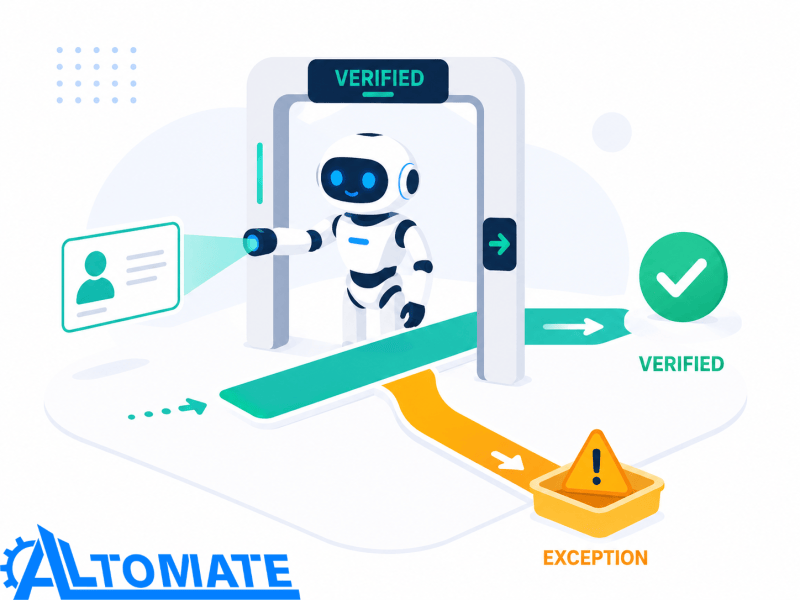
The control layer therefore rechecks the current employee state at critical transitions instead of assuming the original offer data remains valid. It also separates completion from delivery: sending a provisioning request, policy document, or manager task is not evidence that the dependency was accepted or finished.
Control Layer
- Stable employee or hire identifiers are checked before record creation so duplicate names or changed email addresses do not create a second onboarding record.
- Start dates are revalidated before time-sensitive reminders, equipment deadlines, orientation tasks, and training schedules execute.
- Manager ownership is checked again when reporting lines change so onboarding actions do not remain assigned to an inactive or former manager.
- Rejected or incomplete documents keep dependent stages open instead of allowing the onboarding record to show false completion.
- Provisioning and equipment requests carry ownership and status references so sending a request cannot be mistaken for fulfilling it.
- Overdue tasks trigger controlled reminders and escalation instead of repeating indefinitely with no visible exception owner.
- Failed HRIS write-backs retry against the original employee reference rather than creating another employee record after a timeout.
- Repeated failures move into an exception path with the hire, failed dependency, current owner, and last successful state preserved.
This checkpoint behavior is what keeps a stale or conflicting record from moving forward unnoticed, illustrated below.
Approval-dependent onboarding steps also need their own ownership and timeout rules. Where manager, HR, finance, or IT approval becomes the main bottleneck, approval workflow automation handles the narrower routing, escalation, and reassignment problem.
When Day-One readiness keeps failing because several departments hold different versions of the same onboarding state, the problem is no longer a missing checklist item — it is a cross-system design problem. Business automation consulting for cross-system processes can map the readiness gates, owners, and failure paths before another hire reaches a start date with hidden dependencies still open.
Example: The Start Date Moves After Equipment and Access Requests Already Fired
Suppose a hire originally starts on Monday, so the onboarding workflow creates the HR record, requests equipment, opens provisioning tickets, schedules orientation, and assigns manager tasks. Three days later the start date moves by a week; if the original workflow continues untouched, reminders fire too early, equipment deadlines become misleading, and downstream systems may still report the employee as Day-One ready for the old date.
The onboarding record should preserve the same employee identity while revalidating every date-dependent action against the new start date. Completed tasks remain complete where still valid, while unresolved or date-sensitive dependencies are rescheduled, reopened, or routed for human review instead of restarting the entire onboarding sequence and creating duplicates.
This is the scenario in practice — the same hire, but every date-dependent task now needs to be reassessed against the new start date.

Employee IDs, Start Dates, and Dependency Gates Before Provisioning Begins
The accepted-hire trigger must carry enough stable data to identify the employee and determine which onboarding path applies; a candidate email address alone is fragile if the corporate email does not yet exist or the legal name changes before the HR record is finalized. A validation step checks the employee or hire identifier, approved role, manager, location or working arrangement where relevant to the workflow, and confirmed start date before downstream requests are created.
Document and provisioning queues should stop when required prerequisite states are missing rather than firing everything in parallel. A failed HRIS creation, rejected signature, or unresolved manager assignment can make later tasks invalid, so dependency gates prevent equipment, access requests, or training assignments from being treated as ready when the underlying employee record is still uncertain.
If those failures need to be observed across several automations instead of only inside one onboarding record, workflow error monitoring can centralize failed steps and recovery ownership rather than leaving exceptions scattered across individual platform logs.
HRIS, E-Signature, IT Tickets, and LMS Records Must Resolve to the Same Hire
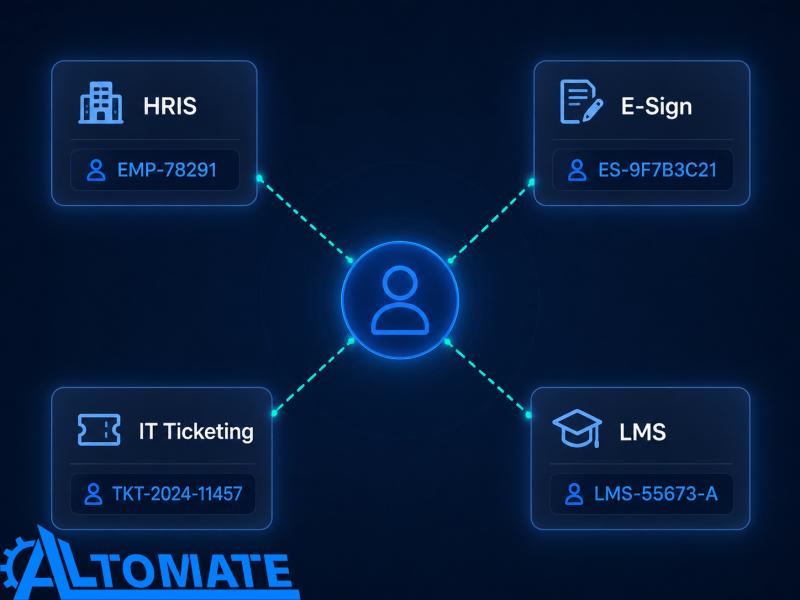
Employee onboarding process automation often spans an HRIS, document or e-signature platform, task system, IT ticket queue, learning system, email, and calendar, but those tools may identify the same person differently. The HRIS may use an internal employee ID, the document platform may return an envelope ID or document ID, and the IT system may create a separate ticket reference that has to remain mapped back to the original onboarding record.
This mapping problem is what the diagram below makes visible.
Integration capability also varies: some systems can emit events when documents are signed or records change, while others depend on webhook-driven updates or scheduled API polling, or limit which fields external tools can write to. The workflow therefore tracks request and completion references instead of assuming every tool can update the onboarding state in real time.
For teams using Zapier as an automation platform across HR tools, Zapier HR automation use cases provides narrower implementation context around HR triggers, approvals, employee updates, and human fallback paths.
What Must Be Complete Before the New Hire Is Marked Day-One Ready
Readiness should be based on explicit dependencies rather than a generic “onboarding started” status. Depending on the organization’s process, those dependencies can include the authoritative employee record, required signed documents, policy acknowledgements, confirmed equipment status, assigned manager actions, provisioning-request confirmation, and required orientation or training assignments.
Not every organization needs the same checklist, but every required item needs an owner and a completion rule. If a task can remain “sent” or “assigned” indefinitely without an acknowledgement or exception state, the system cannot distinguish a genuinely ready employee from an onboarding sequence that simply stopped producing errors.
Readiness Metrics That Reveal Hidden Onboarding Gaps
Useful measurements include accepted-hire-to-readiness time, percentage of hires with unresolved dependencies before Day One, document completion time, overdue manager tasks, unconfirmed provisioning requests, equipment exceptions, failed HRIS updates, start-date-change exceptions, training-assignment completion, and manual reconciliation volume. A high welcome-email delivery rate means little if HR still has to inspect several systems the day before a hire starts.
Reporting should distinguish tasks created from dependencies actually completed. Alltomate’s automation audit checklist can help expose similar gaps where ownership, handoffs, validation, or recovery behavior remains unclear across the onboarding process.
One Readiness State Across HR, IT, Documents, and Day-One Tasks
A healthy onboarding workflow leaves every accepted hire with one visible readiness state, one set of current owners, traceable document and task references, and a clear list of anything still blocking completion. A new hire is not marked ready while a required document is rejected, an equipment task is overdue, or a provisioning request has never been acknowledged.
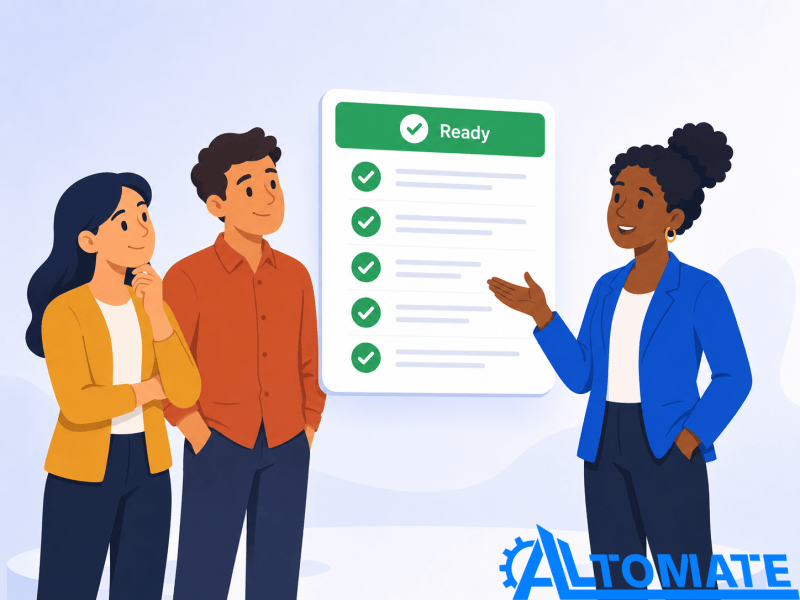
Result: HR, IT, managers, and the new hire operate from a shared onboarding state, while unresolved dependencies remain visible instead of being hidden behind successfully sent emails and created tasks.
That shared state is what this looks like in practice — one dashboard instead of five separate checklists.
The outcome is not a fully autonomous employee experience. It is a controlled administrative system that handles predictable coordination while surfacing the cases where role ambiguity, policy decisions, access requirements, or changing employment details require human judgment.
Where Recruiting Ends and Employee Onboarding Begins
This workflow begins only after the hiring decision is complete and the accepted hire is ready to enter the employee-onboarding process. Candidate qualification, interview evaluation, offer decisions, and interview coordination remain outside scope; the separate interview scheduling automation system owns the ATS-and-calendar state required before that post-hire handoff occurs.
The broader HR and recruitment automation environment includes candidate intake, recruiting operations, scheduling, hiring handoffs, and other HR systems that sit on either side of employee onboarding. Keeping the accepted-offer boundary explicit prevents this Solution from expanding into the full recruitment lifecycle.
Employee Onboarding Is Not Client Onboarding or Ongoing HR Operations
Employee onboarding coordinates a person’s transition from accepted hire into an operationally ready employee; it should not absorb customer activation workflows or every HR process that happens afterward. Client onboarding automation owns the separate customer-side process of intake, activation, CRM coordination, and delivery readiness after a sale.
Once the employee reaches the defined onboarding-complete state, recurring requests, timesheets, policy acknowledgements, employee changes, and ongoing HRIS updates move into ongoing HR workflow automation rather than remaining permanently attached to the onboarding system.
Conversational intake and self-service questions can also sit inside an onboarding experience without becoming the orchestration layer itself. Onboarding chatbot automation covers that narrower interaction pattern, while this Solution remains responsible for the underlying readiness state and dependencies.
Where HR, IT, and Managers Still Need to Decide
Automation can create records, collect documents, route requests, assign tasks, send reminders, track acknowledgements, and surface overdue dependencies. It should stop when the next action depends on deciding what system access a role should receive, interpreting an unusual employment condition, resolving conflicting employee details, approving an exception to policy, or determining whether an incomplete requirement can be waived.
Those decisions need a named human owner and enough onboarding context to understand what is blocked. Automatically granting access or closing a requirement simply because a start date is approaching would convert a coordination system into a decision engine, which is outside this Solution’s scope.
Frequently Asked Questions
When should employee onboarding automation start?
The workflow should begin after the hiring decision is complete and the accepted hire has enough validated information to create a controlled onboarding record. Starting from an unconfirmed offer or unstable employee identity can create duplicate records and premature downstream tasks.
Can employee onboarding automation create IT accounts automatically?
It can create and track provisioning requests where the connected systems and organizational rules permit, but access-entitlement decisions should remain with the authorized owner. Treating a submitted request as completed access can leave a new hire marked ready while the account is still unapproved or uncreated.
What happens when a new hire’s start date changes?
The onboarding record should retain the same employee identity while revalidating date-sensitive reminders, equipment deadlines, orientation tasks, and unresolved provisioning requests. Restarting the workflow from scratch can duplicate records and preserve outdated tasks tied to the original date.
How does onboarding automation prevent missing Day-One tasks?
Required documents, manager actions, equipment tasks, provisioning requests, and training assignments remain explicit dependencies with owners and completion states. If one dependency stays unresolved, the onboarding record remains open and routes the exception instead of reporting false readiness.
Does employee onboarding automation replace HR or managers?
No; the workflow coordinates predictable administrative actions and surfaces missing dependencies. HR, IT, and managers still decide policy exceptions, role-specific access, ambiguous employee conditions, and any case where the correct outcome cannot be determined safely from predefined rules.
Why Alltomate
Alltomate is a Zapier Certified Platinum Solution Partner, and employee onboarding is a cross-system coordination problem where seemingly successful actions can hide incomplete readiness: the document was sent but never signed, the IT ticket was created but never owned, or the employee record exists under a start date that has already changed. The workflow architecture therefore has to preserve employee identity, dependency state, ownership, and recovery paths instead of assuming every downstream task completes because its trigger fired.
If HR still has to manually reconstruct whether a new hire is actually ready by checking several tools before Day One, start with a free business process audit to identify where onboarding dependencies, ownership, and system handoffs are breaking before automating more steps around them.
About the solution designer

Miguel Carlos Arao is the Founder of Alltomate and a Zapier Certified Platinum Solution Partner specializing in automation systems, workflow architecture, and real-world implementation.

Built by a certified Zapier automation partner
Explore more at
business process automation resources,
recurring HR operations automation, and
Zapier-based HR automation patterns.