
A manager can approve an employee request, yet the HRIS can still show the wrong state two days later. That happens when nobody carries the approved change into the system that payroll, reporting, and HR actually trust. The same gap appears when a policy acknowledgement stays unsigned, a timesheet correction misses payroll, or nobody confirms an offboarding task.
To automate HR workflows reliably, turn recurring administrative handoffs into controlled state changes. The workflow validates the employee and request, routes the required approval, and executes the approved action. It then synchronizes the authoritative record and exposes anything that stalls. It does not automate employment judgment. Instead, it keeps routine HR operations from depending on someone remembering the next administrative step.
HR staff should not have to copy approved changes between inboxes, spreadsheets, forms, and employee systems. If they do, see how Alltomate connects multi-system automation workflows before adding another isolated HR tool.
System Snapshot
- Problem: Routine HR requests and employee changes move through separate forms, managers, documents, and systems without one reliable operational state.
- Core System: A controlled request-to-record workflow validates inputs, routes approvals, executes administrative actions, synchronizes HR records, and tracks unresolved exceptions.
- Key Risk if Missing: Approved requests remain unapplied, outdated employee records feed payroll or reporting, and overdue HR tasks disappear between owners.
- Primary Outcome: Recurring HR operations reach a traceable completed state across the request, approval history, supporting documents, and authoritative HR record.
Where Routine HR Work Falls Between Request, Manager, and HRIS
This solution fits recurring employee operations where the next administrative action is known. The problem starts when execution still depends on HR chasing forms, managers, documents, or status updates. The system can cover employee requests, document collection, policy acknowledgements, timesheet approvals, approved employee-data changes, manager notifications, reporting updates, and defined onboarding or offboarding handoffs.
A small team with low request volume and one HR system may not need a separate orchestration layer. Its native workflow may already track ownership, approvals, completion, and exceptions correctly. Once requests cross several tools, stronger state control becomes more useful. The broader HR workflow automation guide covers which HR processes are suitable for automation and which decisions should remain human-led.
One Employee-Operations State From Intake to Record Update
The workflow treats the employee request and its downstream HR record as one controlled operation. It does not treat the form, approval, and update events as separate successes. Each request carries an employee identifier, request type, current state, owner, and downstream record reference. That shared state prevents a duplicate submission or delayed webhook from quietly creating a second version of the same change.
A manager clicking Approve does not complete the request. The approved action must reach the correct system and return a success state. If the HRIS rejects the update or a required document is missing, the workflow stays open. It routes the unresolved state instead of reporting a false completion.
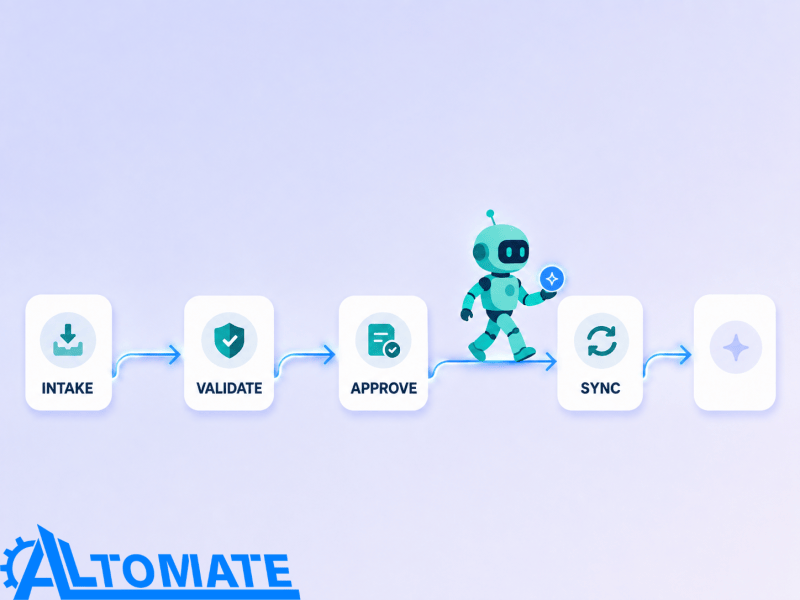
How One HR Request Moves Through Validation, Approval, and Sync
- HR event or request → capture employee ID, request type, effective date, and supporting data → create controlled request state (missing identifier → validation queue)
- Validation → check required fields and current employee status → route eligible request (conflicting status → HR review)
- Approval → assign valid manager or HR owner → record decision and timestamp (owner missing or overdue → escalation)
- Administrative action → apply approved change or create downstream task → record execution reference (destination failure → retry queue)
- HRIS write-back → synchronize approved state and supporting references → confirm authoritative record (write rejected → exception remains open)
- Completion tracking → close reminders, acknowledgements, and dependent tasks → update reporting (unfinished dependency → retain pending state)
This request → validate → route → synchronize → track pattern follows the wider operating model in the business process automation guide. This page stays focused on recurring employee administration and HR record integrity.
The sequence below shows how one request stays traceable across every stage instead of splitting into disconnected steps.
Missing Managers, Duplicate Requests, and Stale Employee Records
HR workflows rarely fail because a form cannot send an email. They fail when an employee changes departments, the former manager still owns the approval, or a duplicate request arrives through another channel. The same problem appears when the HRIS status changes while the request waits. Processing those events in arrival order can approve obsolete requests or apply the right change to the wrong record.
The control layer rechecks ownership and employee state at important transition points. It keeps unresolved requests visible and blocks downstream execution when the current record contradicts the original request. It also escalates overdue approvals because a valid request can remain stuck if the assigned approver never responds.
Checks That Stop Duplicate and Stale HR Requests
Control Layer
- The validator checks employee identifiers before routing so duplicate names or changed email addresses do not update the wrong HR record.
- The workflow checks duplicate submissions against request type, employee ID, and effective date before another approval chain starts.
- The workflow rechecks approver ownership when organizational changes make the original manager invalid or inactive.
- Timed escalation moves pending approvals to the next owner instead of leaving them indefinitely in an inbox.
- The workflow validates effective dates before timesheet, status, payroll-related, or offboarding actions move downstream.
- The workflow keeps dependent steps pending when documents or policy acknowledgements are missing.
- Retry logic targets the existing employee and request identifiers so a failed HRIS write does not create a second record.
- The exception queue captures repeated failures with the last successful state, current owner, and unresolved dependency preserved.
When HR has to compare forms, inbox approvals, spreadsheets, and HRIS records, the problem is no longer a missing reminder. It is a workflow-state design issue. Business automation consulting for cross-system processes can map ownership, escalation, and synchronization rules before incomplete employee changes reach downstream teams.
The control layer is designed to catch failure points like the ones shown below.
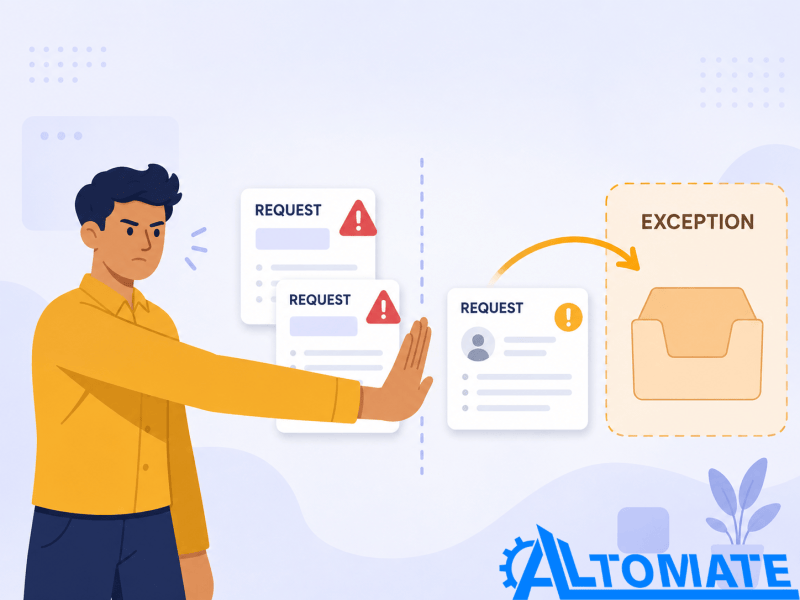
Example: A Timesheet Correction Arrives After Payroll Cutoff
Suppose an employee submits a timesheet correction. The workflow validates the employee and pay period, then routes the request to the current manager. If the manager approves before cutoff, the workflow sends the correction to the designated time or payroll record. It then confirms completion. If approval arrives after cutoff, the workflow does not use the same path.
Instead, it keeps the late request linked to the original employee and timesheet. It moves the request into an HR or payroll exception state and preserves the approval history. A human then decides whether company policy allows an out-of-cycle payroll adjustment.
The branch below shows where that decision point sits in the workflow.

Employee IDs, Approval Ownership, and HRIS Write-Back Controls
The intake trigger binds each request to a stable employee identifier. Email addresses, names, managers, and departments can change while a request remains active. A mutable record key could redirect an approved update after an organizational change. Before approval routing, a validator checks the identifier and current employment state. That check stops stale or malformed requests from moving downstream.
The approval component stores the assigned owner and decision state. Inbox delivery alone does not prove that a valid decision occurred. If ownership changes or the response window expires, an escalation path replaces the invalid routing. The write-back action uses the existing employee and request references. When the destination rejects the update, retry isolation prevents a transient API failure from creating a duplicate record or erasing approval history.
When failed writes appear across multiple automations, one HR request cannot provide enough visibility. Workflow error monitoring gives those failures a centralized owner and recovery path instead of leaving them scattered across platform logs.
For approval-heavy processes, stalled ownership and escalation may become the primary bottleneck. Approval workflow automation covers that adjacent control problem in greater depth.
Employee IDs, Request Taxonomy, and Exception Owners Required Upfront
The workflow needs an authoritative employee identifier, defined request types, valid ownership, required-field rules, approval boundaries, and effective-date logic. It also needs a destination that can record the completed administrative change. HR must know which system owns employment status, manager assignment, timesheets, and acknowledgement completion. Otherwise, automation only spreads the ambiguity faster.
Every request type also needs an explicit exception owner. HR should route a missing document, disputed timesheet, changed termination date, or policy question to that owner. Repeating the same automated step cannot safely resolve those cases.
Where HRIS, Forms, Documents, and Time Systems Disagree
HR operations often span an HRIS, request forms, document tools, time-tracking systems, shared files, messaging tools, and reporting layers. Those systems may not share the same employee identifier or event model. A completed form may contain an email address while the HRIS expects an internal employee ID. A document platform may return its own document ID, which the workflow must map back to the original HR request.
The diagram below shows how the workflow reconciles those identifiers back to one employee record.

Integration capability also varies by platform. Some systems send event-driven webhook notifications as soon as a record changes. Others require scheduled API polling or expose only limited writable fields. The choice between webhook-driven updates and scheduled API polling affects detection speed and recovery when events arrive late or go missing.
Platform-specific automation must account for schema mismatches, permission limits, and state constraints. It cannot assume every HR application participates in the same real-time sequence. Zapier HR automation use cases shows how those constraints change when HR workflows cross multiple tools.
Metrics That Expose Stalled HR Requests
Useful measurements include request-to-approval time and approval-to-record-update time. Teams can also track overdue acknowledgements, failed HRIS write-backs, duplicate requests, unresolved offboarding dependencies, and exception volume by request type. A fast approval metric can still hide poor operations if the authoritative employee record remains outdated.
Reporting should distinguish a human decision from end-to-end administrative completion. Managers may approve requests quickly while HR still reconciles records manually. In that case, the workflow moves decisions faster without removing the handoff problem. Alltomate’s automation audit checklist can help surface similar gaps in ownership, handoffs, and system reliability.
What a Controlled HR Operations Loop Produces
A healthy workflow leaves each recurring HR request with one visible state and one current owner. It also preserves a traceable approval history and the required authoritative record update. A policy acknowledgement should not appear complete while the signature is missing. An employee-status change should not close while a dependent offboarding task remains unresolved.
The result is not a fully autonomous HR function. It is an administrative operating layer that moves routine work consistently. HR can then focus on exceptions, policy interpretation, sensitive employee circumstances, and decisions automation should not make.
That resolved state is what the workflow is working toward at every stage.

Where Hiring and Detailed Onboarding Branch Away
This page can trigger or receive a defined hiring or onboarding handoff. It does not own candidate assessment, interview coordination, hiring decisions, or the detailed design of an employee’s onboarding journey. Interview coordination belongs in the separate interview scheduling automation system. That system has its own rules for calendar availability, booking state, reschedules, and ATS synchronization.
Some onboarding processes use conversational intake, guided employee questions, or self-service information collection. Onboarding chatbot automation covers that narrower interaction pattern. It does not turn this employee-operations workflow into a complete onboarding system.
The broader HR and recruitment automation environment also includes candidate intake, scheduling, contracting, and onboarding. Those activities sit outside this page’s recurring employee-operations scope. Keeping those boundaries explicit helps each page retain clear topical ownership.
Where HR Judgment Must Stop the Workflow
Automation can validate completeness, route requests, collect acknowledgements, trigger reminders, synchronize approved changes, and expose overdue work. It should pause when the next action depends on leave eligibility, an accommodation, a disputed timesheet, performance judgment, termination reasoning, or policy interpretation.
Those cases need a named human owner and enough workflow history to understand what happened before the exception appeared. Automation should not choose an employment outcome simply because a field or deadline exists. Doing so would turn an administrative control system into an employment-decision engine.
Frequently Asked Questions
Can HR workflow automation approve employee requests automatically?
Only requests with fixed administrative rules should bypass human approval. Eligibility questions, policy exceptions, accommodations, disputes, and other consequential decisions should remain human-led.
What happens when a manager does not respond to an HR approval?
The workflow keeps the approval pending until its response window expires. It then routes the request to a defined escalation owner instead of leaving it hidden in the manager’s inbox.
How do automated HR workflows prevent duplicate employee updates?
The workflow checks employee ID, request type, effective date, and current request state before executing another update. A repeated submission or retried integration event should reference the existing request instead of creating another HRIS change.
Can this automate employee onboarding and offboarding?
It can coordinate defined administrative handoffs such as document collection, notifications, task creation, acknowledgement tracking, and offboarding completion checks. Detailed onboarding design, access decisions, unusual departures, and cases requiring policy judgment remain separate or human-controlled.
What happens if an HR request is approved but the HRIS update fails?
The workflow keeps the request unresolved and preserves the approval and intended change. It retries the write-back against the existing employee record, then routes repeated failures to HR.
Why Alltomate
Alltomate is a Zapier Certified Platinum Solution Partner. Recurring HR operations can hide difficult state problems behind a simple trigger. A manager may approve a request while the HRIS still shows the old value. A document may arrive after a dependent task fires, or an employee may change teams while the request is pending. The workflow architecture must preserve ownership, identifiers, approval history, and exception state across those changes.
HR staff should not have to inspect several systems to confirm whether a request, acknowledgement, timesheet change, or offboarding handoff actually finished. If they do, start with a free business process audit. It can reveal where the operating state breaks before you automate more steps around it.
About the solution designer

Miguel Carlos Arao is the Founder of Alltomate and a Zapier Certified Platinum Solution Partner specializing in automation systems, workflow architecture, and real-world implementation.

Built by a certified Zapier automation partner
Explore more at
business process automation resources,
HR automation planning guidance, and
automating approval handoffs.