
WhatsApp automation breaks in a very specific way: Zapier can run successfully while the WhatsApp message still fails. The trigger fires, the Zap completes, and the team assumes the lead or customer was notified — but the provider may have rejected the message because the phone number, opt-in, template, or account setup was not valid.
This failure path is easiest to see as a split between Zapier’s run status and the WhatsApp provider’s delivery status.

Zapier WhatsApp automation needs to behave like a controlled communication workflow, not a simple “send message” shortcut. The workflow has to decide when WhatsApp is allowed, which approved message can be used, where the provider response is logged, and what fallback happens when the message cannot be sent safely.
If WhatsApp is becoming a serious lead or customer communication channel, Alltomate can design the Zapier workflow so alerts, templates, opt-ins, provider responses, and CRM records operate as one traceable system instead of scattered message-sending Zaps.
System Snapshot
- Problem: WhatsApp lead and customer messages fail when Zapier sends before opt-ins, templates, phone formats, and CRM records are validated.
- Core System: A Zapier-controlled WhatsApp Business workflow connected to a provider such as Twilio, 360dialog, or an approved WhatsApp Business API path.
- Key Risk if Missing: Leads receive the wrong message, reps miss urgent chats, duplicate alerts fire, or failed sends disappear without a retry path.
- Primary Outcome: WhatsApp alerts and customer notifications are triggered, checked, sent, logged, and escalated with operational controls.
Where WhatsApp alerts become an operations problem, not a messaging perk
This solution is for businesses using WhatsApp as a lead channel, customer update lane, appointment reminder path, or internal sales alert system where missed timing creates real revenue leakage. It covers Zapier workflows that send WhatsApp Business messages through approved provider paths, but it does not cover scraped numbers, consumer WhatsApp accounts, unsupported bulk outreach, or messages sent without consent.
A full Zapier-to-WhatsApp workflow may be overkill for teams sending only a few manual WhatsApp messages each week. It becomes necessary when leads, appointments, sales handoffs, or customer updates start depending on WhatsApp and one failed message can delay revenue, service, or follow-up.
Phone numbers, opt-ins, and templates are the real send boundary
The architecture starts before the WhatsApp send step because the provider can only send what the upstream system gives it cleanly. Forms, CRMs, booking tools, and spreadsheets often store phone numbers, consent values, and lead owners differently, so Zapier needs a validation layer before the message reaches WhatsApp.
For broader Zapier system design, this page sits under the Zapier automation guide, but the focus here is narrower: WhatsApp Business messages that must respect template rules, contact permissions, and provider responses. A general Zapier automation system may move data across many apps, while this workflow must decide whether WhatsApp is allowed before it sends.
The validation layer sits between the trigger and the WhatsApp provider so invalid contacts, missing opt-ins, and template mismatches are caught before the send step.

- Lead trigger → capture form, CRM, booking, or chat event → prepare WhatsApp alert (duplicate lead → suppress or route to review)
- Validation → normalize phone, check opt-in, match template → approve send path (missing consent → email or task fallback)
- Provider send → pass message to Twilio, 360dialog, or API route → return status to Zapier (provider rejection → log failure and escalate)
- CRM update → write send result, message type, and owner → preserve context (CRM API error → queue retry or create admin task)
Template approval and message windows control what Zapier is allowed to send
WhatsApp automation is not the same as sending a plain internal alert because message eligibility depends on the customer relationship, approved template content, and provider rules. A Zap can pass testing with one sample contact and still fail in production when the live message falls outside the allowed window or does not match an approved template.
This is why the workflow should treat provider feedback as operational data, not background noise. A rejected WhatsApp send should update the CRM, trigger a fallback, or alert a human before the team assumes the message was delivered.
Control Layer
- Opt-in validation before WhatsApp is selected as the channel.
- Phone normalization for country code, spacing, invalid characters, and duplicate contact records.
- Template matching so Zapier uses an approved message format instead of unsupported free text.
- Provider response logging so failed or rejected messages do not disappear behind a successful Zap run.
- Duplicate suppression when the same lead updates twice, submits more than one form, or creates duplicate leads in your CRM.
- Fallback routing to email, CRM task, Slack, or manual review when WhatsApp cannot be used safely.
A concrete Zap build for a high-intent lead alert
A practical build might start with a new HubSpot lead, booking form, or website inquiry that should notify the assigned sales rep through WhatsApp. The failure risk is not only whether Zapier can trigger; it is whether the lead has a valid phone number, confirmed WhatsApp consent, a sales owner, and a message template the provider can accept.
Here is what a scoped Zapier build can look like when the goal is a fast automated lead response workflow without silent message failures:
- Trigger → new high-intent lead enters CRM → start WhatsApp alert workflow (duplicate contact → stop and update existing record)
- Formatter → clean phone number and country code → prepare provider-ready destination (invalid number → create manual follow-up task)
- Filter → confirm WhatsApp opt-in and lead status → allow send path (missing opt-in → route to email or CRM task)
- Paths → match sales owner and message type → choose approved template (no owner → notify manager queue)
- Webhook or provider step → send approved WhatsApp template → receive provider status (rejected send → log error and escalate)
- CRM update → store message ID, timestamp, template, and result → preserve handoff history (CRM write error → queue retry)
The same build can be visualized as a six-step lead alert handoff, with a fallback attached to every point where the workflow can fail.
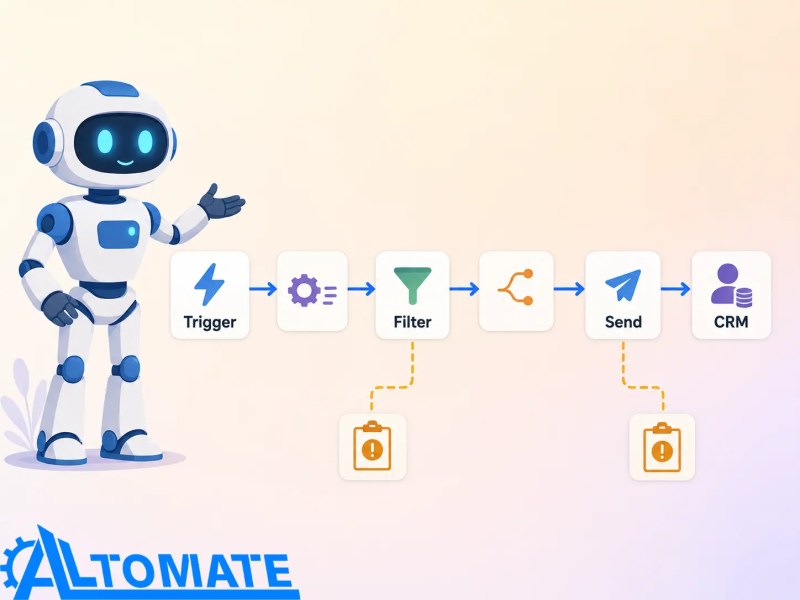
For example, a sales alert might use an approved template such as: “New lead from {{1}} is ready for follow-up. Source: {{2}}. Assigned owner: {{3}}.” If a Twilio-based WhatsApp step returns an error like 63016, the workflow should treat it as an out-of-window or template-delivery problem, log the failure, and create a manual follow-up task instead of assuming the alert reached the rep.
This level of control is what separates a working demo from a workflow the team can rely on during live lead response. A similar production mindset appears in Alltomate’s Jobber Zapier integration case study, where the value came from handling operational handoffs instead of simply connecting two apps.
At this point, the decision is not whether Zapier can send a WhatsApp message; it is whether your team can tolerate missed opt-ins, duplicate alerts, unlogged provider errors, and customer conversations that never reach the CRM. If this describes your WhatsApp setup, this is the kind of workflow Alltomate would scope first through a structured Zapier implementation service: trigger map, provider path, template rules, fallback handling, and CRM logging before more one-off Zaps make the handoff harder to audit.
The build sequence starts at the trigger, not the WhatsApp send step
The trigger audit separates form submissions, CRM stage changes, booking events, and inbound message events because mixing them in one Zap can create duplicate WhatsApp sends when a contact updates twice. Formatter steps standardize phone numbers, country codes, owner fields, and consent values because WhatsApp providers may reject malformed destinations or contacts that lack permission.
The routing step stores provider status, message type, send timestamp, and fallback outcome because a successful Zap run can still leave the team blind if the message ID or rejection reason disappears. When custom payloads or provider endpoints are involved, the workflow borrows the same discipline used in Zapier webhook systems: validate the payload before it reaches the downstream API.
Provider choice changes the failure pattern
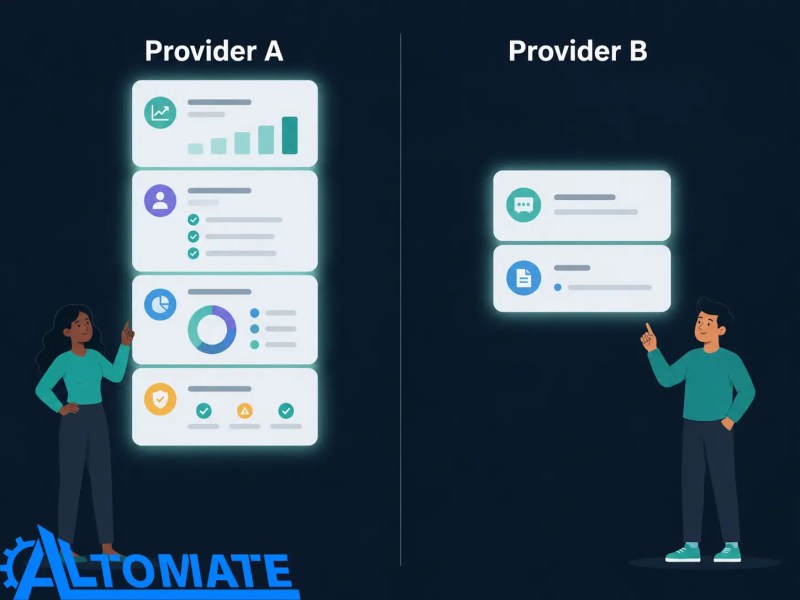
Zapier WhatsApp automation usually depends on an approved WhatsApp Business path, commonly through providers such as Twilio or 360dialog, or through a direct API-supported setup where the business has the right account structure. The provider decision affects setup complexity, template approval flow, delivery status visibility, inbound reply handling, and how much failure detail Zapier can capture.
The provider path changes what Zapier can send, what status data comes back, and how the workflow should react when WhatsApp rejects or delays a message.
CRM connections add another boundary: a HubSpot contact, a ClickUp task, and a booking record may all refer to the same person with different identifiers. For teams routing CRM and task data through Zapier, a HubSpot and ClickUp Zapier setup is often relevant because WhatsApp send history only helps if it lands on the correct contact, deal, task, or owner record.
If the CRM-side question is specifically about HubSpot and WhatsApp, the adjacent HubSpot-specific WhatsApp automation guide belongs there. This solution stays focused on the Zapier control layer: provider routing, template checks, fallback handling, and CRM logging across the workflow.
What gets measured after the message leaves Zapier
The system should measure more than Zap runs because a Zap can complete while the WhatsApp provider rejects or delays the message. Useful tracking includes send attempts, accepted messages, failed provider responses, missing opt-ins, fallback tasks, owner assignment gaps, and CRM logging errors.
Those metrics expose whether WhatsApp is improving response time or simply adding another place for communication to get lost. Without this feedback loop, teams often blame the rep, the provider, or the customer before seeing that the automation skipped a field or selected the wrong message route.
Where human judgment stays in the loop
WhatsApp automation should not remove human judgment from sensitive sales, support, or customer conversations. The workflow can send structured alerts, reminders, and approved notices, but a person should still handle pricing questions, complaints, exceptions, or relationship-heavy replies.
This is especially important when a customer response does not fit a clean dropdown field. Zapier can create the task, attach the conversation context, and update the CRM, but a human still needs to decide the next move before another automated message fires.
Results of a controlled Zapier-to-WhatsApp system
A controlled WhatsApp workflow gives the business a cleaner communication trail: who should be notified, what message was allowed, whether the provider accepted it, and what fallback happened when it failed. The result is not “more messages”; it is fewer silent misses when a lead, appointment, or customer update depends on WhatsApp.
The end state should be a traceable communication log where every WhatsApp attempt has an owner, status, timestamp, and fallback outcome.

Result: WhatsApp becomes a traceable communication workflow inside the CRM and operations stack, not an unmanaged side channel that only works when every field is perfect.
Related Zapier resources that should not be collapsed into this build
Some adjacent Zapier topics matter, but they should stay separate from the WhatsApp system so the page does not drift into generic automation advice. For examples across other operational workflows, see Zapier workflow examples; for broader service design signals, see why hire a Zapier expert.
Platform comparisons like Zapier vs Make or Zapier vs n8n matter when the team is choosing an automation platform, but they do not replace WhatsApp-specific controls. The failure mode here is not only platform selection; it is message eligibility, provider response handling, and CRM traceability.
Frequently asked questions
Can Zapier send WhatsApp messages?
Yes, but usually through an approved WhatsApp Business provider or supported integration path rather than a personal WhatsApp account. The workflow still needs opt-in checks, template handling, and provider response logging because a Zap run does not always mean the WhatsApp message was accepted.
Can Zapier integrate with WhatsApp Business API?
Zapier can participate in WhatsApp Business API workflows through provider-supported apps, webhooks, or API steps depending on the setup. The main constraint is whether the account, template, phone number, and customer eligibility allow the message to be sent.
What breaks most often in Zapier WhatsApp automation?
The most common breaks are malformed phone numbers, missing opt-ins, rejected templates, duplicate CRM triggers, and provider errors that are not written back to the record. These failures are risky because the automation may look active while the customer or sales rep never receives the message.
Is this the same as WhatsApp marketing automation?
No. This solution focuses on operational WhatsApp alerts, lead notifications, appointment updates, and customer communication workflows, not unsupported cold outreach or scraped-contact campaigns. Marketing use cases need stricter template, consent, segmentation, and compliance controls before automation should send anything.
Do we need Twilio or 360dialog for Zapier WhatsApp automation?
Not always, but providers like Twilio or 360dialog are common choices because they operate as Meta-authorized WhatsApp Business Platform partners, exposing messaging through an API or supported integration path. The provider choice affects setup time, template handling, delivery status visibility, and how Zapier receives failure information.
Can WhatsApp replies update the CRM automatically?
They can if the provider exposes inbound message data and the CRM has a reliable contact identifier to match against, which is why an automated contact sync layer may be needed before replies can be trusted. Without identifier matching, replies can attach to the wrong record or create duplicate contacts that make follow-up harder.
Why Alltomate
Alltomate is a Zapier Certified Platinum Solution Partner founded by Miguel Carlos Arao, with experience designing automation systems where the hard part is not the app connection but the operational behavior under messy real-world conditions. For businesses running WhatsApp as a lead or customer communication channel, Alltomate can scope the trigger map, provider path, template logic, fallback rules, and CRM logging needed to make the workflow production-ready.
That matters because a WhatsApp alert system with no validation layer becomes another hidden inbox. A properly designed Zapier-to-WhatsApp workflow gives the team a reliable path for response, ownership, and follow-through before missed messages turn into missed opportunities.
About the solution designer

Miguel Carlos Arao is the Founder of Alltomate and a Zapier Certified Platinum Solution Partner specializing in automation systems, workflow architecture, and real-world implementation.

Built by a certified Zapier automation partner
Explore more at
Zapier services,
Zapier automation solutions, and
the Zapier platform guide.