
Direct approval chains between document systems often fail silently when uploads arrive incomplete, metadata mismatches occur, or OCR extraction passes low-confidence data into downstream workflows.
A signed client contract arrives through email at 11:42 PM, but the approval workflow never starts because the attachment name does not match the intake rule. By morning, sales believes the contract is approved, finance never receives the document, and onboarding stalls because the workflow depended on a single formatting assumption that broke silently.
This solution automates document workflows across intake governance, approval routing, workflow coordination, storage synchronization, and CRM synchronization while related systems like document processing automation handle extraction-heavy operational workflows with larger intake volumes.
If approval queues are stalling between teams or documents are arriving faster than your current routing logic can handle, explore Document Automation Services and Automation Integration Services before isolated exceptions become system-wide processing backlog.
System Snapshot
- Problem: Manual document routing breaks when files arrive incomplete, mislabeled, duplicated, or outside expected intake patterns.
- Core System: Automated intake, validation, approval routing, OCR extraction, storage, and CRM synchronization workflows.
- Key Risk if Missing: Documents stall between teams without escalation visibility, causing approval delays and inconsistent records.
- Primary Outcome: Documents move from intake through final approval with every routing decision, retry attempt, and escalation logged — reducing the gap between when a document arrives and when downstream teams can act on it.
Where incomplete document metadata blocks downstream approvals
This solution covers operational document workflows where contracts, invoices, forms, onboarding records, or internal approvals move between teams, CRMs, storage systems, and communication tools. It becomes necessary when document queues depend on manual sorting, inconsistent naming conventions, or employees remembering which approver should receive the next version. Related systems like invoice processing automation become necessary when invoice-specific validation, approval, and reconciliation rules expand beyond general document routing.
The system does not replace legal review or enterprise records governance, but it prevents incomplete uploads, duplicate versions, and missing metadata from triggering silent downstream failures inside approval and storage workflows. Related systems like document approval automation specialize in multi-stage approval governance and escalation logic, while this workflow architecture coordinates intake, validation, synchronization, routing, and operational continuity across the entire document lifecycle. Related systems like OCR data extraction workflows are connected separately when document complexity expands beyond intake routing.
Why document queues collapse during approval bottlenecks
Document operations usually fail during handoffs rather than during creation. Approval chains rely on human follow-up, inbox visibility, or undocumented routing logic, which is where systems like task handoff automation become necessary to preserve routing ownership and escalation visibility between departments. A single missing identifier can block CRM updates, storage categorization, and compliance logging simultaneously, which is where systems like CRM update automation become necessary to preserve synchronized customer records across platforms.
High-volume environments make the problem worse because retries are often manual, which creates inconsistent versions across folders, approval tools, and CRM records. The operational issue becomes workflow coordination, not document generation.
The failure pattern below shows how stalled approvals and retry delays create operational bottlenecks across connected systems instead of remaining isolated inside a single workflow stage.

Approval bottlenecks spread across connected workflows when retry handling, escalation visibility, and routing ownership are not isolated between workflow stages.
Document workflow architecture under real operational conditions
The workflow starts with controlled intake validation before files enter downstream approvals because accepting incomplete documents creates cascading failures across storage systems, CRM records, and reporting dashboards. Classification rules check metadata, naming patterns, source channels, approval status, and duplicate conditions before routing occurs.
OCR extraction, approval routing, storage synchronization, and CRM updates operate independently through queue-based workflow stages so a single API timeout does not stop the entire process. Without queue separation, one failed approval request can freeze every pending document behind it.
- Intake → document upload/email capture → validation queue (missing fields → hold for review before incomplete records spread into approvals and CRM updates)
- Classification → OCR extraction and tagging → routing decision (duplicate detection → quarantine queue before conflicting document versions sync downstream)
- Approval → approver assignment → status synchronization (SLA breach → escalation notification before requests remain stalled without ownership visibility)
- Storage → folder/database sync → audit logging (API timeout → retry queue before documents disappear from approval tracking and reporting)
The queue-based workflow architecture below shows how intake, OCR extraction, approvals, synchronization, and retry handling operate independently to prevent single-point workflow failures.
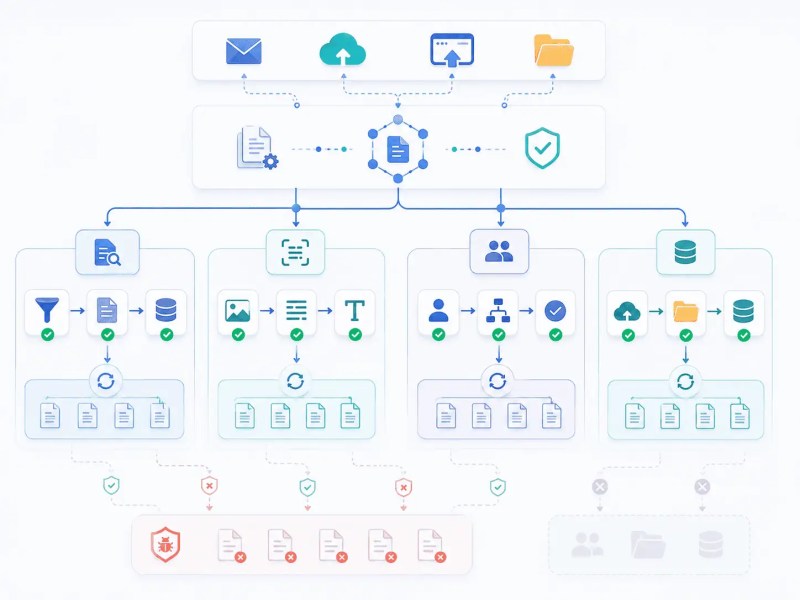
Queue isolation prevents OCR failures, API outages, and stalled approvals from freezing unrelated workflow stages across connected systems.
Once document approvals rely on inbox forwarding, undocumented routing rules, or manual retry handling, operational failures stop behaving like isolated delays and start spreading across reporting, compliance, onboarding, and customer records simultaneously. Explore CRM Automation Services and document workflow automation services before hidden approval bottlenecks become system-wide operational risk.
Operational controls that prevent hidden workflow failures
Automated document systems require operational controls because workflows continue moving even when approvals fail, records mismatch, or files sync into the wrong destination. Without SLA timers and escalation visibility, stalled approvals appear completed while downstream teams continue working with outdated versions.
Control Layer
- SLA timers trigger escalation when approvals remain inactive beyond defined processing windows because stalled approvals otherwise appear completed while downstream teams continue waiting.
- Retry queues isolate temporary API failures during CRM or storage outages so one failed synchronization request does not freeze unrelated document approvals behind it.
- Duplicate detection activates when uploaded filenames, extracted metadata, or CRM identifiers partially match existing records since missing validation can create conflicting approvals and duplicate customer records.
- Audit logs attach routing history, extraction results, approval changes, and retry activity directly to workflow events because missing logs make escalation analysis and compliance tracing unreliable after failures occur.
- Fallback storage routing activates when primary storage APIs timeout or reject uploads so documents are preserved temporarily instead of disappearing from downstream approval queues.
Without operational governance, document automation creates faster inconsistency instead of controlled processing because failures propagate automatically across connected systems.
Teams transitioning from spreadsheet approvals, inbox-based routing, or paper review chains can also compare operational differences in manual workflows vs automated workflows before redesigning document operations.
Not sure where your current process is breaking?
The Document Automation Guide walks through how intake failures, approval bottlenecks, and synchronization gaps typically compound before teams recognize them as a workflow architecture problem rather than a staffing or volume problem.
How a single OCR failure creates orphaned records across approvals, storage, and CRM simultaneously
A procurement request arrives as a scanned PDF. OCR extraction runs and returns a vendor identifier — but at 61% confidence, below the 80% threshold the validation layer requires before passing the field downstream. At this point, three things happen in parallel: the record is held in the review queue, the approval chain does not start, and the CRM write does not fire.
Without the confidence threshold, the low-quality extraction passes through. The approval routes to finance with an incorrect vendor identifier. The CRM creates a new vendor contact instead of matching the existing record. Storage files the document under the new contact’s folder, which is where systems like file organization automation become necessary to prevent orphaned document structures from spreading across storage environments. By the time the escalation timer fires on the stalled approval, three systems carry conflicting records and the OCR error is no longer traceable to a single correction point.
The threshold is not a quality preference — it is the boundary condition that determines whether a single extraction failure stays contained or propagates into three systems simultaneously.
The propagation path below illustrates how one low-confidence OCR extraction can spread conflicting records across approvals, CRM systems, and storage environments simultaneously.

A single low-confidence OCR extraction can create duplicate CRM records, incorrect approvals, and orphaned storage structures when validation thresholds are bypassed.
Result: Approval workflows move with clearer ownership, retry visibility, and fewer hidden processing delays across departments.
Why intake triggers and approval queues must run as isolated stages under unstable payloads
The intake trigger fires on document receipt but writes only to a staging queue — not directly into the approval chain — because email payloads arrive with inconsistent attachment names, missing fields, or malformed metadata that would corrupt downstream routing if passed through immediately. A shared trigger-to-approval chain fails silently here: one malformed payload blocks every document behind it in the same queue.
The field validator runs against the staging record before classification occurs. If required identifiers — vendor ID, contract reference, or contact match — are absent or below OCR confidence threshold, the record is held in a review queue rather than forwarded. Forwarding without validation creates the specific failure where CRM creates a new contact record instead of updating the existing one, producing duplicate customer entries that require manual reconciliation. Related systems like contact synchronization automation and CRM cleanup automation help stabilize identity consistency once duplicate records begin spreading across connected platforms.
Each workflow queue maintains isolated retry handling and processing states so API slowdowns inside CRM synchronization do not freeze unrelated approval or OCR operations. Queue separation preserves workflow continuity during high-volume upload periods where storage systems, OCR services, and CRMs fail independently.
Audit records are written at the queue event level — intake received, validation result, routing decision, retry attempt, approval change — not at the workflow completion level, because post-completion logs cannot reconstruct which step failed when escalation analysis occurs days later.
When AI-assisted extraction becomes necessary for classification or routing decisions, systems like AI document classification, AI data extraction, and AI-assisted workflow automation can extend the workflow without rebuilding the intake architecture. The AI Automation Guide explains how AI-assisted routing systems behave under uncertain or low-confidence conditions, while AI document processing use cases covers operational extraction scenarios in production environments.
API field mismatches between storage systems and CRMs
Most document platforms structure metadata differently, which creates synchronization failures when folder naming, record IDs, or approval states do not match CRM schemas. A CRM may require unique contact identifiers while storage systems rely on filename conventions, causing duplicate records when validation is skipped.
API rate limits also create delayed synchronization windows during high-volume uploads, especially when OCR processing, approval updates, and CRM writes occur simultaneously. Without queue throttling and retry isolation, delayed API responses can create duplicate approvals, stale CRM records, and inconsistent document status visibility across departments. Related integration systems like data synchronization automation, API integration automation, cross-platform workflow automation, and system integration automation help stabilize cross-platform workflow dependencies. Additional integration coordination patterns are covered in how to connect multiple systems.
Metrics and review thresholds that define where automation stops and human judgment starts
Operational reporting tracks approval latency, retry frequency, failed extraction rates, queue aging, and escalation volume through systems like reporting automation because completed uploads do not reveal whether documents are actually moving. A document can appear processed while sitting inside a synchronization queue for hours with no visibility to the teams waiting downstream.
Retry frequency is a leading indicator: a spike in retries on the CRM write queue before a spike in escalation volume means an API constraint is creating approval delays before any document officially stalls. Catching it at the queue level prevents it from appearing as an unexplained approval bottleneck three hours later.
Human review triggers activate at three conditions: OCR confidence below threshold, metadata conflicts between the uploaded file and the existing CRM record, and approval decisions that require policy interpretation the routing rules cannot evaluate. Each condition routes the document to a flagged review queue with the specific trigger attached — not a generic hold — so the reviewer acts on a defined problem rather than re-examining the entire document.
If a review queue item exceeds its SLA without a reviewer action, escalation fires to the backup approver. Without that escalation path, a flagged document sits in review indefinitely while the teams depending on its approval continue waiting under the assumption that automation is still processing it.
The review-threshold workflow below demonstrates how automation pauses uncertain records for human validation instead of allowing low-confidence decisions to propagate automatically.

Validation thresholds isolate uncertain records into review queues before incorrect approvals, duplicate CRM updates, or invalid routing decisions spread across systems.
Explore document workflow examples, how to digitize business documents, document approval workflow automation and manual document processing problems, and paper vs digital workflows for additional operational patterns. Additional failure scenarios and workflow optimization opportunities are covered in which repetitive document tasks can be automated and common document automation mistakes. Teams handling CRM synchronization issues can also explore the CRM Automation Guide for broader operational dependency patterns.
Next steps and related resources
Teams narrowing document intake scope can explore Automate Document Processing for extraction-heavy workflows and Automate Document Approvals for multi-stage approval governance. Contract-specific routing patterns are covered in Automate Contract Workflows.
For foundational context, What Is Document Automation? and OCR Automation Explained cover the operational concepts behind the architecture on this page. The Document Automation Guide and Business Process Automation Guide provide implementation sequencing for teams redesigning end-to-end workflows.
Teams coordinating across connected platforms can explore Cross-Platform Workflow Automation, CRM Update Automation, and Zapier Automation Solutions for integration dependency patterns.
Frequently asked questions
Can document workflows handle approval escalations automatically?
Yes, escalation timers can reroute approvals or notify backup approvers when SLA thresholds are missed. Without escalation logic, documents often remain stalled inside inboxes while downstream teams assume processing already occurred.
Can automated document workflows work with scanned files?
Yes, OCR extraction can classify and extract data from scanned documents before routing decisions occur. Without validation checkpoints, low-quality scans can create incorrect metadata and failed downstream synchronization.
What happens when integrations fail during document processing?
Retry queues and fallback routing isolate temporary API failures without stopping unrelated workflows. Without failure isolation, one storage or CRM outage can block the entire document queue.
Do document workflows replace human approvals completely?
No, workflows usually escalate uncertain conditions or policy-sensitive approvals into review queues. Removing human review entirely increases the risk of incorrect approvals and invalid records entering connected systems.
Why do automated document workflows still require validation queues?
Validation queues isolate incomplete uploads, OCR extraction failures, duplicate records, and malformed metadata before approval routing begins. Without validation stages, incorrect data can propagate across CRM systems, storage platforms, and reporting workflows simultaneously.
Can document workflows update CRM records automatically?
Yes, validated metadata and approval states can update CRM records automatically after processing completes. Without identifier validation, duplicate records and mismatched customer data can spread across systems.
Why Alltomate
Most document automation projects fail not during implementation but during the first high-volume period — when email payloads arrive malformed, OCR confidence drops on scanned documents, and CRM APIs throttle under simultaneous write requests. The workflows stall, but nothing flags it because the automation is technically still running.
Alltomate maps the failure paths before building the routing logic. That means identifying where your current process depends on a single naming convention, an approver’s inbox, or an undocumented CRM field match — and designing queue isolation and validation checkpoints around those specific conditions rather than generic automation patterns.
The intake architecture, OCR confidence thresholds, retry handling, and escalation paths described on this page are not theoretical — they reflect the operational conditions that cause document workflows to produce faster inconsistency instead of controlled processing when those controls are missing.
If your current document process depends on manual approvals, disconnected storage systems, or routing logic that lives inside someone’s head, explore Document Automation Services, Automation Integration Services, and AI-Powered Automation Services to redesign the workflow before the next high-volume period exposes where the gaps are.
About the solution designer

Miguel Carlos Arao is the Founder of Alltomate and a Zapier Certified Platinum Solution Partner specializing in automation systems, workflow architecture, and real-world implementation.

Built by a certified Zapier automation partner
Explore
automation and integration services,
system solutions,
read the automation blog,
or reference the implementation guides.